💡팀원 소개 페이지 만들기
접속자 수 임시 구현
- 일정 시간마다 특정 함수 실행 기능
// 일정 시간마다 방문자 수 증가
setInterval(() => {
	// 일정 시간마다 실행할 함수
	updateVisitorCount(); // 방문자 수 증가 로직
}, 1000 * 30); // n초마다 실행
- DB 에서 방문자수 불러오고 새로고침 하면 늘어나는 기능
let firstVisit = true; //첫 실행시는 1만 증가 (새로고침) // 방문자 수 불러오고 +1 업데이트 async function updateVisitorCount() { try { // 문서 참조 const visitRef = doc(db, "siteCount", "visitCount"); const snapshot = await getDoc(visitRef); const randomCount = Math.floor(Math.random() * 5) + 1; let countAll = 0; // 데이터 읽기 if (snapshot.exists()) { countAll = snapshot.data().countAll || 0; } if (countAll > 1000) { countAll = 0; } if (firstVisit) { countAll += 1; firstVisit = false; } else { countAll += randomCount; } // 데이터 업데이트 await setDoc(visitRef, { countAll }); // span 태그 내의 문자열 가져와서 숫자 값만 남김 const header_count = document.getElementById("header_count"); const currentDisplay = parseInt(header_count.textContent.replace(/\D/g, "")) || 0; } catch (error) { console.error("방문자 수 업데이트 실패:", error); } } // 방문자 함수 실행 updateVisitorCount();-
현재는 임시로 진행했지만 추후 실제 방문자 수 측정하는 기능 구현 예정
-
비동기 코드
💭 JavaScript 에서 비동기 코드 : async / await / promise
- async / await
-
async : 항상 Promise 를 반환
-
await : Promise 가 끝날 때까지 기다림
-
await은 async 함수 안에서만 사용가능
-
try...catch로 감싸주는 게 좋음
async function showData() {
  let data = await fetchData();  // fetchData()가 끝날 때까지 기다림
  console.log(data);
}
-
- Promise
-
비동기 작업에 끝났는지 안 끝났는지 다루는 객체
-
비동기 처리시 시간이 걸리므로 결과가 나올 때까지 기다리는 방식
-
API 요청, 파일읽기, 타이머, DB 처리
//Promise 는 성공, 실패 시 부를 두 개의 매개변수가 있음
const promise = new Promise((resolve, reject) => {
  setTimeout(() => {
    resolve('완료!'); //성공시 발생
    // 또는 reject('에러 발생!');
  }, 1000); //1초 뒤에 작업 실행
});

promise.then(result => { //Promise 가 성공했을때 실행
  console.log(result);  // 👉 '완료!' (1초 뒤)
}).catch(error => {
  console.log(error);   // 에러가 나면 이쪽
});
-
팀원 소개 영역 추가
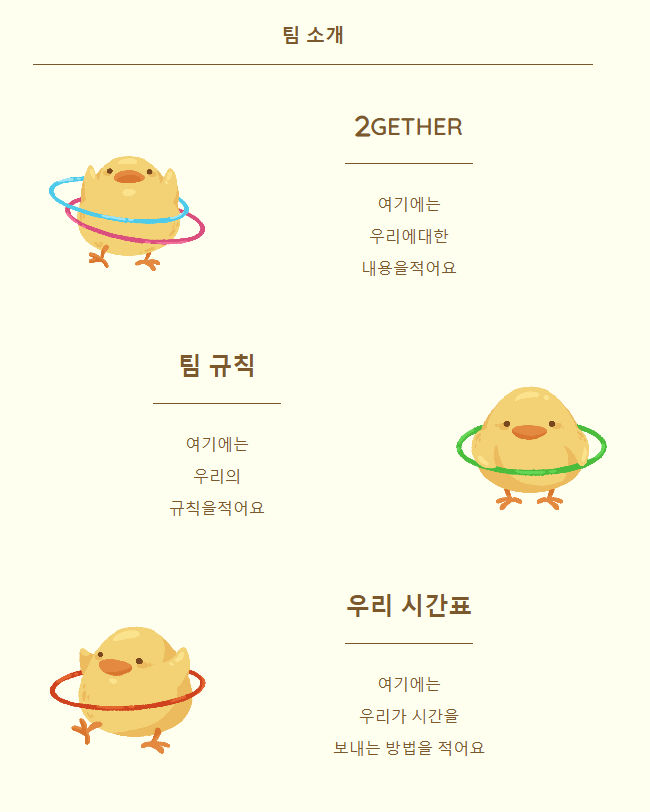
- CSS로만 구현
- Grid로 좌우 영역잡기 어려움
.about-us { color: rgb(123, 89, 45); margin: 0 auto 50px auto; width: 800px; height: 900px; display: flex; flex-wrap: wrap; align-content: flex-start; } .about-us>article { height: 300px; font-size: 24px; font-family: "Quicksand", sans-serif; font-style: normal; font-weight: bold; box-sizing: border-box; } .art1, .art5 { width: 30%; padding: 60px 0px 60px 60px; } .art4 { width: 30%; padding: 60px 60px 60px 0px; } .about-us img { width: 120%; height: 100%; object-fit: cover; } .art2, .art3, .art6 { width: 70%; padding-bottom: 20px; display: grid; grid-template-rows: 1fr 2fr; }- 6개의 칸이 불규칙적으로 길이가 다름
- Grid 로 칸을 나눈뒤, 각각 선택하여 width 길이를 다르게 표현
- 6칸이라 가능했지만 칸이 늘어나면 구현이 어려울 것 같음
SweetAlert2
💭 알림창을 이쁘게 꾸며주는 기능
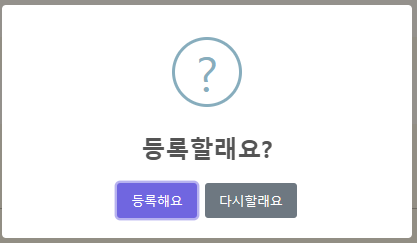
- 알림창 디자인을 가져올 수 있음
- 해당 사이트에서 script 와 css link 필요
- 구현 코드
await Swal.fire({ title: "등록할래요?", //제목 icon: "question", //아이콘 그림 showCancelButton: true, //취소버튼 confirmButtonText: "등록해요", //수락버튼 글씨 cancelButtonText: "다시할래요" //취소버튼 글씨 }).then(async (result) => { //수락 누를 시 해당기능 실행 if (result.isConfirmed) { await addDoc(collection(db, "guestbook"), doc); Swal.fire("등록했어요!", "", "success"); } });-
알람 사용시 바로 뒤에 reload() 함수 사용시 알람이 뜨기 전에 페이지 리로드 됨
-
별도의 설정 필요
// 알람 표시 후 페이지 리로드 시
Swal.fire({
  title: '완료!',
  text: '정상적으로 처리되었습니다.',
  icon: 'success',
  confirmButtonText: '확인'
}).then((result) => {
  if (result.isConfirmed) {
    location.reload();  // 확인 누르면 페이지 새로고침
  }
});
-

기어 올라가는 개발