현재까지 만든 게시판에는 누가 질문 혹은 답변을 작성했는지 알 수 없다. 따라서 Quesion, Answer 모델에 글쓴이를 추가한 후 게시판에 표시되도록 수정한다.
Question 모델 수정
-
Question 모델에 author 필드 추가
from django.contrib.auth.models import User ... class Question(models.Model): author = models.ForeignKey(User, on_delete=models.CASCADE) ...- django.contrib.auth 앱이 제공하는 User 모델을 Question 모델에 외래키로 적용
- 사용자가 삭제되면 사용자와 연결된 Question을 모두 삭제하기 위해 on_delete=models.CASCADE를 적용
-
makemigrations 실행
python manage.py makemigrations It is impossible to add a non-nullable field 'author' to question without specifying a default. This is because the database needs something to populate existing rows. Please select a fix: 1) Provide a one-off default now (will be set on all existing rows with a null value for this column) 2) Quit and manually define a default value in models.py. Select an option: 1 Please enter the default value as valid Python. The datetime and django.utils.timezone modules are available, so it is possible to provide e.g. timezone.now as a value. Type 'exit' to exit this prompt >>> 1 Migrations for 'pybo': pybo/migrations/0002_question_author.py - Add field author to question- 모델이 수정되었으므로 makemigrations를 실행한다.
- author 필드를 추가했는데 기존에 있던 데이터에 author 필드의 값을 처리하는 방법을 선택해야한다.
옵션 설명 0 Null로 채운다. 1 임의의 계정정보를 강제로 채워넣는다. - author 필드에는 값이 무조건 있어야 하므로 1을 선택한다.
- 기존에 넣은 질문은 모두 admin이 작성했으므로 다음 입력에 1을 입력한다. 1은 최초 생성된 슈퍼 유저의 id 값이다.
Answer 모델 수정
Question 모델과 동일한 방법으로 수정한다.
-
Answer 모델에 Author 필드 추가
... class Answer(models.Model): author = models.ForeignKey(User, on_delete=models.CASCADE) ... -
makemigrations 실행
python manage.py makemigrations It is impossible to add a non-nullable field 'author' to answer without specifying a default. This is because the database needs something to populate existing rows. Please select a fix: 1) Provide a one-off default now (will be set on all existing rows with a null value for this column) 2) Quit and manually define a default value in models.py. Select an option: 1 Please enter the default value as valid Python. The datetime and django.utils.timezone modules are available, so it is possible to provide e.g. timezone.now as a value. Type 'exit' to exit this prompt >>> 1 Migrations for 'pybo': pybo/migrations/0003_answer_author.py - Add field author to answer -
Question과 Answer 모델에 migration 파일을 생성했으면 migrate로 실제 모델에 변경사항을 적용한다.
python manage.py migrate
Operations to perform:
  Apply all migrations: admin, auth, contenttypes, pybo, sessions
Running migrations:
  Applying pybo.0002_question_author... OK
  Applying pybo.0003_answer_author... OK
author 필드 적용
-
pybo/views.py의 answer_create 함수 수정
... def answer_create(request, question_id): ... answer.auther = request.user ... -
pybo/views.py의 question_create 함수 수정
...
def question_create(request):
    ...
            question.author = request.user
...
로그인을 요구하는 함수 설정
질문 등록 함수와 답변 등록 함수에 author가 request.user가 설정되었기 때문에 로그아웃 상태에서 답변을 등록하면 AnnoymousUser 객체가 답변을 등록하게 되어 오류가 발생하므로 로그인을 요구해야한다. 하지만 아직 해당 기능을 구현하지 않아 아래와 같은 오류가 발생한다.
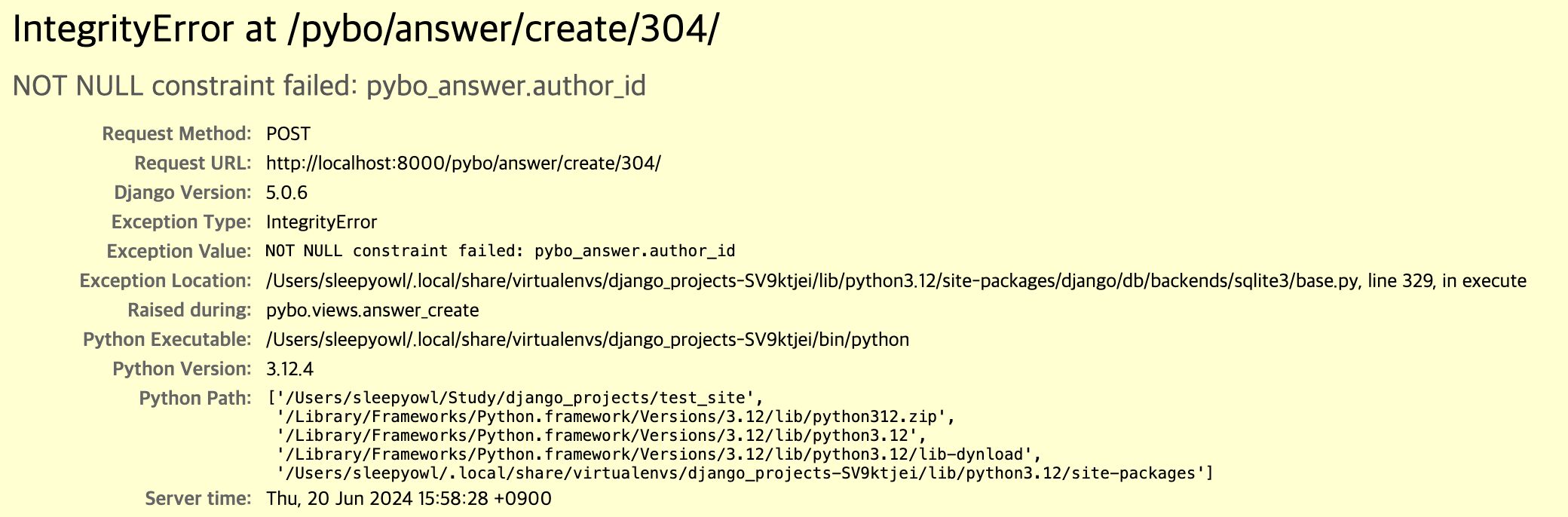
이 문제를 해결하기 위해 @login_required라는 데코레이터를 적용해야한다.
-
answer_create, question_create에 데코레이터 적용
... from django.contrib.auth.decorators import login_required ... @login_required(login_url='common:login') def answer_create(request, question_id): ... @login_required(login_url='common:login') def question_create(request):- login_required 데코레이터에 login_url을 설정하여 로그인 페이지로 넘어가도록 한다.
-
로그인 페이지 URL 확인
- 로그인 페이지의 URL을 확인하면 일반적인 방법으로 로그인 페이지로 왔을 때와 다르다는 것을 확인할 수 있다,
# 일반적인 경우 http://localhost:8000/common/login/?csrfmiddlewaretoken=emSuivvSN4BAHCIRcckTlIl4FBp1Skge1SDOKYzST7twyiCwzdcPryXw21675nVg # 로그아웃 상태에서 로그인 서비스를 사용하기 위해 로그인 페이지로 온 경우 http://localhost:8000/common/login/?next=/pybo/answer/create/304/- ‘?next=’라는 파라미터가 추가되었는데 이 의미는 로그인 성공 후 next 파라미터의 URL 페이지로 이동한다는 의미이다.
- 로그인 페이지의 URL을 확인하면 일반적인 방법으로 로그인 페이지로 왔을 때와 다르다는 것을 확인할 수 있다,
-
next 파라미터 활용
- 로그인 후 next 파라미터에 있는 URL로 페이지를 이동하기 위해 로그인 템플릿에 next를 추가해야 한다.
... <form method="post" class="post-form" action="{% url 'common:login' %}"> {% csrf_token %} <!-- 로그인 성공 후 이동되는 URL --> <input type="hidden" name="next" value="{{ next }}"> ...- hidden 항목으로 next를 추가
- next 파라미터를 활용하면 기존에는 로그인 했을 때 index.html로 넘어갔다면 수정 후에는 사용하던 페이지로 다시 이동한다.
-
로그아웃 상태에서 글을 작성할 수 없도록 수정
... <div class="form-group"> <textarea {% if not user.is_authenticated %}disabled{% endif %} name="content" id="content" class="form-control" rows="10"></textarea> ...- 질문 상세 페이지에서 로그인이 되어있지 않을 때 답변 등록 필드에 글이 작성되지 않도록 수정
-
로그아웃 상태인 사용자의 답변이 막힌 페이지
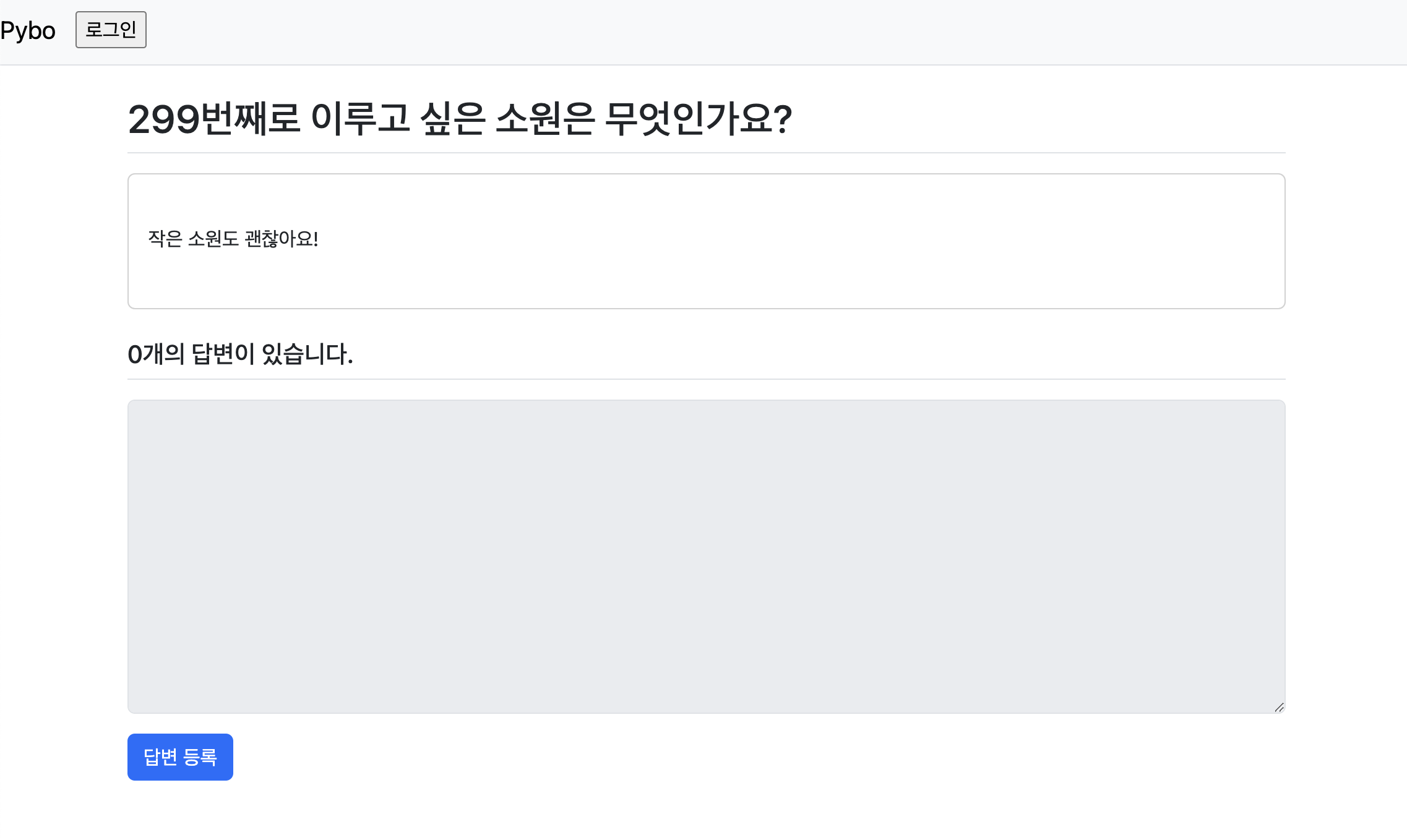
- Form이 비활성화 되어서 글을 작성할 수 없다.