금일은 지금까지 학습해온 thread 의 직접 사용에 대한 문제점과 자바의 Executor 프레임워크에 대해 알아보는 시간입니다.
목차
- 스레드의 문제점
- Executor Framework
- ExecutorService
스레드의 직접 사용의 문제점
-
스레드 생성 시간으로 인한 성능문제
- 메모리 할당 : 각 스레드는 자신 만의 호출 스택을 가지고 있어야 한다. 스레드 생성시에 호출 스택을 위한 메모리 할당이 소모된다.
- 운영체제 자원 사용 : 스레드 생성 작업은 운영체제 커널 수준에서 이루어지며, 시스템 콜을 통해 처리하며 이는 cpu와 메모리 리소소를 소모하는 작업이다.
- 운영체제 스케줄러 설정 : 스레드가 생성되면 운영체제의 스케줄러는 스레드를 관리하고 실행 순서를 조정해야 합니다. 때문에 스케줄링 알고리즘에 따라 추가적인 오버헤드가 발생할 수 잇습니다.
스레드를 생성하는 작업은 객체를 생성하는 것과 비교할 수 없을 정도록 큰작업입니다. 아래와 같은 문제를 해결하기 위해서는 스레드 재사용하는 방법을 고려할 수 있다.
-
스레드 관리 문제
- 자원이 한정되어 있기 때문에 스레드는 무한 생성이 불가능하다. 때문에 최대 스레드의 수 까지만 생성할 수 있도록 관리가 필요합니다.
-
Runnable 인터페이스의 불편함
public interface Runnable { void run(); }run()메서드는 반환 값을 가지지 않습니다. 스레드의 실행 결과를 직접 받을 수 없기 때문에join()함수를 사용해서 스레드가 종료되길 기다리거나 스레드의 결과값을 변수에 넣어 주어야 한다.예외처리 부분에서
run()메서드는checked exception을 던질 수 없고 예외의 처리는 메서드 내부에서 처리해야 합니다. -
해결 방법
-
위의 두가지 문제를 해결 하기 위해서 스레드 풀을 사용하는 것이다.
스레드 풀은 스레드를 관리하며 미리 필요한 만큼 만들어 둡니다.
작업이 완료된 스레드는 종료하는 것이 아니라, 다시 스레드 풀에 반납하여 재사용 가능하게 할 수 있습니다.
WAITING상태로 관리해야하며 작업 요청이 오면RUNNABLE상태로 변경해야 하고 멀티 스레드 환경에서의 생산자 소비자 문제는Executor Framework로 해결 가능합니다.
-
Executor 프레임워크
Executor interface
package java.util.concurrent;

public interface Executor {
	void execute(Runnable command);
}
ExecutorService interface - main method
public interface ExecutorService extends Executor, AutoCloseable {

 <T> Future<T> submit(Callable<T> task);

 @Override
 default void close(){...}
 ...

}
Executor 인터페이스를 확장해서 작업 제출과 제어 기능을 추가로 제공합니다.
주요 메서드로는 submit(), close() 가 있으며 Executor framework 를 사용할 때는 대부분 이 인터페이스를 사용합니다.
참고로 ExecutorService 인터페이스의 기본 구현체는 ThreadPoolExecutor 입니다.
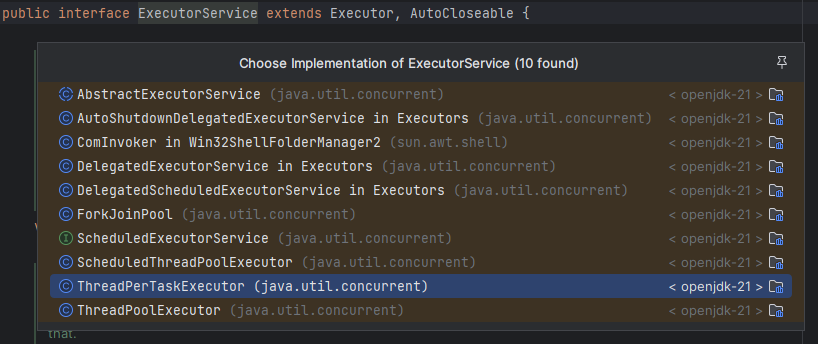
ThreadPoolExecutor 을 활용하여 실습에 앞서 로그 출력 유틸리티 코드를 작성해 보겠습니다.
해당 구현체가 아니라면 인스턴스 자체를 출력하는 코드입니다.
public abstract class ExecutorUtils {

    public static void printState(ExecutorService executorService) {
        if (executorService instanceof ThreadPoolExecutor poolExecutor) {
            int pool = poolExecutor.getPoolSize();
            int active = poolExecutor.getActiveCount();
            int queuedTasks = poolExecutor.getQueue().size();
            long completedTask = poolExecutor.getCompletedTaskCount();
            log("[pool=" + pool + ", active=" + active + ", queuedTasks=" + queuedTasks + ", completedTask=" + completedTask + "]");
        } else {
            log(executorService);
        }
    }

    public static void printState(ExecutorService executorService, String taskName) {
        if (executorService instanceof ThreadPoolExecutor poolExecutor) {
            int pool = poolExecutor.getPoolSize();
            int active = poolExecutor.getActiveCount();
            int queuedTasks = poolExecutor.getQueue().size();
            long completedTask = poolExecutor.getCompletedTaskCount();
            log(taskName + " -> [pool=" + pool + ", active=" + active + ", queuedTasks=" + queuedTasks + ", completedTask=" + completedTask + "]");
        } else {
            log(executorService);
        }
    }
}
Main method
ThreadPoolExecutor 의 생성자로는 다음 속성을 사용합니다. corePoolSize, maximumPoolsize, keepAlivetime, Timeunit unit, BlockingQueue workQueue가 있습니다.
    public static void main(String[] args) {
        ExecutorService es = new ThreadPoolExecutor(2, 2, 0, TimeUnit.MILLISECONDS, new LinkedBlockingQueue<>());
        log("== 초기 상태 ==");
        printState(es);
        es.execute(new RunnableTask("taskA"));
        es.execute(new RunnableTask("taskB"));
        es.execute(new RunnableTask("taskC"));
        es.execute(new RunnableTask("taskD"));
        log("== 작업 수행 중 ==");
        printState(es);

        sleep(3000);
        log("== 작업 수행 완료 ==");
        printState(es);

        es.close();
        log("== showdown 완료 ==");
        printState(es);
    }
RunnableTask
해당 예제는 간단하게 Runnable 를 상속받아 run() 메서드를 구현하였습니다.
public class RunnableTask implements Runnable {

    private final String name;
    private int sleepMs = 1000;

    public RunnableTask(String name) {
        this.name = name;
    }

    public RunnableTask(String name, int sleepMs) {
        this.name = name;
        this.sleepMs = sleepMs;
    }

    @Override
    public void run() {
        log(name + " 시작");
        sleep(sleepMs); // 가정
        log(name + " 완료");
    }
}
즉 해당 코드는 4개의 task 가 BlockingQueue 에 들어가면 스레드 풀에는 2개의 스레드가 들어갈 수 있는 것이다.
es.execute(new RunnableTask("")) 를 호출하면 BlockingQueue 에 작업을 보관하는 것이다.
작업을 보관할 블로킹 큐의 구현체로 LinkedblockingQueue 를 사용했고 해당 큐는 무한대로 작업을 저장 가능합니다.
ThreadPoolExecutor 생성 시점에 스레드 풀에 스레드를 미리 만들지 않고 작업이 들어오면 그때 corePoolSize 까지 스레드를 만든다.
main thread 의 경우 작업을 큐에 보관까지만 하고 바로 다음 코드를 수행한다.
close() 를 호출하게 되면 스레드는 제거되고 이때 스레드 풀에 대기하는 스레드도 함께 제거된다.
만약 java 19 미만은 shutdown() 를 호출하면 된다. Runnable 의 불편함
처음에 언급한 것 처럼 Runnable 의 단점인 반환값이 없고 예외 처리의 불편함으로 인해 해결점으로 Executor Framework 의 Callable, Future 인터페이스가 있다.
해당 인터페이스의 대한 학습은 다음 시간에 진행해보겠습니다.
참고자료
