
시작하며
토이프로젝트를 하며 서버와 통신을 하던 중 request 전에 자동으로 처리하는 방법을 고민하였다.
왜냐하면 매번 같은 코드를 매 요청시마다 넣어주기가 불편했기 때문이다!
나의 경우 refresh 토큰과 access 토큰을 사용했기에 클라이언트 측에서는 인증이 필요한 요청을 보낼때 매번 header 에 refresh 토큰과 access 토큰을 추가하여 요청을 보내야했다.
또한 access 토큰을 만료가 됐을 경우 access 토큰을 재발급 받게끔 요청을 해야 했으므로 이러한 작업들은 매 요청마다 추가할려고 하면 코드의 분량이 엄청나게 증가하고 복잡해졌다.
그래서 axios interceptor 를 사용하게 되었다!
Axios 라이브러리
-
Axios는 브라우저, Node.js를 위한 Promise API를 활용하는 HTTP 비동기 통신 라이브러리이다.
쉽게 말해서 백엔드랑 프론트엔드랑 통신을 쉽게하기 위해 Ajax와 더불어 사용한다.
-
이미 자바스크립트에는 fetch api가 있지만, 프레임워크에서 ajax를 구현할땐 axios를 쓰는 편이라고 보면 된다.
-
axios 브라우저 호환성
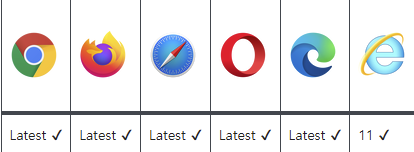
기본적인 axios 사용법은 fetch / axios 를 확인해 주시면 됩니다!
먼저 전체적인 코드를 살펴보자!
import axios from 'axios';

const client = axios.create({
  baseURL: process.env.REACT_APP_API_URL,
  withCredentials: true,
});
client.interceptors.request.use(function (config) {
  const token = window.localStorage.getItem('accessToken');
  config.headers.Authorization = token;
  return config;
});

client.interceptors.response.use(
  function (response) {
    return response;
  },
  async (error) => {
    const {
      config,
      response: { status },
    } = error;

    const originalRequest = config;

    if (status === 401) {
      try {
        const res = await axios.post(`${process.env.REACT_APP_API_URL}/refresh`, {}, { withCredentials: true });
        window.localStorage.setItem('accessToken', res.headers.authorization);
        const token = window.localStorage.getItem('accessToken');
        originalRequest.headers = {
          Authorization: token,
        };
        return await axios(originalRequest);
      } catch (error) {
        window.localStorage.removeItem('accessToken');
        window.localStorage.removeItem('recoil-persist');
        alert('토큰이 만료되었습니다. 다시 로그인해 주세요');
        window.location.href = `http://localhost:3000/login`;
      }
    }
    return Promise.reject(error);
  }
);

export default client;
첫번째로 axios를 만들어준다
const client = axios.create({
  baseURL: process.env.REACT_APP_API_URL,
  withCredentials: true,
});
나의 경우 client라는 이름으로 axios를 만들고 baseURL과 withCredentials 속성을 주었다.
매 요청시 두가지는 꼭 필요했기 때문이다.
두번째로 interceptors.request.use 를 사용했다.
client.interceptors.request.use(function (config) {
  const token = window.localStorage.getItem('accessToken');
  config.headers.Authorization = token;
  return config;
});
reqeust를 보낼때 localStorage에 token 정보가 있다면
config.headers.Authorization = token; 요청 헤더에
headers.Authorization에 토큰을 넣어 주었다.
마지막으로 interceptors.response.use 를 사용했다.
client.interceptors.response.use(
  function (response) {
    return response;
  },
  async (error) => {
    const {
      config,
      response: { status },
    } = error;

    const originalRequest = config;

    if (status === 401) {
      try {
        const res = await axios.post(`${process.env.REACT_APP_API_URL}/refresh`, {}, { withCredentials: true });
        window.localStorage.setItem('accessToken', res.headers.authorization);
        const token = window.localStorage.getItem('accessToken');
        originalRequest.headers = {
          Authorization: token,
        };
        return await axios(originalRequest);
      } catch (error) {
        window.localStorage.removeItem('accessToken');
        window.localStorage.removeItem('recoil-persist');
        alert('토큰이 만료되었습니다. 다시 로그인해 주세요');
        window.location.href = `http://localhost:3000/login`;
      }
    }
    return Promise.reject(error);
  }
);
response를 받았을 때, error가 발생했고 해당 error의 status가 401이라면 기존의 originalRequest를 /refresh 로 전달해 accessToken 을 재발급 받았다.
재발급 받은 토큰은 다시 로컬스토리지에 저장을 하고 헤더 부분에서 토큰 정보를 변경하고 다시 originalRequest를 보내준다.
만약 401 이외의 오류가 들어온다면 토큰 재발급에 실패한것으로 처리를 했다.
이 경우 refreshToken이 만료되었기 때문에 다시 로그인을 해야한다.

훌륭한 글이네요. 감사합니다.