
시작하며
토이 프로젝트를 진행하던 도중 모달에 fade-in / out 을 적용하려고 했는데 transition 이 작동하지 않아서 왜그럴까 생각하며 작성하게 되었다!
작동이 되지 않는 이유
코드를 살펴보자!
난 현재 아래와 같이 조건부 렌더링을 하거나 modalOpen 이라는 state가 ture일 때만 화면에 렌더링해주는 코드를 작성했다.
Main.tsx에서 Modal을 불러오는 코드
{modalOpen && <DetailModal id={id} viewDetail={viewDetail} modalOpen={modalOpen} setModal={setModal} />}
{modalOpen ? <DetailModal id={id} viewDetail={viewDetail} modalOpen={modalOpen} setModal={setModal} /> : null}DetailModal.tsx
import styled from 'styled-components';
import { useRef, useEffect } from 'react';
import { IViewDetail } from '../Projects/data';
import useBodyScrollLock from './useBodyScrollLock';
const Container = styled.div<{open:boolean}>`
position: fixed;
display: flex;
justify-content: center;
align-items: center;
background-color: rgba(0, 0, 0, 0.6);
top: 0;
left: 0;
transition: all 0.3s linear;
width: 100%;
height: 100%;
opacity: ${(open) => (open ? '1' : '0')};
`;
const ModalBox = styled.div`
display: flex;
padding: 10px;
width: 900px;
height: 200px;
background-color: white;
z-index: 10;
@media all and (min-width: 768px) and (max-width: 1023px) {
width: 620px;
}
@media all and (min-width: 480px) and (max-width: 767px) {
width: 460px;
}
@media all and (max-width: 479px) {
width: 320px;
}
`;
interface Iid {
num: number;
}
interface IViewDetailProps {
id: number;
modalOpen: boolean;
setModal: React.Dispatch<React.SetStateAction<boolean>>;
viewDetail: IViewDetail;
}
const DetailModal = ({ id, modalOpen, setModal
}: IViewDetailProps) => {
const modalRef = useRef<HTMLDivElement>(null);
const { openScroll } = useBodyScrollLock();
useEffect(() => {
const outsideClick = (e: MouseEvent) => {
if (modalOpen && modalRef.current && !modalRef.current.contains(e.target as Node)) {
openScroll();
setModal(false);
}
};
document.addEventListener('mousedown', outsideClick);
return () => {
document.removeEventListener('mousedown', outsideClick);
};
}, [modalOpen, setModal]);
const onClickCloseBtn = () => {
openScroll();
setModal(false);
};
return (
<>
<Container open={modalOpen}>
<ModalBox ref={modalRef}></ModalBox>
</Container>
</>
);
};
export default DetailModal;그 결과를 보면 전혀 적용이 되지 않는 모습이 보인다.

난 분명 display: none을 쓰지 않았는데 왜 안될까 계속 고민했었다!
하지만 이유는 다른 곳에 있었다.
Main.tsx에서 Modal을 불러오는 코드에 있었다.
아래와 같이 null인 상태에서 모달을 그려주기 때문에 transition이 먹히지 않았던 것이다.
{modalOpen && <DetailModal id={id} viewDetail={viewDetail} modalOpen={modalOpen} setModal={setModal} />}
{modalOpen ? <DetailModal id={id} viewDetail={viewDetail} modalOpen={modalOpen} setModal={setModal} /> : null}여기서 잠깐! transition 의 작동원리
transition은 변경이 발생하는 순간 작동한다.
예를 들어 A 모양에서 B 모양으로 변경될 때 작동을 한다.
하지만 display:none은 요소의 표시 뿐만 아니라 표소가 있는 공간도 비워버리는 설정이다.
따라서 ‘A모양 -> B모양’으로의 변형이 아니라 ‘없음 -> B모양’ 이 되므로 transition이 작동하지 않는 것이다.
이 말을 토대로 보면 null 즉, 없던 모양에서 transition을 주기 때문에 transition이 작동하지 않는다고 생각 했다!!
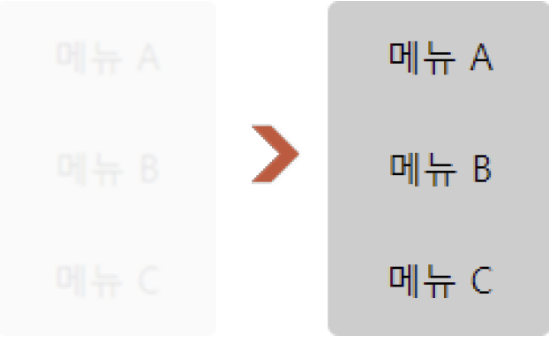
그래서 해결 방법으로 visiblility 속성을 사용하였다.
visibility는 공간은 그대로 두고 설정에 따라 요소를 숨기거나 나타내므로 A에서 B로 변경을 적용할 수 있다
visibility를 보면 아래와 같은 느낌이다!
수정한 코드
먼저 Main.tsx 에서는 아래와 같이 Modal을 렌더링 한다.
<DetailModal id={id} viewDetail={viewDetail} modalOpen={modalOpen} setModal={setModal} />그리고 DetailModal.tsx 에서 아래와 같이 수정한다.
편의상 변경된 부분만 적어야겠다.
const Container = styled.div`
  position: fixed;
  display: flex;
  justify-content: center;
  align-items: center;
  background-color: rgba(0, 0, 0, 0.6);
  top: 0;
  left: 0;
  transition: all 0.3s linear;
  width: 100%;
  height: 100%;

//변경된 부분
  &.modal-visible {
    opacity: 1;
    visibility: visible;
  }
  &.modal-hidden {
    visibility: hidden;
    opacity: 0;
  }
`;

.....
return (
    <>
      <Container className={modalOpen ? 'modal-visible' : 'modal-hidden'}>
        <ModalBox ref={modalRef}></ModalBox>
      </Container>
    </>
  );
};

export default DetailModal;
이제 아래와 같이 잘 적용이 된다!

마무리
React 에서 transition 속성을 사용하고 싶을 때는
해당 컴포넌트를 조건부 렌더링 처리를 하지말자!
없는 컴포넌트(null, 없던 모양)에서 transition을 주기 때문에 transition이 작동하지 않는다!
transition을 적용하려면 기억하자!
transition은 ‘모양의 변형‘이다.