사전 설정
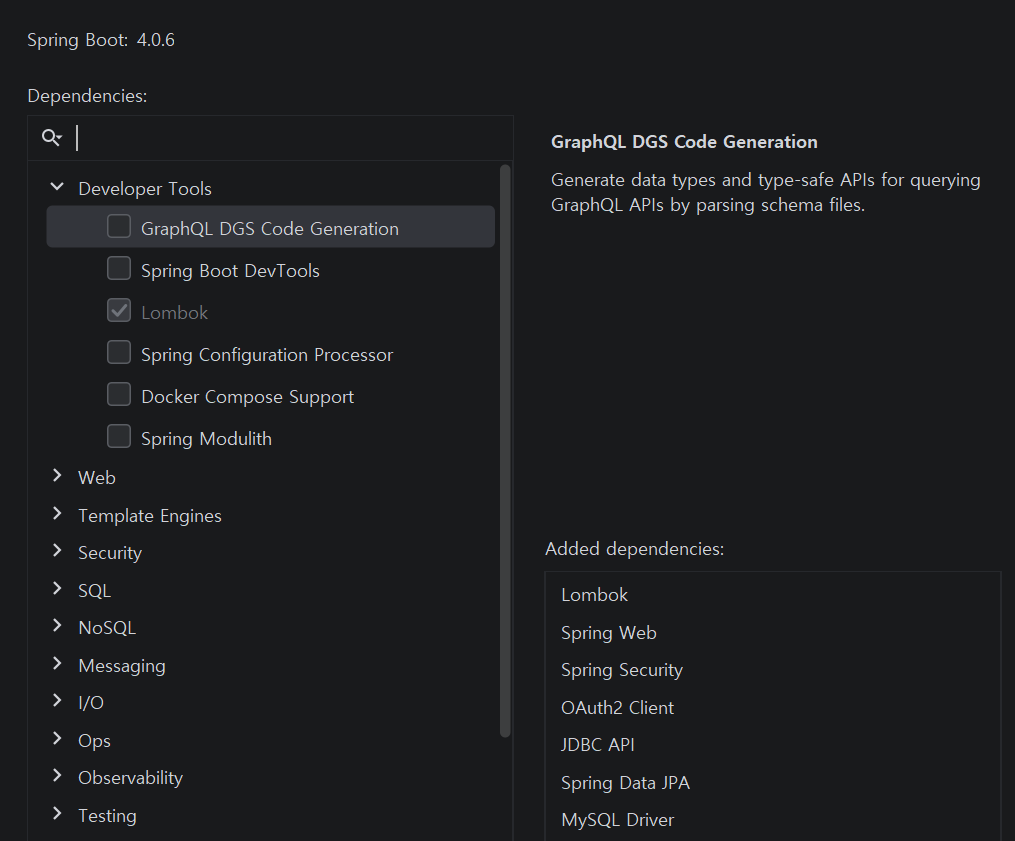
Spring Starter정의
JWT 라이브러리의의존성정의
jwt.io->libraries
。JWT를 공식적으로 생성할 수 있는라이브러리 모음
。jwtk/jjwt 사용
▶Spring OAuth사용 시nimbus-jose-jwt를 사용하는게 좋다.implementation 'io.jsonwebtoken:jjwt-api:0.13.0' runtimeOnly 'io.jsonwebtoken:jjwt-impl:0.13.0' runtimeOnly 'io.jsonwebtoken:jjwt-jackson:0.13.0'
application.yml설정
。application.ymlspring: security: oauth2: client: registration: google: client-name: Google client-id: ${GOOGLE_CLIENT_ID} client-secret: ${GOOGLE_CLIENT_SECRET_KEY} redirect-uri: "{baseUrl}/{action}/oauth2/code/{registrationId}" scope: - email naver: client-name: Naver client-id: ${NAVER_CLIENT_ID} client-secret: ${NAVER_CLIENT_SECRET_KEY} authorization-grant-type: authorization_code client-authentication-method: client_secret_post redirect-uri: "{baseUrl}/{action}/oauth2/code/{registrationId}" scope: - email provider: naver: authorization-uri: https://nid.naver.com/oauth2.0/authorize user-name-attribute: response token-uri: https://nid.naver.com/oauth2.0/token user-info-uri: https://openapi.naver.com/v1/nid/me config: import: optional:file:.env.dev[.properties] custom: redis: host: ${REDIS_HOST} port: ${REDIS_PORT} rootuser: email: ${INITIAL_ADMIN_EMAIL} password: ${INITIAL_ADMIN_PASSWORD} username: ${INITIAL_ADMIN_USER_NAME} jwt: specification: issuer: ${TOKEN_ISSUER} audience: ${TOKEN_AUDIANCE} redirection: baseUrl: ${FRONTEND_BASE_URL} secrets: appkey: ${SECURITY_TOKEN_KEY} validations: access: ${ACCESS_TOKEN_TIME} refresh: ${REFRESH_TOKEN_TIME}
JWT 토큰생성 시 활용되는Secret Key정의
。해당Secret Key를 기반으로RSA 알고리즘기반으로토큰 서명을 수행
。Key설정 시 매우 큰Byte를 가진문자열이어야한다.
▶비대칭키(RS256 , ES256) 등은 최소2048bit의 사용을 권장하므로KeyPairGenerator에서문자열 key 크기를2048 bit=8 Byte으로 생성하도록 설정.
▶레인보우 테이블에 의해 하나씩브루트포스되는것을 막고자UUID2개를 생성 및 조합 후Base64로인코딩한문자열을SecretKey로 설정
UUID Generator, Base64 Encoder
。외부로 탈취되면 안되므로,application.yml내placeholder로 등록하는환경변수(.env.dev)로 저장# Redis REDIS_HOST=localhost REDIS_PORT=6379 # Kafka 관련 설정 KAFKA_BOOTSTRAP_SERVER=localhost:9092 # 기본 루트 유저 INITIAL_ADMIN_EMAIL=wjdtn747@naver.com INITIAL_ADMIN_PASSWORD=wjdtn3902 INITIAL_ADMIN_USER_NAME=RootUser # JWT 관련 설정 TOKEN_ISSUER=MTVS-STRATA TOKEN_AUDIANCE=STRATA-USER FRONTEND_BASE_URL=http://localhost:3000 SECURITY_TOKEN_KEY=MDE5ZTRkZTItZjczZi03MWZkLThiZDctNDU2YTJmYWQ0NDFjLTAxOWU0ZGUyLWY3M2YtNzk5NC04MjY3LTA1MmQ2Zjg0MDJhZg== ACCESS_TOKEN_TIME=1800000 REFRESH_TOKEN_TIME=604800000 # OAUTH2 관련 설정 GOOGLE_CLIENT_ID=구글계정ID GOOGLE_CLIENT_SECRET_KEY=구글SecretKey NAVER_CLIENT_ID=네이버계정ID NAVER_CLIENT_SECRET_KEY=네이버SecretKey。
UUID2개를Base64로인코딩한문자열을Key로 설정
▶어플리케이션에는@Value또는@ConfiguationProperties로 가져올 수 있음.
yml 파일내 저장된Properties를객체로 가져오기
。@ConfigurationProperties로 설정
▶중첩 클래스설정 시불변성보장 가능@Getter @ConfigurationProperties(prefix = "custom.jwt") @RequiredArgsConstructor public class JwtProperties { private final Specification specification; private final Redirection redirection; private final Validations validations; private final Secrets secrets; @RequiredArgsConstructor @Getter public static class Specification{ private final String issuer; private final String audience; } @RequiredArgsConstructor @Getter public static class Redirection{ private final String baseUrl; } @RequiredArgsConstructor @Getter public static class Secrets{ private final String appkey; } @RequiredArgsConstructor @Getter public static class Validations{ private final Long access; private final Long refresh; } }
Role저장용Enum정의@Getter @RequiredArgsConstructor public enum UserRole { // 쇼핑몰의 경우 Enum 필드 안에 할인률 등의 속성을 추가해서 다양하게 활용 가능 PLAYER("ROLE_PLAYER"), ADMIN("ROLE_ADMIN"), EMPTY("EMPTY"); private final String value; }。
EMPTY는Refresh Token의Role지정용도
▶Refresh Token은재발급 용도 토큰으로서사용자 정보를 필요로 하지 않으므로.
도메인정의@Entity @Getter @NoArgsConstructor(access = AccessLevel.PROTECTED) public class Users extends BaseEntity { @Id @GeneratedValue(strategy = GenerationType.IDENTITY) private Long id; // @Column(length = 50, nullable = false) private String email; // @Column(length = 50, nullable = false) private String displayName; // @Column(nullable = false, length = 20) private String provider; // @Column(length = 100, nullable = false) private String password; // @Column(nullable = false) @Enumerated(EnumType.STRING) private UserRole role; // @Builder public Users( String email, String displayName, String password, UserRole role ){ this.email = email; this.displayName = displayName; this.password = password; this.role = role; this.provider = extractProvider(email); } public String extractProvider(String email){ String[] s1 = email.split("@"); String[] s2 = s1[1].split("\\."); return s2[0]; } }。
provider:OAuth Provider명(naver, ... )
초기
Security Configuration정의
。JWT 토큰을 사용하여세션을 사용하지 않으므로.CSRF 비허용및 세션 관리 전략 : STATELESS 설정
▶ 단. 다른출처에서 접속 시CORS는 허용해야한다.@Configuration @RequiredArgsConstructor public class SecurityConfig { private final OauthSuccessHandler oauthSuccessHandler; private final JwtFilter jwtFilter; // @Value("${custom.baseUrl}") public String BASE_URL; // @Bean SecurityFilterChain securityFilterChain(HttpSecurity http) throws Exception { return http .csrf(AbstractHttpConfigurer::disable) .cors(Customizer.withDefaults()) .httpBasic(basic -> basic.disable()) .formLogin(formLogin -> formLogin.disable()) .headers(headers -> headers.frameOptions(frame -> frame.sameOrigin())) .sessionManagement(session->session.sessionCreationPolicy(SessionCreationPolicy.STATELESS)) .oauth2Login( oauth -> oauth.successHandler(oauthSuccessHandler) ) .authorizeHttpRequests(auth -> auth // 개발 환경에서 필요한거 추후 운영에서 빼야됨 .requestMatchers("/h2-console/**", "/api/files/**" , "/api/actuator/**", "/v3/**" ).permitAll() // // Preflight Request 허용 .requestMatchers(CorsUtils::isPreFlightRequest).permitAll() // // 로그인 / 회원가입은 익명 사용자만 가능 .requestMatchers(HttpMethod.GET, EndPoints.GET_ANONYMOUS).anonymous() .requestMatchers(HttpMethod.POST, EndPoints.POST_ANONYMOUS).anonymous() // .requestMatchers(HttpMethod.GET, EndPoints.GET_ADMIN_AUTHENTICATED).hasAnyRole(Role.SUPER_ADMIN.name(), Role.ADMIN.name()) .requestMatchers(HttpMethod.GET, EndPoints.GET_AUTHENTICATED).authenticated() // .requestMatchers(HttpMethod.POST, EndPoints.POST_PERMIT_ALL).permitAll() .requestMatchers(HttpMethod.POST, EndPoints.POST_ADMIN_AUTHENTICATED).hasAnyRole(Role.SUPER_ADMIN.name(), Role.ADMIN.name()) .requestMatchers(HttpMethod.POST, EndPoints.POST_AUTHENTICATED).authenticated() // .requestMatchers(HttpMethod.PUT, EndPoints.PUT_ADMIN_AUTHENTICATED).hasAnyRole(Role.SUPER_ADMIN.name(), Role.ADMIN.name()) .requestMatchers(HttpMethod.PUT, EndPoints.PUT_AUTHENTICATED).authenticated() // .requestMatchers(HttpMethod.PATCH, EndPoints.PATCH_ADMIN_AUTHENTICATED).hasAnyRole(Role.SUPER_ADMIN.name(), Role.ADMIN.name()) .requestMatchers(HttpMethod.PATCH, EndPoints.PATCH_AUTHENTICATED).authenticated() // .requestMatchers(HttpMethod.DELETE, EndPoints.DELETE_ADMIN_AUTHENTICATED).hasAnyRole(Role.SUPER_ADMIN.name(), Role.ADMIN.name()) .requestMatchers(HttpMethod.DELETE, EndPoints.DELETE_AUTHENTICATED).authenticated() // .anyRequest().denyAll() ) .addFilterBefore(jwtFilter, UsernamePasswordAuthenticationFilter.class) .build(); } // // // CORS 관련 설정 @Bean public WebMvcConfigurer corsConfigurer(){ return new WebMvcConfigurer() { @Override public void addCorsMappings(CorsRegistry registry) { registry.addMapping("/api/**") .allowedOrigins(BASE_URL) .allowedMethods("*") .allowedHeaders("*") .allowCredentials(true) .exposedHeaders("Authorization") .maxAge(3600); } }; } // static public class EndPoints { public static final String[] GET_ANONYMOUS = { "/api/users/login", "/api/users/oauth2/authorization/**", "/oauth2/authorization/**" } ; public static final String[] GET_AUTHENTICATED = { "/api/users/**", "/api/posts/**", "/api/requests/**", "/api/categories/**", "/api/files/**", "/api/messages/**" } ; public static final String[] GET_ADMIN_AUTHENTICATED = { "/api/admin/**"}; // public static final String[] POST_ANONYMOUS = { "/api/users/login", "/api/users/signup"} ; public static final String[] POST_PERMIT_ALL = { "/api/users/refresh" }; public static final String[] POST_AUTHENTICATED = { "/api/users/**", "/api/posts/**", "/api/requests/**", "/api/files/**", "/api/messages/**", "/api/feedback/**" }; public static final String[] POST_ADMIN_AUTHENTICATED = { "/api/categories/**", "/api/admin/**"}; ㅍ public static final String[] PUT_AUTHENTICATED = { "/api/users/**", "/api/posts/**", "/api/requests/**", "/api/files/**", "/api/messages/**", "/api/feedback/**" }; public static final String[] PUT_ADMIN_AUTHENTICATED = { "/api/admin/**"} ; // public static final String[] PATCH_AUTHENTICATED = { "/api/users/**", "/api/posts/**", "/api/requests/**", "/api/categories/**", "/api/files/**", "/api/messages/**", "/api/feedback/**" }; public static final String[] PATCH_ADMIN_AUTHENTICATED = { "/api/categories/**", "/api/admin/**"} ; // public static final String[] DELETE_AUTHENTICATED = { "/api/users/**", "/api/posts/**", "/api/requests/**", "/api/files/**", "/api/messages/**", "/api/feedback/**" }; public static final String[] DELETE_ADMIN_AUTHENTICATED = { "/api/admin/**"} ; } }
토큰 발급기능 구현
Refresh / Access Token을 포함할 수 있는DTO정의public record KeyPair( String accessToken, String refreshToken ) { }
토큰의Claims 정보를 포함하는DTO정의
。JwtFilter에서AuthenticationToken을 위한UserDetails 구현체생성에 필요한데이터를 포함하도록 설정public record TokenBody( Long playerId, String email, UserRole role ) { }
Secret Key생성
。application.yml에 정의된Secret Key를 등록
▶@Configuration Class를의존성 주입후 가져옴@Slf4j @Service @RequiredArgsConstructor public class TokenProvider { private final JwtProperties jwtProperties; private SecretKey getSecretKey(){ return Keys.hmacShaKeyFor(jwtProperties.getSecrets().getAppkey().getBytes()); } //
토큰 발급 메서드
。Jwts 클래스의빌더 패턴을 활용해서토큰을문자열로 생성
▶빌더 패턴을 통해header/payload/signature를 설정하여JWT 토큰생성private String issueToken( Long id, String email, UserRole role, Long validTime, TokenType tokenType ){ return Jwts.builder() .claim("id", id.toString()) .claim("email", email) .claim("role", role.toString()) .subject(tokenType.getValue()) .issuer(jwtProperties.getSpecifications().getIssuer()) .issuedAt(new Date()) .issuedAt(new Date(new Date().getTime() + validTime)) .signWith(getSecretKey()) .compact(); }。
payload에 포함되는sub/iat/exp등의claims을 포함
。Jwts.claim("Key", "Value"):Payload내커스텀 Key : Value를 추가
▶payload내"role" : "역할"로 추가됨
。비대칭키 암호화 방식에서Secret Key를 통해 생성될JWT 토큰의서명을 수행
▶ JWT 토큰
- Access Token / Refresh Token
발급 메서드
。Refresh Token은갱신 용도 토큰으로서, 내부Payload 정보가 필요 없다.
▶Access Token에 비해 많은 정보를 포함하지 않도록 설정.
。각각application.yml에 설정된수명시간을 기준으로수명을 설정public KeyPair issueKeyPair( Long id, String email, UserRole role ){ return new KeyPair( issueToken( id, email, role, jwtProperties.getValidations().getAccess(), TokenType.ACCESS_TOKEN ), issueToken( id, email, UserRole.EMPTY, jwtProperties.getValidations().getRefresh(), TokenType.REFRESH_TOKEN ) ); } public String issueRefreshToken( Long id ){ return issueToken( id, null, UserRole.EMPTY, jwtProperties.getValidations().getRefresh(), TokenType.REFRESH_TOKEN ); }▶
Refresh Token은식별용도의ID외 많은정보를 갖지 않도록 설정.
토큰 검증및Claims 추출 메서드정의
。JwtParser 객체를 생성 후parseSignedClaims(토큰)을 통해검증과Claims 반환을 수행public boolean validate(String token){ try { Jwts.parser() .verifyWith(getSecretKey()) .build() .parseSignedClaims(token); return true; } catch(ExpiredJwtException e){ throw new CustomException(ErrorCode.EXPIRED_TOKEN); } catch(MalformedJwtException e){ throw new CustomException(ErrorCode.ABNORMAL_TOKEN); } catch(JwtException e){ throw new CustomException(ErrorCode.ERROR_FROM_TOKEN); } } public Jws<Claims> parseClaims(String token){ return Jwts.parser() .verifyWith(getSecretKey()) .build() .parseSignedClaims(token); }▶ 두
메서드는역할이 다르지만, 같은parseSignedClaims(토큰)를 공유
Jwts.parser().verifyWith(SecretKey객체).build():
。Secret Key를 기반으로JwtParser 객체생성
▶parser : 분석기
JwtParser객체.parseSignedClaims(토큰):
。JWT 토큰이 포함하는Jws<Claims>를 반환하는메서드
。 해당로직을 수행하는 도중만료 여부와Secret Key를 통해서명 검증등의토큰 검증이 수행
▶ 주로토큰 검증 용도로 사용
jjwt 라이브러리관련예외JwtException:
。JWT 처리 과정에서 발생하는 모든예외의최상위 예외 클래스
ExpiredJwtException:
。JWT의exp가현재 시간보다이전인 경우 발생하는예외
MalformedJwtException:
。JWT 형식이 올바르지 않은 경우 발생하는예외
▶Header.Payload.Signature 구조가 아닌 경우
▶Base64 디코딩이 불가능한 경우
▶토큰 문자열이 손상된 경우
Jws<Claims>에서데이터를 추출하여DTO로 생성해서 반환하는메서드작성
。위에서 정의한parseClaims()를 통해토큰에서Jws<Claims>를 추출
。JwtFilter에 필요한데이터를 포함하는DTO에토큰으로부터데이터 추출및 입력public TokenBody parseJwt(String token){ Jws<Claims> claimsJws = parseClaims(token); Object email = claimsJws.getPayload().get("email"); Object role = claimsJws.getPayload().get("role"); return new TokenBody( Long.parseLong(claimsJws.getPayload().get("id").toString()), (Strings.isNotBlank(email.toString()))? email.toString() : "", (Strings.isNotBlank(role.toString()))? UserRole.valueOf(role.toString()) : UserRole.PLAYER ); }
- 최종본
@Slf4j
@Service
@RequiredArgsConstructor
public class TokenProvider {
    private final JwtProperties jwtProperties;
    private SecretKey getSecretKey(){
        return Keys.hmacShaKeyFor(
                jwtProperties
                        .getSecrets()
                        .getAppkey()
                        .getBytes()
        );
    }
    private String issueToken(
            Long id,
            String email,
            UserRole role,
            Long validTime,
            TokenType tokenType
    ){
        return Jwts.builder()
                .claim("id", id.toString())
                .claim("email", email)
                .claim("role", role.toString())
                .subject(tokenType.getValue())
                .issuer(jwtProperties.getSpecifications().getIssuer())
                .issuedAt(new Date())
                .issuedAt(new Date(new Date().getTime() + validTime))
                .signWith(getSecretKey())
                .compact();
    }
    public KeyPair issueKeyPair(
            Long id,
            String email,
            UserRole role
    ){
        return new KeyPair(
               issueToken(
                    id,
                    email,
                    role,
                    jwtProperties.getValidations().getAccess(),
                    TokenType.ACCESS_TOKEN
               ),
                issueToken(
                    id,
                    null,
                    null,
                    jwtProperties.getValidations().getRefresh(),
                    TokenType.REFRESH_TOKEN
                )
        );
    }
    public String issueRefreshToken(
            Long id
    ){
        return issueToken(
                id,
                null,
                null,
                jwtProperties.getValidations().getRefresh(),
                TokenType.REFRESH_TOKEN
        );
    }
    public boolean validate(String token){
        try {
            Jwts.parser()
                    .verifyWith(getSecretKey())
                    .build()
                    .parseSignedClaims(token);
            return true;
        } catch (ExpiredJwtException e){
            throw new BusinessException(ErrorCode.TOKEN_EXPIRED);
        } catch (MalformedJwtException e){
            throw new BusinessException(ErrorCode.ABNORMAL_TOKEN);
        } catch (JwtException e){
            throw new BusinessException(ErrorCode.TOKEN_ERROR);
        }
    }
    public Jws<Claims> parseClaims(String token){
        return Jwts.parser()
                .verifyWith(getSecretKey())
                .build()
                .parseSignedClaims(token);
    }
    public TokenBody parseJwt(String token){
        Jws<Claims> claimsJws = parseClaims(token);
        Object email = claimsJws.getPayload().get("email");
        Object role = claimsJws.getPayload().get("role");
        return new TokenBody(
                Long.parseLong(claimsJws.getPayload().get("id").toString()),
                (Strings.isNotBlank(email.toString()))? email.toString() : "",
                (Strings.isNotBlank(role.toString()))? UserRole.valueOf(role.toString()) : UserRole.PLAYER
        );
    }
}

공부기록 블로그