ADO.NET
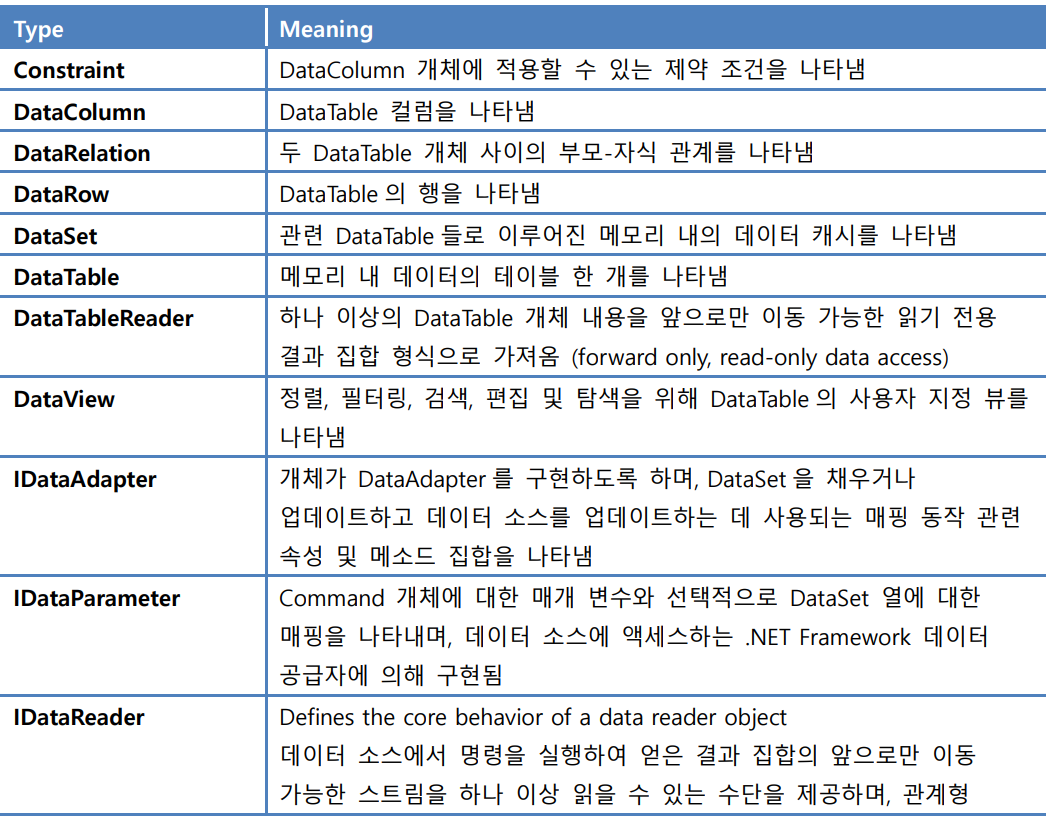
。데이터 접근을 위한 .NET Framework 내 class의 집합
。다양한 종류의 데이터(DB,File 등)에 접근할 수 있도록한다.
ADO.NET의 2가지 방식
Connected Layer :
。Data와의 연결을 유지한 채 데이터에 읽고 쓰기를 수행.
。data 저장소의 연결을 코드에서 명시적으로 설정.
。Data provider들을 활용해서 데이터 저장소와 통신
。DataReader의 경우 데이터 저장소로부터 forward-only , read-only 방식으로 data를 가져옴.Disconnected Layer:
。Dataset을 이용해 Data와의 연결을 끊은 상태에서 Data를 다룬 후 Data Source에 반영.
。Dataset 내부에 포함된 DataTable 개체를 이용해서 data를 가져옴.
。Data adapter를 이용하여 DataSet 획득 시 자동으로 연결이 설정되고 닫혀짐.
=> 네트워크 부하 제거.
。데이터 변경을 data source로 반영 시 data adapter를 SQL문장과 함께 사용.DataSet :
-데이터 종류에 관계없이 데이터에 접근하도록 설계.
-DataTable 개체의 Collection
-각 DataTable은 row와 column으로 구성 및 기본키 , 외래키 , 제약조건 등을 가짐.
-테이블 간 관계를 구성하는 DataRelation의 Collection을 포함.
.NET Framework Data Provider
DataProvider는 각각 특정 DBMS에 특화.
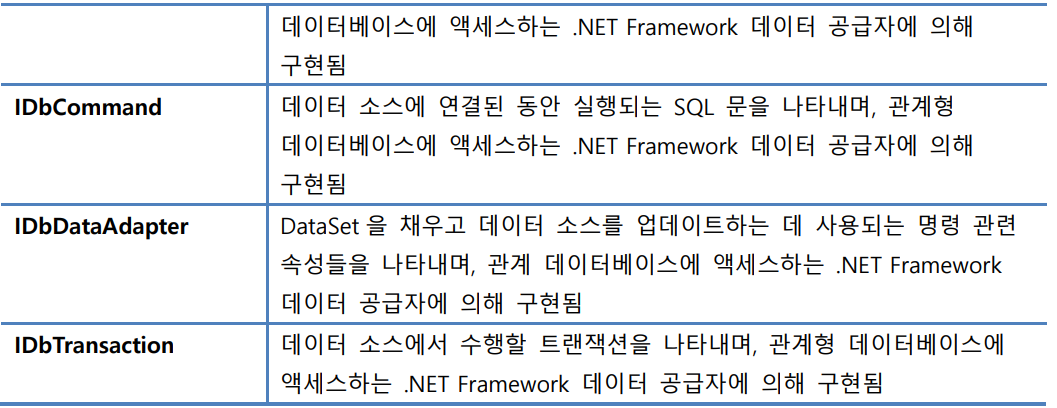
- Connection 개체 :
。DataSource에 대해 연결 및 단절 제공
。관계된 transaction 개체와의 접근 제공.- Command 개체 :
。DB에 접근하여 SQL Query를 보내기위해 사용
。Data Reader 개체와의 접근 제공.- DataReader :
。Command개체.ExecuteReader() 를 통해 얻음
。Data 간 forward-only , read-only 방식으로 데이터를 한 record씩 읽음
。많은 양의 data를 한 라인씩 읽을 때 적당한 방식.
。 data source와의 연결을 명시적으로 닫을 때까지 유지. =>Network에 부하를 줌.- DataAdapter :
。DataSource와 DataSet간 bridge 역할 수행.
=> 데이터저장소와 호출자 간 DataSet 전달.
。DataSet에 data를 load하거나 변경하여 다시 data source로 반영하는 역할 수행.- Parameter :
。Parameter을 이용한 쿼리에서 이름을 나타냄.- Transaction :
。DB Transaction을 수행.
Npgsql : .NET Access to postgreSQL
PostgreSQL에 대한 오픈소스 ADO.NET Data Provider.
Connected Layer 실습 #1
주제: DB에 저장된 데이터를 connected layer 방식으로 콘솔 프로그램을 통해 출력.
- Connected layer 방식이므로 Data Provider을 추가.
=> data가 postgreSQL에 저장되있으므로, Npgsql이용.- Npgsql 설치 시 Nuget 패키지 관리자를 이용해서 설치 후 using 구문을 통해 추가.
- Connection 개체 생성 connection string을 생성 후 개체의 생성자에 넣어서 Connection 개체 생성.
string strConn = "Host=localhost; port=5432; Username=postgres;" +
                "Password=wjd747; Database = GeoDB";
NpgsqlConnection Conn = new NpgsqlConnection(strConn);
。연결용 문자열에는 세미콜론으로 분할하여 각 data source에 대한 경로를 설정.
- Command 개체 생성
。개체에 전달할 SQL string을 생성 후 connection 개체와 함께 생성자에 넣어서 Command 개체 생성.string sql = "select * from bicycle limit 20"; NpgsqlCommand cmd = new NpgsqlCommand(sql, Conn);。connection 개체의 CreateCommand 메소드를 이용하여 command 개체를 생성 후 CommandText 프로퍼티를 통해 SQL string을 넣는다.
cmd = conn.CreateCommand(); cmd.CommandText = strSQL;
- Open()을 수행하여 DBMS와 연결.
- DataReader 개체 생성 SQL을 이용해서 Command 개체의 ExecuteReader()를 이용해 forward-only 또는 read-only로 DataReader 개체를 얻을 수 있음.
NpgsqlDataReader dr = cmd.ExecuteReader();
- DataReader 개체의 Read() 메소드를 이용해서 Data를 읽는다.
- 이후 DataReader 개체 - Connection 개체 순으로 각각 Close() 메소드를 이용하여 닫는다.
- 순서 : Connection 개체 생성(DB계정 string) -> connection.Open() :DBMS 연결 -> command 개체 생성(SQL string, conn개체) -> DataReader 개체 생성(command.ExecuteReader()) -> DataReader개체.Read() -> DataReader.Close() -> Connection.Close()
using Npgsql;
namespace Ch02
{
internal class Program
{
static void Main(string[] args)
{
// Connection 생성
string strConn = "Host=localhost; port=5432; Username=postgres;" +
"Password=wjd747; Database = GeoDB";
NpgsqlConnection Conn = new NpgsqlConnection(strConn);
// Connection 열기
Conn.Open();
// DataProvider - sql을 이용해서 Command 객체 생성.
string sql = "select * from bicycle limit 20";
NpgsqlCommand cmd = new NpgsqlCommand(sql, Conn);
// Data Reader 얻기. -> ExecuteReader() 이용.
NpgsqlDataReader dr = cmd.ExecuteReader();
// data 읽기
Console.WriteLine("자전거 대여소\t주소\t좌표");
while(dr.Read())
{
Console.WriteLine($"{dr["name"].ToString().Trim()}\t" +
$"{dr["address"].ToString().Trim()} " +
$"({dr["x"].ToString().Trim()} , {dr["y"].ToString().Trim()})");
}
// data 닫기
dr.Close();
Conn.Close();
}
}
}Connected Layer 실습 #2
주제 : Command 개체를 이용해서 업데이트
- 테이블 내용 변경 시 Command 개체의 ExecuteNonQuery() 메소드 이용.
=> SQL의 insert , update , delete 활용- ExecuteNonQuery 결과값은 영향받은 행의 수
- DisplayData() : SQL문에서 설정한 SELECT 구문을 통해 ExecuteReader()를 활용해서 데이터를 읽어옴.
- Insert 버튼은 한 행의 데이터를 제작하여 Command 개체의 CommandText를 통해 INSERT 구문을 넣는다. 이때 ExecuteNonQuery()는 영향을 받은 행의 수를 return.
- FormClosing은 Close() 메소드로 연결을 끊는 역할 수행.
using Npgsql;
namespace Ex2_ENQ
{
public partial class MainForm : Form
{
string strConn = "Host=localhost; port=5432; Username=postgres;" +
"Password=wjd747; Database = GeoDB";
string strSQL = "select * from bicycle order by id;";
NpgsqlConnection conn;
NpgsqlCommand cmd;
int numberOfRows;
public MainForm()
{
InitializeComponent();
}
private void btnLoad_Click(object sender, EventArgs e)
{
conn = new NpgsqlConnection(strConn);
// Command 개체 생성.
cmd = conn.CreateCommand();
cmd.CommandText = strSQL;
conn.Open();
DisplayData();
}
private void DisplayData()
{
// listBox 초기화.
lstData.Items.Clear();
// command 개체의 SQL 구문 교체.
cmd.CommandText = strSQL;
// DataReader 개체 생성
NpgsqlDataReader rd = cmd.ExecuteReader();
string item = String.Empty;
while(rd.Read())
{
item = String.Empty;
for(int i = 0; i < rd.FieldCount-1; i++)
{
item += rd.GetValue(i).ToString().Trim() + "\t";
}
//listBox에 add
lstData.Items.Add(item);
}
rd.Close();
}
private void btnInsert_Click(object sender, EventArgs e)
{
string str = "5000, '공간정보공학 따릉이', '동대문구', '서울시립대학교 21세기관 앞'";
MessageBox.Show(str, "Adding data...");
// Command 개체의 SQL Insert 구문 교체.
cmd.CommandText = "Insert into bicycle(id,name,sgg,address) values("+str+")";
try
{ // ExecuteNonQuery() : connection 개체에 대해 SQL문을 적용.
// command 개체로 하여금 Insert 구문을 실행하도록 함.
numberOfRows = cmd.ExecuteNonQuery();
}
catch { }
lblRows.Text = "Number of rows updated = " + numberOfRows;
DisplayData();
}
private void btnUpdate_Click(object sender, EventArgs e)
{
MessageBox.Show("이름 변경 : 공간정보공학 따릉이 -> 공간DB 따릉이");
// Command 개체의 SQL Update 구문 교체.
cmd.CommandText = "update bicycle set name='공간DB 따릉이' where id = 5000;";
try
{ // ExecuteNonQuery() : connection 개체에 대해 SQL문을 적용.
// command 개체로 하여금 update 구문을 실행하도록 함
numberOfRows = cmd.ExecuteNonQuery();
}
catch { }
lblRows.Text = "Number of Rows updated = " + numberOfRows;
DisplayData();
}
private void btnDelete_Click(object sender, EventArgs e)
{
if ( lstData.SelectedItems.Count == 0 )
{
MessageBox.Show("Select an Item with id = 5000");
return;
}
string str = lstData.SelectedItem.ToString();
int id = int.Parse(str.Substring(0, 4));
if (id == 5000)
{
MessageBox.Show("선택된 따릉이 대여소 삭제");
cmd.CommandText =
"DELETE FROM bicycle " +
"WHERE id = " + id;
try
{
numberOfRows = cmd.ExecuteNonQuery();
}
catch { }
lblRows.Text = "Number of rows deleted = " + numberOfRows;
DisplayData();
}
else
MessageBox.Show("Select an item with id = 5000");
}
private void MainForm_FormClosing(object sender, FormClosingEventArgs e)
{
if (conn != null)
conn.Close();
}
}
}Disconnected Layers
- Connected Layer과 동일하게 Connection과 Command 같은 개체는 여전히 사용되지만 , 특별히 DataAdapter과 DataSet 같은 개체가 사용됨.
DataAdapter : 교량 역할
- DB를 DataSet으로 복사하거나 , 복사된 DataSet에 적용된 변경을 다시 DB에 반영하는 역할 수행.
- DataAdapter을 통해 Data를 가져올 경우 DataSet 개체에 저장됨.
- DB와의 연결을 자동으로 처리
- DataAdapter의 Fill() 메소드를 통해 DB내용을 DataSet으로 복사.
- DataAdapter의 SelectCommand() 메소드를 통해 Command 개체를 전달.
- DataAdapter개체.Update(DataTable개체)로 변경된 사항을 DataSource에 반영한다.
- DataAdapter 사용 시 자동으로 연결을 열고 닫으므로 Open() , Close() 메소드를 정의 안해도 된다.
- Application이 DataSet 개체를 얻을 경우 자동으로 DB와의 연결이 끊어짐.
=> DB에서 메모리에 복사한 DataSet 개체로 작업.- 이후 application은 복사한 DataSet 개체로 추가,삭제,변경을 자유롭게 작업 후 다시 DataAdapter를 이용해 DB에 물리적으로 반영.
DataSet :
- DataSource를 메모리에 복사하여 가져온 개체.
=> DataTable들을 저장하는 Container
=> 각 DataTable 개체는 DataRow , DataColumn 개체의 Collection을 포함.- DataSet class는 DataTableCollection , DataRelationCollection을 가지고 있음.
。DataTableCollection : DataSet의 Tables 프로퍼티를 이용해서 획득되며 DataTable들로 구성됨.
。DataRelationCollection : DataSet으로 복사된 DataTable 간의 관계를 맺는데 사용.
Disconnected Layer 기본절차
- Connection 개체 생성
=>DataSource 연결을 위한 목적- Command 개체 생성
- DataAdapter 개체 생성 후
Adapter개체.SelectCommand property로 command 개체 지정.- DataSet 개체 생성
- DataAdapter 개체의 sql을 통해 생성된 table을 Fill() Method를 사용해서 DB 내용을 DataSet으로 복사
ex) int 행의수 = DataAdapter개체.Fill(dataset,"생성될DBtable명");- DataTable 개체 생성 후 처리.
- DataAdapter 사용 시 자동으로 연결을 Open 및 Close.
Disconnected Layers 실습 #1
DataAdapter 개체 생성 방법
- DataAdapter 개체 생성 후 개체.SelectCommand 프로퍼티 사용해서 Command 개체 설정.
NpgsqlDataAdapter myAdapter = new NpgsqlDataAdapter();
myAdapter.SelectCommand = cmd;
- 개체 생성 시 Command 개체를 생성자로 넣음.
NpgsqlDataAdapter myAdapter = new NpgsqlDataAdapter(cmd);
- DataAdapter 개체 생성 시 SQL , Connection string을 각각 넣는다. ( Connection 개체와 Command 개체 생성 과정 생략 가능.)
NpgsqlDataAdapter myAdapter = new NpgsqlDataAdapter(strSQL, strConn);
- DataAdapter의 Fill() 메소드 :
。int 행의수 = DataAdapter개체.Fill(dataset,"생성될DBtable명");
。매개 변수로 DataSet 개체와 table의 이름을 지정하며 이때 해당 table의 이름을 지정을 안하면 디폴트로 "Table"이라는 이름이 설정된다.
。행의 갯수를 return.
using Npgsql;

namespace SimpleDisconnected
{
    internal class Program
    {
        static void Main(string[] args)
        {
            // Connection 개체 생성
            string strConn = "Host=localhost; port=5432; Username=postgres;" +
                "Password=wjd747; Database = GeoDB";
            NpgsqlConnection conn = new NpgsqlConnection(strConn);

            // Command 개체 생성
            string strSQL = "select name,address,x,y from bicycle";
            NpgsqlCommand cmd = conn.CreateCommand();
            cmd.CommandText = strSQL;
            //NpgsqlCommand cmd = new NpgsqlCommand(strSQL, conn);

            // DataAdapter 개체 생성
            NpgsqlDataAdapter adp = new NpgsqlDataAdapter();
            adp.SelectCommand = cmd;

            // DataSet 개체 생성
            DataSet ds = new DataSet();

            // DataAdapter의 Fill() 메소드를 이용하여
            // DataSet 개체에  DB의 특정 DataTable을 복사
            int numberOfRows = adp.Fill(ds,"Bicycle");

            // Fill()은 DataSet에 DataTable을 복사할 뿐 아니라
            // 영향 받은 행의 수를 numberOfRows로 return.
            Console.WriteLine("numberOfRows = "+ numberOfRows);

            // DataSet에서 Table 추출.
            DataTable dt = ds.Tables["Bicycle"];

            foreach(DataRow dr in dt.Rows)
            {
                Console.WriteLine($"{dr["name"]},{dr["address"]},{dr["x"]},{dr["y"]}");
            }
        }
    }
}
DisConnected Layer 실습 #4
- DataAdapter의 Fill() 메소드 : 매개 변수로 DataSet 개체와 table의 이름을 지정하며 이때 해당 table의 이름을 지정을 안하면 디폴트로 "Table"이라는 이름이 설정된다.
- CommandBuilder :
。DataAdapter 개체를 통해 생성한다.
。DataAdapter가 사용하는 Command 개체의 INSERT,UPDATE,DELETE를 위한 SQL문을 제작하는 개체.
。하나의 DataSource에 대해 사용되며 , SELECT SQL문이 정의된 경우 변경용 SQL문을 자동으로 제작.NpgsqlCommandBuilder builder = new NpgsqlCommandBuilder(adapter);。CommandBuilder는 기본 생성자를 이용해서 생성 후 DataAdapter 프로퍼티에 DataAdapter 개체를 넣어도된다.
SqlCommandBuilder builder = new SqlCommandBuilder();
builder.DataAdapter = adapter;
- DataSet의 변경 내용 관리
DataRows.RowState : row가 변경(추가,삭제,변경) 이 되었는지의 정보를 저장하는 propery
。DataRowState.Added : DataRowCollection에 추가된 행
。DataRowState.Deleted : DataRow의 Delete() method를 통해 삭제된 행
DataRowVersion : 여러 개의 복사본 행들을 관리하는 열거자- DataTable개체.GetChanges() :
DataTable이 마지막으로 호출 된 후 변경된 내용이 모두 포함된 DataTable의 복사본을 가져옴.DataRow dr1 = dt.NewRow(); dr1["id"] = 5000; dr1["name"] = "공간정보공학 따릉이"; dr1["address"] = "시립대 21세기관 앞"; dt.Rows.Add(dr1); DataTable tc = dt.GetChanges(DataRowState.Added);
using Npgsql;

namespace ex4_dataadapter
{
    public partial class Form1 : Form
    {
        NpgsqlConnection conn;
        NpgsqlCommand cmd;
        NpgsqlDataAdapter adp;
        DataSet ds;
        DataTable dt;

        public Form1()
        {
            InitializeComponent();
        }

        private void Form1_Load(object sender, EventArgs e)
        {
            // Connection 개체 생성
            string strConn = "Host=localhost; port=5432; Username=postgres;" +
                "Password=wjd747; Database = GeoDB";
            conn = new NpgsqlConnection(strConn);

            // Command 개체 생성
            string strSQL = "select id,name,address from bicycle order by id;";
            cmd = conn.CreateCommand();
            cmd.CommandText = strSQL;

            // DataAdapter 개체 생성
            adp = new NpgsqlDataAdapter();
            adp.SelectCommand = cmd;

            // Dataset 개체 생성
            ds = new DataSet();
            int numberofRows = adp.Fill(ds, "Bicycle");
            dt = ds.Tables["Bicycle"];

            DisplayData();
        }

        private void DisplayData()
        {
            // listbox 초기화
            lstData.Items.Clear();

            string item = String.Empty;

            foreach(DataRow dr in dt.Rows)
            {
                item = String.Empty;
                if ( dr.RowState == DataRowState.Deleted)
                {
                    string id = dr["id",DataRowVersion.Original].ToString();
                    lstData.Items.Add("***deleted*** :" + id);
                    continue;
                }
                for (int curCol = 0; curCol < dt.Columns.Count; curCol++)
                {
                    item += dr[curCol].ToString().Trim() + "\t";
                }
                item += string.Format("({0})", dr.RowState);
                if (dr.HasErrors) item += "(***" + dr.RowError + "***)";
                lstData.Items.Add(item);
            }
        }

        private void btnInsert_Click(object sender, EventArgs e)
        {
            // DataRow 개체 생성 후 채우기
            DataRow row = dt.NewRow();

            row["id"] = 5000;
            row["name"] = "공간정보공학 따릉이";
            row["address"] = "시립대 21세기관 앞";

            dt.Rows.Add(row);

            // 기존 dt에서 변경된 dt2 생성
            DataTable dt2 = dt.GetChanges(DataRowState.Added);
            if (dt2 != null)
            {
                foreach(DataRow dr in dt2.Rows)
                {
                    MessageBox.Show("***added*** id : " + dr["id"]);
                }
            }
            DisplayData();
        }

        private void btnUpdate_Click(object sender, EventArgs e)
        {
            // listbox에서 선택한 항목의 index 획득하기
            int idx = lstData.SelectedIndex;
            if (idx == -1) return;

            DataRow row = dt.Rows[idx];
            if (row["id"].ToString() != "5000") { return; }
            else { row["name"] = "공간DB 따릉이"; };


            DataTable dt2 = dt.GetChanges(DataRowState.Modified);
            if ( dt2 != null)
            {
                foreach (DataRow changedRow in dt.Rows)
                {
                    MessageBox.Show("***modified*** id : " + changedRow["id"]);
                }
            }
            DisplayData();
        }

        private void btnCommit_Click(object sender, EventArgs e)
        {
            NpgsqlCommandBuilder bd = new NpgsqlCommandBuilder(adp);

            // DataAdapter를 이용해 DataSource로 변경된 요소를 반영
            try
            {
                adp.Update(dt);
                // adp.Update(ds,"Bicycle") 과 동일/
            }
            catch (NpgsqlException ex)
            {
                MessageBox.Show(ex.Message, "Error");
            }
            DisplayData();
        }

        private void btnDelete_Click(object sender, EventArgs e)
        {
            // listbox에서 선택한 항목의 index 획득하기
            int idx = lstData.SelectedIndex;
            if (idx == -1) return;

            // DataTable에서 row 선택 후 삭제
            DataRow row = dt.Rows[idx];
            if (row["id"].ToString() != "5000") { return; }
            else { row.Delete(); };

            DataTable dt2 = dt.GetChanges(DataRowState.Modified);
            if (dt2 != null)
            {
                foreach (DataRow deletedRow in dt.Rows)
                {
                    MessageBox.Show("***deleted*** id: " +
                    deletedRow["id", DataRowVersion.Original]);
                }
            }
            DisplayData();
        }

        private void btnReload_Click(object sender, EventArgs e)
        {
            ds.Reset();
            adp.Fill(ds, "Bicycle");
            dt = ds.Tables["Bicycle"];
            DisplayData();
        }
    }
} 
공부기록 블로그