AWS S3란?
AWS Simple Storage Service
파일을 저장하고 불러오는등 파일을 관리하는 서비스 제공
객체
- 파일과 파일정보로 구성된 저장단위
- 파일
버킷
- 저장된 객체에 대한 컨테이너
- 일종의 폴더
버킷 생성
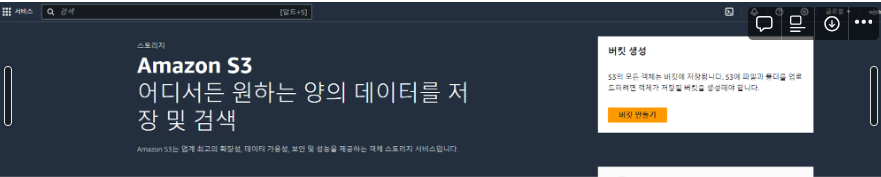
1. 버킷 생성
- AWS 콘솔 로그인 → S3 검색 → 버킷 만들기
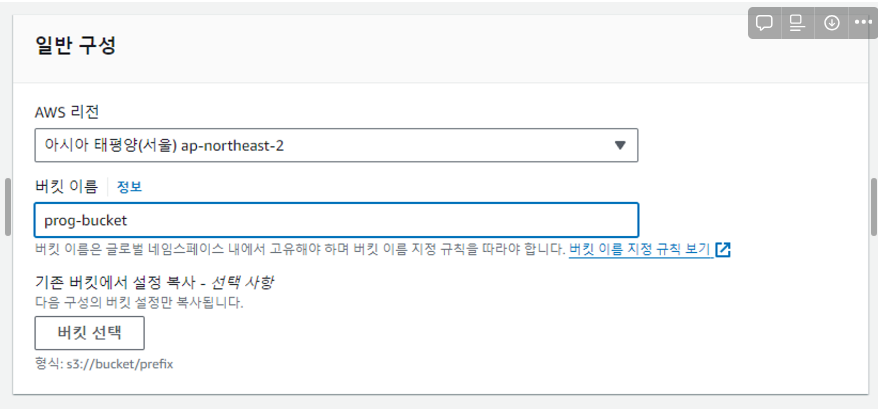
2. 일반 구성
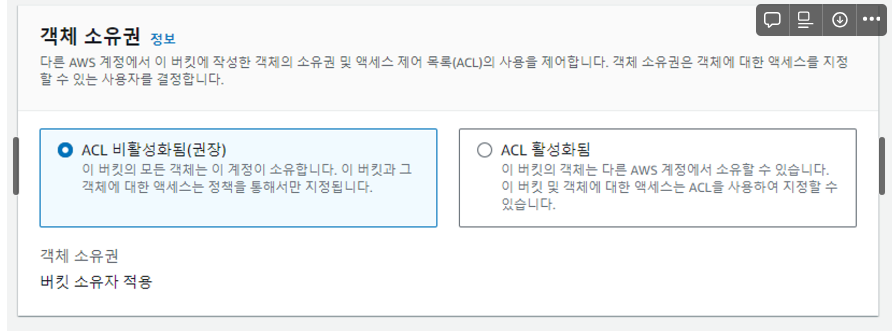
3. 객체 소유권
- 여러 계정에서 관리한건지 선택
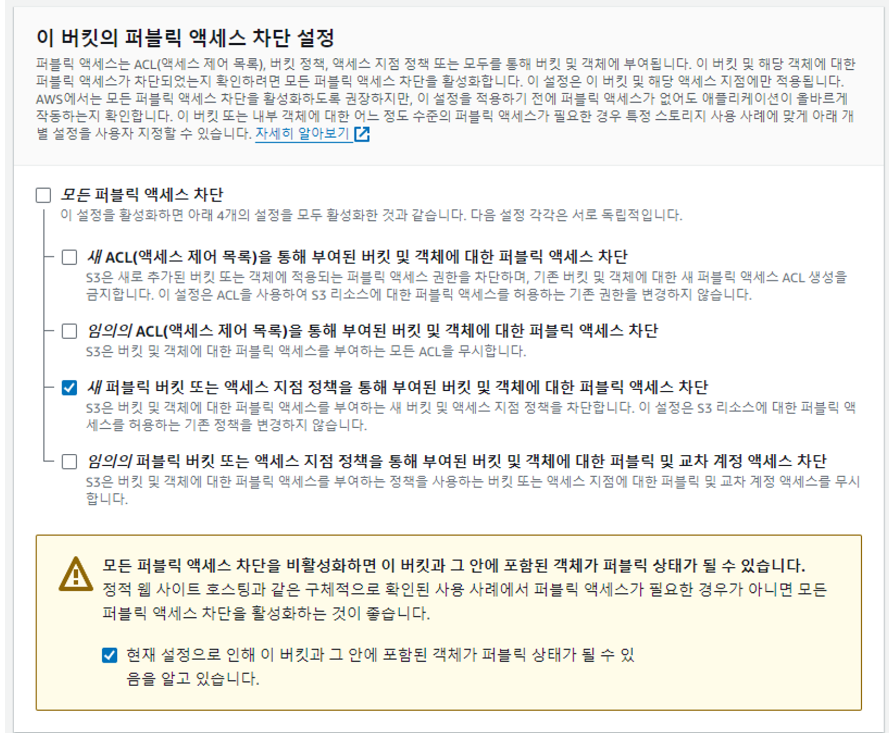
4. 퍼블릭 액세스 차단 설정
- 새 ACL(액세스 제어 목록)을 통해 부여된 버킷 및 객체에 대한 퍼블릭 액세스 차단
- 지정된 ACL이 퍼블릭이거나, 요청에 퍼블릭 ACL이 포함되어 있으면 PUT 요청을 거절한다
- 임의의 ACL(액세스 제어 목록)을 통해 부여된 버킷 및 객체에 대한 퍼블릭 액세스 차단
- 버킷의 모든 퍼블릭 ACL과 그 안에 포함된 모든 오브젝트를 무시하고, 퍼블릭 ACL를 포함한 PUT 요청은 허용
- 새 퍼블릭 버킷 또는 액세스 지점 정책을 통해 부여된 버킷 및 객체에 대한 퍼블릭 액세스 차단
- 지정된 버킷 정책이 퍼블릭이면 PUT 요청을 거절
- 버킷 및 객체에 대한 퍼블릭 액세스를 차단하고 사용자가 버킷 정책을 관리할 수 있다
- 기존의 버킷 정책에는 영향 안준다
- 임의의 퍼블릭 버킷 또는 액세스 지점 정책을 통해 부여된 버킷 및 객체에 대한 퍼블릭 및 교차 계정 액세스 차단
- 퍼블릭 정책이 있는 버킷에 대한 액세스가 권한이 있는 사용자와 AWS 서비스로만 제한되며, 이 설정 활성화는 기존 버킷 정책에 영향을 주지 않는다
- 퍼블릭 액세스가 차단되있는 경우 IAM에서 AWSAccessKeyId와 AWSSecretKey를 발급받아 접근 가능
5. ACL
- 버킷이나 객체에 대해 요청자의 권한 허용 범위를 어디까지 설정할 것인가를 설정한다
- 각각의 버킷과 그 속에 포함된 객체는 ACL과 연동된다
- ACL로 S3 버킷이나 객체의 접근을 제어하는게 가능
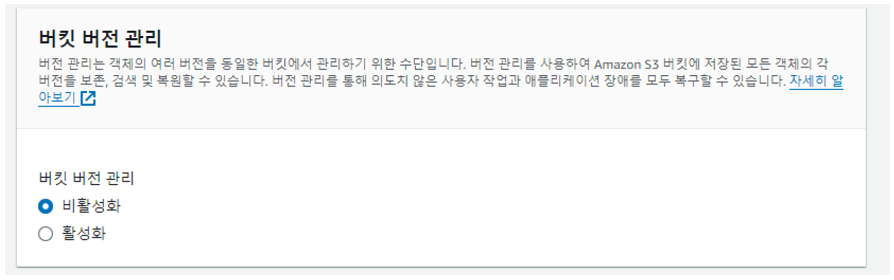
6. 버킷 버전 관리
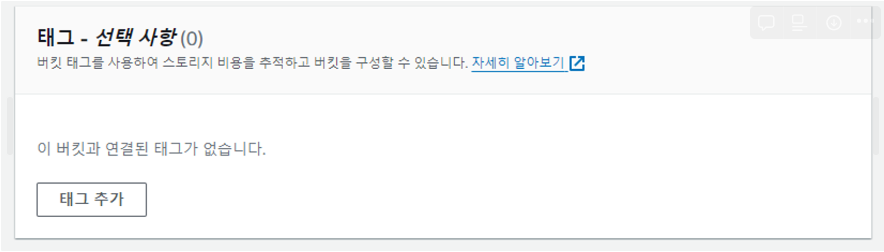
7. 태그
- 서비스 많아져서 구분해야되는거 아니면 안해도됨
8. 기본 암호화
- 활성화시 돈나감

버킷 정책 편집
- 권한 → 버킷정책 → 편집 → 버킷정책 → 버킷 ARN 복사 후 정책 생성기 클릭
정책 생성

-
*입력

-
GetObject, DeleteObject 선택

-
복사한 ARN 키 + /*
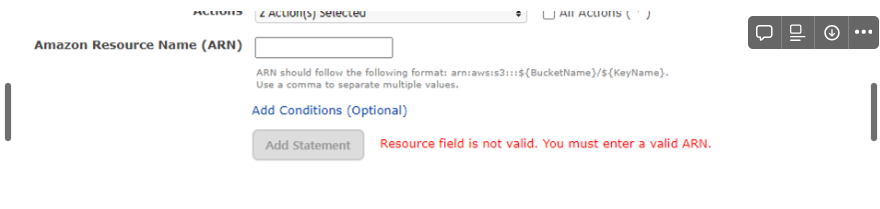
Generate Policy
-
Generate Policy 클릭

-
JSON 복사
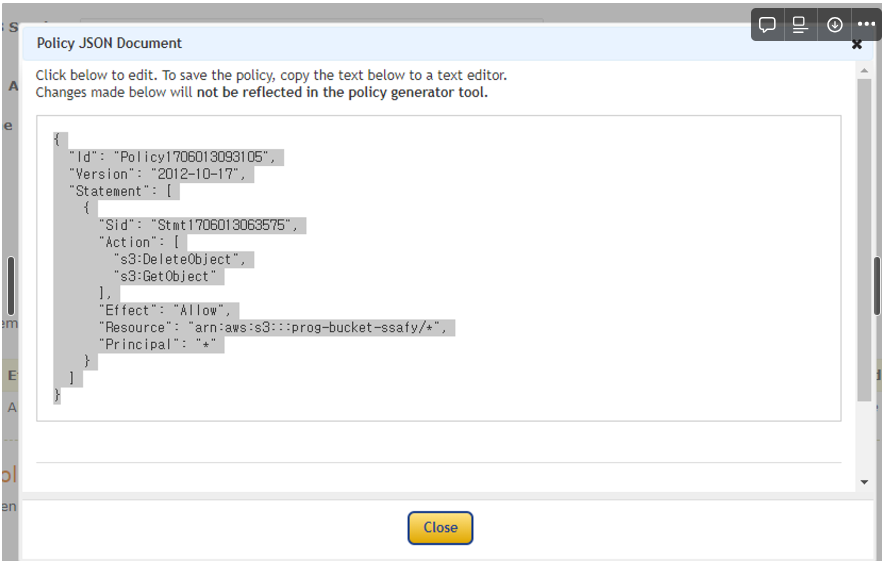
버킷 정책 편집 적용
- 위에서 복사한 JSON 붙여넣기 후 저장
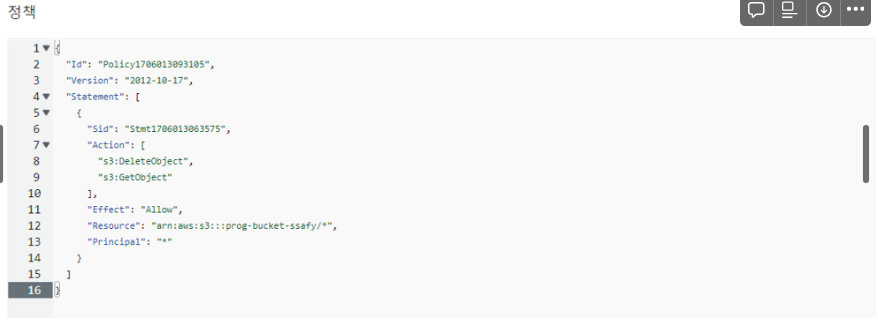
사용자/액세스 키 생성
사용자 생성
- AWS → IAM → 엑세스 관리 → 사용자 → 사용자 생성 클릭

사용자 세부 정보 지정
- 이름 입력하고 다음 클릭
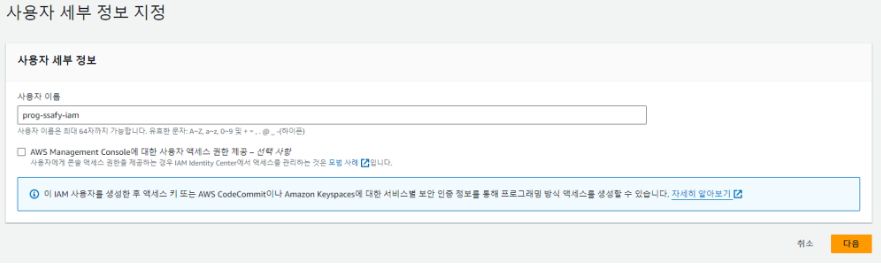
권한 설정
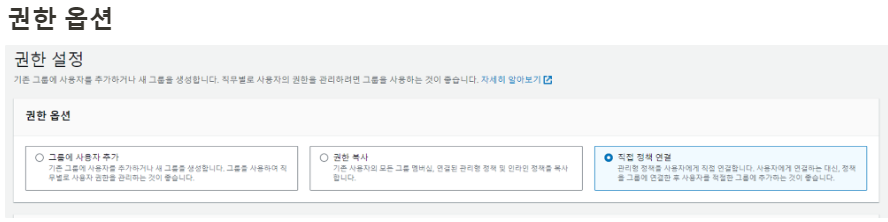
권한 정책
- S3FullAccess 검색후 추가
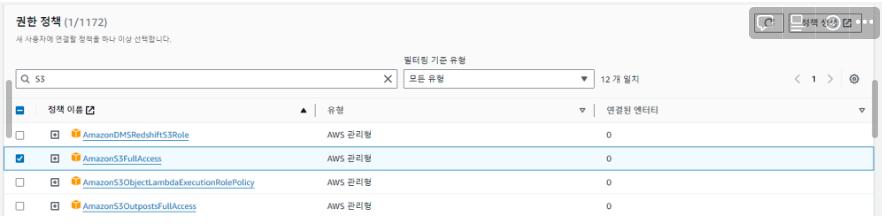
생성
- 다음 누르고 생성 하면 첫 화면으로 돌아가서면 사용자 추가된거 확인 가능
액세스 키 생성
- AWS → IAM → 엑세스 관리자 → 사용자 → 생성한 사용자 이름 클릭 → 보안 자격 증명 → 엑세스 키 만들기 클릭

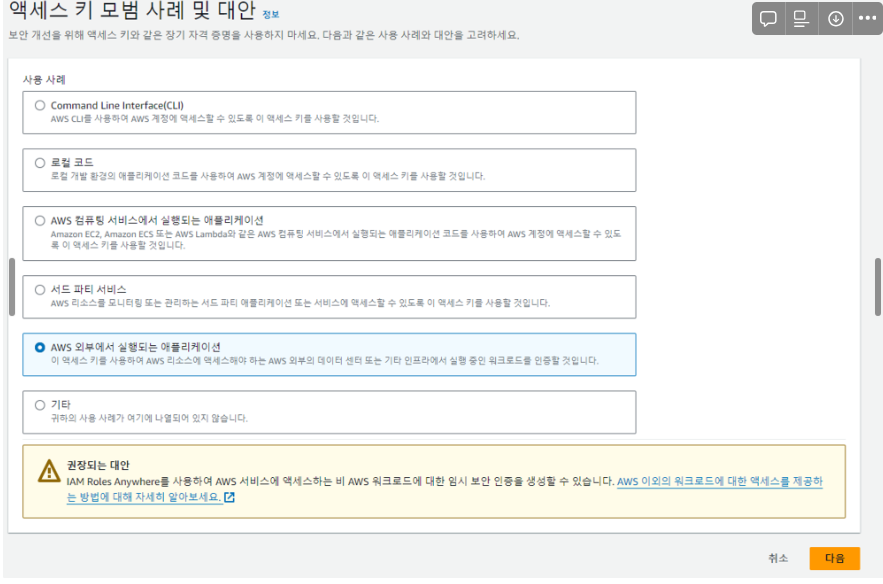
액세스 키 모범 사례 및 대안
- 일단 외부 애플리케이션 선택
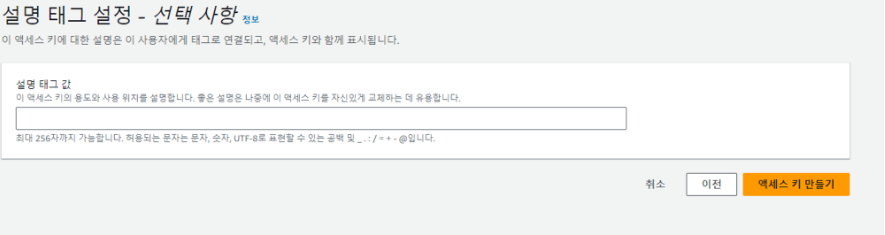
설명 태크 설정
- 선택 사항
- 액세스 키 만들기 누르면 키값이랑 비밀 키 값 보인다
- 엑세스 키 빌밀 키 스프링 부트 연동에 필요하니까 따로 복사해두기!!
Spring 연동
1. 의존성 추가
build.gradle에 의존성 추가
- 버전확인은 여기서
Maven Repository: org.springframework.cloud » spring-cloud-starter-aws
implementation 'org.springframework.cloud:spring-cloud-starter-aws:2.2.6.RELEASE'application.yml 설정 추가
- 절대 절대 절대 깃허브 올리지 말것
- Gitlab-runner 사용시 Variables 사용
- access-key, secret-key @Value 어노텐션으로 불러올 수 있다
cloud:
  aws:
    credentials:
      access-key: <발급받은 키 입력>
      secret-key: <발급받은 키 입력>

    s3:
      bucket: <버킷 이름>
    region:
      static: ap-northeast-2
    stack:
      auto: false
스프링 설정 추가
S3Config.java
import org.springframework.beans.factory.annotation.Value;

@Configuration
public class S3Config {
    @Value("${cloud.aws.credentials.access-key}")
    private String accessKey;
    @Value("${cloud.aws.credentials.secret-key}")
    private String secretKey;
    @Value("${cloud.aws.region.static}")
    private String region;

    @Bean
    public AmazonS3Client amazonS3Client() {
        BasicAWSCredentials awsCredentials = new BasicAWSCredentials(accessKey, secretKey);
        return (AmazonS3Client) AmazonS3ClientBuilder.standard()
                .withRegion(region)
                .withCredentials(new AWSStaticCredentialsProvider(awsCredentials))
                .build();
    }
}
S3Uploader.java
@RequiredArgsConstructor
@Component
@Service
@Slf4j
public class S3Uploader {
		// S3와 상호작용 버킷 생성, 삭제, 리스트 조회, 객체 업/다운 로드, 객체 삭제 등 작업 수행하는 클래스
    private final AmazonS3 amazonS3Client;

    @Value("${cloud.aws.s3.bucket}")
    private String bucket;

    public String saveUploadFile(MultipartFile multipartFile) {
        validateFileExits(multipartFile);
				// AWS SDK에 포함된 클래스, S3에 객체 업/다운 로드 시 사용하는 메타 데이터
        ObjectMetadata objectMetadata = new ObjectMetadata();
				//객체의 미디어 타입
        objectMetadata.setContentType(multipartFile.getContentType());
				//파일 크기 설정
        objectMetadata.setContentLength(multipartFile.getSize());

        String fileName = createFileName(Objects.requireNonNull(multipartFile.getOriginalFilename()));
        try (InputStream inputStream = multipartFile.getInputStream()) {
				//PutObjectRequest =  객체를 업로드하는 요청, inputStream = 업로드할 파일의 내용
            amazonS3Client.putObject(new PutObjectRequest(bucket, fileName, inputStream, objectMetadata)
				// withCannedAcl = 객체 접근 권한 설정, CannedAccessControlList.PublicRead = 공개적으로 읽기 가능
                    .withCannedAcl(CannedAccessControlList.PublicRead));
        } catch (IOException e) {
            throw new ResponseStatusException(HttpStatus.INTERNAL_SERVER_ERROR, "이미지 업로드에 실패했습니다.");
        }
        return fileName;
    }

// 파일 경로 가져오는 메서드, 해당 버킷 안에 fileName의 파일이 어디있는지 검사
    public String getFilePath(String fileName) {
        return amazonS3Client.getUrl(bucket, fileName).toString();
    }

// 파일 삭제
    public void deleteFile(String fileName) {
        amazonS3Client.deleteObject(new DeleteObjectRequest(bucket, fileName));
    }

//파일 이름 생성
    private String createFileName(String fileName) {
        try {
						//파일 확장자 추출 .PNG = PNG
            String ext = fileName.substring(fileName.lastIndexOf("."));
						//파일 이름 안겹치게 UUID로 랜덤값 줌
            return UUID.randomUUID() + ext;
        } catch (StringIndexOutOfBoundsException e) {
            throw new ResponseStatusException(HttpStatus.BAD_REQUEST, "잘못된 형식의 파일(" + fileName + ") 입니다.");
        }
    }

//파일 비어있는지 확인
    private void validateFileExits(MultipartFile multipartFile) {
        if (multipartFile.isEmpty()) {
            throw new RuntimeException("파일이 비어있습니다.");
        }
    }
}
단밤