Spring boot랑 React로 Stomp 사용하기

Stomp란?
Simple Text Oriented Messaging Protocal의 약자로 간단한 메시지를 전송하기 위한 프로토콜이다.
기존 WebSocket 통신 방식을 좀 더 효울적으로 다룰 수 있게 해주는 프로토콜이다.
Stomp는 pub, sub 구조로 동작하고 클라이언트가 서버로 메시지를 보내는 것을 pub, 클라이언트가 서버로부터 메시지를 받는 것을 sub이라 한다.
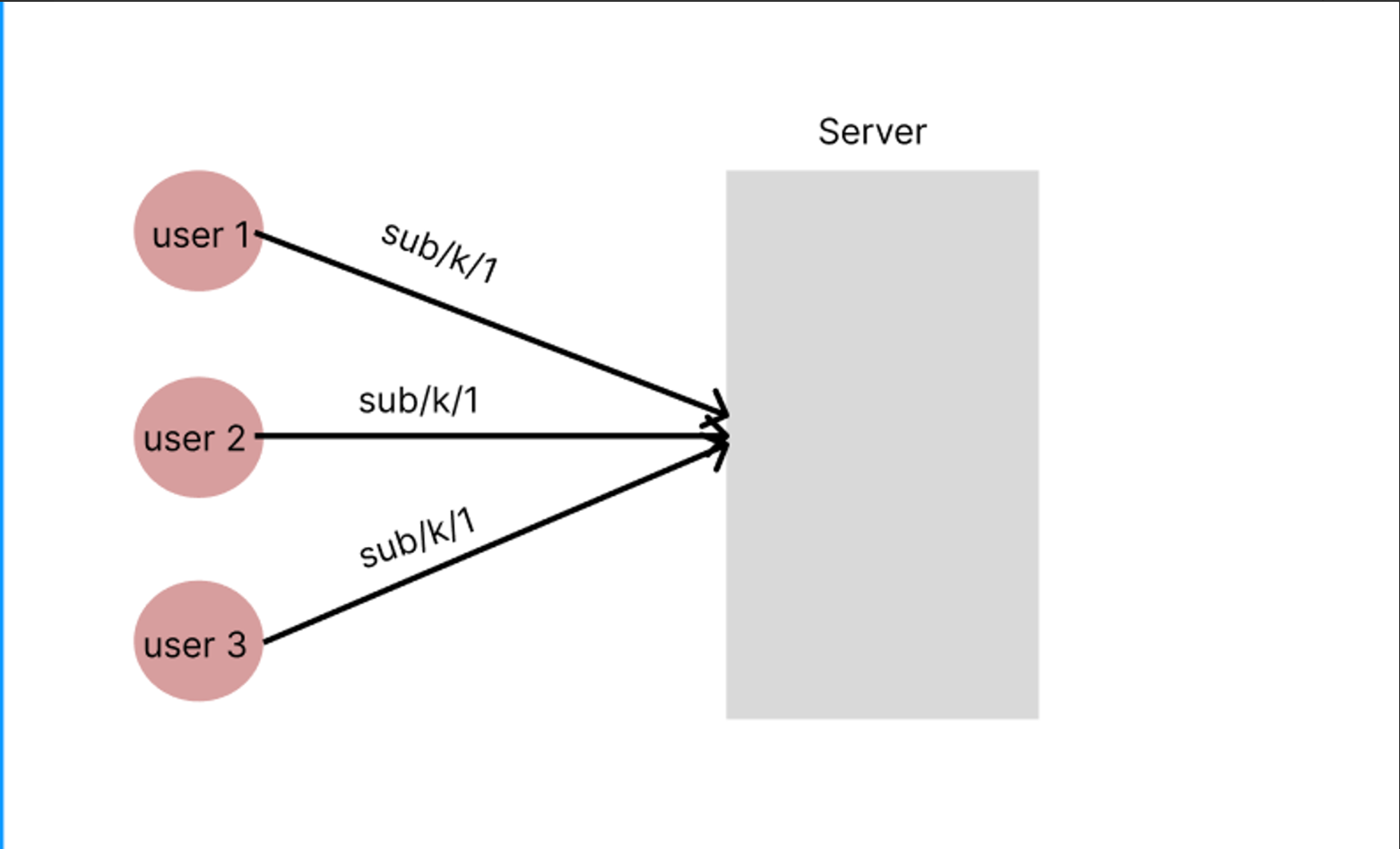
유저(클라이언트)가 서버의 sub/k/1이라는 주소를 구독하고
서버는 특정 이벤트가 발생 했을 때 sub/k/1을 구독한 유저들에게 소켓을 통해 이벤트 처리 결과를 보낸다.
Spring 설정
Spring Boot Dependencies 추가
implementation 'org.springframework.boot:spring-boot-starter-websocket'WebSocketConfig
package org.sixback.omess.common.config;

import org.springframework.context.annotation.Configuration;
import org.springframework.messaging.simp.config.MessageBrokerRegistry;
import org.springframework.web.socket.config.annotation.EnableWebSocketMessageBroker;
import org.springframework.web.socket.config.annotation.StompEndpointRegistry;
import org.springframework.web.socket.config.annotation.WebSocketMessageBrokerConfigurer;

@Configuration
@EnableWebSocketMessageBroker
public class WebSocketConfig implements WebSocketMessageBrokerConfigurer {

    @Override
    public void configureMessageBroker(MessageBrokerRegistry registry){
        registry.enableSimpleBroker("/sub"); // sub가 prefix로 붙은 destination의 클라이언트에게 전송 가능하도록 Broker 등록
        registry.setApplicationDestinationPrefixes("/pub");  // pub가 prefix로 붙은 메시지들은 @MessageMapping이 붙은 method로 바운드
    }

    @Override
    public void registerStompEndpoints(StompEndpointRegistry registry) {
        registry.addEndpoint("/ws")   //websocket 연결 할 엔드 포인트
                .setAllowedOrigins("http://localhost:5173");
    }

}
- registerStompEndpoints
- 최소 소켓 연결 시 ws://{서버주소}/ws로 소켓 연결
- setAllowedOrigins을 통해 웹소켓 연결을 허용할 주소 설정 ex) setAllowedOrigins("http://{서버주소}:5173") setAllowedOrigins(”*”)으로 설정하면 서버 배포 시 에러 터지는 문제 발생 원인은 모르겠음;;
- configureMessageBroker
/sub로 시작하는 모든 대상 주소에 대한 메시지를 브로커가 처리하도록 지정/pub/k/1로 메시지를 발행할 경우, 서버 측에서@MessageMapping("/k/1")로 어노테이션된 메소드가 해당 메시지를 처리
Controller
package org.sixback.omess.domain.kanbanboard.controller;

import lombok.RequiredArgsConstructor;
import org.sixback.omess.domain.kanbanboard.model.dto.request.issue.WriteIssueRequest;
import org.springframework.messaging.handler.annotation.DestinationVariable;
import org.springframework.messaging.handler.annotation.MessageMapping;
import org.springframework.messaging.handler.annotation.SendTo;
import org.springframework.web.bind.annotation.RestController;

@RestController
@RequiredArgsConstructor
public class KanbanBoardStompController {

    @MessageMapping("/kanbanboards/{module_id}") // pub 생략
    @SendTo("/sub/kanbanRoom/{module_id}")
    public String updateIssue(@DestinationVariable("module_id") Long moduleId) {
        return moduleId.toString();
    }
}
- MessageMapping
- 특정 경로로 들어오는 메시지를 라우팅한다
- 프론트에서 "/kanbanboards/{module_id}"로 보내기 위해서는 /pub/kanbanboards/1으로 요청을 보내야 한다.
- SendTo
- 해당 요청을 처리 후 SendTo에 명시한 대상을 구독한 클라이언트들에게 메시지를 보낸다.
- DestinationVariable
- HTTP 요청의
PathVariable과 동일
- HTTP 요청의
React 설정
WebSocketStorage
import {create} from "zustand";
import {CompatClient} from "@stomp/stompjs";

type WebSocketStorage= {
    // 전역 변수
    client: CompatClient | null;

    // 전역 변수 setter
    setClient: (client: CompatClient | null) => void;

    //요청
    sendStomp: () => void;
}

export const useWebSocketStorage = create<WebSocketStorage>((set, get) => ({
    // 전역 변수
    client: null,

    // 전역 변수 setter
    setClient: (client: CompatClient | null) => {
        set({client})
        get().client!.connect(
            {},
            () => {
                get().client &&
                get().client!.subscribe('/sub/kanbanRoom/' + get().kanbanBoardId,
                    (message) => {
	                    // message 처리 로직 추가
                    }
                );
            }
        )
    },

    //요청
    sendMessage: () => {
        if (get().client && get().client?.connected) {
            // STOMP 메시지 전송
            get().client?.send('/pub/kanbanboards/' + get().kanbanBoardId,
                {},
            );
        } else {
            console.log('Not connected to WebSocket');
        }
    }
}));- setClient
- connect 함수로 서버 연결 후 subscribe를 통해 백엔드 서버 구독
- sendMessage
- 백엔드 서버의 '/pub/kanbanboards/' + get().kanbanBoardId 주소로 요청 보냄
import { Container } from "@mui/material";
import { useWebSocketStorage } from "../stores/KanbanBoardStorage.tsx";
import { useEffect } from "react";
import { Stomp } from "@stomp/stompjs";

const KanbanBoardPage = ({ projectId, moduleId }: KanbanBoardProps) => {
    const {setClient, sendMessage} = useWebSocketStorage();

    const serverUrl = import.meta.env.VITE_WEBSOCKET_URL;

    // stomp 칸반보드 구독
    useEffect(() => {
        const sock = new WebSocket(`ws://${serverUrl}/ws`);
        setClient(Stomp.over(() => sock));
    }, []);

    return (
        <Container style={{ padding: 20 }}>
            <Button onChange={sendMessage} > 버튼 </Button>
        </Container>
    );
};

export default KanbanBoardPage;

단밤