2024-01-22(31일차) - JSP_AM_2024_01
📅2024. 01. 22 31일차
🎬JSP_AM_2024_01 구현
ArticleListServlet 구현
- 게시물 목록 서블렛
try {
			conn = DriverManager.getConnection(url, "root", "");
			response.getWriter().append("연결 성공!");

			DBUtil dbUtil = new DBUtil(request, response);

			String sql = "SELECT * FROM article;";

			List<Map<String, Object>> articleRows = dbUtil.selectRows(conn, sql);

//			response.getWriter().append(articleRows.toString());
			request.setAttribute("articleRows", articleRows);
			request.getRequestDispatcher("/jsp/article/list.jsp").forward(request, response);

		} catch (SQLException e) {
			System.out.println("에러 : " + e);
		} finally {
			try {
				if (conn != null && !conn.isClosed()) {
					conn.close();
				}
			} catch (SQLException e) {
				e.printStackTrace();
			}
}<!DOCTYPE html>
<html>
<head>
<meta charset="UTF-8"">
<title>게시물 목록</title>
</head>
<body>
<a href="https://www.naver.com" target="_blank">네이버</a>
<a href="http://localhost:8081/JSP_AM_2024_01/article/list"
target="_blank">버튼</a>
<a href="/JSP_AM_2024_01/article/list" target="_blank">버튼</a>
<a href="detail" target="_blank">디테일</a>
<h2>게시물 목록</h2>
<ul>
<%
for (Map<String, Object> articleRow : articleRows) {
%>
<li><a href="detail?id=<%=articleRow.get("id")%>"><%=articleRow.get("id")%>번, <%=articleRow.get("regDate")%>,<%=articleRow.get("title")%>,<%=articleRow.get("body")%></a></li>
<%
}
%>
</ul>ArticleDetailServlet 구현
- 게시글 상세보기
try {
			Class.forName("com.mysql.jdbc.Driver");
		} catch (ClassNotFoundException e) {
			System.out.println("클래스가 없습니다.");
			e.printStackTrace();
		}

		String url = "jdbc:mysql://127.0.0.1:3306/JSP_AM?useUnicode=true&characterEncoding=utf8&autoReconnect=true&serverTimezone=Asia/Seoul&useOldAliasMetadataBehavior=true&zeroDateTimeNehavior=convertToNull";
		String user = "root";
		String password = "";

		Connection conn = null;

		try {
			conn = DriverManager.getConnection(url, "root", "");
			response.getWriter().append("연결 성공!");

			DBUtil dbUtil = new DBUtil(request, response);

			int id = Integer.parseInt(request.getParameter("id"));

//			String sql = "SELECT * FROM article WHERE id = " + id + ";";
			String sql = String.format("SELECT * FROM article WHERE id = %d;", id);

			Map<String, Object> articleRow = dbUtil.selectRow(conn, sql);

			request.setAttribute("articleRow", articleRow);
			request.getRequestDispatcher("/jsp/article/detail.jsp").forward(request, response);

		} catch (SQLException e) {
			System.out.println("에러 : " + e);
		} finally {
			try {
				if (conn != null && !conn.isClosed()) {
					conn.close();
				}
			} catch (SQLException e) {
				e.printStackTrace();
			}
}<%
Map<String, Object> articleRow = (Map<String, Object>) request.getAttribute("articleRow");
%>
<!DOCTYPE html>
<html>
<head>
<meta charset="UTF-8"">
<title>게시물 상세페이지</title>
</head>
<body>
<h2>게시물 상세페이지</h2>
<div>
번호 :
<%=articleRow.get("id")%></div>
<div>
날짜 :
<%=articleRow.get("regDate")%></div>
<div>
제목 :
<%=articleRow.get("title")%></div>
<div>
내용 :
<%=articleRow.get("body")%></div>
<div><a style="color:green" href="list">리스트로 돌아가기</a></div>
</body>
</html>sql injection
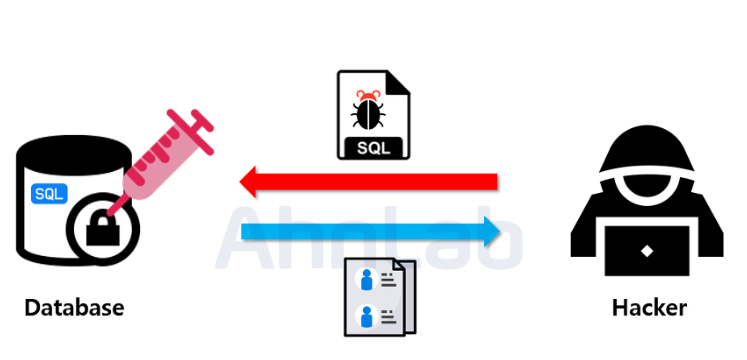
-
SQL Injection 이란 악의적인 사용자가 보안상의 취약점을 이용하여, 임의의 SQL 문을 주입하고 실행되게 하여 데이터베이스가 비정상적인 동작을 하도록 조작하는 행위이다.
-
인젝션 공격은 공격이 비교적 쉬운 편이고 공격에 성공할 경우 큰 피해를 입힐 수 있는 공격이다.
-
막는방법 statement대신 PreparedStatement쓰면 된다.