03. Print
출력
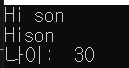
name = "son"
print("Hi", name)
print("Hi" + name)   # 문자열은 결합이 가능합니다.

age = 30
print("나이: ", age)
- Console
print("나이 :" + age")
- ERROR : 문자열과 숫자는 결합할 수 없습니다.
변수 포맷을 사용한 출력
- print("서식문자" %(데이터))
- 출력 데이터와 서식문자의 갯수, 숫자, 타입은 일치해야 합니다.
%d : 정수
%f : 실수
%s : 문자열
%c : 문자
print("숫자 : %d \n" %(10))
print("이름 : %s - 나이 : %d" %(name, age))
- Console

- print("{ }".format())
- 출력 내용안의 { }(포맷필드) 위치에 데이터를 출력할 수 있습니다.
- 변수의 타입을 지정하지 않아도 됩니다.
print("숫자 : {}".format(10))
print("이름 : {} - 나이 {}".format(name,age))
- Console

f-string
- print(f"{ }")
- 출력 내용 앞에 f 를 붙이고, {} 를 사용해서 변수를 추가합니다.
print(f"숫자 : {10}")
print(f"이름 : {name} - 나이 : {age}")
- Console

실수 출력시 소수점 자리 조정
height = 123.456
print("높이 : {:.2f}".format(height))
print(f"높이 : {height:.2f}")
- Console

십진수값 변환 출력
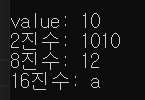
value = 10
print("value: {}".format(value))
print("2진수: {:b}".format(value))
print("8진수: {:o}".format(value))
print("16진수: {:x}".format(value))
- Console
출력 필드 폭 지정
- {:숫자}
- 숫자 만큼의 자리를 지정해서 출력
- < : 왼쪽 맞춤
^ : 가운데 맞춤
> : 오른쪽 맞춤
digitA = 123
print("{:5}|".format(digitA))
print("{:<5}|".format(digitA))
print("{:^5}|".format(digitA))
print("{:>5}|".format(digitA))
- Console

- 숫자는 기본이 오른쪽 맞춤이고, 문자열은 기본이 왼쪽 맞춤입니다.
digitB = "abc"
print("{:5}|".format(digitB))
print("{:<5}|".format(digitB))
print("{:^5}|".format(digitB))
print("{:>5}|".format(digitB))
- Console