06. string
문자열 슬라이싱
- 문자열을 부분적으로 추출할 때 사용합니다.
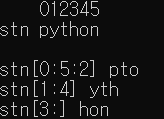
문자열 [ begin : end : step ]
- 시작 index 는 포함되지만 마지막 index 는 포함하지 않습니다.
stn = "python"
print("    012345")
print(f"stn {stn}")
print()
print(f"stn[0:5:2] {stn[0:5:2]}")
print(f"stn[1:4] {stn[1:4]}")
print(f"stn[3:] {stn[3:]}")
split( separator )
- split 함수는 구분자를 기준으로 문자열을 분할하여 리스트에 저장한 뒤 반환합니다.
- 구분자는 문자열로 지정합니다
- 구분자의 기본값은 " " 공백입니다.
s1 = "떡볶이 김말이 오뎅"
print(f"s1 {s1}")
print(f"s1.split {s1.split()}")
print()

s2 = "서울->대전->대구->부산"
print(f"s2 {s2}")
print(f"s2.split {s2.split('->')}")
print()

splitlines()
stn = """python string
hello python"""
print()
print(f"stn : {stn}")
print(f"stn.splitline : {stn.splitlines()}")
print()

대소문자 변경
lower()
stn = "Python String"
print(stn.lower())
print()

upper()
stn = "Python String"
print(stn.upper())
print()

swapcase()
stn = "Python String"
print(stn.swapcase())
print()

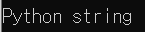
capitalize()
stn = "python string"
print(stn.capitalize())
print()
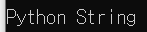
title()
stn = "python string"
print(stn.title())
print()
공백제거
strip()
- 문자열의 앞뒤에 공백이 있으면 제거하여 반환합니다.
stn = " python "
print(stn)
print(stn.strip())
print()

lstrip()
- 문자열의 앞쪽(왼쪽)에 공백이 있으면 제거하여 반환합니다
- 오른쪽은 제거하지 않습니다.
stn = " python #"
print(stn.lstrip())
print()

rstrip()
- 문자열의 뒤쪽(오른쪽)에 공백이 있으면 제거하여 반환합니다
- 왼쪽은 제거하지 않습니다.
stn = " python "
print(stn.rstrip())
print()

문자 변경
replace( 대상, 변경 )
- 문자열의 특정 문자를 변경해서 반환합니다.
- 문자열 안에서 찾은 모든 글자가 변경됩니다.
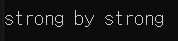
stn = "step by step"
print(stn.replace("ep", "rong"))
print()
문자열 검색
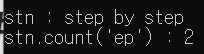
count( 문자열 )
- 문자열에서 특정 문자열를 찾아서 해당 문자열의 수를 반환합니다.
stn = "step by step"
print(f"stn : {stn}")
print(f"stn.count('ep') : {stn.count('ep')}")
print()
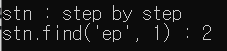
find( 문자열, 시작 index )
- 문자열의 시작 index 부터 특정 문자열을 찾아서 index 값을 반환합니다.
- 찾는 값이 없으면 -1 을 반환합니다.
stn = "step by step"
print(f"stn : {stn}")
print(f"stn.find('ep', 1) : {stn.find('ep', 1)}")
print()
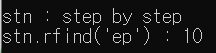
rfind( 문자열 )
- 문자열의 뒤에서 부터 특정 문자열을 찾아서 index 값을 반환합니다.
- 찾는 값이 없으면 -1 을 반환합니다.
stn = "step by step"
print(f"stn : {stn}")
print(f"stn.rfind('ep') : {stn.rfind('ep')}")
print()
index( 검색문자열 )
- find() 함수와 동일한 용도이지만, 실패하면 Error 입니다.
stn = "step by step"
print(f"stn : {stn}")
print(f"stn.index('ep') : {stn.index('ep')}")
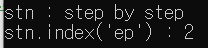
# print(f"stn.index('z') : {stn.index('z')}") # Error
문자열 확인
-
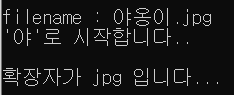
startwith()
- 문자열이 특정 단어로 시작하는지를 확인하여 True, False 를 반환합니다.
-
endwith()
- 문자열이 특정 단어로 끝나는지를 확인하여 True, False 를 반환합니다.
fileName = "야옹이.jpg"
print(f"filename : {fileName}")

if fileName.startswith('야'):
    print("'야'로 시작합니다..")
else:
    print("'야'로 시작하지 않습니다.")
print()

if fileName.endswith('jpg'):
    print("확장자가 jpg 입니다...")
else:
    print("확장자가 jpg 가 아닙니다.....")
print()
데이터의 형태를 확인합니다.
- isalpha() : 모든 문자가 알파벳 형태인지를 확인합니다.
- islower() : 모든 문자가 알파벳 소문자인지를 확인합니다.
- isupper() : 모든 문자가 알파벳 대문자인지를 확인합니다.
- isdecimal() : 모든 문자가 숫자로 되어있는지를 확인합니다.
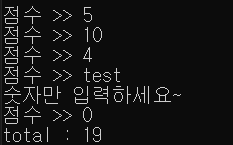
total = 0
while True:
  point = input("점수 >> ")
  if point.isdecimal():
    point =int(point)
    total += point
  else:
    print("숫자만 입력하세요~")

  if point ==0:
    break

print(f"total : {total}")