CSS란?
웹페이지의 스타일을 꾸며준다.
<head>
<style></style>
</head>
css 외부 문서로 만들어 가져오기
<head>
<link rel="stylesheet" href="style.css">
</head>
style.css 파일에 스타일 내용(스타일 태그 제외)을 만들고 link로 가져오면 적용됨
미디어 쿼리 @media
@media(max-width:800px){ <!-- 창크기가 800이하면 디스플레이 없앰 -->
    div{
            display:none;
        }
    }
클래스와 ID
문단이나 버튼, 입력 등등 그룹과 아이디를 부여하여 각각의 문단에 따로 스타일, 함수를 부여할수있다.
class 중복 허용, .클래스명
id 중복 불가, #아이디
tag 태그이름
class in tag .클래스명 > 태그이름
ex)
<style>
.red {
  color: #f33;
}

#yellow-bg {
  background: #ffa;
}
</style>
<body>
  <bin class="red" id="yellow-bg"></bin>
태그
글자 색, 크기, 정렬
color 				<!-- 글자색 -->
font-size 			<!-- 글자크기 -->
text-align: center; <!-- 정렬 -->
백그라운드 스타일
width: 300px; 			<!-- 백그라운드, 이미지 폭 -->
height: 200px; 			<!-- 백그라운드 크기 -->
background-color: 색깔;  <!-- 색깔  transparen:투명 -->
백그라운드 이미지 삽입
아래 3개의 태그가 한쌍이다.
background-image: url(''); 		<!-- url 링크 삽입 -->
background-position: center; 	<!-- 이미지를 가운데 정렬 -->
background-size: cover; 		<!-- 이미지를 백그라운드 크기에 맞게 적용 -->
div 안의 텍스트나 내용만을 정렬한다
display:none 					<!-- 안보이게 설정 -->
display: flex;
flex-direction: column;
align-items: center;
justify-content: center;
그리드
태그{
display: grid;
grid-template-columns: 150px 1fr;
}
h    |h              |
박스모델
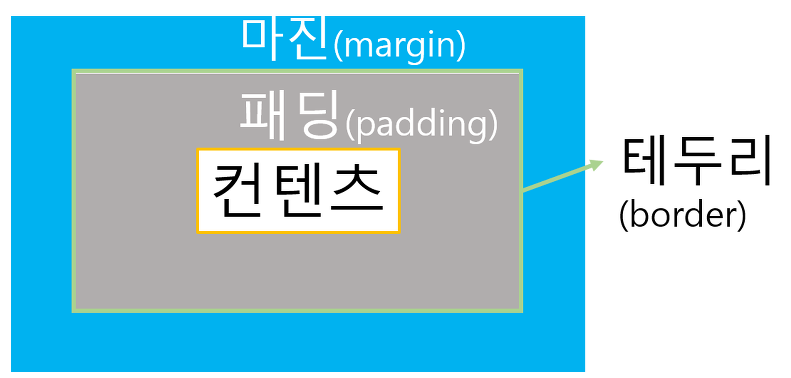
background-clip: content-box; 	<!-- padding 영역만큼 이미지나 백그라운드를 잘라냄 -->
border-radius: 1px; 			<!-- 테두리를 둥글게 -->
border-style: solid; 			<!-- 사용하지 않으면 border 영역을 칠할수없다 -->
border-color: 색깔; 				<!-- 지정을 안해주면 color 값에 영향을 받는다. -->
border-width: 1px; 				<!-- 폭 -->
border: 1px solid 색깔; 			<!-- 테두리를 1px 하얀선으로 나타내라 solid:선 dotted:점선 dached:직각점선 -->
border-top: ; 					<!-- top - right - bottom - left -->
margin: 50px auto 0px auto; 	<!-- 위 우 아래 좌 크기 지정 여백 auto:끝까지지정 -->
텍스트나 그림, 제목등을 가운데 정렬하려면 텍스트들을 감싼다 - <div>
background-color 를 사용하여 구역이 얼마나 되는지 확인한다
구역이 화면 끝까지 존재하므로 해당 구역을 width로 줄여준다 - background 폭이랑 똑같게
여백을 동등하게 준다 - margin
margin: 50px auto 0px auto;
ISFP