
Today
- 성낙현의 JSP 자바 웹 프로그래밍
- 선생님 TIP : 제발 문제가 발생하면 로그부터 확인하자
프론트 문제 - 브라우저 개발자도구 콘솔 확인
서버 문제 - 에러 로그 필히 확인하기 - 내장객체 실습
- 선생님 TIP : 제발 문제가 발생하면 로그부터 확인하자
<!-- 회원가입 페이지 실습 : join.jsp -->
<%@ page language="java" contentType="text/html; charset=UTF-8" pageEncoding="UTF-8"%>
<%@ page trimDirectiveWhitespaces="true" %>
<%@ page import="java.util.Arrays" import="java.util.List" %>
<!DOCTYPE html>
<html>
<head>
<meta charset="UTF-8">
<title>회원가입</title>
<style>
* { margin : 0; padding : 0; list-style : none;}
body {margin : 10px;}
form {
margin : 10px auto;
width : 500px;
display : flex;
flex-direction : column;
align-items : center;
border : 1px solid #999;
border-radius : 10px;
padding : 10px;
}
ul {padding : 10px;}
ul li {
display : grid;
grid-template : 1fr / 1fr;
grid-template-areas: "title" "contents";
}
ul span {
display :block;
width : 100px;
text-align : left;
font-weight : 600;
grid-area : title;
}
ul > li:not(:first-child){
padding-top : 10px;
}
ul li div {
grid-area : contents;
}
button, .button {
width : 80px;
height : 30px;
border-radius : 10px;
border : 1px solid #888;
padding : 5px 10px;
}
button:hover, button:hover a, .button:hover {
background : #888;
border : 1px solid #888;
color : #fff;
}
a, a:link, a:visited {
text-decoration : none;
color : #000;
}
input[type = "text"], input[type = "password"], input[type = "date"] {
margin-top : 5px;
height : 25px;
padding : 0 10px 0;
border-radius : 10px;
border : 1px solid #888;
}
textarea {
margin-top : 5px;
padding : 0 10px 0;
border-radius : 10px;
border : 1px solid #888;
}
input:focus + span, textarea:focus + span {
color : orange;
}
p {
color : red;
padding : 5px;
}
</style>
</head>
<body>
<%
request.setCharacterEncoding("UTF-8");
String loginErr = request.getParameter("loginErr");
String result = (loginErr == null)? "" : "올바른 아이디가 아닙니다.";
String id = request.getParameter("id") != null? request.getParameter("id") : "";
String pwd = request.getParameter("pwd") != null? request.getParameter("pwd") : "";
String name = request.getParameter("name") != null? request.getParameter("name") : "";
String gender = request.getParameter("gender") != null ? request.getParameter("gender") : "";
String birthday = request.getParameter("birthday") != null ? request.getParameter("birthday") : "";
String self = request.getParameter("self") != null ? request.getParameter("self") : "";
String[] favo = request.getParameterValues("favo");
List<String> favoList = (favo != null && favo.length > 0)? Arrays.asList(favo) : Arrays.asList("지현", "장지현");
%>
<a class="button" href="./RequestInfo.jsp?param1=값1¶m2=값2">클라이언트/서버 환경정보 조회 (GET방식)</a>
<a class="button" href="./RequestHeader.jsp">헤더 정보 조회</a>
<!-- <form action="RequestParameter.jsp" method="post"> -->
<form action="./join_ok.jsp" method="post">
<h3>회원가입</h3>
<ul>
<li>
<input type="text" value="<%= id %>" name="id" id="id" maxlength="20">
<span>아이디</span>
</li>
<li>
<input type="password" value="<%= pwd %>" name="pwd" id="pwd" maxlength="20">
<span>비밀번호</span>
</li>
<li>
<input type="text" value="<%= name %>" name="name" id="name" maxlength="20">
<span>이름</span>
</li>
<li>
<label for="male"><input type="radio" value="M" name="gender" id="male" <% if(gender != "" && gender.equals("M")) {%>checked<%}%> >남</label>
<label for="female"><input type="radio" value="F" name="gender" id="female" <% if(gender != "" && gender.equals("F")) {%>checked<%} %>>여</label>
<span>성별</span>
</li>
<li>
<input type="date" name="birthday" id="birthday" value="<%= birthday %>">
<span>생년월일</span>
</li>
<li>
<label for="favoSpo"><input type="checkbox" value="sports" name="favo" id="favoSpo" <% if(favoList.contains("sports")) {%>checked<%}%> >스포츠</label>
<label for="favoEco"><input type="checkbox" value="economic" name="favo" id="favoEco" <% if(favoList.contains("economic")) {%>checked<%}%> >경제</label>
<label for="favoCul"><input type="checkbox" value="culture" name="favo" id="favoCul" <% if(favoList.contains("culture")) {%>checked<%}%> >문학</label>
<label for="favoLov"><input type="checkbox" value="love" name="favo" id="favoLov" <% if(favoList.contains("love")) {%>checked<%}%> >연애</label>
<label for="favoTra"><input type="checkbox" value="travel" name="favo" id="favoTra <% if(favoList.contains("travel")) {%>checked<%}%> ">여행</label>
<span>관심사항</span>
</li>
<li>
<textarea id="self" name="self" maxlength="200" cols="40" rows="5"><%= self %></textarea>
<span>자기소개</span>
</li>
</ul>
<p> <%= result %> </p>
<div>
<button type="submit" id="submit">제출</button>
<button type="reset">초기화</button>
<button type="button"><a href="http://localhost:8080/chap02/join.jsp">홈으로</a></button>
</div>
</form>
<script>
const submit = document.querySelector("#submit");
const engL = ["a", "b", "c", "d", "e", "f", "g", "h", "i", "j", "k", "l", "m", "n", "o", "p", "q" ,"r", "s", "t", "u", "v", "w", "x", "y", "z"];
const engU = ["A", "B", "C", "D", "E", "F", "G", "H", "I", "J", "K", "L", "M", "N", "O", "P", "Q", "R", "S", "T", "U", "V", "W", "X", "Y", "Z"];
const num = ["1","2","3","4","5","6","7","8","9","0"];
const symbols = ["!", "@", "#", "$", "%", "^", "&", "*", "(", ")", "_", "+"];
submit.addEventListener("click", (e) => {
const id = document.querySelector("#id");
const pwd = document.querySelector("#pwd");
const name = document.querySelector("#name");
const self = document.querySelector("#self");
const gender = document.querySelectorAll("input[name = 'gender']:checked");
const favo = document.querySelectorAll("input[name = 'favo']:checked");
const birthday = document.querySelector("#birthday");
if(id.value.length == 0) {
e.preventDefault();
id.focus();
return alert("아이디는 필수 입력사항입니다.");
}
if(pwd.value.length == 0) {
e.preventDefault();
pwd.focus();
return alert("비밀번호는 필수 입력사항입니다.");
}
if(name.value.length == 0) {
e.preventDefault();
name.focus();
return alert("이름은 필수 입력사항입니다.");
}
if(gender.length == 0) {
e.preventDefault();
return alert("성별은 필수 입력사항입니다.");
}
if (birthday.value.length == 0) {
e.preventDefault();
birthday.focus();
return alert("생년월일은 필수 입력사항입니다.");
}
if(favo.length == 0) {
e.preventDefault();
return alert("관심사항은 필수 입력사항입니다.");
}
if(self.value.length == 0) {
e.preventDefault();
self.focus();
return alert("자기소개는 필수 입력사항입니다.");
}
if(id.value.length < 8 || id.value.length > 20) {
e.preventDefault();
id.focus();
return alert("아이디는 8자리 이상, 20자리 이하로 입력해주세요");
}
if(!(engL.indexOf((id.value).substring(0,1)) >= 0) && !(engU.indexOf((id.value).substring(0,1)) >= 0) ) {
e.preventDefault();
id.focus();
return alert("아이디의 첫 시작은 영문이어야합니다.");
}
if(id.value.length > 0) {
let allowed = (engL.concat(engU)).concat(num);
let idValue = (id.value).split("");
for(let i of idValue) {
if(!(allowed.includes(i))) {
e.preventDefault();
id.focus();
return alert("아이디는 영문, 숫자만 입력가능합니다.");
}
}
}
if(pwd.value.length < 4 || pwd.value.length > 20) {
e.preventDefault();
pwd.focus();
return alert("비밀번호는 4자리 이상, 20자리 이하로 입력해주세요");
}
if(pwd.value.length > 0) {
let eng = engL.concat(engU);
let pwdValue = (pwd.value).split("");
let cnt1 = 0, cnt2 = 0, cnt3 = 0;
for(let j of pwdValue) {
if(eng.includes(j)) {
cnt1 ++;
}
}
for(let j of pwdValue) {
if(num.includes(j)) {
cnt2 ++;
}
}
for(let j of pwdValue) {
if(symbols.includes(j)) {
cnt3 ++;
}
}
if(cnt1 == 0 || cnt2 == 0 || cnt3 == 0) {
e.preventDefault();
pwd.focus();
return alert("비밀번호는 영문, 숫자, 특수문자("+ symbols.toString() +")만 입력가능합니다.");
}
}
if(birthday.value.length >= 0) {
let day = new Date(birthday.value);
let today = new Date();
if(day.getTime() > today.getTime()) {
e.preventDefault();
birthday.focus();
return alert("생년월일은 오늘 날짜보다 미래일 수 없습니다.");
}
}
if(self.value.length < 50) {
e.preventDefault();
self.focus();
return alert("자기소개는 50자리 이상 입력해주세요");
}
alert("정상처리되었습니다.");
})
</script>
</body>
</html><!-- 클라이언트/서버 환경정보 조회 실습 : requestInfo.jsp -->
<%@ page language="java" contentType="text/html; charset=UTF-8" pageEncoding="UTF-8"%>
<%@ page trimDirectiveWhitespaces="true" %>
<!DOCTYPE html>
<html>
<head>
<meta charset="UTF-8">
<title>Insert title here</title>
</head>
<body>
<% request.setCharacterEncoding("UTF-8"); %>
<h3>클라이언트/서버 환경정보 조회</h3>
<ul>
<li>데이터 전송 방식 : <%=request.getMethod() %></li>
<li>URL : <%=request.getRequestURL() %></li>
<li>URL : <%=request.getRequestURI() %></li>
<li>프로토콜 : <%=request.getProtocol() %></li>
<li>서버이름 : <%=request.getServerName() %></li>
<li>서버포트 : <%=request.getServerPort() %></li>
<li>클라이언트 IP 주소 : <%=request.getRemoteAddr() %></li>
<li>쿼리스트링 : <%=request.getQueryString() %></li>
<li>전송된 값1 : <%=request.getParameter("param1") %></li>
<li>전송된 값2 : <%=request.getParameter("param2") %></li>
</ul>
</body>
</html><!-- 요청 헤더 정보 출력 실습 : requestHeader.jsp -->
<%@ page import="java.util.Enumeration" %>
<%@ page language="java" contentType="text/html; charset=UTF-8" pageEncoding="UTF-8"%>
<%@ page trimDirectiveWhitespaces="true" %>
<!DOCTYPE html>
<html>
<head>
<meta charset="UTF-8">
<title>내장객체 - Request Header</title>
</head>
<body>
<h2>내장객체 - 요청 헤더 정보 출력</h2>
<%
Enumeration headers = request.getHeaderNames();
while(headers.hasMoreElements()) {
String headerName = (String) headers.nextElement();
String headerValue = request.getHeader(headerName);
out.print("헤더명 : " + headerName + ", 헤더값 : " + headerValue + "<br>");
}
%>
</body>
</html><!-- 요청 파라미터 가져오는 실습 : requestParameter.jsp -->
<%@ page language="java" contentType="text/html; charset=UTF-8" pageEncoding="UTF-8"%>
<%@ page trimDirectiveWhitespaces="true" %>
<!DOCTYPE html>
<html>
<head>
<meta charset="UTF-8">
<title>내장객체 - request</title>
</head>
<body>
<h2>내장객체 - request</h2>
<%
request.setCharacterEncoding("UTF-8");
String id = request.getParameter("id");
String pwd = request.getParameter("pwd");
String name = request.getParameter("name");
String gender = request.getParameter("gender");
String birthday = request.getParameter("birthday");
String self = request.getParameter("self").replace("\r\n", "<br>");
String[] favo = request.getParameterValues("favo");
String favoVal = "";
if(favoVal != null) {
for(int i = 0; i <favo.length; i++){
favoVal += favo[i] + " ";
}
}
%>
<ul>
<li>아이디 : <%= id %></li>
<li>비밀번호 : <%= pwd %></li>
<li>이름 : <%= name %></li>
<li>성별 : <%= gender %></li>
<li>생년월일 : <%= birthday %></li>
<li>관심사항 : <%= favoVal %></li>
<li>자기소개 : <%= self %></li>
</ul>
</body>
</html><!-- 회원가입 정보 가져와서 리다이렉트 실습 : join_ok.jsp -->
<%@ page language="java" contentType="text/html; charset=UTF-8" pageEncoding="UTF-8"%>
<%@ page trimDirectiveWhitespaces="true" %>
<!DOCTYPE html>
<html>
<head>
<meta charset="UTF-8">
<title>Insert title here</title>
</head>
<body>
<%
request.setCharacterEncoding("UTF-8");
String id = request.getParameter("id");
String pwd = request.getParameter("pwd");
String name = request.getParameter("name");
String gender = request.getParameter("gender");
String birthday = request.getParameter("birthday");
String self = request.getParameter("self").replace("\r\n", "<br>");
String[] favo = request.getParameterValues("favo");
String favoVal = "";
if(favoVal != null) {
for(int i = 0; i <favo.length; i++){
favoVal += favo[i] + " ";
}
}
if(id.equals("TEST1234") ) {
response.sendRedirect("./welcome.jsp");
} else {
request.getRequestDispatcher("./join.jsp?loginErr=1").forward(request, response);
}
%>
</body>
</html><!-- 회원가입 정보 가져와서 리다이렉트 실습-초라한 웰컴 페이지 ㅎㅎ : welcome.jsp -->
<%@ page language="java" contentType="text/html; charset=UTF-8" pageEncoding="UTF-8"%>
<%@ page trimDirectiveWhitespaces="true" %>
<!DOCTYPE html>
<html>
<head>
<meta charset="UTF-8">
<title>Insert title here</title>
</head>
<body>
<h2>로그인 성공</h2>
</body>
</html>Review
- 회원정보 값 유효성 체크는, 정규식을 안쓰면...힘들다
=> 정규식 공부해야함!! - 스크립트 요소에서 변수 선언, 함수 선언 등은 모두 선언부에서 최대한 처리해주고 표현식과 스크립틀릿 에서는 가능한 깔끔하게 작성하는게 눈에 보기 좋음
- html 태그 내 스크립틀릿 부분에서
<input type="radio" value="M" name="gender" id="male" <% if(gender != "" && gender.equals("M")) {%>checked<%}%>
이런식으로 자바 문법이 아닌 부분은 스크립틀릿에서 꺼내주고 다시 스크립틀릿 열어서 이어서 작성하는 구조가 가능...! - 상렬님이 알려주심!!!
TO DO
- Java 최종 정리 (~3/9일까지로 연장)
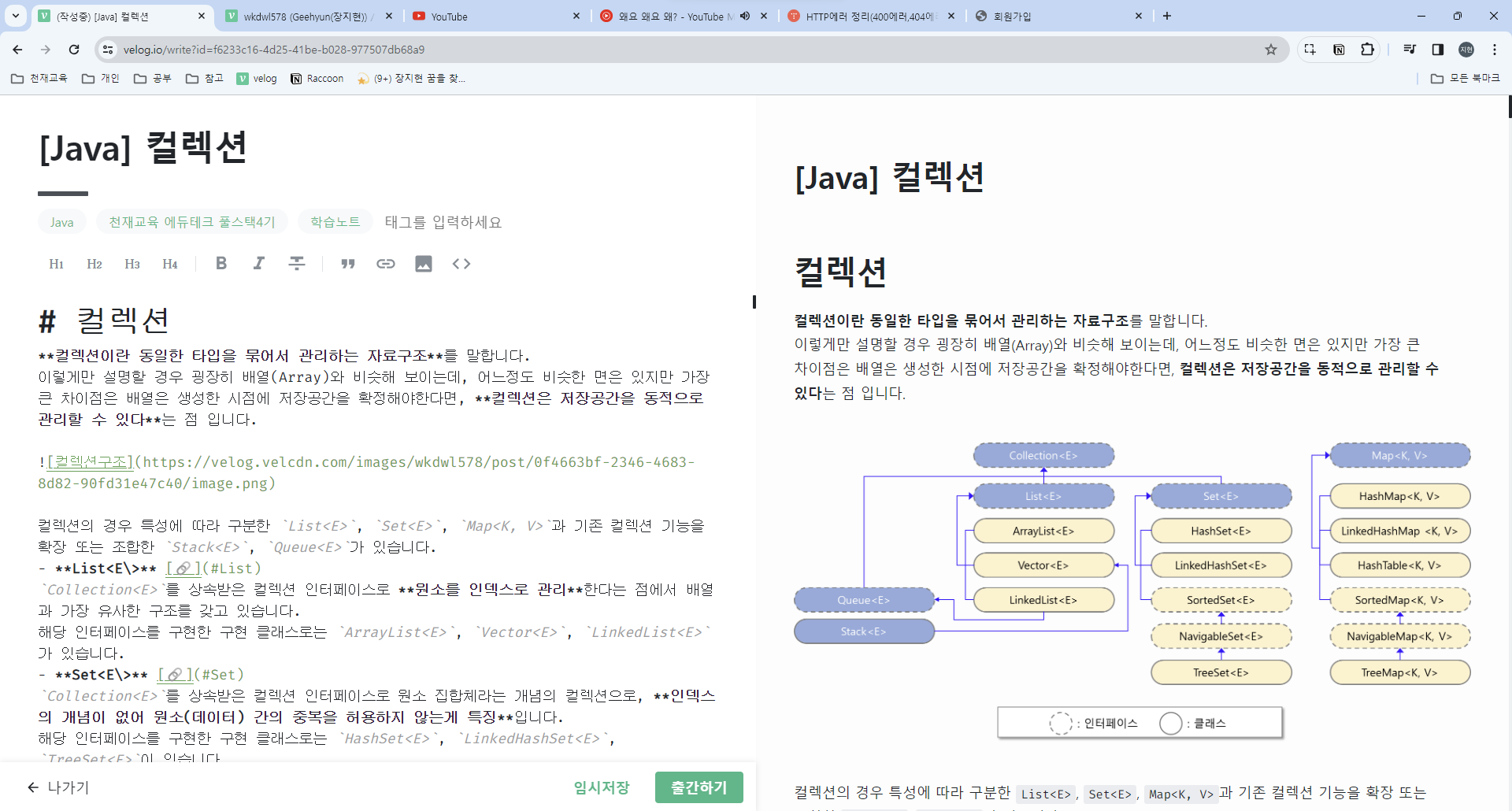
=> 3/5일까지 무조건 컬렉션 정리 완료하려 하였으나...이제 진짜 스택이랑 큐만 남음!!! 이번주까지 완료 예정
- Maria DB 최종 정리
정리하고 있는 부분 : 361p / 진도 : 완료! ㅎㅎ - 우선순위
1) Java
2) JSP
3) MariaDB

블로그 이전 했습니다. 아래 블로그 아이콘(🏠) 눌러서 놀러오세요