Today
-
JSTL 복습
-
Stream(스트림)
-
스트림이란?
Java8 부터 컬렉션 등의 요소를 반복 처리하기 위해 사용된 문법으로
컬렉션(List / Set / Map)의 내부 메서드인stream()를 이용해 Stream 객체로 전환할 수 있습니다. (다른 타입에서도 가능한것 많음)public static void main(String[] args) { Set<String> std = new HashSet<String>(); std.add("홍길동"); std.add("임꺽정"); std.add("신길동"); std.add("신자바"); std.add("신기루"); Stream<String> str = std.stream(); // 만든 Set 객체를 Stream 객체로 전환 str.forEach(n->System.out.println(n)); // Stream 객체를 forEach 메서드롤 통해 각 요소마다 처리해줌 } -
스트림의 장점
1) 내부 반복자이므로 처리 속도가 빠르고 병렬 처리에 효율적
2) 람다식으로 다양한 요소 처리를 정의할 수 있음
3) 중간 처리와 최종 처리를 수행하도록 파이프 라인 형성 가능=> 배우는 이유 : spring에서 사용할 mapper의 개념을 좀 더 쉽게 이해하기 위해 학습 진행 예정
-
스트림은 내부 반복자
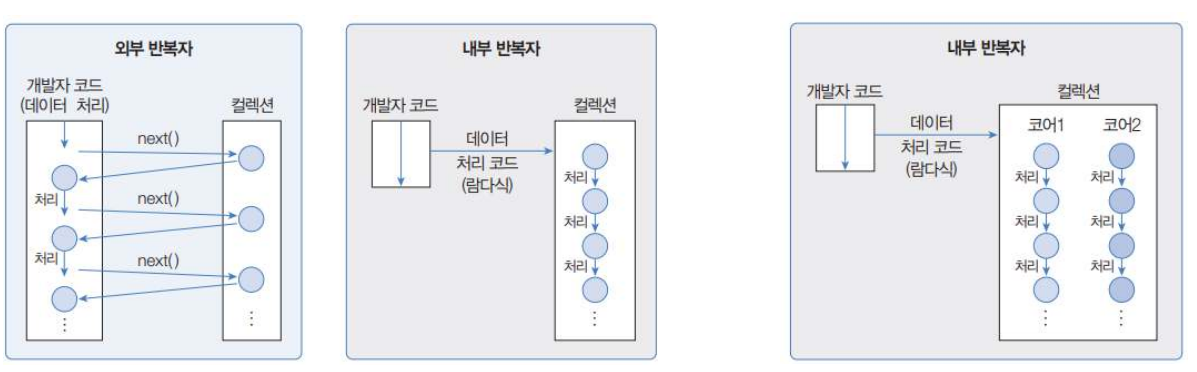
- 요소 처리 방법을 컬렉션 내부로 주입시켜서 요소를 반복 처리
- 개발자 코드에서 제공한 데이터 처리코드(람다식)을 가지고 컬렉션 내부에서 요소를 반복처리
- 내부 반복자는 멀티 코어 CPU를 최대한 활용하기 위해 요소들을 분배시켜 병렬 작업 가능
-
스트림 파이프라인
-
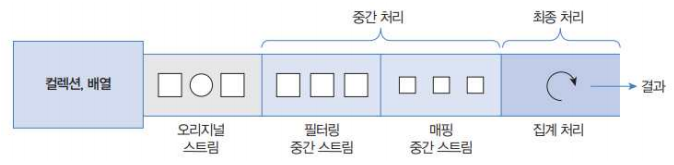
컬렉션의 오리지날 스트림 뒤에 필터링 중간 스트림이 연결될 수 있고, 그 뒤에 매핑 중간 스트림이 연결될 수 있음
-
오리지널 스트림과 집계 사이의 중간 스트림은 최종 처리를 위해 요소를 걸러내거나(필터링), 요소를 변환하거나(매핑), 정렬하는 작업을 수행 (중간처리)
-
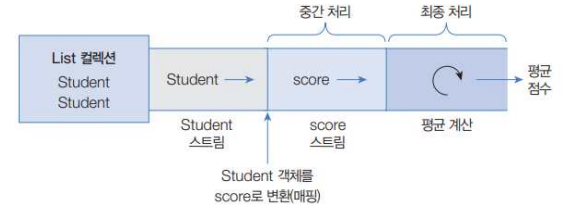
최종 처리는 중간 처리에서 정제된 요소들을 반복하거나, 집계(카운팅, 총합, 평균) 작업을 수행
=> 최종 처리를 하지 않으면 중간에 아무리 출려하려 해도 암것도 출력되지 않음public static void main(String[] args) { int[] arrInt = {1,2,3,4,5}; Arrays.stream(arrInt).filter(a -> a % 2 == 0).peek(n -> System.out.println("짝수 : " + n)); // 파이프 라인 메서드는 최종처리가 없으면 암것도 안나옴. // 최종처리 메서드를 이용해서 처리를 해줘야만 결과가 나옴. int total = Arrays.stream(arrInt).filter(a -> a % 2 == 0).peek(n -> System.out.println("짝수 : " + n)).sum(); }
-
-
스트림 객체의 구조
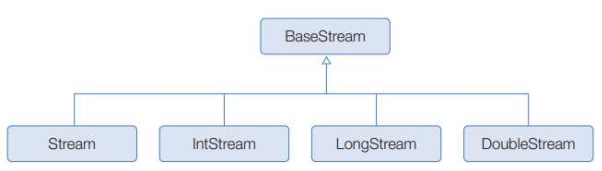
스트림 객체는BaseStream인터페이스의 구현체인Stream,IntStream,LongStream,DoubleStream이 구현되어있습니다. -
스트림 객체의 주요 메서드
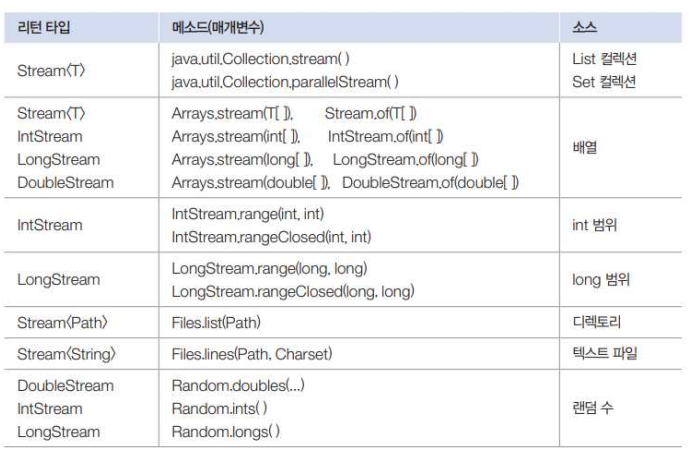
위 메서드를 이용하여 다양한 리소스(타입)으로부터 Stream 객체를 얻을 수 있습니다. -
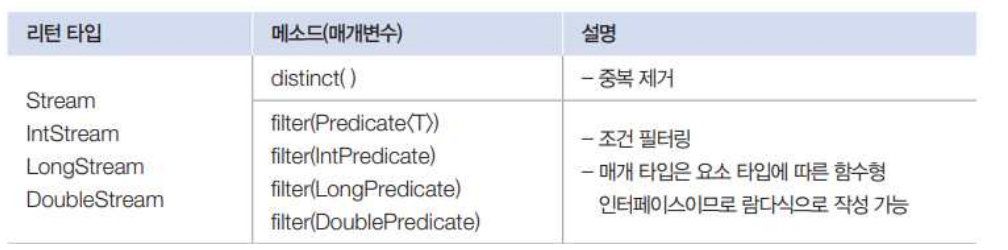
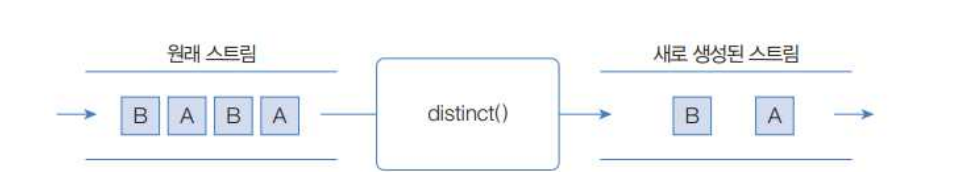
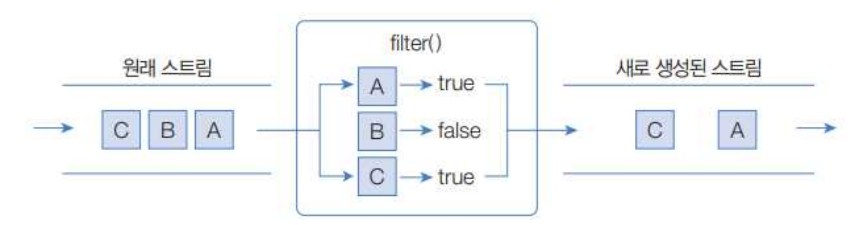
스트림 객체의 필터링 (discinct / filter)
-
distinct(): 요소의 중복제거 메서드
-
filter(): 매개값으로 주어진 Predicate가 true인 값만 리턴하는 메서드
public static void main(String[] args) {
        List<String> list = new ArrayList<>();
        list.add("홍길동");
        list.add("홍길동");
        list.add("홍길순");
        list.add("홍길남");
        list.add("박문수");
        list.add("임꺽정");
        list.add("장지현");
        list.add("김구");
        list.add("이산");

        // distinct() : 요소의 중복제거 메서드
        list.stream().distinct().forEach(n -> System.out.println("이름 : " + n));

        System.out.println("\r\n");

        // filter() : 매개값으로 주어진 Predicate가 true인 값만 리턴하는 메서드
        list.stream().filter(n -> n.startsWith("홍")).forEach(n -> System.out.println("이름 : " + n)); // 홍으로 시작하는 자
        System.out.println("\r\n");
        list.stream().filter(n -> n.length() < 3).forEach(n -> System.out.println("이름 : " + n)); // 길이가 3보다 작은 자
    }
-
-
스트림의 매핑
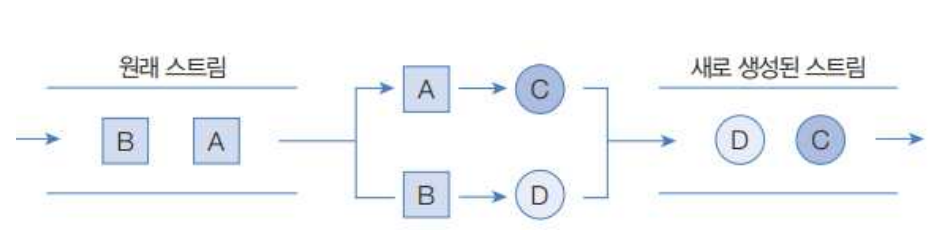
- 스트림 요소를 다른 요소로 변환하는 중간 처리 기능
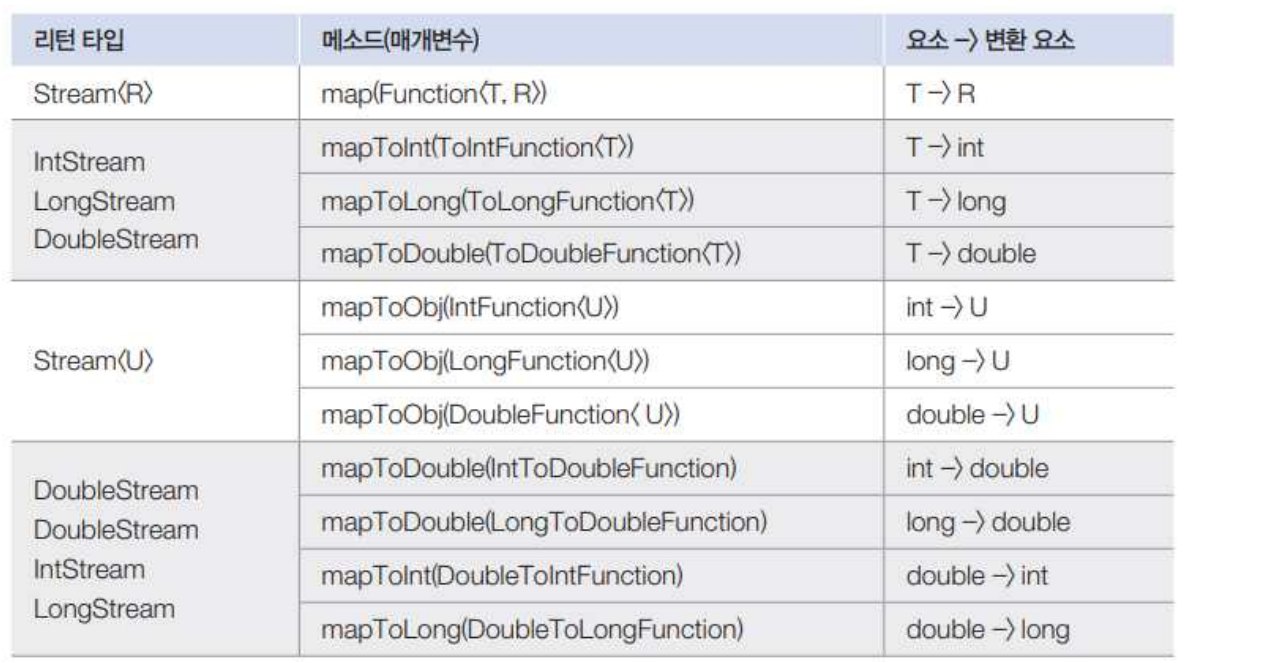
- 위 메서드의 매개타입인
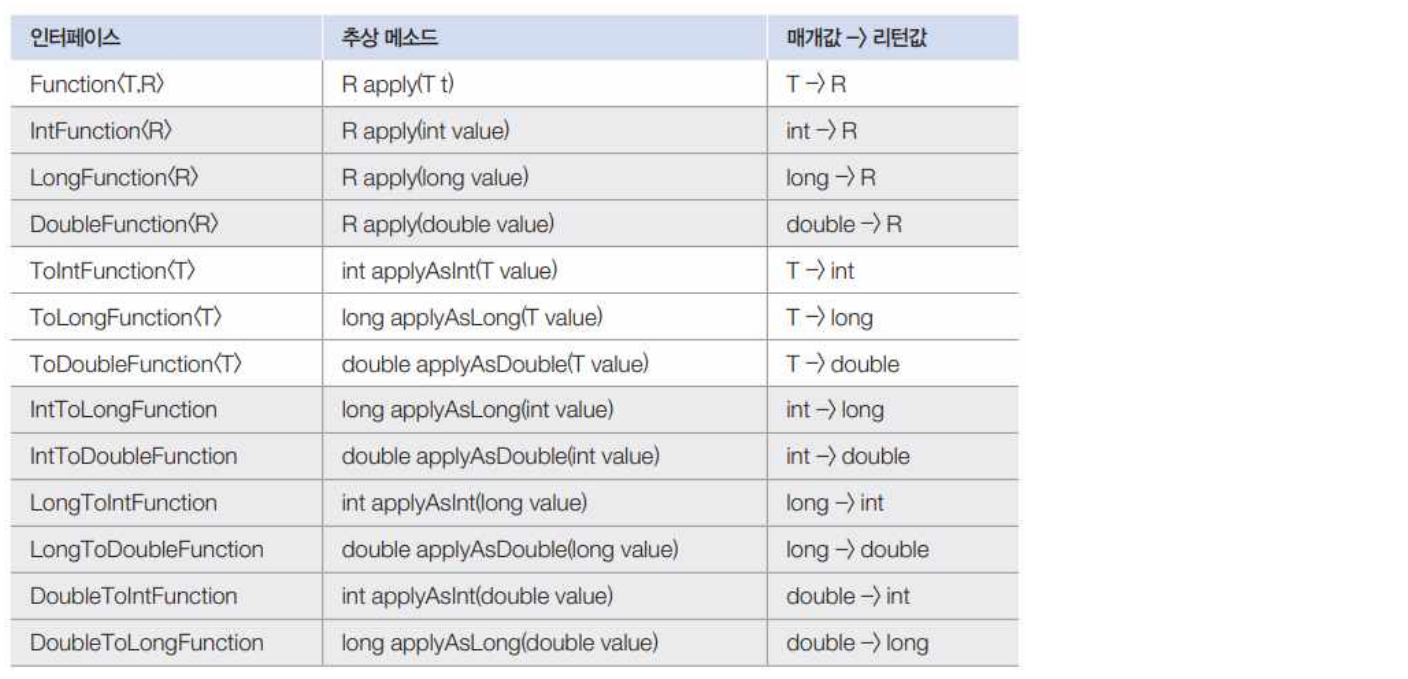
Function은 함수형 인터페이스
모든Function은 매개값을 리턴값으로 매핑(변환)하는applyXxx()메소드를 가짐
public static void main(String[] args) { List<Student> sdtList = new ArrayList<>(); sdtList.add(new Student("홍길동", 85)); sdtList.add(new Student("홍길순", 95)); sdtList.add(new Student("홍길남", 75)); sdtList.add(new Student("박문수", 65)); sdtList.add(new Student("임꺽정", 100)); sdtList.stream() .mapToInt(s -> s.getScore()) // 점수만 갖고오는 중간 매핑 부분 .forEach(score -> System.out.println("점수 :" + score));; int[] arrInt = {1, 2, 3, 4, 5}; IntStream intStream = Arrays.stream(arrInt); intStream.boxed().forEach(obj -> System.out.println("obj.intValue : " + obj.intValue())); } - 스트림 요소를 다른 요소로 변환하는 중간 처리 기능
-
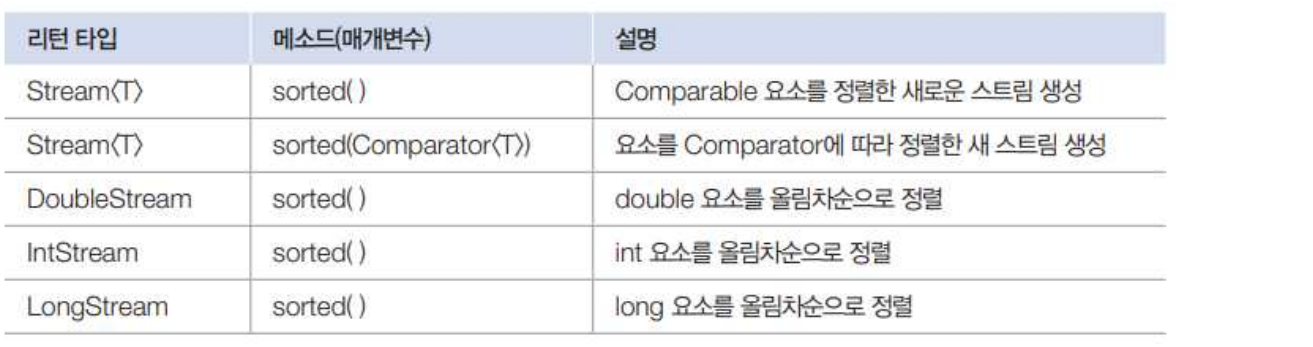
스트림의 정렬
-
스트림의 요소가 객체일 경우 객체가
Comparable을 구현하고 있어야만sorted()메소드를 사용하여 정렬 가능. 그렇지 않다면ClassCastException발생public static void main(String[] args) { List<Student> list = new ArrayList<>(); list.add(new Student("홍길동", 30)); list.add(new Student("홍길순", 10)); list.add(new Student("홍길남", 20)); // 오름차순 정렬 list.stream().sorted().forEach(s -> System.out.println(s.getName() + " : " + s.getScore())); // 내림차순 정렬 list.stream().sorted(Comparator.reverseOrder()).forEach(s -> System.out.println(s.getName() + " : " + s.getScore())); }public class Student implements Comparable<Student> { public String name; public int score; public Student() {} public Student(String name, int score) { this.name = name; this.score = score; } public String getName() { return this.name; } public int getScore() { return this.score; } // Comparable 인터페이스 구현 @Override public int compareTo(Student o) { return Integer.compare(score, o.score); } }💡 Comparable 인터페이스 구현없이 정렬하기
public static void main(String[] args) {
      List<Student> list = new ArrayList<>();
      list.add(new Student("홍길동", 30));
      list.add(new Student("홍길순", 10));
      list.add(new Student("홍길남", 20));
      // 사용자 클래스에서 Comparable 인터페이스 구현없이 정렬 할 때 비교하는 방법
      list.stream()
          .sorted((s1, s2) -> Integer.compare(s1.getScore(), s2.getScore()))
          .forEach(s -> System.out.println(s.getName() + ":" + s.getScore()));
      // 내림차순 만들기 (비교하는 부분을 반대로 해주면 됨)
      list.stream()
          .sorted((s2, s1) -> Integer.compare(s1.getScore(), s2.getScore()))
          .forEach(s -> System.out.println(s.getName() + ":" + s.getScore()));
  }
-
-
스트림의 루핑
-
스트림에서 요소를 하나씩 반복해서 가져와 처리하는 것
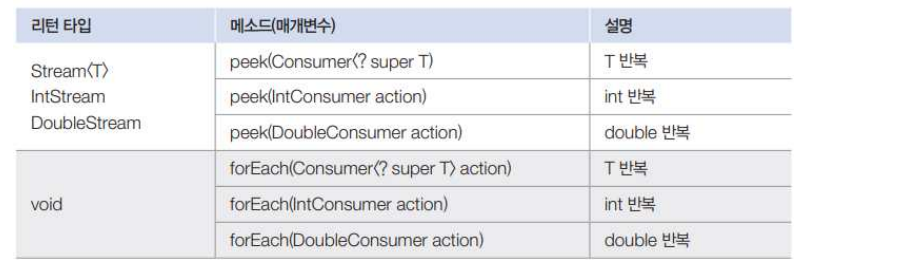
public static void main(String[] args) {
     int[] arrInt = {1,2,3,4,5};

     int total = Arrays.stream(arrInt).filter(a -> a % 2 == 0).peek(n -> System.out.println("짝수 : " + n)).sum();
     System.out.println("total : " + total);

 }
-
-
스트림의 집계

-
최종 처리 기능으로 요소들을 처리해서 카운팅, 합계, 평균값, 최대값, 최소값 등 하나의 값으로 산출하는 것
public static void main(String[] args) { int[] arrInt = {1,2,3,4,5,6,7,8,9,10}; long count = Arrays.stream(arrInt).filter(n -> n%2 == 0).count(); System.out.println("coutn : " + count); long sum = Arrays.stream(arrInt).filter(n -> n%2 == 0).sum(); System.out.println("sum : " + sum); double average = Arrays.stream(arrInt).filter(n -> n%2 == 0).average().getAsDouble(); System.out.println("average : " + average); int min = Arrays.stream(arrInt).filter(n -> n%2 == 0).min().getAsInt(); System.out.println("min : " + min); int max = Arrays.stream(arrInt).filter(n -> n%2 == 0).max().getAsInt(); System.out.println("max : " + max); int first = Arrays.stream(arrInt).filter(n -> n%2 == 0).findFirst().getAsInt(); System.out.println("first : " + first); }- reduce : 사용자 정의 집계함수
public static void main(String[] args) {
    List<Student> list = Arrays.asList(
            new Student("홍길동", 92),
            new Student("홍길순", 85),
            new Student("홍길남", 88)
            );

    int sum1 = list.stream().mapToInt(Student::getScore).sum();
    System.out.println("sum1 : " + sum1);

    int sum2 = list.stream().mapToInt(Student::getScore).reduce(0, (a,b) -> a+b);
    System.out.println("sum2 : " + sum2);

}
-
-
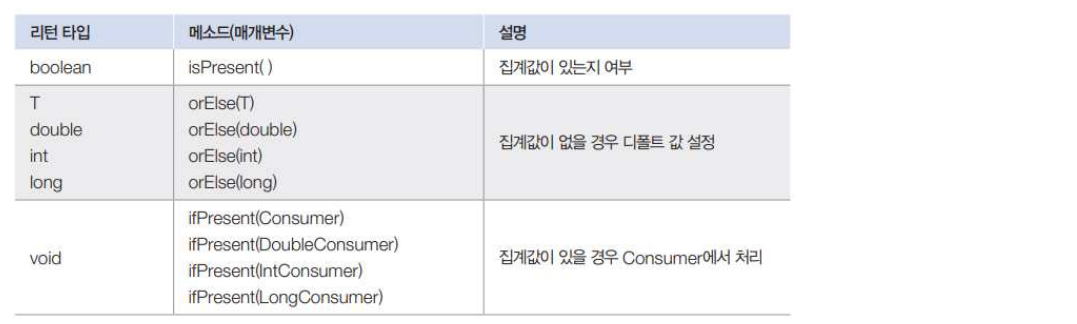
Optional 클래스
-
집계함수의 경우 계산할 값이 null이거나 0이 포함될 경우 에러가 발생할 수 있습니다.
-
Optional,OptionalDouble,OptionalInt,OptionalLong클래스는 단순히 집계값만 저장하는 것이 아니라, 집계값이 없으면 디폴트 값을 설정하거나 집계값을 처리하는Consumer를 등록하는 메서드를 지원합니다. -
최종 처리에서
average사용 시 요소 없는 경우를 대비하는 방법
1)isPresent()메소드가 true를 리턴할 때만 집계값을 얻는다.
2)orElse()메소드로 집계값이 없을 경우를 대비해서 디폴트 값을 정해놓는다.
3)ifPresent()메소드로 집계값이 있을 경우에만 동작하는 Consumer 람다식을 제공한다.public static void main(String[] args) { List<Integer> list = new ArrayList<>(); //double avg = list.stream().mapToInt(Integer::intValue).average().getAsDouble(); //System.out.println("avg : " + avg); // 계산할 요소가 없으므로 에러 발생 (java.util.NoSuchElementException) OptionalDouble option1 = list.stream().mapToInt(Integer::intValue).average(); if (option1.isPresent()) { // 값이 있는지 체크! System.out.println("평균 : " + option1); // 없으니까 if문으로 안들어옴 } else { System.out.println("평균 : 0.0"); // 없으니까 else 문으로 들어옴 } // orElse 메서드 double avg2 = list.stream().mapToInt(Integer::intValue).average().orElse(0.0); System.out.println("avg2 : " + avg2); // ifPresent 메서드 list.stream().mapToInt(Integer::intValue).average().ifPresent(a -> System.out.println("avg : " + a)); // 값이 없으니깐 안나옴. }💡 Integer::intValue는 무엇인고?
메서드 참조 방식으로 메서드를 축약해서 사용하는 방법입니다.
위Integer::intValue의 경우 Integer 클래스에 있는 intValue() 메서드를 사용하겠다는 의미입니다.
클래스 내에 있는 메서드명을 클래스명::메서드명 식으로 기입하여, 알아서 값 넣어서 사용하게끔하는 방식입니다.
다만, 사용할 때 값을 알아서 처리하게끔 하기 때문에 세심하게 사용하기는 어렵습니다.public static void main(String[] args) { String[] arrStr = {"aa", "bbb", "cccc"}; Stream<String> stream1 = Stream.of(arrStr); Stream<String> stream2 = Stream.of(arrStr); IntStream stream3 = stream1.mapToInt(s -> s.length()); IntStream stream4 = stream2.mapToInt(s -> s.length()); stream3.forEach(a -> System.out.println(a)); stream4.forEach(System.out::println); // 메서드 참조 방식으로, 매개변수 등을 생략할 수 있다. }
-
-
스트림의 매칭
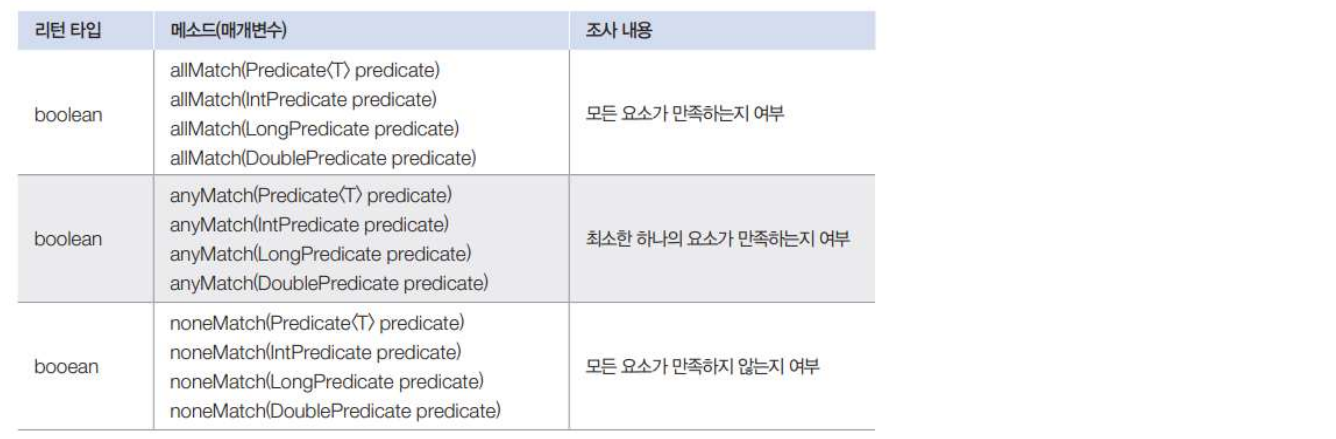
- 요소들이 특정 조건에 만족하는지 여부를 조사하는 최종 처리 기능
allMatch(),anyMatch(),noneMatch()메소드는 매개값으로 주어진 Predicate가 리턴하는 값에 따라 true 또는 false를 리턴
-
스트림의 수집
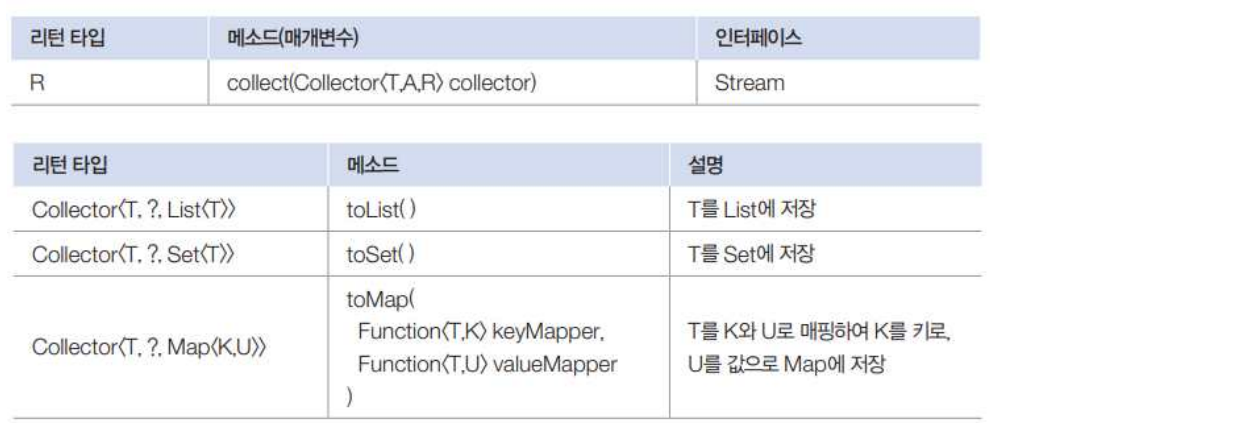
- 스트림은 요소들을 필터링, 매핑한 후 요소들을 수집하는 최종처리 메소드
collect()제공한다.coolect()메소드를 사용하면 필요한 요소만 컬렉션에 담을 수 있고, 요소들을 그룹핑한 후 집계도 할 수 있다. - collector은 어떤 요소를 어떤 컬렉션에 수집할 것인지 결정
타입 파라미터의 T는 요소, A는 누적기accumulator, 그리고 R은 요소가 저장될 컬렉션
public static void main(String[] args) { List<Student2> list = new ArrayList<>(); list.add(new Student2("홍길동", 95, "남")); list.add(new Student2("홍길순", 65, "여")); list.add(new Student2("홍길남", 25, "남")); list.add(new Student2("박문수", 75, "남")); list.add(new Student2("임꺽정", 85, "여")); // toList() 메서드 사용 List<Student2> mList = list.stream().filter(s -> s.getGender().equals("남")).toList(); mList.stream().forEach(a -> System.out.println(a.getName())); List<Student2> fList = list.stream().filter(s -> s.getGender().equals("여")).toList(); fList.stream().forEach(a -> System.out.println(a.getName())); // collect(Collectors.toMap()) 사용 Map<String, Integer> map = list.stream().collect(Collectors.toMap(s -> s.getName(), s -> s.getScore())); System.out.println("map : " + map); } - 스트림은 요소들을 필터링, 매핑한 후 요소들을 수집하는 최종처리 메소드
-
그룹핑

Collectors.groupingBy()메소드에서 얻은 Collector를collect()메소드를 호출할 때 제공groupingBy()는 Function을 이용해서 T를 K로 매핑하고, K를 키로 해List<T>를 값으로 갖는 Map 컬렉션을 생성
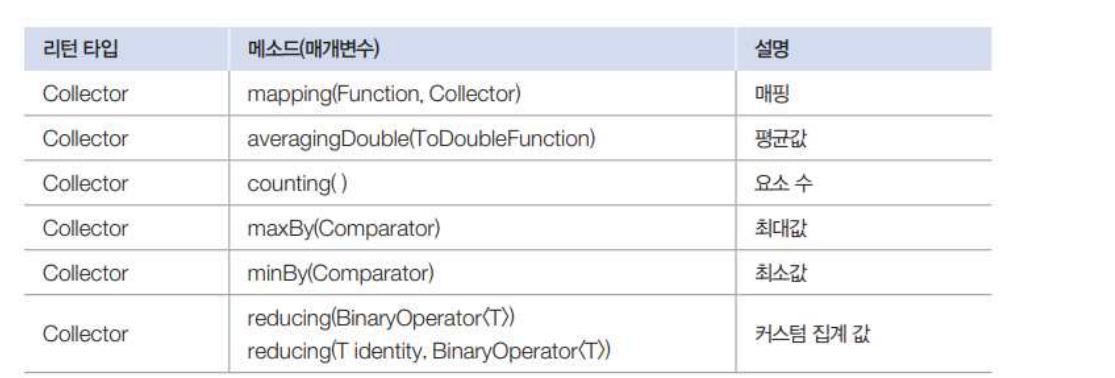
Collectors.groupingBy()메소드는 그룹핑 후 매핑 및 집계(평균, 카운팅, 연결, 최대, 최소, 합계)를 수행할 수 있도록 두 번째 매개값인 Collector를 가질 수 있음
public static void main(String[] args) {
      List<Student2> list = new ArrayList<>();
      list.add(new Student2("홍길동", 92, "남"));
      list.add(new Student2("홍길순", 82, "여"));
      list.add(new Student2("홍길남", 72, "남"));
      list.add(new Student2("오혜영", 93, "여"));

      // 성별 기준으로 그룹핑 하여 Map 객체에 넣음
      Map<String, List<Student2>> map = list.stream().collect(Collectors.groupingBy(s->s.getGender()));

      // 각 각의 성별(키값)을 이용해서 list로 분리
      List<Student2> mList = map.get("남");
      List<Student2> fList = map.get("여");

      mList.stream().forEach(s->System.out.println(s.getName()));
      System.out.println();
      fList.stream().forEach(s->System.out.println(s.getName()));
      // 각 성별로 그룹핑 후 평균점수 계산
      Map<String, Double> map1 = list.stream().collect(Collectors.groupingBy(s-> s.getGender(), Collectors.averagingDouble(s->s.getScore())));
      System.out.println(map1);
  }
-
-
DTO vs VO
DTO와 VO는 거의 구분하지 아니하나, 실질적으로는 조금 다른 개념임.- DTO : Data Transfer Object
데이터 전송용 객체 => 데이터를 갖고와서 getter와 setter의 메서드만 갖으며, getter와 setter 내에서 필요에 따라 연산 및 조작을 하는 객체 - VO : value Object
값 자체를 표현하는 객체 => 데이터베이스의 테이블 내 컬럼에 해당하는 데이터를 갖고있고 getter와 setter 내에서 연산 및 조작이 없음.
- DTO : Data Transfer Object
-
MVC와 3티어
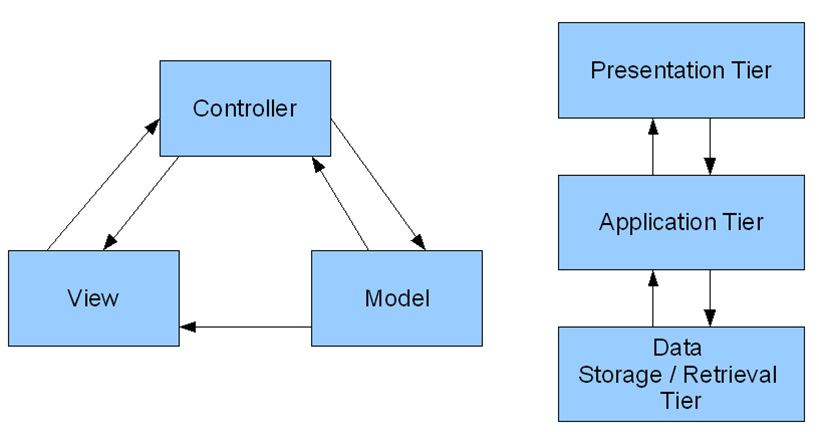
- MVC : Model-View-Controller
- 3티어 : MVC 모델에서 View와 Controller를 표현계층(Presetation Tier)으로, Model을 서비스계층(Application Tier)과, 영속계층(Data Storage/Retrieval Tier)으로 나누는 방식 입니다.
Review
- Spring 학습 전 복습 및 관련 개념 학습을 진행했음
- Stream
- MVC와 3Tier
- JSP의 영역, EL, JSTL... 등등
- Stream 관련해서 수업을 진행했는데, 람다식과 메서드 참조 방식으로 축약형이 정말 많아서...아직 제대로 이해하지는 못하고 그렇구나 하고 열심히 실습함.