옵티미스틱 업데이트는 좋아요 기능과 같이 유저에게 빠른 피드백을 제공해야 하는 경우에 사용.
- 간단히 말하자면 서버로부터의 리스폰스를 기다리지 않고 유저에게 바로 낙관적인 피드백을 주는 것.
👀 좋아요 기능 구현하기
-
실제 뮤테이션 리퀘스트를 보내기 전에 기존의 캐시 데이터를 조작해서 새로운 데이터를 반영해 유저에게 먼저 보여주고,
-
그 이후에 뮤테이션이 끝나면 서버에 반영된 데이터를 refetch해서 최신 데이터로 동기화해 주겠습니다.
✅ api 구상
- postId별 좋아요
- 로그인 유저가 좋아요 눌렀는가 안눌렀는가
- 특정 포스터에 좋아요 누르기
- 좋아요 취소
// ...

export async function getLikeCountByPostId(postId) {
  const response = await fetch(`${BASE_URL}/posts/${postId}/likes`);
  const body = await response.json();
  return body.count;
}

export async function getLikeStatusByUsername(postId, username) {
  const response = await fetch(`${BASE_URL}/posts/${postId}/likes/${username}`);
  if (response.status === 200) {
    return true;
  } else if (response.status === 404) {
    return false;
  } else {
    throw new Error('Failed to get like status of the post.');
  }
}

export async function likePost(postId, username) {
  const response = await fetch(
    `${BASE_URL}/posts/${postId}/likes/${username}`,
    {
      method: 'POST',
    }
  );

  if (!response.ok) {
    throw new Error('Failed to like the post.');
  }
}

export async function unlikePost(postId, username) {
  const response = await fetch(
    `${BASE_URL}/posts/${postId}/likes/${username}`,
    {
      method: 'DELETE',
    }
  );

  if (!response.ok) {
    throw new Error('Failed to unlike the post.');
  }
}
Post 컴포넌트
Post 컴포넌트 안에서 좋아요 개수와 현재 유저의 좋아요 여부에 대한 데이터를 받아오는 useQuery()를 추가
import { useQuery } from '@tanstack/react-query';
import { getLikeCountByPostId } from './api';

function Post({ post, currentUsername }) {
  const { data: likeCount } = useQuery({
    queryKey: ['likeCount', post.id],
    queryFn: () => getLikeCountByPostId(post.id),
  });

  const { data: isPostLikedByCurrentUser } = useQuery({
    queryKey: ['likeStatus', post.id, currentUsername],
    queryFn: () => getLikeStatusByUsername(post.id, currentUsername),
    enabled: !!currentUsername,
  });

  return (
    <li>
      <div>{post.user.name}: {post.content}</div>
      <button>
        {isPostLikedByCurrentUser ? '♥️ ' : '♡ '}
        {`좋아요 ${likeCount ?? 0}개`}
      </button>
    </li>
  );
}

export default Post;
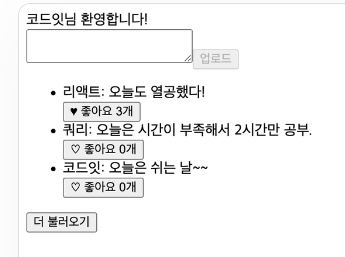
🔼 좋아요 개수가 제대로 보이고, 좋아요 버튼을 누른 유저로 로그인하면 버튼이 활성화된 상태로 잘 보입니다.
옵티미스틱 업데이트로 구현
useMutation()의 onMutate, onError, onSettled를 활용해서 구현
1. 먼저 뮤테이션 함수에는 다음과 같이 유저가 like를 했는지 unlike를 했는지에 따라 각각에 맞는 API 함수를 불러 주는 함수를 정의해 줍니다.
import { getLikeCountByPostId, getLikeStatusByUsername, likePost, unlikePost } from './api';

// ...

const likesMutation = useMutation({
  mutationFn: async ({ postId, username, userAction }) => {
    if (userAction === 'LIKE_POST') {
      await likePost(postId, username);
    } else {
      await unlikePost(postId, username);
    }
  },
});
2.onMutate 옵션을 추가
onMutate: 뮤테이션 함수가 실행되기 바로 전에 실행하는 함수
좋아요 데이터를 refetch하는 것을 막기 위해 cancelQueries()를 실행해서 좋아요 데이터를 받아오는 쿼리가 실행 중이라면 취소해 주도록 합니다.
=>데이터가 refetch되어서 좋아요를 누른 결과를 덮어 쓰는 걸 방지하기 위해서예요.
이때, 현재 좋아요 상태와 좋아요 개수에 대한 데이터를 둘 다 변경할 예정이므로, 각각의 데이터에 대한 쿼리를 취소해 줄게요.
const queryClient = useQueryClient();

// ...

const likesMutation = useMutation({
  mutationFn: ...
    onMutate: async ({ postId, username, userAction }) => {
    await queryClient.cancelQueries({ queryKey: ['likeStatus', postId, username] });
    await queryClient.cancelQueries({ queryKey: ['likeCount', postId] });
  },
});
3. 유저 액션에 따라 해당 데이터 수정
현재의 좋아요에 대한 쿼리 데이터를 가져와서 유저의 액션에 따라 해당 데이터를 수정합니다.
그전에 기존의 쿼리 데이터도 따로 저장해 줄텐데요.
=> 이는 뮤테이션 실행 중 에러가 발생하면 이전의 데이터로 롤백하기 위해 사용할 거예요.
const queryClient = useQueryClient();

// ...

const likesMutation = useMutation({
  mutationFn: ...,
    onMutate: async ({ postId, username, userAction }) => {
    await queryClient.cancelQueries({
      queryKey: ['likeStatus', postId, username],
    });
    await queryClient.cancelQueries({ queryKey: ['likeCount', postId] });

//기존 데이터 저장
    const prevLikeStatus = queryClient.getQueryData([
      'likeStatus',
      postId,
      username,
    ]);
    const prevLikeCount = queryClient.getQueryData(['likeCount', postId]);

//데이터 수정
    queryClient.setQueryData(
      ['likeStatus', postId, username],
      () => userAction === 'LIKE_POST'
    );
    queryClient.setQueryData(['likeCount', postId], (prev) =>
      userAction === 'LIKE_POST' ? prev + 1 : prev - 1
    );
  },
});
- getQueryData : 기존 쿼리의 캐시된 데이터를 가져오는데 사용할 수 있는 동기 함수
- setQueryData : 쿼리 데이터를 수동으로 설정
4. 에러 발생시 데이터 롤백 처리
✅ 에러가 발생하면 이전의 데이터로 롤백하는 부분을 onError에 추가
const likesMutation = useMutation({
  mutationFn: ...,
    onMutate: async ({ postId, username, userAction }) => {
    // ...
    return { prevLikeStatus, prevLikeCount };
  },
    onError: (err, { postId, username }, context) => {
    queryClient.setQueryData(
      ['likeStatus', postId, username],
      context.prevLikeStatus
    );
    queryClient.setQueryData(['likeCount', postId], context.prevLikeCount);
  },
});
- context 파라미터 :
onMutate에서 리턴한 데이터가 들어 있다.
=> 이걸로 이전 데이터로 복원할 수 있습니다.
5. 데이터 refetch
마지막으로 제대로 된 서버 데이터로 동기화하기 위해 성공과 실패 여부에 상관없이 invalidateQueries() 함수로 데이터를 refetch하겠습니다.
참고로 onSettled는 성공, 실패 여부에 상관없이 항상 실행됩니다.
const likesMutation = useMutation({
  mutationFn: ...,
    onMutate: ... ,
    onError: ...,
    onSettled: (data, err, { postId, username }) => {
    queryClient.invalidateQueries({
      queryKey: ['likeStatus', postId, username],
    });
        queryClient.invalidateQueries({
      queryKey: ['likeCount', postId],
    });
  },
});
6. 좋아요 버튼 클릭이벤트
const handleLikeButtonClick = (userAction) => {
  if (!currentUsername) return; //로그인이 되어 있지 않으면 뮤테이션을 실행하지 않게 리턴한다.
  likesMutation.mutate({
    postId: post.id,
    username: currentUsername,
    userAction,
  });
};

return (
  <li>
    <div>{post.user.name}: {post.content}</div>
    <button
      onClick={() =>
        handleLikeButtonClick(
          isPostLikedByCurrentUser ? 'UNLIKE_POST' : 'LIKE_POST'
        )
      }
    >
      {isPostLikedByCurrentUser ? '♥️ ' : '♡ '}
      {`좋아요 ${likeCount ?? 0}개`}
    </button>
  </li>
);