클라우드기반 취약점 진단 실습
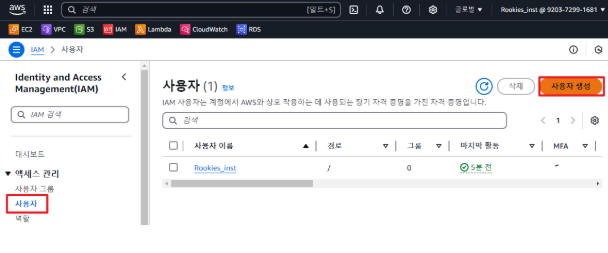
IAM 사용자 추가 및 MFA 실습
- 1) IAM으로 로그인하여 대시보드 확인 > 안보임 > 정책부여 > 보임
- 3) IAM 사용자 생성
- 13) MFA 설정
권한 경계 설정 실습
- IAMFullAccess 권한부여 생성자생성 > 로그인하여 작업 확인
- (원래 브라우저) 권한 경계를 AmazonEC2FullAccess 권한으로 설정 > (다른 브라우저)로그인 후 iam 서비스 접근 불가능 > ec2 관련 작업 할수 없음 > ec2 관련 권한이 부여되지 않았기 때문에
IAM user3개 설정 및 정책추가
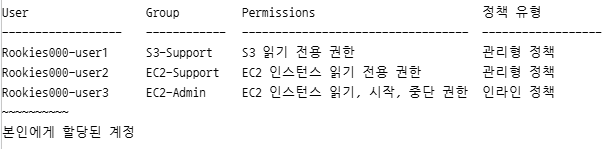
- 1) user1,2,3 생성
- 2 ) s3-support, ec2-support, ec2-admin 사용자 그룹을 생성
- 각각 user1,2,3 사용자로 추가
s3-support한테 정책을 추가하면 > user1에게도 정책추가댐 - 6) EC2 인스턴스 생성
- 7) S3 버킷 생성
버킷 생성 후 간단한 텍스트파일 업로드 - 8) user1로 로그인
- s3 버킷확인 가능
- 버킷안의 텍스트파일 확인+다운로드까지 확인
- 파일업로드 시도 > 권한이 없으므로 안댐
- ec2 대시보드 > 확인불가능
- 9) user2로 로그인
- s3 > 아무것도 확인 불가능
- ec2 > 대시보드 확인가능 / ec2중지 > 불가능
- 10) user3로 로그인
- s3 > 확인 불가능
- ec2 > 인스턴스 중지+다시시작 가능
실습 : 정책 추가해보기
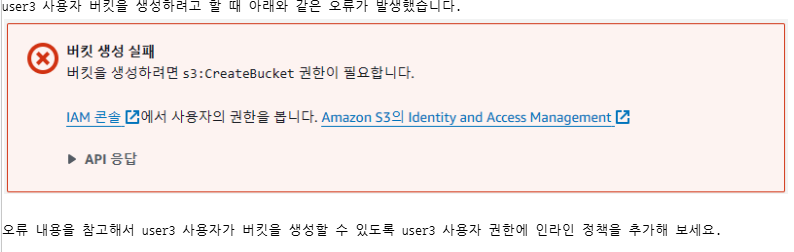
-
user3에 인라인 정책(createBucket) 추가
-
12) S3-Support 사용자 그룹에 EC2 인스턴스를 실행하고, 중지할 수 있도록 권한을 추가
클라우드 보안 가이드
- 발급받은 계정으로 Access Key를 생성
CLI를 이용해서 사용자 목록, Bucket 조회
1) aws configure 명령을 이용해서 Access Key를 등록
- 파일 조회 : dir *.csv
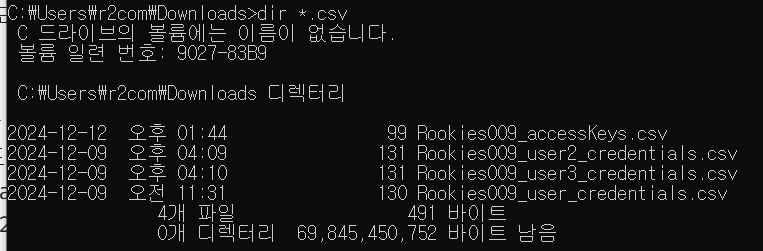
- 키 확인 : type Rookies009_accessKeys.csv
癤풞ccess key ID,Secret access key
AKIA2OAJT4UQBBTIFTVY,eSgy9kbGrKlPmvEPdNOa3vsG4IXlzyHc/6GRIQlE
- access key 등록 : aws configure
AWS Access Key ID [****FTVY]: AKIA2OAJT4UQBBTIFTVY
AWS Secret Access Key [****IQIE]: 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
Default region name [us-east-1]: us-east-1
Default output format [json]: json

2) 사용자 목록 조회 - 사용자 목록 조회 명령어 : aws iam list-users
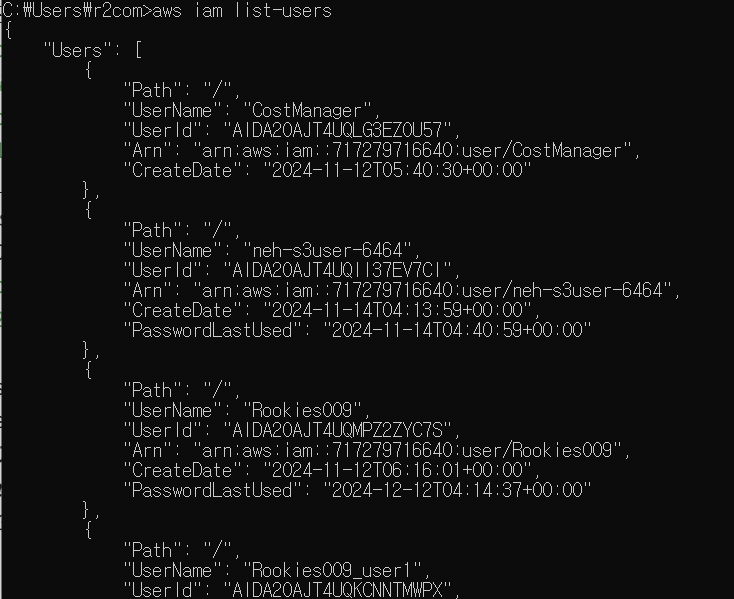
3) S3 버킷 목록 조회 - s3 버킷 목록 조회 명령어 : aws s3api list-bucket
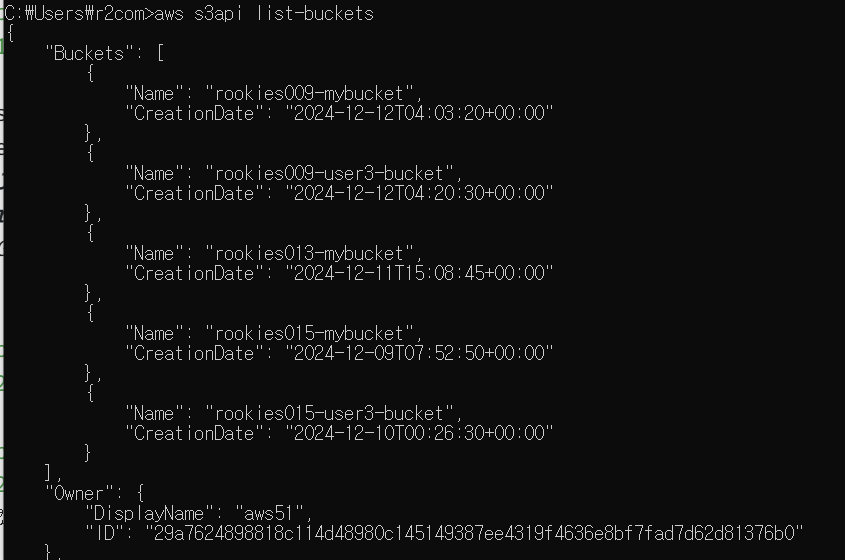
불필요한 계정 여부 조회
- 명령어 : list-user-tags
IAM 역할 및 권한에 대한 현황을 확인
- 그룹 목록을 조회
C:\Users\myanj> aws iam list-groups - 그룹에 적용된 관리형 정책을 조회
C:\Users\myanj> aws iam list-attached-group-policies --group-name Rookies_inst_S3-Support - 그룹에 적용된 인라인 정책을 조회
C:\Users\myanj> aws iam list-group-policies --group-name Rookies_inst_S3-Support - 그룹에 적용된 인라인 정책 문서의 내용을 조회
C:\Users\myanj> aws iam get-group-policy --group-name Rookies_inst_S3-Support --policy-name Rookies_inst_StartAndStopInstancePolicy
실습 : 발급일 기준 6개월을 초과한 access key 존재 유무 판정
- 기본 IAM 계정 키확인, 마지막 사용 확인
C:\Users\myanj> aws iam list-access-keys
C:\Users\r2com>aws iam get-access-key-last-used --access-key-id AKIA2OAJT4UQBBTIFTVY - user1, user2, user3 에게 액세스 키를 발급
C:\Users\myanj> aws iam create-access-key --user-name Rookies_inst_user1
C:\Users\myanj> aws iam create-access-key --user-name Rookies_inst_user2
C:\Users\myanj> aws iam create-access-key --user-name Rookies_inst_user3 - 액세스 키 목록을 조회
C:\Users\myanj> aws iam list-access-keys --user-name Rookies_inst_user1
C:\Users\myanj> aws iam list-access-keys --user-name Rookies_inst_user2
C:\Users\myanj> aws iam list-access-keys --user-name Rookies_inst_user3
ps 코드를 통해 키 목록 정보를 조회
- vscode 설치 및 실행
- GetIAccessKeys.ps1 생성
- 파워쉘을 실행해서 권한을 부여하고 스크립트를 실행
PS C:\aws> Set-ExecutionPolicy -Scope Process -ExecutionPolicy Bypass
PS C:\aws> .\GetIAMAccessKeys.ps1
python 코드를 통해 키 목록 정보를 조회
- GetIAMAccessKeys.py 생성
- GetUserGroups.py 생성
실습 : 사용자 목록을 조회해서 그룹에 할당되지 않은 경우 "취약", 그렇지 않은 경우 "양호" 메시지를 출력하도록 구현(정렬까지 된 완-버전이 맨아래 코드)
GetUserGroups.py
import subprocess

# 매개변수(cmd)로 전달된 쉘 명령어를 실행하고 그 결과를 반환하는 함수
def execute_command(cmd):
    try:
        return subprocess.run(cmd, capture_output=True, shell=True, encoding="cp949")
    except Exception as e:
        print(f"예외 발생 : {e}")

# IAM 사용자 목록을 조회
result = execute_command("aws iam list-users")
if result.stderr:
    print(result.stderr)
else:
    import json
    user_list = []
    users = json.loads(result.stdout)

    for user in users["Users"]:
        # 사용자 이름을 이용하여 사용자가 소속한 그룹을 조회
        # aws iam list-groups-for-user --user-name 사용자이름
        groups = execute_command(f"aws iam list-groups-for-user --user-name {user["UserName"]}")
        groups = json.loads(groups.stdout)

        if len(groups["Groups"]) == 0:
            user["GroupName"] = ""
        else:
            temp = []
            for group in groups["Groups"]:
                temp.append(group["GroupName"])
            user["GroupName"] = ", ".join(temp)

        # GroupName이 없으면 "취약", 있으면 "양호"로 표시
        if user["GroupName"] == "":
            user["state"] = "취약"
        else:
            user["state"] = "양호"

        user_list.append(user)

    # 사용자 정보, 그룹 이름, 판정 결과를 출력
    max_length = 0
    for user in user_list:
        if max_length < len(user["GroupName"]):
            max_length = len(user["GroupName"])
    for user in user_list:
        print(f"""\
{user['UserName']:<20}\t\
{user['UserId']}\t\
{user['GroupName']:<{max_length}}\t\
{user['state']}\
""")
boto3 사용
GetUserList.py 생성
import boto3


# boto3 IAM 클라이언트 생성
client = boto3.client("iam")


# IAM 사용자 목록 조회
response = client.list_users()


# 결과 출력
for user in response["Users"]:
    print(f"UserName: {user["UserName"]}")
    print(f"UserId: {user["UserId"]}")
    print(f"Arn: {user["Arn"]}")
    print(f"CreateDate: {user["CreateDate"]}")
    print(f"PasswordLastUsed: {user["PasswordLastUsed"]}")
    print()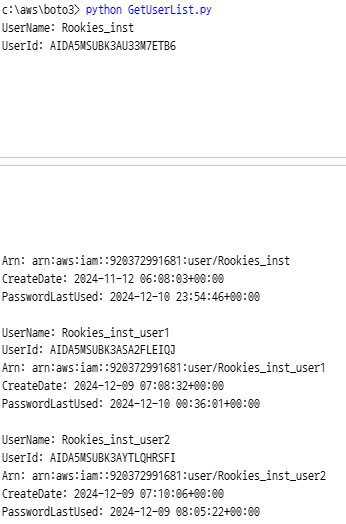
테이블 형식으로 출력되도록 수정
GetUserList.py
import boto3
from prettytable import PrettyTable


# boto3 IAM 클라이언트 생성
client = boto3.client("iam")


# IAM 사용자 목록 조회
response = client.list_users()


# PrettyTable 객체 생성
table = PrettyTable()
table.field_names = ["UserName", "UserId", "Arn", "CreateDate", "PasswordLastUsed"]


# 결과 출력
for user in response["Users"]:
    table.add_row([
        user["UserName"],
        user["UserId"],
        user["Arn"],
        user["CreateDate"],
        user.get("PasswordLastUsed", "N/A"),
    ])


print(table)
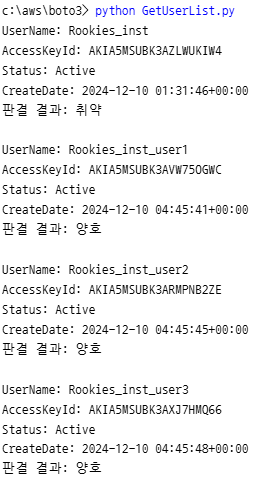
발급일 기준 6 개월을 초과한 Access Key 존재 유무를 판정하는 함수를 개발
GetUserList.py
import boto3
import datetime
from prettytable import PrettyTable


def get_user_list():
    # boto3 IAM 클라이언트 생성
    client = boto3.client("iam")


    # IAM 사용자 목록 조회
    # https://boto3.amazonaws.com/v1/documentation/api/latest/reference/services/iam/client/list_users.html
    response = client.list_users()


    # PrettyTable 객체 생성
    table = PrettyTable()
    table.field_names = ["UserName", "UserId", "Arn", "CreateDate", "PasswordLastUsed"]


    # 결과 출력
    for user in response["Users"]:
        table.add_row([
            user["UserName"],
            user["UserId"],
            user["Arn"],
            user["CreateDate"],
            user.get("PasswordLastUsed", "N/A"),  # PasswordLastUsed가 없을 수 있음
        ])


    print(table)


# IAM 사용자에게 발급된 액세스 키 조회
def get_user_access_key():
    client = boto3.client("iam")


    res_users = client.list_users()
    for user in res_users["Users"]:
        # 사용자별로 액세스 키 목록을 조회
        # https://boto3.amazonaws.com/v1/documentation/api/latest/reference/services/iam/client/list_access_keys.html
        res_accesskeys = client.list_access_keys(UserName=user["UserName"])
        for accesskey in res_accesskeys["AccessKeyMetadata"]:
            print(f"UserName: {accesskey['UserName']}")
            print(f"AccessKeyId: {accesskey['AccessKeyId']}")
            print(f"Status: {accesskey['Status']}")
            print(f"CreateDate: {accesskey['CreateDate']}")
            # CreateDate가 22시간 보다 크면 판결 결과를 "취약"으로 표시 (그렇지 않은 "양호"로 표시)
            if datetime.datetime.now() - accesskey["CreateDate"].replace(tzinfo=None) > datetime.timedelta(hours=30):
                print("판결 결과: 취약")
            else:
                print("판결 결과: 양호")
            print()


# __name__ 변수에는 직접 실행될 때는 "__main__"을 값으로 가지고,
# 모듈로 import될 때는 모듈 이름(파이썬 파일 이름, 여기에서는 GetUserList)을 값으로 가짐
# 직접 실행될 때만 get_user_list() 함수를 호출하도록 제한하는 코드
if __name__ == "__main__":
    # get_user_list()
    get_user_access_key()
1,2,3,x 선택지 있는 프로그램으로 변경
- GetUserList.py 파일의 이름 account_checker.py로 변경하고, checker.py 파일을 추가
checker.py
from account_checker import get_user_access_key, get_user_list

def show_menu():
    print("*" * 20)
    print("[1] IAM 사용자 목록 조회")
    print("[2] IAM 사용자 액세스 키 조회")
    print("[X] 종료")
    print("*" * 20)
    print()

def main():
    while True:
        show_menu()
        menu = input("메뉴 선택: ")
        if menu == "1":
            get_user_list()
        elif menu == "2":
            get_user_access_key()
        elif menu == "X" or menu == "x":
            print("프로그램을 종료합니다.")
            break
        else:
            print("잘못된 메뉴 선택입니다.")


if __name__ == "__main__":
    main()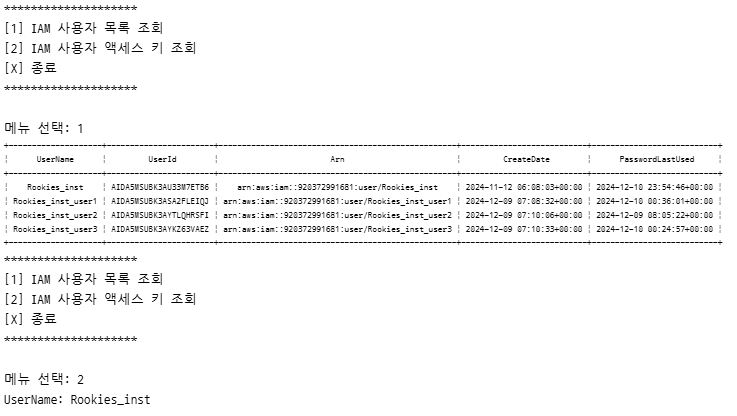
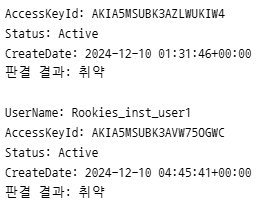
실습: 사용자가 속해 그룹 정보와 그룹에 속해 있지 않은 경우 "취약", 그렇지 않은 경우 "양호" 판정 결과 출력하는 get_user_group_info 함수를 account_checker.py 파일에 구현하고, checker.py 파일에 통합해 보세요.
account_checker.py
import boto3
import datetime
from prettytable import PrettyTable

client = boto3.client("iam")

def get_user_list():
    response = client.list_users()
    return response["Users"]

def print_list(items):
    if len(items) == 0:
        print("출력할 정보가 없습니다.")
        return

    table = PrettyTable()
    table.field_names = items[0].keys()
    for item in items:
        table.add_row(item.values())
    print(table)

def get_user_access_key(users):
    for user in users:
        res_accesskeys = client.list_access_keys(UserName=user["UserName"])
        for accesskey in res_accesskeys["AccessKeyMetadata"]:
            print(f"UserName: {accesskey['UserName']}")
            print(f"AccessKeyId: {accesskey['AccessKeyId']}")
            print(f"Status: {accesskey['Status']}")
            print(f"CreateDate: {accesskey['CreateDate']}")
            # CreateDate가 22시간 보다 크면 판결 결과를 "취약"으로 표시 (그렇지 않은 "양호"로 표시)
            if datetime.datetime.now() - accesskey["CreateDate"].replace(tzinfo=None) > datetime.timedelta(hours=30):
                print("판결 결과: 취약")
            else:
                print("판결 결과: 양호")
            print()

def get_user_group_info(users):
    results = []
    for user in users:
        res = client.list_groups_for_user(UserName=user["UserName"])
        if len(res["Groups"]) == 0:
            user["GroupName"] = ""
            user["state"] = "취약"
        else:
            group_names = [group["GroupName"] for group in res["Groups"]]
            user["GroupName"] = ", ".join(group_names)
            user["state"] = "양호"
        results.append(user)
    return results

if __name__ == "__main__":
    users = get_user_list()
    print_list(users)
    get_user_access_key(users)
    results = get_user_group_info(users)
    print_list(results)
checker.py
from account_checker import get_user_access_key, get_user_list, **get_user_group_info, print_list**

def show_menu():
    print("*" * 20)
    print("[1] IAM 사용자 목록 조회")
    print("[2] IAM 사용자 액세스 키 조회")
    print("[3] IAM 사용자 그룹 정보 조회")
    print("[X] 종료")
    print("*" * 20)
    print()
실행 가능한 형태로 변경
- pyinstaller 설치 : pip install pyinstaller
- 실행 파일 생성 : pyinstaller --onefile checker.py
- 실행 파일 실행 : .\dist\checker.exe
- 아이콘을 추가해서 빌드 : pyinstaller --onefile --icon=paw_patrol_badge_icon_263848.ico checker.py
키 페어 관리
키 파일을 이용해서 SSH 접속
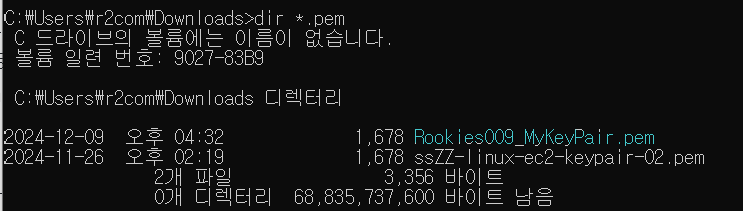
C:\Users\r2com\Downloads>
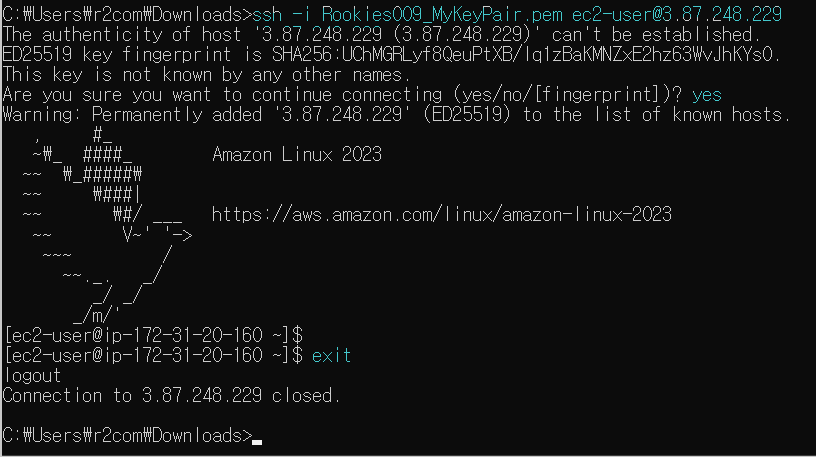
ssh -i Rookies009_MyKeyPair.pem ec2-user@3.87.248.229
-> 3.87.248.229=퍼블릭 IPv4 주소
인스턴스에 할당된 키 페어목록 정보를 출력하는 기능 구현
- ec2_checker.py 생성
ec2_checker.py
import boto3

client = boto3.client("ec2")

def list_instances_with_key_pairs():
    # https://boto3.amazonaws.com/v1/documentation/api/latest/reference/services/ec2/client/describe_instances.html
    instances = client.describe_instances()
    for reservation in instances["Reservations"]:
        for instance in reservation["Instances"]:
            print(f"InstanceId: {instance['InstanceId']}")
            print(f"PublicIpAddress: {instance['PublicIpAddress']}")
            print(f"PrivateIpAddress: {instance['PrivateIpAddress']}")

            if "KeyName" in instance:
                print(f"KeyName: {instance['KeyName']}")
                print(f"판정 결과: 양호")
            else:
                print(f"판정 결과: 취약")

            print()

if __name__ == "__main__":
    list_instances_with_key_pairs()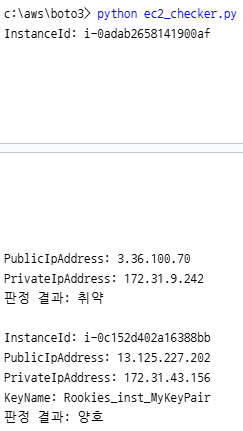
checker 모듈에 통합
checker.py
from account_checker import get_user_access_key, get_user_list, get_user_group_info, print_list
from ec2_checker import list_instances_with_key_pairs

def show_menu():
    print("*" * 20)
    print("[1] IAM 사용자 목록 조회")
    print("[2] IAM 사용자 액세스 키 조회")
    print("[3] IAM 사용자 그룹 정보 조회")
    print("[4] EC2 인스턴스 키 페어 체크")
    print("[X] 종료")
    print("*" * 20)
    print()

def main():
    while True:
        show_menu()
        menu = input("메뉴 선택: ")
        if menu == "1":
            print_list(get_user_list())
        elif menu == "2":
            get_user_access_key(get_user_list())
        elif menu == "3":
            print_list(get_user_group_info(get_user_list()))
        elif menu == "4":
            list_instances_with_key_pairs()
        elif menu == "X" or menu == "x":
            print("프로그램을 종료합니다.")
            break
        else:
            print("잘못된 메뉴 선택입니다.")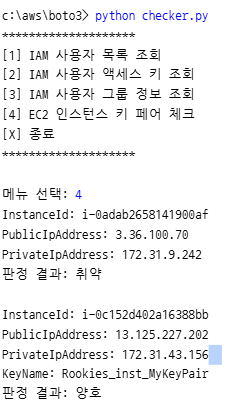
판정결과까지 나오는 프로그램으로 변경
- ec2_checker.py 수정
- s3_checker.py 생성
- checker.py 수정
ec2_checker.py
from s3_checker import check_s3_public_access, list_buckets, check_object_exists

def get_key_pairs():
    key_pairs = client.describe_key_pairs()
    return key_pairs["KeyPairs"]

def check_key_pair_s3_storage():
    key_pairs = get_key_pairs()
    buckets = list_buckets()

    for key_pair in key_pairs:
        key_name = key_pair["KeyName"]
        print(f"KeyPair: {key_name}")
        print("=" * 30)

        for bucket in buckets:
            bucket_name = bucket["Name"]
            print(f"Bucket: {bucket_name}")
            status = "버킷에 키가 저장되어 있지 않음 >> 판정 불가"
            if check_object_exists(bucket_name, key_name+".pem"):
                if check_s3_public_access(bucket_name):
                    status = "퍼블릭 버킷에 저장 >> 취약"
                else:
                    status = "프라이빗 버킷에 저장 >> 양호"

            print(f"판정 결과: {status}")
            print()

if __name__ == "__main__":
    # list_instances_with_key_pairs()
    check_key_pair_s3_storage()
s3_checker.py
import boto3
from botocore.exceptions import ClientError

client = boto3.client('s3')

def list_buckets():
    response = client.list_buckets()
    return response["Buckets"]

def check_s3_public_access(bucket_name):
    # 1. 버킷 정책 확인
    try:
        policy_status = client.get_bucket_policy_status(Bucket=bucket_name)
        is_public = policy_status["PolicyStatus"]["IsPublic"]
        if is_public:
            # print(f"버킷 '{bucket_name}'은 퍼블릭 접근 가능합니다. (정책 기반)")
            return True
    except ClientError as e:
        if e.response['Error']['Code'] == "NoSuchBucketPolicy":
            # print(f"버킷 '{bucket_name}'에는 정책이 없습니다. 정책 기반 퍼블릭 접근 확인 불가.")
            pass
        else:
            # print(f"버킷 정책 확인 중 오류 발생: {e}")
            pass

    # 2. ACL 확인
    try:
        acl = client.get_bucket_acl(Bucket=bucket_name)
        for grant in acl['Grants']:
            if grant['Grantee'].get('URI') == 'http://acs.amazonaws.com/groups/global/AllUsers':
                if grant['Permission'] in ['READ', 'WRITE', 'FULL_CONTROL']:
                    # print(f"버킷 '{bucket_name}'은 퍼블릭 접근 가능합니다. (ACL 기반)")
                    return True
    except ClientError as e:
        print(f"ACL 확인 중 오류 발생: {e}")

    # 3. 퍼블릭 접근 불가능으로 간주
    # print(f"버킷 '{bucket_name}'은 퍼블릭 접근이 불가능합니다.")
    return False

def check_object_exists(bucket_name, object_name):
    try:
        client.head_object(Bucket=bucket_name, Key=object_name)
        return True
    except: # S3.Client.exceptions.NoSuchKey
        return False
checker.py
from ec2_checker import list_instances_with_key_pairs, check_key_pair_s3_storage

def show_menu():
    print("*" * 20)
    print("[1] IAM 사용자 목록 조회")
    print("[2] IAM 사용자 액세스 키 조회")
    print("[3] IAM 사용자 그룹 정보 조회")
    print("[4] EC2 인스턴스 키 페어 체크")
    print("[5] 퍼블릭 버킷에 키 페어 저장 여부 체크")
    print("[X] 종료")
    print("*" * 20)
    print()

def main():
    while True:
        show_menu()
        menu = input("메뉴 선택: ")
        if menu == "1":
            print_list(get_user_list())
        elif menu == "2":
            get_user_access_key(get_user_list())
        elif menu == "3":
            print_list(get_user_group_info(get_user_list()))
        elif menu == "4":
            list_instances_with_key_pairs()
        elif menu == "5":
            check_key_pair_s3_storage()
        elif menu == "X" or menu == "x":
            print("프로그램을 종료합니다.")
            break
        else:
            print("잘못된 메뉴 선택입니다.")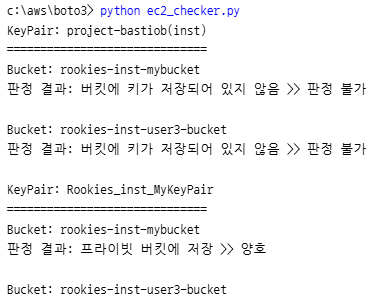
flask 기반 웹 애플리케이션 개발
- 플라스크 패키지 설치
간단한 데이터 샘플이 나오는 페이지 개발
- app.py 작성
app.py
from flask import Flask
app = Flask(__name__)

# 데이터 샘플
data = [
    {"ID": 1, "Name": "홍길동", "age": 20},
    {"ID": 2, "Name": "고길동", "age": 40},
    {"ID": 3, "Name": "신길동", "age": 60},
]

# /list 요청을 처리하는 함수
@app.route("/list")
def list():
    return data

if __name__ == "__main__":
    app.run(debug=True)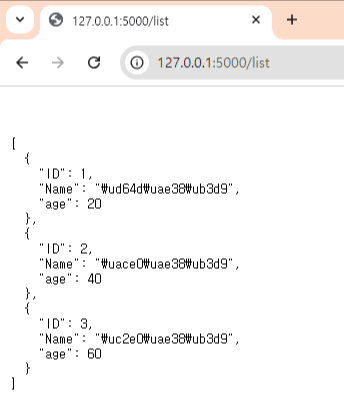
-> 브라우저로 확인 > not found > html 구성으로 확인
템플릿을 적용
- app.py를 수정
- list.html 작성해서 웹 동작하는거 확인
- templates 폴더를 만들고 그안에 list.html 생성
app.py
# /list 요청을 처리하는 함수
@app.route("/list")
def list():
    return render_template("list.html", mydata=data)
list.html
<!DOCTYPE html>
<html lang="en">

<head>
    <meta charset="UTF-8">
    <meta name="viewport" content="width=device-width, initial-scale=1.0">
    <title>Document</title>
    <style>
        table {
            width: 50%;
            margin: 20px auto;
            border-collapse: collapse;
            text-align: left;
        }
        th,
        td {
            padding: 8px 12px;
            border: 1px solid #ddd;
        }
        th {
            background-color: #f4f4f4;
        }
        tr:nth-child(even) {
            background-color: #f9f9f9;
        }
    </style>
</head>
<body>
    <h2 style="text-align: center">사용자 목록</h2>
    <table>
        <header>
            <tr>
                <th>ID</th>
                <th>이름</th>
                <th>나이</th>
            </tr>
        </header>
        <tbody>
            {% for row in mydata %}
            <tr>
                <td>{{ row.id }}</td>
                <td>{{ row.name }}</td>
                <td>{{ row.age }}</td>
            </tr>
            {% endfor %}
        </tbody>
    </table>
</body>
</html>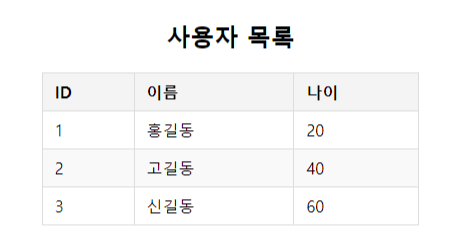
템플릿 문법 수정
list.html
<tbody>
            {% for row in mydata %}
            <tr {% if row.id % 2==0 %} style="background-color: red" {% endif %}>		⇐ 조건문
                <td>[{{ loop.index }}] {{ row.id }}						⇐ 루프의 인덱스 조회
                </td>
                <td>{{ row.name }}</td>
                <td>{{ row.age }}</td>
            </tr>
            {% endfor %}
        </tbody>
IAM 사용자 목록을 조회해서 테이블 형식으로 출력
- app.py ⇒ boto3를 이용해서 사용자 정보를 조회한 결과를 템플릿으로 전달하도록 수정
- list.html ⇒ 변경된 데이터(boto3를 이용해서 가져온 데이터) 구조에 맞게 변경
app.py
import boto3

# boto3를 이용해서 IAM 사용자 정보를 가져와서 반환하는 함수
def get_iam_users():
    client = boto3.client('iam')
    response = client.list_users()
    return response["Users"]
list.html
<body>
    <h2 style="text-align: center">사용자 목록</h2>
    <table>
        <header>
            <tr>
                <th>ID</th>
                <th>사용자명</th>
                <th>ARN</th>
                <th>생성일시</th>
            </tr>
        </header>
        <tbody>
            {% for row in mydata %}
            <tr>
                <td>{{ row.UserId }}</td>
                <td>{{ row.UserName }}</td>
                <td>{{ row.Arn }}</td>
                <td>{{ row.CreateDate }}</td>
            </tr>
            {% endfor %}
        </tbody>
    </table>
</body>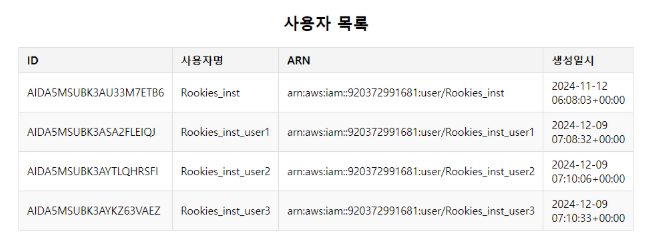
- app.py ⇒ 기존에 만들어두었던 모듈(account_checker.py)을 활용 (boto3 디렉터리를 myboto3로 변경)
/users/accesskeys 형식으로 요청했을 때 사용자 이름과 해당 사용자에게 발행 액세스 키 목록을 함께 출력하는 기능을 추가
- app.py ⇒ users_accesskeys()함수 작성+ get_user_access_key_data 함수 호출 결과를 users_accesskeys.html 템플릿으로 전달
- account_checker.py ⇒ 데이터만 반환하는 get_user_access_key_data() 함수를 생성
- list.html 파일을 복사해서 users_accesskeys.html 템플릿 파일을 추가
app.py
from myboto3.account_checker import get_user_list, get_user_access_key_data

@app.route("/users/accesskeys")
def users_accesskeys():
    data = get_user_access_key_data(get_user_list())
    return render_template("users_accesskeys.html", data=data)
account_checker.py
def get_user_access_key_data(users):
    results = []
    for user in users:
        res_accesskeys = client.list_access_keys(UserName=user["UserName"])
        for accesskey in res_accesskeys["AccessKeyMetadata"]:
            if datetime.datetime.now() - accesskey["CreateDate"].replace(tzinfo=None) > datetime.timedelta(hours=55):
                accesskey["State"] = "취약"
            else:
                accesskey["State"] = "양호"
            results.append(accesskey)
    return results
users_accesskeys.html
<body>
    <h2 style="text-align: center">사용자별 액세스키 목록</h2>
    <table>
        <header>
            <tr>
                <th>사용자명</th>
                <th>액세스키</th>
                <th>생성일시</th>
                <th>판정결과</th>
            </tr>
        </header>
        <tbody>
            {% for row in data %}
            <tr>
                <td>{{ row.UserName }}</td>
                <td>{{ row.AccessKeyId }}</td>
                <td>{{ row.CreateDate }}</td>
                <td {% if row.State=="취약" %} style="color: red" {% endif %}>
                    {{ row.State }}
                </td>
            </tr>
            {% endfor %}
        </tbody>
    </table>
</body>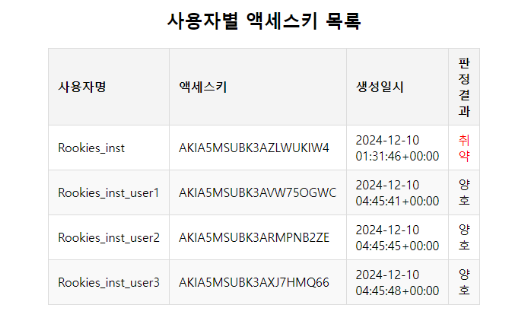
스타일 파일을 별도로 분리
- (app.py 파일이 위치한 디렉터리 아래에) static 디렉터리를 만들고 style.css 파일을 추가
style.css
table {
    /* width: 50%; */
    margin: 20px auto;
    border-collapse: collapse;
    text-align: left;
}
th,
td {
    padding: 8px 12px;
    border: 1px solid #ddd;
}
th {
    background-color: #f4f4f4;
}
tr:nth-child(even) {
    background-color: #f9f9f9;
}
- list.html 파일과 users_accesskeys.html 파일에 정의한 style 태그로 정의한 스타일(internal style)을 제거 + link 태그를 이용해서 style.css 파일(external style)을 사용하도록 수정
list.html, users_accesskeys.html 공통
<head>
    <meta charset="UTF-8">
    <meta name="viewport" content="width=device-width, initial-scale=1.0">
    <title>Document</title>
    <link rel="stylesheet" href="/static/style.css">
</head>
사용자 목록에서 사용자 이름을 클릭하면 해당 사용자에게 발행된 액세스키 목록을 출력하는 기능을 추가
- app.py ⇒ 사용자의 액세스 키를 조회해서 응답하는 라우터 함수를 추가
- list.html ⇒ 사용자 목록에서 이름을 클릭하면 /users/사용자이름/accesskeys 형식으로 이동하도록 링크를 추가
app.py
@app.route("/user/<username>/accesskeys")
def user_accesskeys(username):
    data = get_user_access_key_data([{"UserName": username}])
    return render_template("users_accesskeys.html", data=data)
list.html
 <tbody>
            {% for row in mydata %}
            <tr>
                <td>{{ row.UserId }}</td>
                <td>
                    <a href="/user/{{row.UserName}}/accesskeys">{{ row.UserName }}</a>
                </td>
                <td>{{ row.Arn }}</td>
                <td>{{ row.CreateDate }}</td>
            </tr>
            {% endfor %}
        </tbody>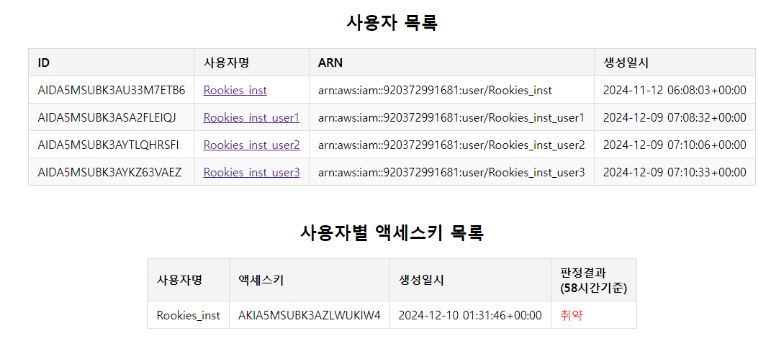
액세스 키 정보를 출력하는 페이지에 [사용자 목록으로 이동] 링크를 추가
- users_accesskeys.html 수정
<tbody>
            {% for row in data %}
            <tr>
                <td>{{ row.UserName }}</td>
                <td>{{ row.AccessKeyId }}</td>
                <td>{{ row.CreateDate }}</td>
                <td {% if row.State=="취약" %} style="color: red" {% endif %}>
                    {{ row.State }}
                </td>
            </tr>
            {% endfor %}
        </tbody>
        <tfoot>
            <tr>
                <td colspan="4"><a href="/list">사용자 목록으로 이동</a></td>
            </tr>
        </tfoot>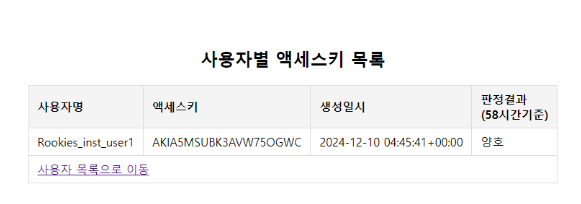
메인 페이지 구현
- app.py ⇒ / 주소로 들어 요청을 처리하는 라우터 함수를 추가
- templates/main.html 생성 ⇒ 각 기능을 호출하는 메뉴를 제공
app.py
@app.route("/")
def main():
    return render_template("main.html")
main.html
<!DOCTYPE html>
<html lang="en">
<head>
    <meta charset="UTF-8">
    <meta name="viewport" content="width=device-width, initial-scale=1.0">
    <title>Document</title>
    <link rel="stylesheet" href="/static/style.css">
</head>
<body>
    <h1>AWS 취약점 점검 서비스</h1>
    <h2><a href="/list">IAM 사용자 목록 조회</a></h2>
    <h2><a href="/users/accesskeys">사용자별 액세스키 검증</a></h2>
</body>
</html>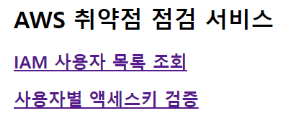
템플릿 페이지(html 파일)에 [메인으로 이동] 링크를 추가
<!-- list.html -->
        <tfoot>
            <tr>
                <td colspan="4"><a href="/">메인으로 이동</a></td>
            </tr>
        </tfoot>
<!-- users_accesskeys.html -->
<tfoot>
<tr>
<td colspan="4">
<a href="/">메인으로 이동</a> |
<a href="/list">사용자 목록으로 이동</a>
</td>
</tr>
</tfoot>실습 : 사용자별 액세스키 목록에서 판정 결과가 "취약"인 경우, 취약 클릭하면 해당 액세스키를 삭제하고, 메인 화면으로 이동하도록 기능을 추가해 보세요.
- account_checker.py 파일에 사용자의 액세스키를 삭제하는 함수를 추가
- app.py에 라우터 함수를 추가
- 템플릿 파일(main.html, users_accesskeys.html)에 메시지를 출력하는 코드를 추가
- secret_key 만드는 방법
import secrets
secrets.token_hex(32)
account_checker.py
def delete_user_access_key(username, accesskey):
    client.delete_access_key(UserName=username, AccessKeyId=accesskey)
app.py
from flask import Flask, render_template, flash, redirect, url_for
from myboto3.account_checker import get_user_list, get_user_access_key_data, delete_user_access_key

app.secret_key = '6e9d2c8e1a5b6c9f8438e1b6c9a5d1e2f7a8b9c1d2e3f4g5h6i7j8k9l0m1n2o3'

@app.route("/user/<username>/accesskey/<accesskey>/delete")
def delete_access_key(username, accesskey):
    try:
        delete_user_access_key(username, accesskey)
        flash(f"액세스키를 정상적으로 삭제했습니다.")
        return redirect("/")


    except Exception as e:
        flash(f"액세스키를 삭제하는데 실패했습니다. {str(e)}")
        return redirect(url_for("users_accesskeys"))
main.html, users_accesskeys.html
   		... (생략) ...
    {% with messages = get_flashed_messages() %}
    {% for message in messages %}
    <script>
        alert("{{ message }}");
    </script>
    {% endfor %}
    {% endwith %}
</body>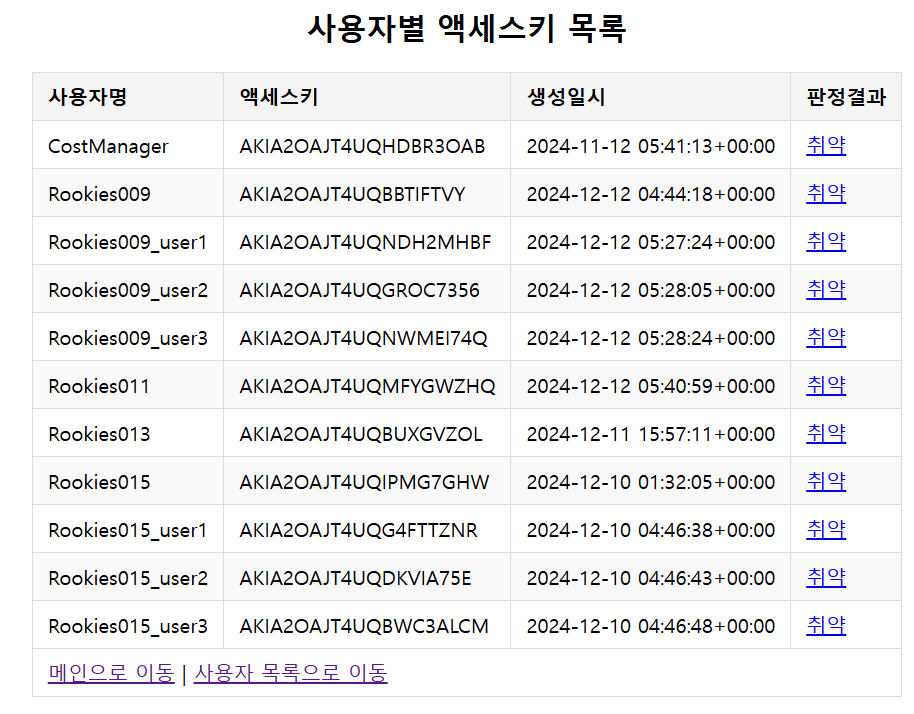
/users/mfa/check 주소로 요청했을 때 사용자 별로 MFA 설정 여부를 표시
- account_checker.py ⇒ 사용자별 MFA 설정 정보를 조회해서 반환하는 함수를 추가 ⇒ 등록된 MFA 디바이스가 있으면 디바이스 개수와 판정값을 반환
- app.py ⇒ check_all_users_mfa() 함수 호출 결과를 템플릿(check_users_mfa.html)으로 전달
- check_users_mfa.html ⇒ 라우터 함수가 전달한 값을 형식에 맞춰서 출력
- main.html ⇒ 링크 추가
account_checker.py
def check_all_users_mfa(users):
    results = []
    for user in users:
        res = client.list_mfa_devices(UserName=user["UserName"])
        if len(res["MFADevices"]) == 0:
            user["MFADevices"] = 0
            user["State"] = "취약"
        else:
            user["MFADevices"] = len(res["MFADevices"])
            user["State"] = "양호"
        results.append(user)
    return results
app.py
from myboto3.account_checker import get_user_list, get_user_access_key_data, delete_user_access_key, check_all_users_mfa

@app.route("/users/mfa/check")
def check_users_mfa():
    data = check_all_users_mfa(get_user_list())
    return render_template("check_users_mfa.html", data=data)
check_users_mfa.html
<!DOCTYPE html>
<html lang="en">
<head>
    <meta charset="UTF-8">
    <meta name="viewport" content="width=device-width, initial-scale=1.0">
    <title>Document</title>
    <link rel="stylesheet" href="/static/style.css">
</head>
<body>
    <h2 style="text-align: center">사용자별 MFA 설정 현황</h2>
    <table>
        <header>
            <tr>
                <th>사용자ID</th>
                <th>사용자명</th>
                <th>MFA 설정 여부</th>
                <th>판정결과</th>
            </tr>
        </header>
        <tbody>
            {% for row in data %}
            <tr>
                <td>{{ row.UserId }}</td>
                <td>{{ row.UserName }}</td>
                <td>{{ row.MFADevices }}</td>
                <td {% if row.State=="취약" %} style="color: red" {% endif %}>
                    {{ row.State }}
                </td>
            </tr>
            {% endfor %}
        </tbody>
        <tfoot>
            <tr>
                <td colspan="4"><a href="/">메인으로 이동</a></td>
            </tr>
        </tfoot>
    </table>
</body>
</html>
main.html
<body>
    <h1>AWS 취약점 점검 서비스</h1>
    <h2><a href="/list">IAM 사용자 목록 조회</a></h2>
    <h2><a href="/users/accesskeys">사용자별 액세스키 검증</a></h2>
    <h2><a href="/users/mfa/check">사용자별 MFA 설정 현황</a></h2>

    {% with messages = get_flashed_messages() %}
    {% for message in messages %}
    <script>
        alert("{{ message }}");
    </script>
    {% endfor %}
    {% endwith %}
</body>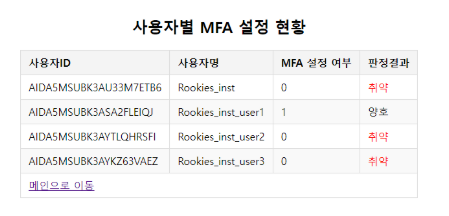
/check_password_policy 주소로 요청이 들어왔을 때 실행되는 check_password_policy() 라우터 함수를 구현
-
account_checker.py ⇒ password_policy() 함수를 구현
-
app.py ⇒ check_password_policy() 라우터 함수를 구현
-
password_policy.html 생성 ⇒ 형식에 맞춰서 출력
-
main.html ⇒ 링크를 추가
account_checker.py
def password_policy():
   response = client.get_account_password_policy()
   return response["PasswordPolicy"]
**app.py**from myboto3.account_checker import get_user_list, get_user_access_key_data, delete_user_access_key, check_all_users_mfa, password_policy'
@app.route("/check_password_policy")
def check_password_policy():
try:
data = password_policy()
except:
data = {}
return render_template("password_policy.html", data=data)
**password_policy.html**IAM 암호 정책
{% if data %}
<p>암호 정책이 아래와 같이 설정되어 있습니다.</p>
<table>
    <tr>
        <th>최소 암호 길이</th>
        <td>{{data.MinimumPasswordLength}}</td>
    </tr>
    <tr>
        <th>특수 문자 필수 여부</th>
        <td>{{data.RequireSymbols}}</td>
    </tr>
    <tr>
        <th>숫자 필수 여부</th>
        <td>{{data.RequireNumbers}}</td>
    </tr>
    <tr>
        <th>대문자 필수 여부</th>
        <td>{{data.RequireUppercaseCharacters}}</td>
    </tr>
    <tr>
        <th>소문자 필수 여부</th>
        <td>{{data.RequireLowercaseCharacters}}</td>
    </tr>
    <tr>
        <th>암호 변경 허용 여부</th>
        <td>{{data.AllowUsersToChangePassword}}</td>
    </tr>
    <tr>
        <th>암호 만료 여부</th>
        <td>{{data.ExpirePasswords}}</td>
    </tr>
    <tr>
        <th>최대 암호 사용 기간</th>
        <td>{{data.MaxPasswordAge}}</td>
    </tr>
    <tr>
        <th>암호 재사용 방지 기간</th>
        <td>{{data.PasswordReusePrevention}}</td>
    </tr>
    <tr>
        <th>강제 암호 만료 여부</th>
        <td>{{data.HardExpiry}}</td>
    </tr>
    <tr>
        <td colspan="2">
            <a href="/">메인으로 이동</a>
        </td>
    </tr>
</table>
{% else %}
<p>암호 정책이 설정되어 있지 않으므로, 취약 합니다. </p>
{% endif %}main.html
<body>
    <h1>AWS 취약점 점검 서비스</h1>
    <h2><a href="/list">IAM 사용자 목록 조회</a></h2>
    <h2><a href="/users/accesskeys">사용자별 액세스키 검증</a></h2>
    <h2><a href="/users/mfa/check">사용자별 MFA 설정 현황</a></h2>
    <h2><a href="/check_password_policy">IAM 패스워드 정책</a></h2>


    {% with messages = get_flashed_messages() %}
    {% for message in messages %}
    <script>
        alert("{{ message }}");
    </script>
    {% endfor %}
    {% endwith %}
</body>

-> 암호 정책 설정 x
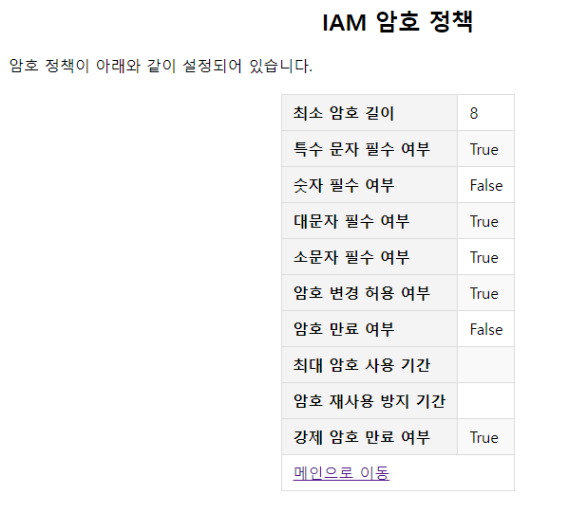
-> 암호정책 0
사용자 및 그룹에 적용된 권한 정책_html 형식으로 보기
- account_checker.py 파일에 get_account_permissions() 함수를 추가
account_checker.py
def get_account_permissions(users):
    # 반환할 값을 저장할 리스트
    results = []

    for user in users:
        # 사용자 이름을 추출
        username = user["UserName"]

        # 사용자에게 연결된 정책을 조회
        attached_policies = client.list_attached_user_policies(UserName=username)
        inline_policies = client.list_user_policies(UserName=username)

        # 사용자가 속한 그룹을 조회
        groups = client.list_groups_for_user(UserName=username)

        # 반환할 정보의 구조를 정의
        user_data = {
            "UserName": username,
            "AttachedPolicies": [], # 관리형 정책
            "InlinePolicies": [],   # 인라인 정책
            "GroupsPolicies": []    # 그룹에 할당된 정책
        }

        # 관리형 정책을 user_data에 추가
        for policy in attached_policies.get("AttachedPolicies", []):
            policy_arn = policy["PolicyArn"]
            policy_name = policy["PolicyName"]

            # 관리형 정책 문서의 내용을 조회
            policy_details = client.get_policy(PolicyArn=policy_arn)
            policy_version = client.get_policy_version(PolicyArn=policy_arn, VersionId=policy_details["Policy"]["DefaultVersionId"])
            policy_document = policy_version["PolicyVersion"]["Document"]

            user_data["AttachedPolicies"].append({
                "PolicyName": policy_name,
                "PolicyDocument": policy_document
            })

        # 인라인 정책을 user_data에 추가
        for policy in inline_policies.get("PolicyNames", []):
            policy_name = policy

            # 인라인 정책 문서의 내용을 조회
            policy_doc = client.get_user_policy(UserName=username, PolicyName=policy)
            policy_doc = policy_doc.get("PolicyDocument")
            user_data["InlinePolicies"].append({
                "PolicyName": policy_name,
                "PolicyDocument": policy_doc
            })

        # 그룹에 할당된 정책을 user_data에 추가
        for group in groups.get("Groups", []):
            group_name = group["GroupName"]

            # 그룹에 할당된 관리형 정책과 인라인 정책을 조회
            group_attached_policies = client.list_attached_group_policies(GroupName=group_name)
            group_inline_policies = client.list_group_policies(GroupName=group_name)

            # 그룹에 할당된 정책을 저장할 딕셔너리를 정의
            group_data = {
                "GroupName": group_name,    # 그룹 이름
                "AttachedPolicies": [],     # 그룹에 할당된 관리형 정책
                "InlinePolicies": []        # 그룹에 할당된 인라인 정책
            }

            # 그룹에 할당된 관리형 정책을 group_data에 추가
            for policy in group_attached_policies.get("AttachedPolicies", []):
                policy_arn = policy["PolicyArn"]
                policy_name = policy["PolicyName"]

                # 관리형 정책 문서의 내용을 조회
                policy_detail = client.get_policy(PolicyArn=policy_arn)
                policy_version = client.get_policy_version(PolicyArn=policy_arn, VersionId=policy_details["Policy"]["DefaultVersionId"])
                policy_document = policy_version["PolicyVersion"]["Document"]

                group_data["AttachedPolicies"].append({
                    "PolicyName": policy_name,
                    "PolicyDocument": policy_document
                })

            # 그룹에 할당된 인라인 정책을 group_data에 추가
            for policy in group_inline_policies.get("PolicyNames", []):
                policy_name = policy

                # 인라인 정책 문서의 내용을 조회
                policy_doc = client.get_group_policy(GroupName=group_name, PolicyName=policy)
                policy_doc = policy_doc.get("PolicyDocument")
                group_data["InlinePolicies"].append({
                    "PolicyName": policy_name,
                    "PolicyDocument": policy_doc
                })
            user_data["GroupsPolicies"].append(group_data)
        results.append(user_data)
    return results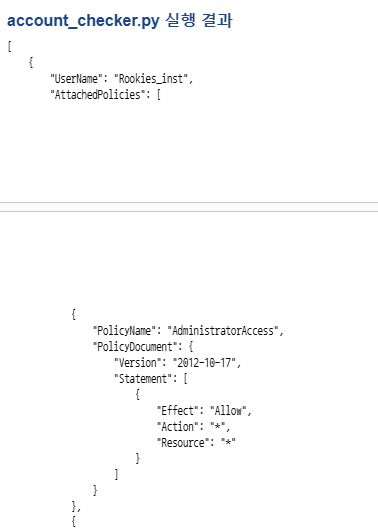
사용자 및 그룹에 적용된 권한 정책_테이블 형식으로 보기
- users_permissions.html 생성 ⇒ users_permissions() 라우터 함수가 전달한 값을 형식에 맞춰서 출력
- main.html ⇒ users_permissions.html로 이동할 수 있는 링크를 추가
users_permissions.html
<!DOCTYPE html>
<html lang="en">

<head>
    <meta charset="UTF-8">
    <meta name="viewport" content="width=device-width, initial-scale=1.0">
    <title>Document</title>
    <link rel="stylesheet" href="/static/style.css">
    <style>
        td {
            background-color: white;
        }
    </style>
</head>

<body>
    <h2 style="text-align: center">계정별 할당된 권한 조회</h2>

    <table>
        <header>
            <tr>
                <th>사용자명</th>
                <th>유형</th>
                <th>권한정책</th>
            </tr>
        </header>
        {% for user in data %}
            <tr>
                <td rowspan="{{ (user.AttachedPolicies | length if user.AttachedPolicies | length > 0 else 1) +
                                    (user.InlinePolicies | length if user.InlinePolicies | length > 0 else 1) +
                                    (user.GroupsPolicies | length if user.GroupsPolicies | length > 0 else 1) }}">
                    {{ user.UserName }}</td>


            {% if user.AttachedPolicies | length == 0 %}
                <td>관리형</td>
                <td>x</td>
            </tr>
            {% endif %}
            {% for policy in user.AttachedPolicies %}
            {% if loop.index == 1 %}
                <td rowspan="{{ user.AttachedPolicies | length  }}">관리형</td>
                <td>{{ policy.PolicyName }}</td>
            </tr>
            {% else %}
            <tr>
                <td>{{ policy.PolicyName }}</td>
            </tr>
            {% endif %}
            {% endfor %}

            {% if user.InlinePolicies | length == 0 %}
            <tr>
                <td>인라인</td>
                <td>x</td>
            </tr>
            {% endif %}
            {% for policy in user.InlinePolicies %}
            {% if loop.index == 1 %}
            <tr>
                <td rowspan="{{ user.InlinePolicies | length }}">인라인</td>
                <td>{{ policy.PolicyName }}</td>
            </tr>
            {% else %}
            <tr>
                <td>{{ policy.PolicyName }}</td>
            </tr>
            {% endif %}
            {% endfor %}

            {% if user.GroupsPolicies | length == 0 %}
            <tr>
                <td>그룹</td>
                <td>x</td>
            </tr>
            {% else %}
            <tr>
                <td>그룹</td>
                <td>
                    <table>
                        {% for policy in user.GroupsPolicies %}
                        {% if loop.index == 1 %}
                        <tr>
                            <th>그룹명</th>
                            <th>유형</th>
                            <th>권한정책</th>
                        </tr>
                        <tr>
                            <td>{{ policy.GroupName }}</td>
                            <td></td>
                            <td></td>
                        </tr>
                        {% else %}
                        <tr>
                            <td>{{ policy.GroupName }}</td>
                            <td></td>
                            <td></td>
                        </tr>
                        {% endif %}
                        {% endfor %}
                    </table>
                </td>
            </tr>
            {% endif %}
        {% endfor %}
    </table>
</body>
</html>
main.html
<body>
    <h1>AWS 취약점 점검 서비스</h1>
    <h2><a href="/list">IAM 사용자 목록 조회</a></h2>
    <h2><a href="/users/accesskeys">사용자별 액세스키 검증</a></h2>
    <h2><a href="/users/mfa/check">사용자별 MFA 설정 현황</a></h2>
    <h2><a href="/check_password_policy">IAM 패스워드 정책</a></h2>
    <h2><a href="/users/permissions">사용자별 권한 조회</a></h2>


    {% with messages = get_flashed_messages() %}
    {% for message in messages %}
    <script>
        alert("{{ message }}");
    </script>
    {% endfor %}
    {% endwith %}
</body>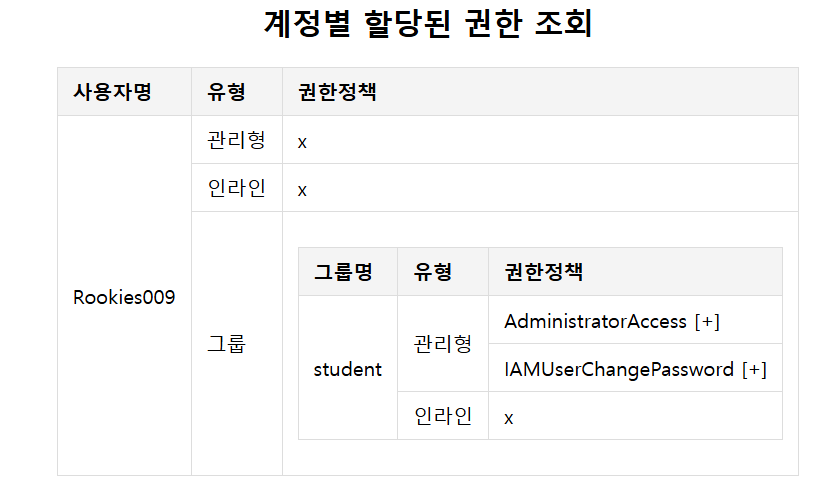
계정별 할당된 권한 조회+그룹에 지정된 권한 정보도 출력
- users_permissions.html 수정
users_permissions.html
<html lang="en">
<head>
    <meta charset="UTF-8">
    <meta name="viewport" content="width=device-width, initial-scale=1.0">
    <title>Document</title>
    <link rel="stylesheet" href="/static/style.css">
    <style>
        td {
            background-color: white;
        }
    </style>
    <script>
        function toggle(event) {
            // 이벤트 발생 대상(span) 가져오기
            const toggleIcon = event.target;

            // 해당 span의 다음 요소(pre 태그) 가져오기
            const preElement = toggleIcon.nextElementSibling;

            // 토글 처리
            if (preElement.style.display === "none") {
                preElement.style.display = "block";
                toggleIcon.textContent = "[-]";
            } else {
                preElement.style.display = "none";
                toggleIcon.textContent = "[+]";
            }
        }
    </script>
</head>
<body>
    <h2 style="text-align: center">계정별 할당된 권한 조회</h2>
    <table>
        <tr>
            <th>사용자명</th>
            <th>유형</th>
            <th>권한정책</th>
        </tr>
        {% for user in data %}
            <tr>
                <td rowspan="{{ (user.AttachedPolicies | length if user.AttachedPolicies | length > 0 else 1) +
                                    (user.InlinePolicies | length if user.InlinePolicies | length > 0 else 1) +
                                    (user.GroupsPolicies | length if user.GroupsPolicies | length > 0 else 1) }}">
                    {{ user.UserName }}</td>
            {% if user.AttachedPolicies | length == 0 %}
                <td>관리형</td>
                <td>x</td>
            </tr>
            {% endif %}

            {% for policy in user.AttachedPolicies %}
            {% if loop.index == 1 %}
                <td rowspan="{{ user.AttachedPolicies | length  }}">관리형</td>
                <td>
                    {{ policy.PolicyName }}
                    <span onclick='toggle(event)'>[+]</span>
                    <pre id="user_attached_{{loop.index | string}}" style="display:none">{{ policy.PolicyDocument | tojson(indent=4) }}</pre>
                </td>
            </tr>
            {% else %}
            <tr>
                <td>
                    {{ policy.PolicyName }}
                    <span onclick='toggle(event)'>[+]</span>
                    <pre id="user_attached_{{loop.index | string}}" style="display:none">{{ policy.PolicyDocument | tojson(indent=4) }}</pre>
                </td>
            </tr>
            {% endif %}
            {% endfor %}

            {% if user.InlinePolicies | length == 0 %}
            <tr>
                <td>인라인</td>
                <td>x</td>
            </tr>
            {% endif %}
            {% for policy in user.InlinePolicies %}
            {% if loop.index == 1 %}
            <tr>
                <td rowspan="{{ user.InlinePolicies | length }}">인라인</td>
                <td>
                    {{ policy.PolicyName }}
                    <span onclick='toggle(event)'>[+]</span>
                    <pre id="user_inline_{{loop.index | string}}" style="display:none">{{ policy.PolicyDocument | tojson(indent=4) }}</pre>
                </td>
            </tr>
            {% else %}
            <tr>
                <td>
                    {{ policy.PolicyName }}
                    <span onclick='toggle(event)'>[+]</span>
                    <pre id="user_inline_{{loop.index | string}}" style="display:none">{{ policy.PolicyDocument | tojson(indent=4) }}</pre>
                </td>
            </tr>
            {% endif %}
            {% endfor %}

            {% if user.GroupsPolicies | length == 0 %}
            <tr>
                <td>그룹</td>
                <td>x</td>
            </tr>
            {% else %}
            <tr>
                <td>그룹</td>
                <td>
                    <table style="width: 100%">
                        <tr>
                            <th>그룹명</th>
                            <th>유형</th>
                            <th>권한정책</th>
                        </tr>
                        <tr>
                        {% for policy in user.GroupsPolicies %}
                                <td rowspan="{{ (policy.AttachedPolicies | length if policy.AttachedPolicies | length > 0 else 1) +
                                                (policy.InlinePolicies | length if policy.InlinePolicies | length > 0 else 1) }}">
                                    {{ policy.GroupName }}</td>

                            {% if policy.AttachedPolicies | length == 0 %}
                                <td>관리형</td>
                                <td>x</td>
                            </tr>
                            {% endif %}

                            {% for attached in policy.AttachedPolicies %}
                                {% if loop.index == 1 %}
                                    <td rowspan="{{policy.AttachedPolicies | length if policy.AttachedPolicies | length > 0 else 1}}">관리형</td>
                                    <td>
                                        {{ attached.PolicyName }}
                                        <span onclick='toggle(event)'>[+]</span>
                                        <pre id="group_attached_{{loop.index | string}}" style="display:none">{{ attached.PolicyDocument | tojson(indent=4) }}</pre>
                                    </td>
                                </tr>
                                {% else %}
                                    <td>
                                        {{ attached.PolicyName }}
                                        <span onclick='toggle(event)'>[+]</span>
                                        <pre id="group_attached_{{loop.index | string}}" style="display:none">{{ attached.PolicyDocument | tojson(indent=4) }}</pre>
                                    </td>
                                </tr>
                                {% endif %}
                            {% endfor %}

                            {% if policy.InlinePolicies | length == 0 %}
                                <td>인라인</td>
                                <td>x</td>
                            </tr>
                            {% endif %}

                            {% for inline in policy.InlinePolicies %}
                                {% if loop.index == 1 %}
                                    <td rowspan="{{policy.InlinePolicies | length if policy.InlinePolicies | length > 0 else 1}}">인라인</td>
                                    <td>
                                        {{ inline.PolicyName }}
                                        <span onclick='toggle(event)'>[+]</span>
                                        <pre id="group_inline_{{loop.index | string}}" style="display:none">{{ inline.PolicyDocument | tojson(indent=4) }}</pre>
                                    </td>
                                </tr>
                                {% else %}
                                    <td>
                                        {{ inline.PolicyName }}
                                        <span onclick='toggle(event)'>[+]</span>
                                        <pre id="group_inline_{{loop.index | string}}" style="display:none">{{ inline.PolicyDocument | tojson(indent=4) }}</pre>
                                    </td>
                                </tr>
                                {% endif %}
                            {% endfor %}
                        {% endfor %}
                    </table>
                </td>
            </tr>
            {% endif %}
        {% endfor %}
    </table>
</body>
</html>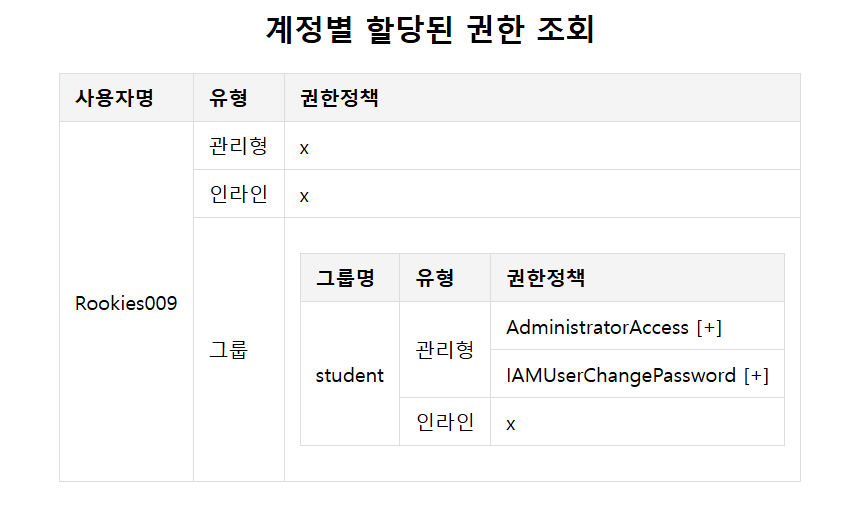
인스턴스에 연결된 보안그룹 조회
- ec2_checker.py 생성
- app.py 파일에 /ec2/securitygroups URL 요청을 처리할 ec2_securitygroups() 라우터 함수를 추가
- ec2_securitygroups.html 템플릿 작성
- main.html 페이지에서 기능 링크를 추가
ec2_checker.py
import boto3
from s3_checker import check_s3_public_access, list_buckets, check_object_exists

client = boto3.client("ec2")

def get_ec2_security_group_details():
    # 결과를 저장할 리스트를 정의
    results = []

    # 모든 EC2 인스터스를 조회
    # https://boto3.amazonaws.com/v1/documentation/api/latest/reference/services/ec2/client/describe_instances.html
    instances = client.describe_instances()

    # 인스턴스별 인스턴스ID와 보안그룹 정보를 추출
    for reservation in instances["Reservations"]:
        for instance in reservation["Instances"]:
            instance_id = instance["InstanceId"]
            security_groups = instance["SecurityGroups"]

            result_sgs = []

            # 보안그룹의 정보를 조회
            for sg in security_groups:
                sg_id = sg["GroupId"]

                # 보안그룹의 상세 정보를 조회
                # https://boto3.amazonaws.com/v1/documentation/api/latest/reference/services/ec2/client/describe_security_groups.html
                sg_details = client.describe_security_groups(GroupIds=[sg_id])
                # 해당 보안그룹의 인바운드 규칙을 저장할 리스트
                for sg_detail in sg_details["SecurityGroups"]:
                    inbound_rules = []
                    for rule in sg_detail.get("IpPermissions", []):
                        inbound_rules.append(rule)

                    outbound_rules = []
                    for rule in sg_detail.get("IpPermissionsEgress", []):
                        outbound_rules.append(rule)

                result_sgs.append({
                    "SecurityGroupId": sg_id,
                    "InboundRules": inbound_rules,
                    "OutboundRules": outbound_rules
                })

            results.append({
                "InstanceId": instance_id,
                "SecurityGroups": result_sgs})
    return results

def list_instances_with_key_pairs():
    # https://boto3.amazonaws.com/v1/documentation/api/latest/reference/services/ec2/client/describe_instances.html
    instances = client.describe_instances()
    for reservation in instances["Reservations"]:
        for instance in reservation["Instances"]:
            print(f"InstanceId: {instance['InstanceId']}")
            print(f"PublicIpAddress: {instance['PublicIpAddress']}")
            print(f"PrivateIpAddress: {instance['PrivateIpAddress']}")

            if "KeyName" in instance:
                print(f"KeyName: {instance['KeyName']}")
                print(f"판정 결과: 양호")
            else:
                print(f"판정 결과: 취약")
            print()

def get_key_pairs():
    key_pairs = client.describe_key_pairs()
    return key_pairs["KeyPairs"]

def check_key_pair_s3_storage():
    key_pairs = get_key_pairs()
    buckets = list_buckets()

    for key_pair in key_pairs:
        key_name = key_pair["KeyName"]
        print(f"KeyPair: {key_name}")
        print("=" * 30)

        for bucket in buckets:
            bucket_name = bucket["Name"]
            print(f"Bucket: {bucket_name}")

            status = "버킷에 키가 저장되어 있지 않음 >> 판정 불가"
            if check_object_exists(bucket_name, key_name+".pem"):
                if check_s3_public_access(bucket_name):
                    status = "퍼블릭 버킷에 저장 >> 취약"
                else:
                    status = "프라이빗 버킷에 저장 >> 양호"

            print(f"판정 결과: {status}")
            print()

if __name__ == "__main__":
    # list_instances_with_key_pairs()
    # check_key_pair_s3_storage()
    a = get_ec2_security_group_details()
    import json
    a = json.dumps(a, indent=4)
    print(a)
app.py
from myboto3.ec2_checker import get_ec2_security_group_details

@app.route("/ec2/securitygroups")
def ec2_securitygroups():
    data = get_ec2_security_group_details()
    return render_template("ec2_securitygroups.html", data=data)
ec2_securitygroups.html
<!DOCTYPE html>
<html lang="en">

<head>
    <meta charset="UTF-8">
    <meta name="viewport" content="width=device-width, initial-scale=1.0">
    <title>Document</title>
    <link rel="stylesheet" href="/static/style.css">
</head>
<body>
    <h2 style="text-align: center">사용자 목록</h2>
    <table>
        <header>
            <tr>
                <th>인스턴스 ID</th>
                <th>보안그룹 ID</th>
                <th>인바운드 규칙</th>
                <th>아웃바운드 규칙</th>
            </tr>
        </header>
        <tbody>
            {% for instance in data %}
                <tr>
                    <td rowspan="{{ instance.SecurityGroups|length }}">{{ instance.InstanceId }}</td>
                {% for sg in instance.SecurityGroups %}
                    {% if loop.index > 1 %}
                    <tr>
                    {% endif %}
                        <td>{{ sg.SecurityGroupId }}</td>
                        <td>
                            {% for rule in sg.InboundRules %}
                            <ul>
                                <li>FromPort: {{ rule.FromPort }}</li>
                                <li>Source:
                                    {% if rule.IpRanges | length > 0 %}
                                        {{ rule.IpRanges[0].CidrIp }} ({{ rule.IpRanges[0].Description }})
                                    {% else %}
                                        {{ rule.UserIdGroupPairs[0].GroupId }} ({{ rule.UserIdGroupPairs[0].Description }})
                                    {% endif %}
                                </li>

                            </ul>
                            {% endfor %}
                        </td>
                        <td>
                            {% for rule in sg.OutboundRules %}
                            <ul>
                                <li>ToPort: {{ rule.ToPort }}</li>
                                <li>IpRages: {{ rule.IpRanges | join(", ") }}</li>
                            </ul>
                            {% endfor %}

                        </td>
                    </tr>
                {% endfor %}
            {% endfor %}
        </tbody>
    </table>
</body>
</html>
main.html
<body>
    <h1>AWS 취약점 점검 서비스</h1>
    <h2><a href="/list">IAM 사용자 목록 조회</a></h2>
    <h2><a href="/users/accesskeys">사용자별 액세스키 검증</a></h2>
    <h2><a href="/users/mfa/check">사용자별 MFA 설정 현황</a></h2>
    <h2><a href="/check_password_policy">IAM 패스워드 정책</a></h2>
    <h2><a href="/users/permissions">사용자별 권한 조회</a></h2>
    <h2><a href="/ec2/securitygroups">EC2 인스턴스에 연결된 보안그룹 조회</a></h2>
    {% with messages = get_flashed_messages() %}
    {% for message in messages %}
    <script>
        alert("{{ message }}");
    </script>
    {% endfor %}
    {% endwith %}
</body>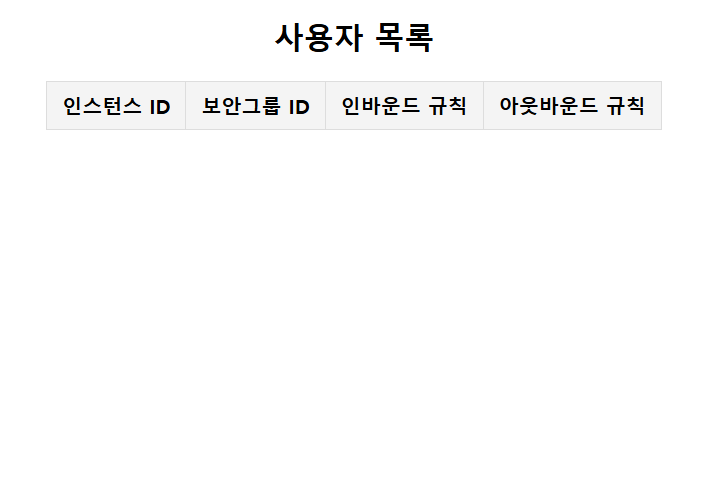
서브넷에 연결된 NACL 조회
- ec2_checker.py 파일에 get_nacl_details() 함수를 정의
- app.py 파일에 /subnet/nacl 엔드 포인트로 요청했을 때 결과를 반환하는 subnet_nacl() 라우트 함수를 추가
- subnet_nacl.html 템플릿 파일에 형식에 맞춰서 출력
- main.html 파일에 /subnet/nacl 기능 링크를 추가
ec2_checker.py
def get_nacl_details():
    results = []
    subnets = client.describe_subnets()
    for subnet in subnets['Subnets']:
        subnet_id = subnet['SubnetId']
        vpc_id = subnet['VpcId']
        nacls = client.describe_network_acls(Filters=[{'Name': 'association.subnet-id', 'Values': [subnet_id]}])

        subnet_data = {
            "VpcId": vpc_id,
            "SubnetId": subnet_id,
            "NetworkAcls": []
        }

        for nacl in nacls['NetworkAcls']:
            nacl_id = nacl['NetworkAclId']
            entries = []


            for entry in nacl['Entries']:
                entries.append({
                    "RuleNumber": entry['RuleNumber'],
                    "Protocol": entry.get('Protocol') if entry.get('Protocol') != '-1' else 'ALL',
                    "RuleAction": entry['RuleAction'],
                    "Egress": entry['Egress'],
                    "CidrBlock": entry.get('CidrBlock', 'ALL'),
                    "Ipv6CidrBlock": entry.get('Ipv6CidrBlock', 'ALL'),
                    "PortRange": entry.get('PortRange', 'ALL'),
                })
            subnet_data['NetworkAcls'].append({
                "NetworkAclId": nacl_id,
                "IsDefault": nacl['IsDefault'],
                "Entries": entries
            })
        results.append(subnet_data)
    return results
app.py
from myboto3.ec2_checker import get_ec2_security_group_details, get_nacl_details

@app.route("/subnet/nacl")
def subnet_nacl():
    data = get_nacl_details()
    return render_template("subnet_nacl.html", data=data)
subnet_nacl.html
<!DOCTYPE html>
<html lang="en">
<head>
    <meta charset="UTF-8">
    <meta name="viewport" content="width=device-width, initial-scale=1.0">
    <title>Document</title>
    <link rel="stylesheet" href="/static/style.css">
</head>

<body>
    <h2 style="text-align: center">서브넷에 연결된 NACL 조회</h2>
    <table>
        <header>
            <tr>
                <th>서브넷</th>
                <th>VPC</th>
                <th>NACL</th>
                <th>기본 NACL 여부</th>
                <th>인바운드 규칙</th>
                <th>아웃바운드 규칙</th>
            </tr>
        </header>
        <tbody>
            {% for row in data %}
            <tr>
                <td>{{ row.SubnetId }}</td>
                <td>{{ row.VpcId }}</td>
                <td>{{ row.NetworkAcls[0].NetworkAclId }}</td>
                <td>{{ row.NetworkAcls[0].IsDefault }}</td>
                <td>
                    {% for rule in row.NetworkAcls[0].Entries %}
                    {% if not rule.Egress %}
                    <ul>
                        <li>Rule Number: {{ rule.RuleNumber }}</li>
                        <li>Protocol: {{ rule.Protocol }}</li>
                        <li>Rule Action: {{ rule.RuleAction }}</li>
                        <li>CIDR: {{ rule.CidrBlock }}</li>
                        <li>Port Range: {{ rule.PortRange }}</li>
                    </ul>
                    {% endif %}
                    {% endfor %}
                </td>
                <td>
                    {% for rule in row.NetworkAcls[0].Entries %}
                    {% if rule.Egress %}
                    <ul>
                        <li>Rule Number: {{ rule.RuleNumber }}</li>
                        <li>Protocol: {{ rule.Protocol }}</li>
                        <li>Rule Action: {{ rule.RuleAction }}</li>
                        <li>CIDR: {{ rule.CidrBlock }}</li>
                        <li>Port Range: {{ rule.PortRange }}</li>
                    </ul>
                    {% endif %}
                    {% endfor %}
                </td>
            </tr>
            {% endfor %}
        </tbody>
        <tfoot>
            <tr>
                <td colspan="4"><a href="/">메인으로 이동</a></td>
            </tr>
        </tfoot>
    </table>
</body>
</html>
main.html
<body>
    <h1>AWS 취약점 점검 서비스</h1>
    <h2><a href="/list">IAM 사용자 목록 조회</a></h2>
    <h2><a href="/users/accesskeys">사용자별 액세스키 검증</a></h2>
    <h2><a href="/users/mfa/check">사용자별 MFA 설정 현황</a></h2>
    <h2><a href="/check_password_policy">IAM 패스워드 정책</a></h2>
    <h2><a href="/users/permissions">사용자별 권한 조회</a></h2>
    <h2><a href="/ec2/securitygroups">EC2 인스턴스에 연결된 보안그룹 조회</a></h2>
    <h2><a href="/subnet/nacl">서브넷에 연결된 NACL 조회</a></h2>
    {% with messages = get_flashed_messages() %}
    {% for message in messages %}
    <script>
        alert("{{ message }}");
    </script>
    {% endfor %}
    {% endwith %}
</body>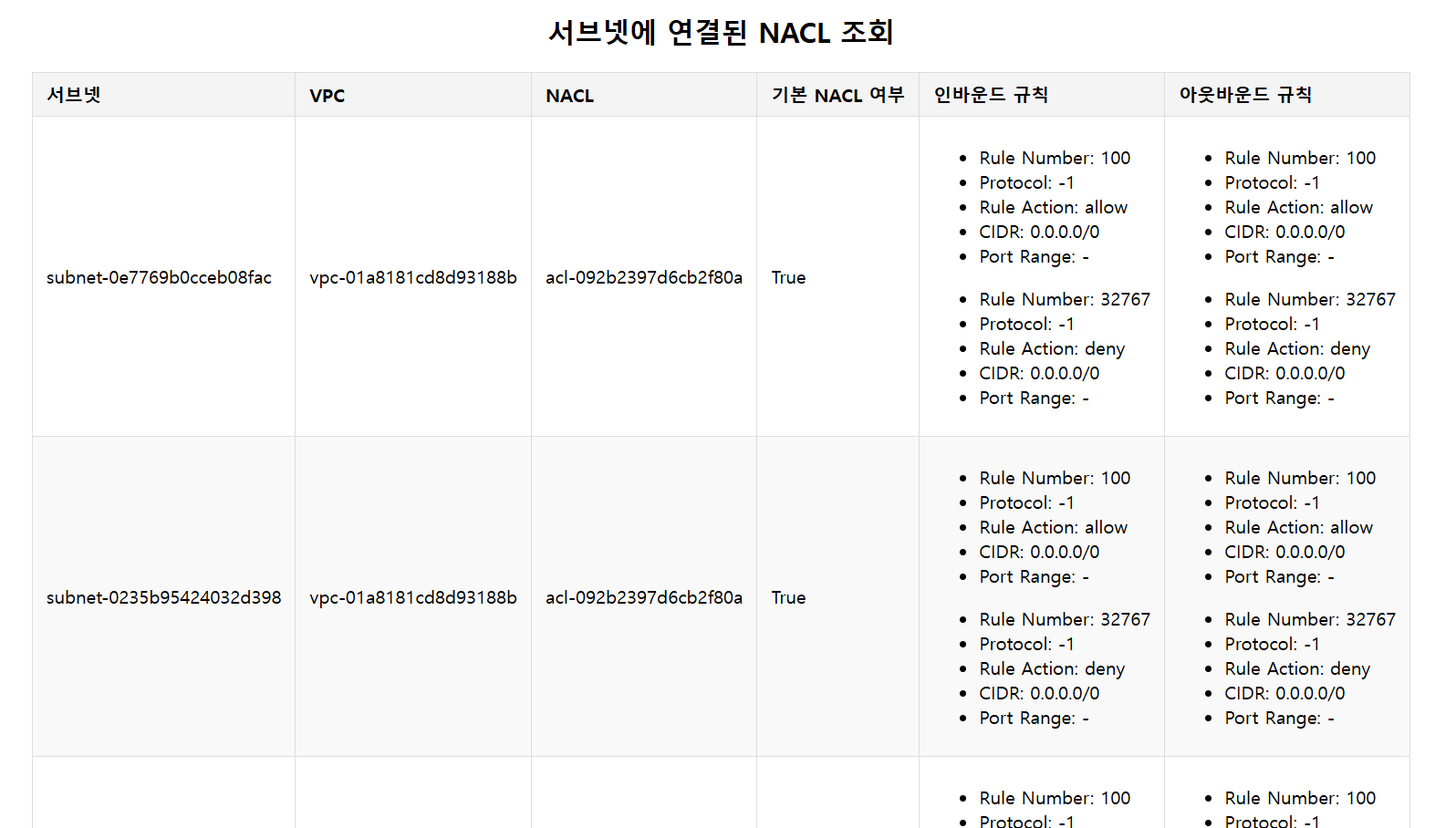
웹 서비스 환경 구성
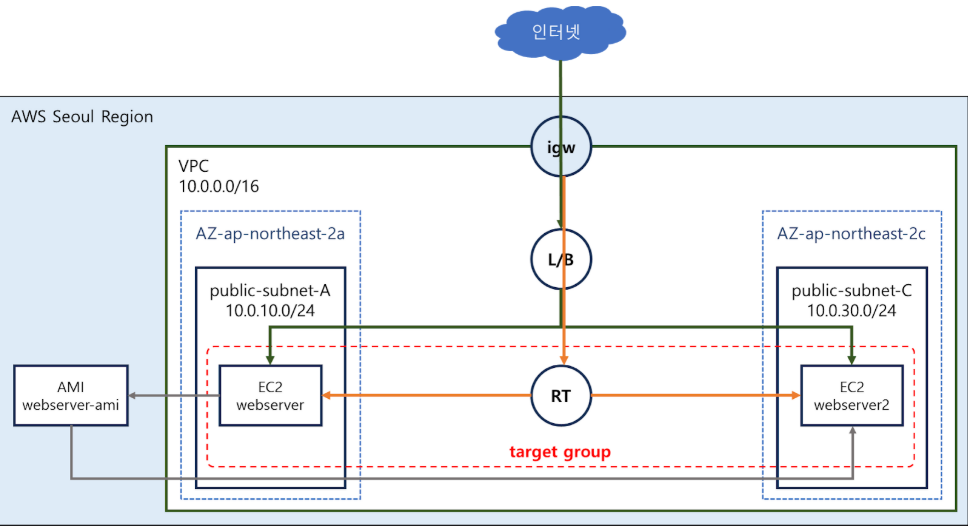
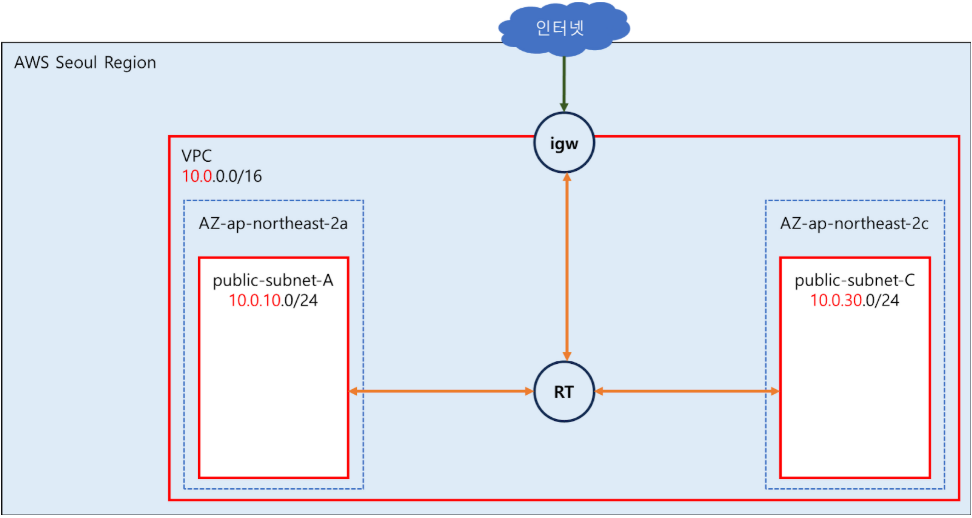
-> 최종 완성된 형태 다이어그램
1) 네트워크 구성
-
vpc 생성
-
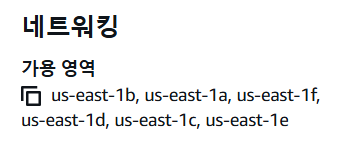
가용영역 정할때 : ec2 > 인스턴스 유형 > 네트워킹 > 가용영역 유형 확인
3) 보안그룹 생성 - HTTP(8),SSH(22) 접근을 허용
-
2) NACL 설정을 확인
- VPC 생성 시 자동으로 만들어지는 기본 NACL(default NACL) 설정을 확인
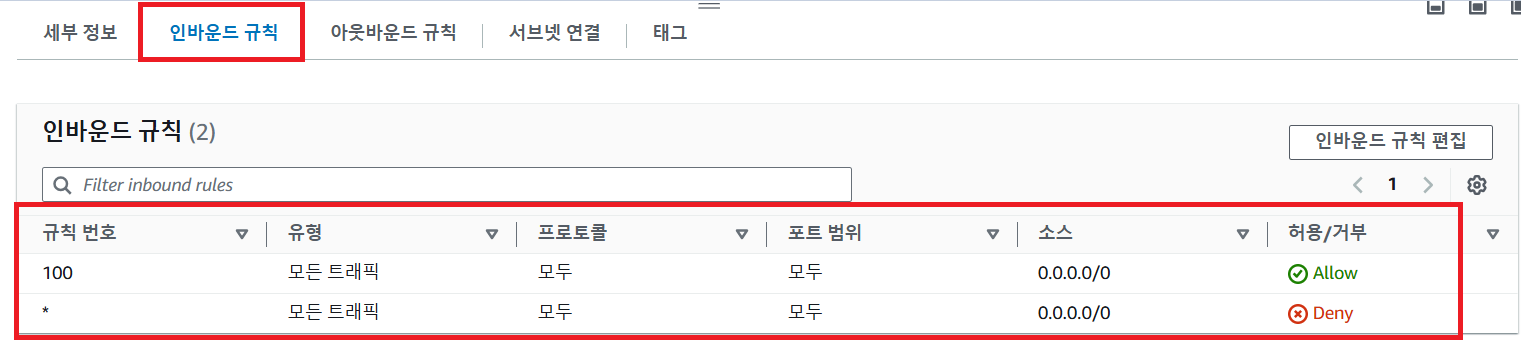
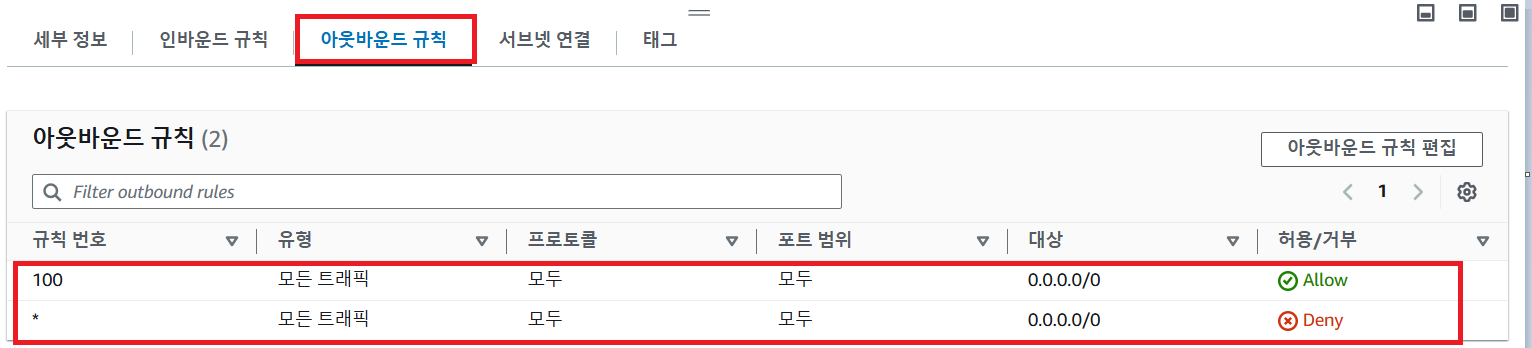
- VPC 생성 시 자동으로 만들어지는 기본 NACL(default NACL) 설정을 확인
-
들어오는것, 나가는거 모두 허용되어있음
-> 인바운드 규칙은 서브넷 내에게 제공하는 서비스 포드 한 해서만 허용하는 것이 안전한 설정이다
-> 아웃바운드는 전체를 허용하는 것이 맞 -
보안그룹 생성
- 인바운드 규칙 설정
- 아웃바운드 규칙 설정x > 해당 보안그룹이 적용되는 인스턴스에서 외부로 나가는 트래픽은 없기 때문에
4) 인스턴스1 생성
- 첫번째 서브넷에 PHP 기반의 웹 서비스가 가능하게 생성
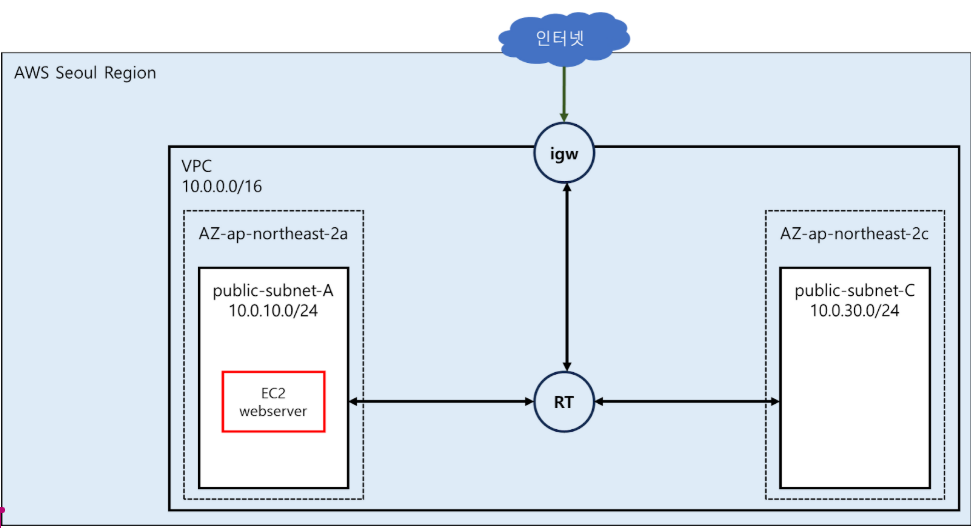
- 인스턴스 생성
5) 웹 서버 동작을 확인
- 인스턴스로 SSH 접속(명령 프롬포트에서 SSH명령어로 접속)
- ssh -i Rookies009-Webserver-keypair.pem ec2-user@192.168.233.1
- 웹 서버의 실행 상태를 확인 : systemctl status httpd
- 기본 웹 루트 디렉터리 : cd /var/www/html
- 기본 웹 루트 디렉터리에 파일을 확인 : ls -l
total 52 -> 깃 허브에서 가져온 파일이 존재 - 기본 웹 페이지 문서 내용을 확인 : cat index.php
- EC2 인스턴스에 대한 메타데이터 조회 : cat get-index-meta-data.php
_ - 인바인드 규칙 90,110 추가 + 확인후 제거
- 아웃바인드 규칙 추가
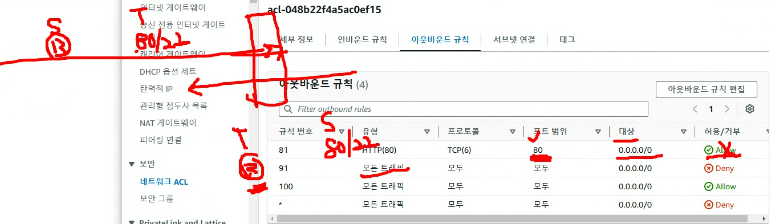
-> 접속 안댐
+ 랜덤포트 : well-known으로 지정된 포트 제외해서 정해진다
+ 따라서 트래픽이 나갈때 타겟포트가 80번이 될리 없으니 접속이 안댐
6) 인스턴스2 생성 + AMI
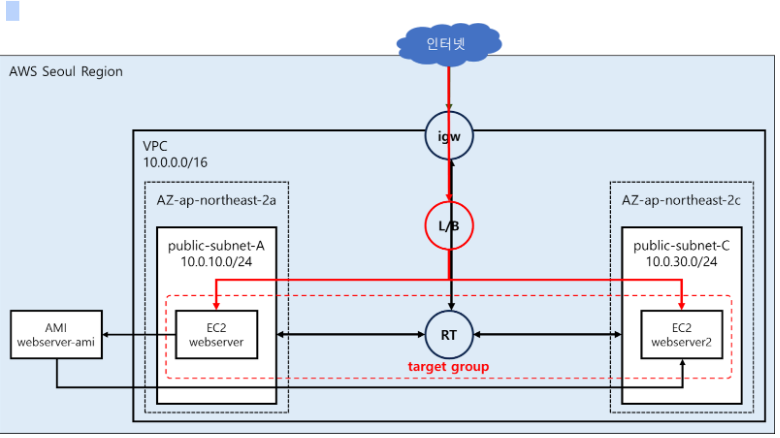
- 실행중인 인스턴스를 이용해서 AMI를 생성
- 7) AMI로 인스턴스 시작
생성한 AMI 이미지를 이용해서 다른 서브넷에 인스턴스를 추가 > 사용자 데이터를 입력하지 않아도 웹 서비스 환경이 설정된 상태로 인스턴스가 실행- 생성후 브라우저로 접속확인
9) 로드 밸런서 구성
- 동일한 기능을 제공하는 인스턴스 두개 이상 실행되는중~
- 개별 인스턴스 주소로 접속하는 경우, 이용의 불편과 부하가 집중되는 문제가 발생할수도 ~
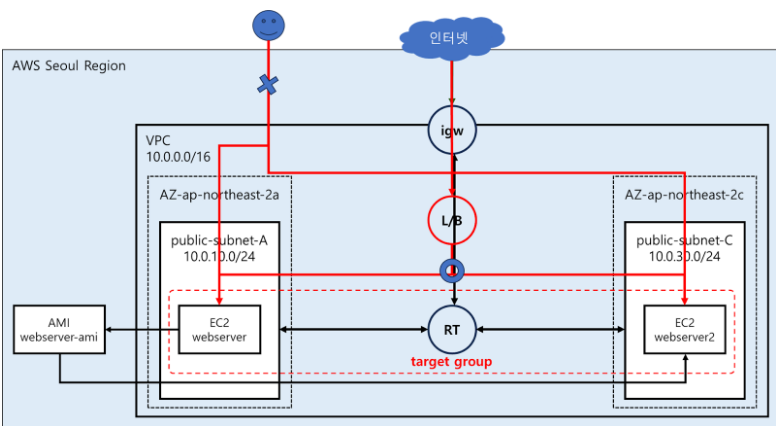
- 애플리케이션 로드밸런서 생성
- 10) 생성 후 브라우저를 이용해서 로드 밸런서의 DNS 이름으로 접근
11) 로드 밸런서를 통해서만 서비스를 이용할수 있도록 제한
- 지금은 개별 인스턴스로 직접 접근 가능 > 로드밸런서 통해서만 처리
- == 개별 인스턴스에 로드밸런서로부터 오는 HTTP(80)만 허용하도록 보안그룹 수정!
AWS CLI를 이용한 VPC, EC2 인스턴스 생성
- AWS CLI 설치 확인
- IAM 사용자 및 액세스키 확인 ⇒ 각자에게 발급된 계정을 사용
- 액세스 키 적용 여부를 확인
- vpc 생성
- VPC ID 확인
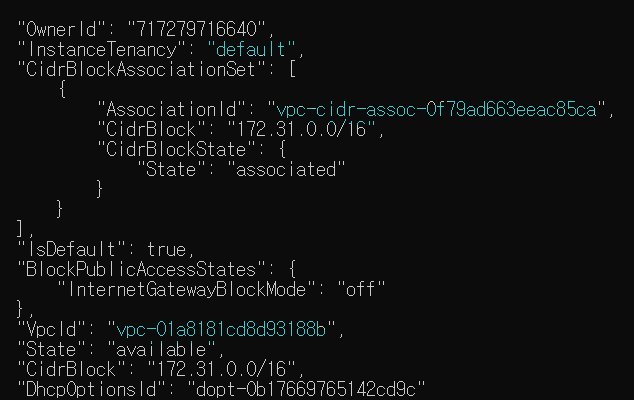
1번째 vpc = default vpc
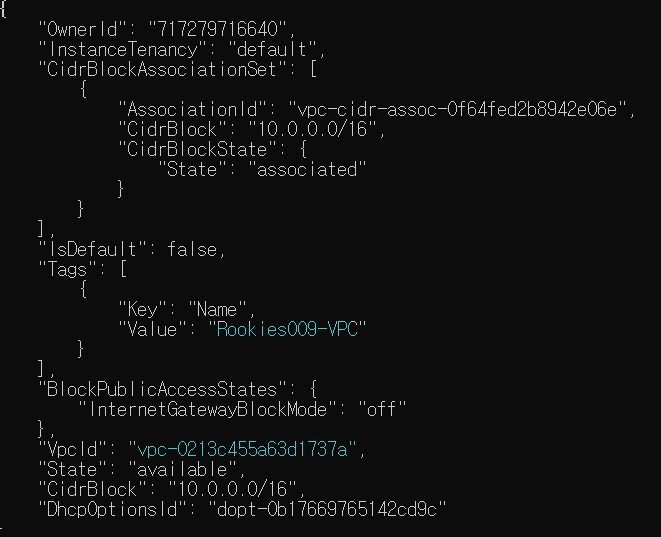
2번째 vpc = 방금 만든거
vpc id = vpc-0213c455a63d1737a
인터넷게이트웨이 생성 후 VPC에 연결
- VPC ID를 환경변수로 설정
- 인터넷게이트웨이 생성
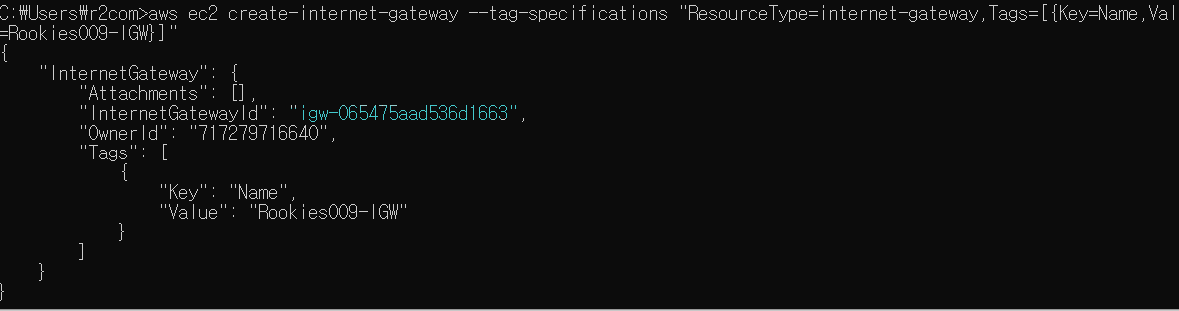
igw-065475aad536d1663 - 인터넷게이트웨이 ID를 환경변수로 등록
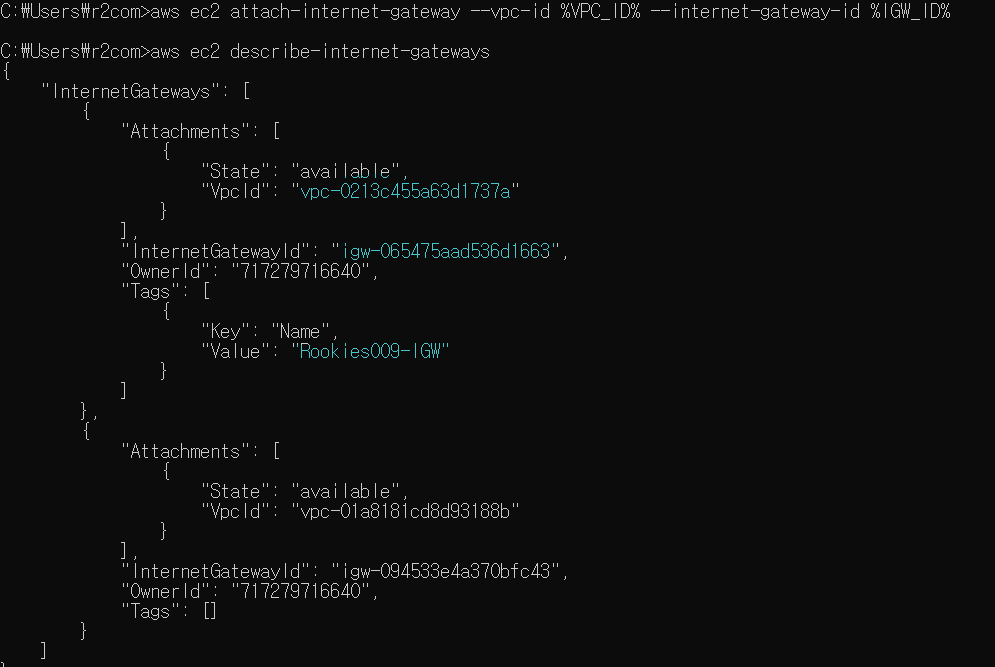
- 인터넷게이트웨이를 VPC에 연결
퍼블릭 서브넷 역할을 할 서브넷을 생성
- 첫번째 서브넷 생성
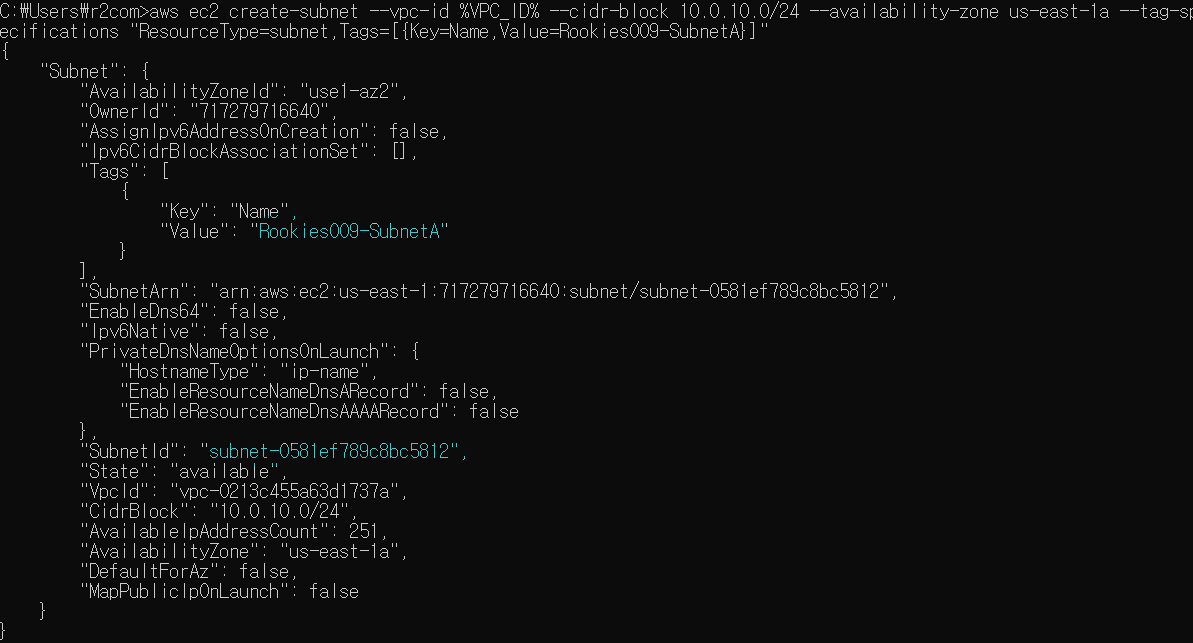
subnet-0581ef789c8bc5812 - 두번째 서브넷 생성
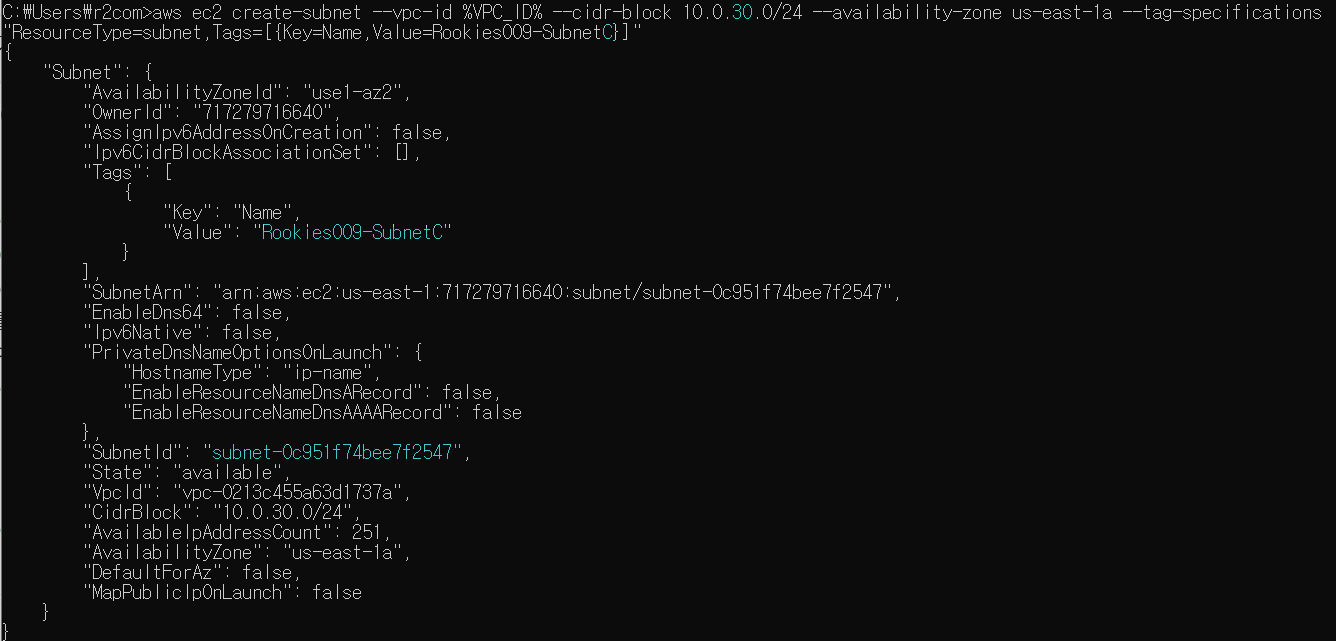
subnet-0c951f74bee7f2547 - 첫번째 서브넷 ID와 두번째 서브넷 ID를 환경변수로 등록
퍼블릭 라우팅 테이블 역할을 할 라우팅 테이블을 생성
- 라우팅 테이블 생성
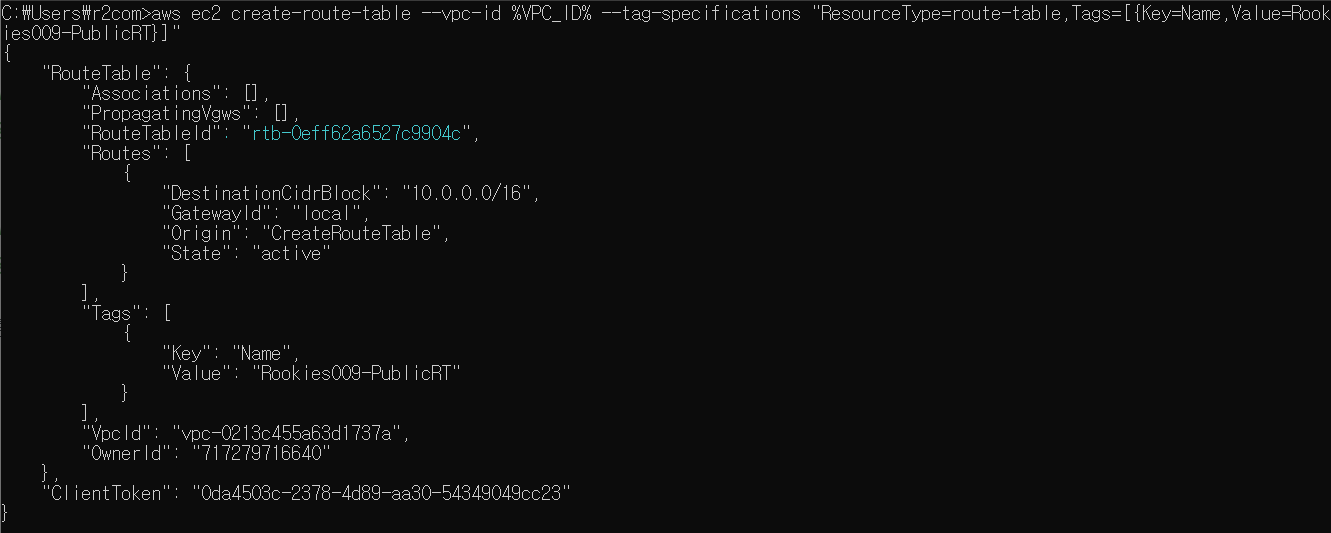
"RouteTableId": "rtb-0eff62a6527c9904c" - 라우팅 테이블의 ID를 환경변수에 등록
- 라우팅 테이블에 인터넷 게이트웨이로의 라우팅 정보를 추가
퍼블릭 서브넷 설정
- 첫번째 서브넷에 퍼블릭 라우팅 테이블을 연결

- 두번째 서브넷에 퍼블릭 라우팅 테이블을 연결

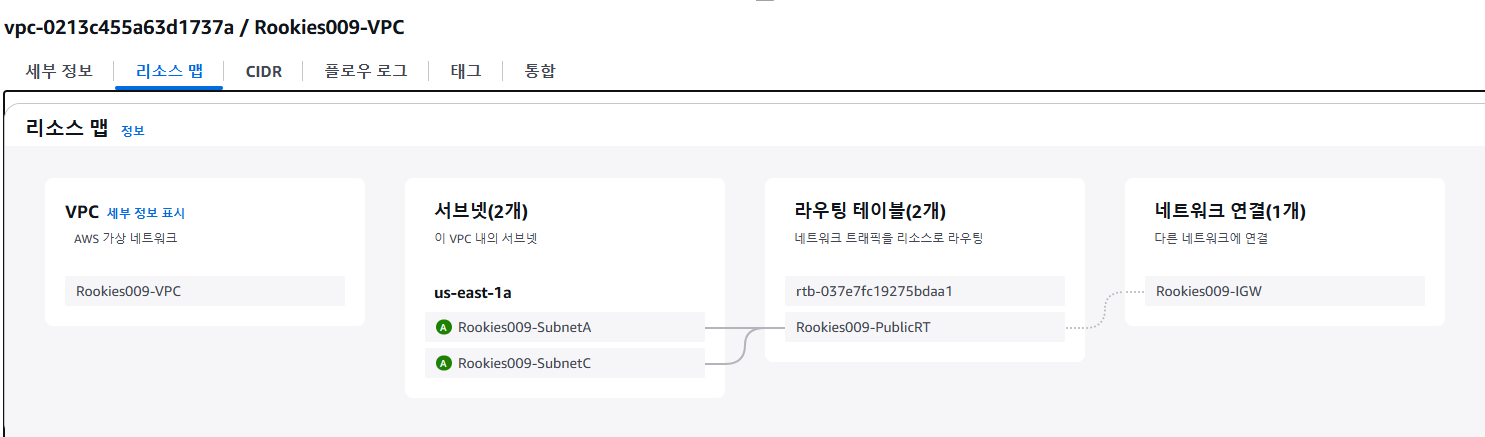
퍼블릭 서브넷에 퍼블릭 IP를 자동 할당하도록 설정
- 서브넷 정보를 상세 조회
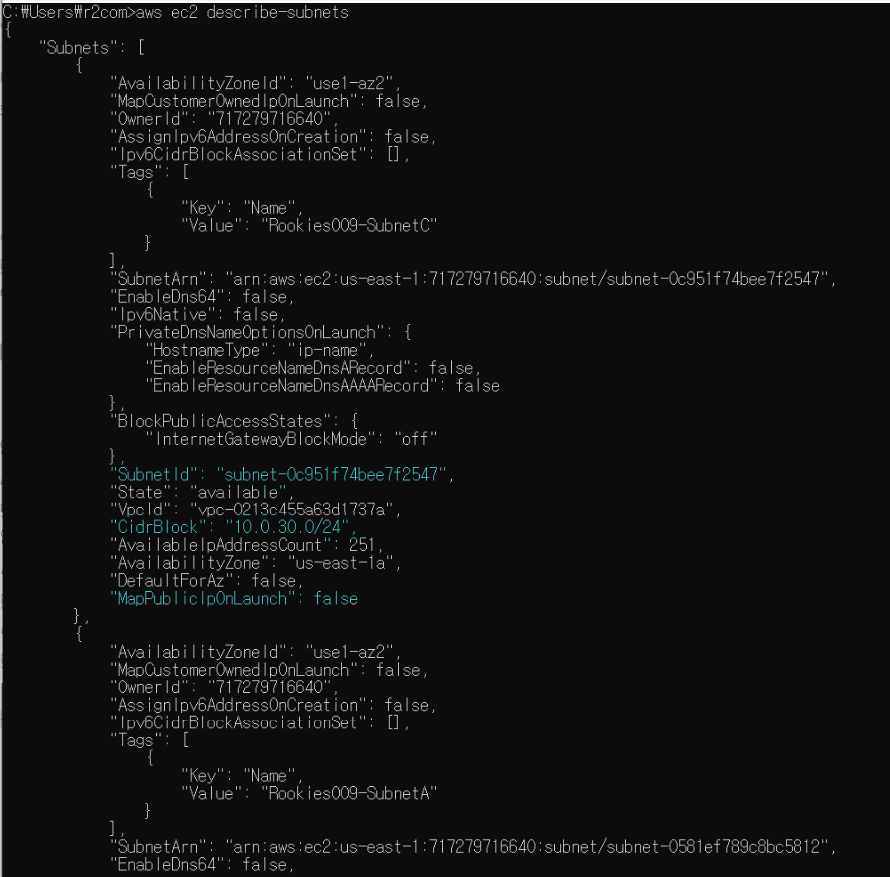
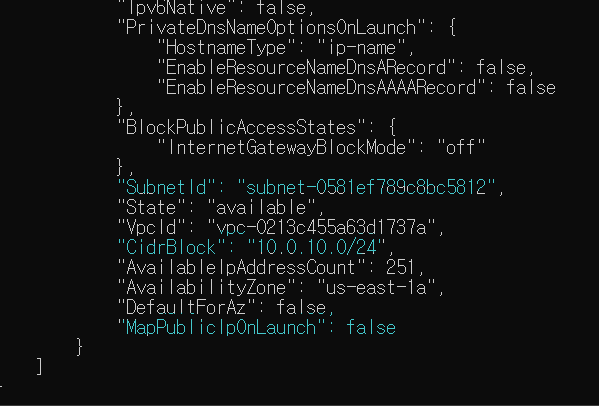
"SubnetId": "subnet-0c951f74bee7f2547",
"VpcId": "vpc-0213c455a63d1737a",
"MapPublicIpOnLaunch": false
"SubnetId": "subnet-0581ef789c8bc5812",
"CidrBlock": "10.0.10.0/24",
"MapPublicIpOnLaunch": false
- 서브넷 상세 조회 결과에서 SubnetID, CidrBlock, MapPublicIpOnLaunch(퍼블릭 IP 자동할당) 정보만 추출해서 출력
- 각 서브넷에 퍼블릭 IP를 자동 할당하도록 설정을 변경
- 서브넷 상세 조회
VPC DNS 호스트 이름을 활성화
프라이빗 서브넷 생성
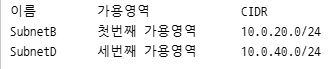
- SubnetB 이름의 서브넷 생성
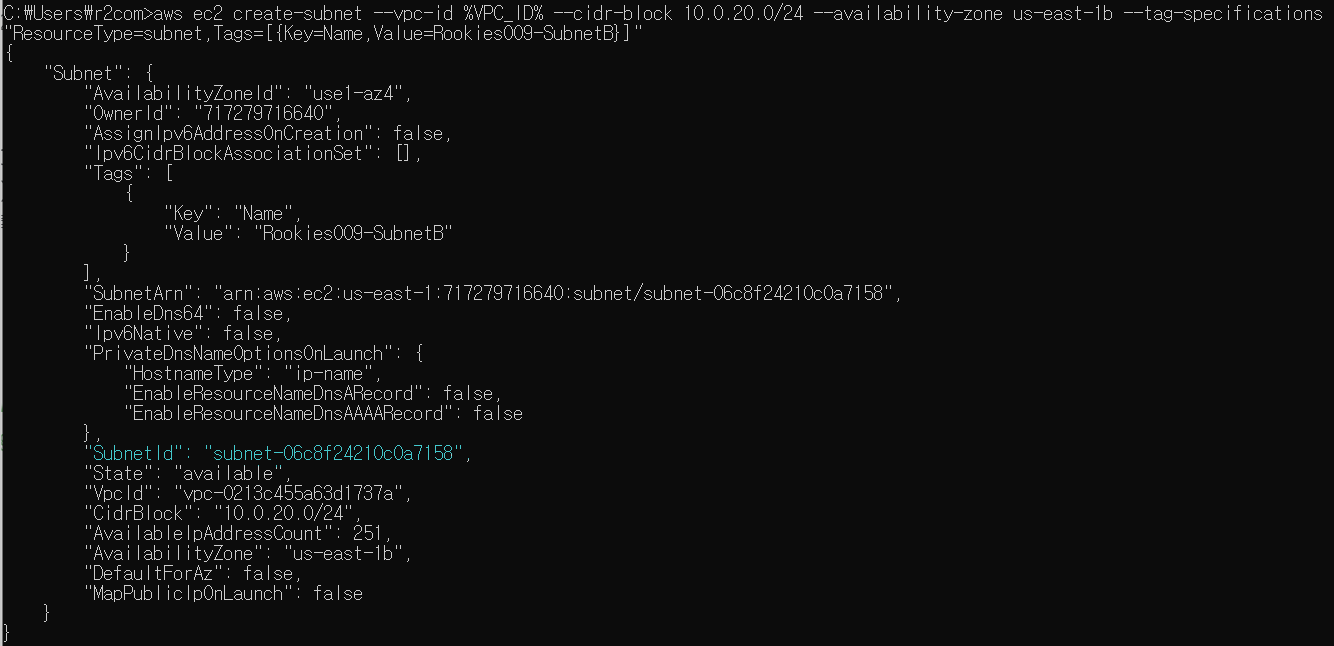
"SubnetId": "subnet-06c8f24210c0a7158" - SubnetD 이름의 서브넷 생성
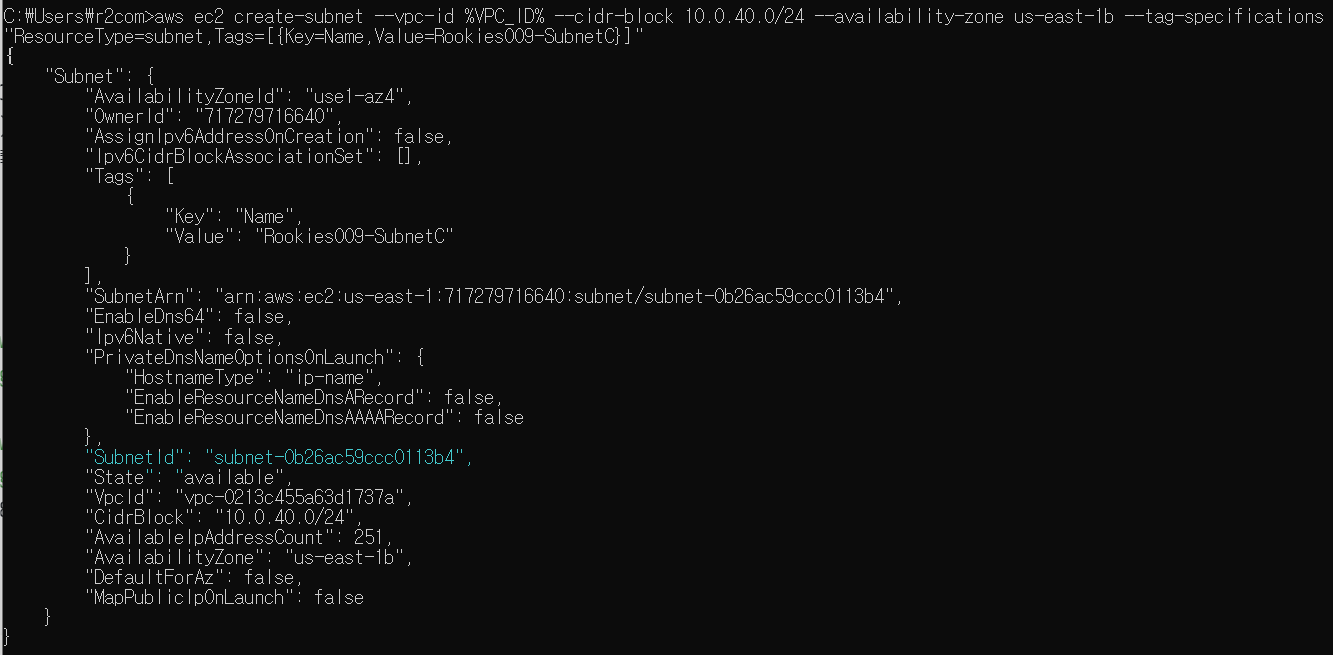
"SubnetId": "subnet-0b26ac59ccc0113b4" - 프라이빗 서브넷 ID를 환경변수로 설정
프라이빗 라우팅 테이블 생성
- 라우팅 테이블 정보를 조회
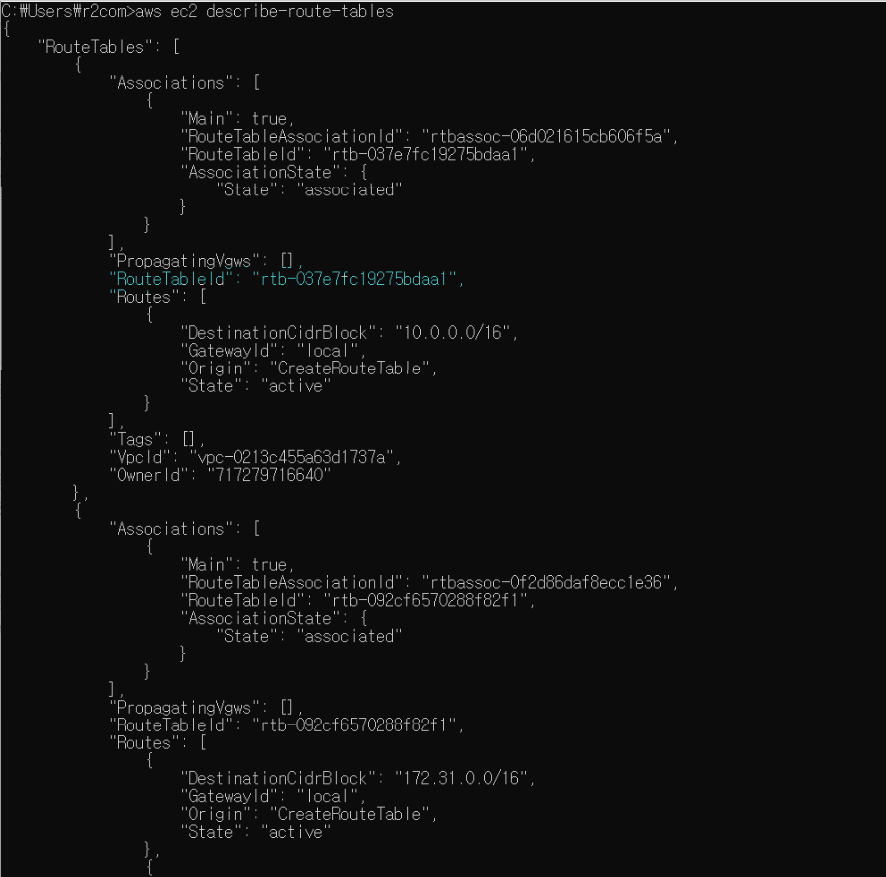
"RouteTableId": "rtb-037e7fc19275bdaa1" - 기본 라우팅 테이블을 프라이빗 라우팅 테이블로 활용 ⇒ 기본 라우팅 테이블의 ID를 환경변수로 등록
- 기본 라우팅 테이블에 이름을 Rookies-inst-PrivateRT 설정
- 라우트 테이블 조회
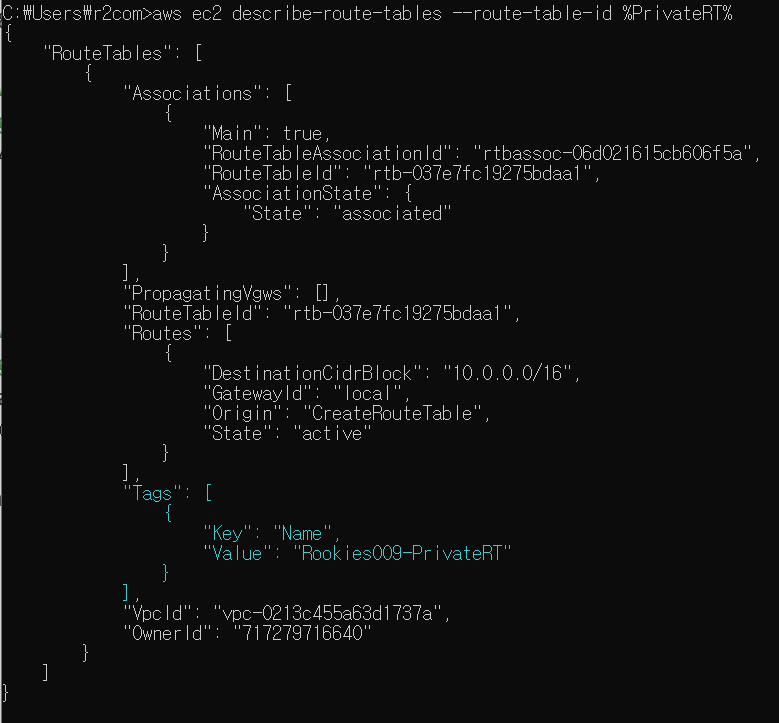
프라이빗 서브넷과 프라이빗 라우트 테이블을 연결
- 서브넷과 연결 여부를 확인
- 서브넷과 연결
- 다시확인
키 페어 생성
- 키 페어 이름을 환경 변수로 설정
- 키 페어 생성
- 키 페어를 삭제하고 (새로운 양식으로) 다시 생성
- 키 페어를 삭제하고 키 페어 내용을 파일로 저장
보안 그룹 생성
- 보안 그룹 생성
- 보안 그룹 ID를 환경변수로 등록
- 보안 그룹에 인바운드 규칙을 추가
EC2 인스턴스 생성
- 인스턴스 생성 시 사용할 사용자 데이터의 내용을 담고 있는 텍스트 파일을 작성
- 인스턴스 생성에 사용할 이미지 ID를 확인
- 인스턴스 생성
- 인스턴스 ID를 환경변수로 설정
- 인스턴스의 퍼블릭 주소를 확인
- 인스턴스의 퍼블릭 주소로 요청을 전달
리소스 정리
- 인스턴스 종료
- 보안그룹 삭제
- 서브넷 삭제
- 인터넷 게이트웨이를 VPC에서 분리
- 인터넷 게이트웨이 삭제
- 퍼블릭 라우팅 테이블 삭제
- 키페어 삭제
- 로컬에 저장한 키 파일과 사용자 데이터 파일 삭제
- VPC 삭제
관리형 콘솔에서 리소스 삭제를 확인
AWS Cloudformation을 이용해서 서비스 네크워크를 생성
- 템플릿 생성 ⇒ c:\aws\create_vpc_01.yml
- 스택 생성
- 출력 확인 ⇒ 템플릿에서 outputs 항목에 정의한 내용이 출력
- 리소스 생성을 확인
- 스택 업데이트
- 2) 퍼블릿 서브넷, 프라이빗 서브넷을 각각 하나 더 추가
-> 논리적 이름을 변경할 경우 해당 리소스를 먼저 삭제하고 추가하는 형식으로 작업해야 함 - 3) 논리적 이름을 변경할 리소스를 삭제하도록 템플릿을 수정
⇒ 처음에 만든 서브넷과 서브넷-라우터 테이블 연결은 삭제된 상태 ⇒ 물리적 ID도 삭제 - 5) 논리적 이름을 변경한 새로운 서브넷과 서브넷-라우터 테이블 연결을 추가하도록 템플릿 수정
- 2) 퍼블릿 서브넷, 프라이빗 서브넷을 각각 하나 더 추가
- 7) 서브넷이 추가되었는지 확인
- 8) 스택 삭제 후 S3 버킷 비우고, 삭제
Cloudformation을 이용한 웹 애플리케이션 배포
기본 VPC에 웹 서버가 설치된 EC2 인스턴스를 생성
- #1 기본 VPC 생성
- #2 템플릿 정의 ⇒ WebApplication.json
- #3 스택생성
- #4 출력 탭에 나온 WebSiteURL 주소로 접근
- #5 인스턴스 확인 ⇒ Properties 항목이 반영되었는지 확인
스택 업데이트
- #1 템플릿 수정
- #2 키페어를 생성
- #3 스택 업데이트
- #4 리소스가 변경된 것을 확인
- 보안그룹에 인바운드 22번 포트 허용 규칙 추가를 확인
- #5 EC2 인스턴스로 연결
- #6 템플릿 수정 ⇒ index.php 파일의 내용을 수정