코딩은 자전거타기
그래들 오류 해결법
A problem occurred configuring root project 'sapp3'.
> Could not resolve all artifacts for configuration ':classpath'.
   > Could not resolve org.springframework.boot:spring-boot-gradle-plugin:3.3.2.
     Required by:
         project : > org.springframework.boot:org.springframework.boot.gradle.plugin:3.3.2
      > Dependency requires at least JVM runtime version 17. This build uses a Java 8 JVM.

* Try:
> Run this build using a Java 17 or newer JVM.
> Run with --stacktrace option to get the stack trace.
> Run with --info or --debug option to get more log output.
> Run with --scan to get full insights.
> Get more help at https://help.gradle.org.
이런 오류가 뜬다면 Java 버전이 안맞다는 것을 확인할 수 있다
해결법은 의외로 간단
file - settings - Build, Execution, Deployment - Build Tools - Gradle 에서 Gradle JVM 을
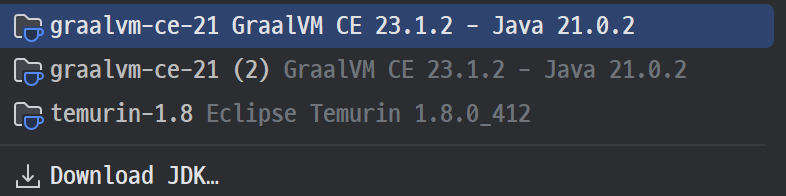
이걸로 바꾸면 된다. 그냥 21붙어있는 내용으로 바꾸기
그리고 제일 중요한 녀석

코끼리 녀석 클릭해주기
InteliJ 에서 Java 버전오류로 인한 gradle 오류를 해결하는 방법에 대해서 알아보았다

멋진사람