Textview autosizing
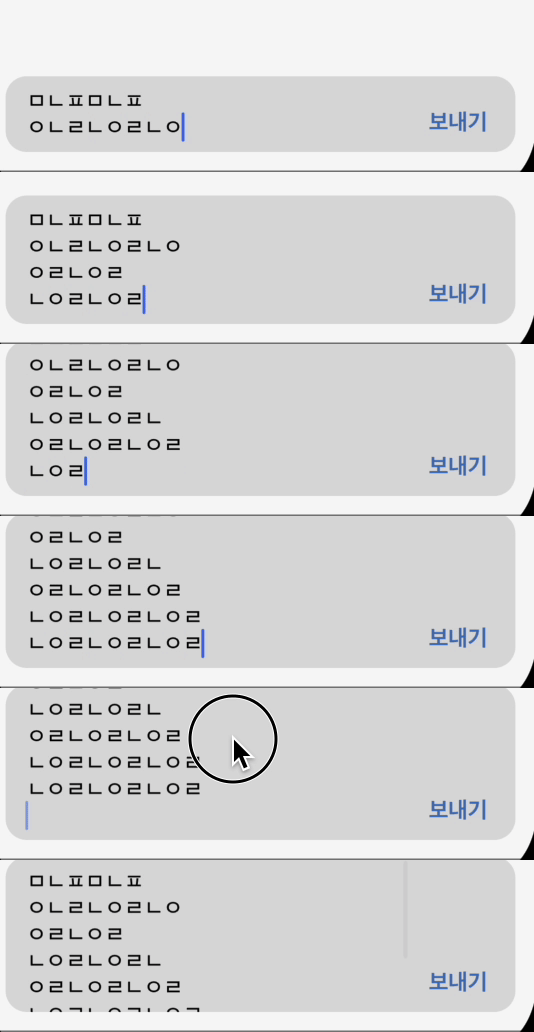
앱을 개발하면서 채팅 기능을 구현해야 했다. 카카오톡을 사용해보면 입력창 높이가 일정 높이까지 증가하지만 특정 높이에 도달하면 스크롤 기능이 활성화된다!
나는 textview를 사용하여 입력창을 구현했고 다음과 같은 조건을 만족해야했다.
- 특정 높이(100) 전까지는 textview 높이 증가
- 특정 높이 도달하기 전까지는 스크롤 기능 비활성화
- 특정 높이 이상에 도달하면 스크롤 기능 활성화
당연히 먼저 textview의 delegate를 설정한다.
textview.delegate = selftextview의 textViewDidChange(_ textView: UITextView) 함수를 사용하여 auto sizing을 결정해야한다.
extension ChatViewController: UITextViewDelegate{
    // 메세지 입력창 textview의 height autosizing
    func textViewDidChange(_ textView: UITextView) {

        }
    }
아래와 같이 작성하여 원하는 한계 높이(여기선 100)를 설정하여 사용하면 된다.
extension ChatViewController: UITextViewDelegate{

    // 메세지 입력창 textview의 height autosizing
    func textViewDidChange(_ textView: UITextView) {
        let size = CGSize(width: textView.frame.width, height: .infinity)
        let estimatedSize = textView.sizeThatFits(size)

        guard textView.contentSize.height < 100.0 else {
            textView.isScrollEnabled = true;
            return
        }
        textView.isScrollEnabled = false
        textView.constraints.forEach { (constraint) in
            if constraint.firstAttribute == .height {
                constraint.constant = estimatedSize.height
            }
        }

    }
결과