File Vulnerability
File Upload Vulnerability
공격자의 파일을 웹 서비스에 파일 시스템에 업로드하는 과정에서 발생하는 보안 취약점
이용자가 업로드 될 파일의 이름을 임의로 정할 수 있을 때, 임의 경로에 원하는 파일을 업로드하거나 악성 확장자를 갖는 파일을 업로드할 수 있을 때 발생
원하는 시스템 커맨드를 실행하는 원격 코드 실행 취약점 유발 가능
Path Traversal
업로드에 존재하는 제약(보안을 위해 특정 디렉터리에만 업로드 허용)을 우회하여 임의 디렉터리에 파일을 업로드 할 수 있는 취약점
# Path Traversal 취약점이 있는 코드
from flask import Flask, request
app = Flask(__name__)
@app.route('/fileUpload', methods = ['GET', 'POST'])
def upload_file():
	if request.method == 'POST':
    # POST 요청을 받았을 때
		f = request.files['file']
        #request 객체의 file이라는 이름의 폼으로 전송된 파일
		f.save("./uploads/" + f.filename)
        #./uploads에 file명을 그대로 저장
		return 'Upload Success'
	else:
		return """
		<form action="/fileUpload" method="POST" enctype="multipart/form-data">
			<input type="file" name="file" />
			<input type="submit"/>
		</form>
		"""
if __name__ == '__main__':
	app.run()
../와 같은 메타 문자 사용시 uploads를 벗어난 상위 디렉터리에 파일 업로드 가능
#정상적인 파일 업로드를 했을 때 HTTP 요청
POST /fileUpload HTTP/1.1
Host: storage.dreamhack.io
Origin: https://storage.dreamhack.io
Content-Type: multipart/form-data; boundary=----WebKitFormBoundary20y3eoLVSNf9Ns5i
------WebKitFormBoundary20y3eoLVSNf9Ns5i
Content-Disposition: form-data; name="file"; filename="test.txt"
Content-Type: text/plain
upload test !
------WebKitFormBoundary20y3eoLVSNf9Ns5i--
#악의적인 파일 업로드 HTTP 요청
POST /fileUpload HTTP/1.1
Host: storage.dreamhack.io
Origin: https://storage.dreamhack.io
Content-Type: multipart/form-data; boundary=----WebKitFormBoundary20y3eoLVSNf9Ns5i
------WebKitFormBoundary20y3eoLVSNf9Ns5i
Content-Disposition: form-data; name="file"; filename="../hack.py"
#filename이 ..을 통해 상위 디렉터리로 이동해서 저장
Content-Type: text/plain
[malicious file content]
------WebKitFormBoundary20y3eoLVSNf9Ns5i--상위 디렉터리에 저장되기 때문에 상위 디렉터리에 있는 것을 덮어쓰면 임의의 코드 실행 가능
악성 파일 업로드
이용자가 파일을 업로드할 때 제대로 검사하지 않아서 발생하는 취약점
웹 셸: 업로드 취약점을 통해 시스템에 명령을 내릴 수 있는 코드
웹서버 .php, .jsp, .asp 같은 확장자 파일을 CGI로 실행->이용자에게 결과 반환
# 아파치 설정 파일
<FilesMatch ".+\.ph(p[3457]?|t|tml)$">
# php, php3, phpml이 이 정규 표현식 만족
    SetHandler application/x-httpd-php
</FilesMatch>
파일의 확장자가 정규표현식을 만족하면 x-httpd-php로 핸들링하게 하는 설정 파일
x-httpd-php: php 엔진, 요청 파일 실행 후 결과 반환
웹 서버들이 php 파일에 대해 이 핸들링 지원
->임의의 php소스 파일을 .php 확장자로 업로드 후 GET 요청을 보낼 수 있으면 CGI에 의해 코드 실행될 수 o
웹 브라우저는 파일의 확장자나 응답의 Content-Type에 따라 요청 처리
- 확장자가 .html이거나 Content-Type헤더가 text/html인 경우 html 엔진으로 처리
- 확장자가 .png, .jpg등의 이미지 확장자이거나 Content-Type헤더가 image/png의 경우 이미지로 렌더링
->공격자가 exploit.html을 업로드하고 이에 접근하는 url이 https://dreamhack.io/uploads/exploit.html 일 경우 이를 HTML로 해석 -> XSS 공격으로 이어질 수 o
File Download Vulnerability
웹 서비스의 파일 시스템에 존재하는 파일을 다운로드 하는 과정에서 발생하는 보안 취약점
이용자가 다운로드 할 파일의 이름을 임의로 정할 수 있을 때 발생
웹 서비스의 파일 시스템에 존재하는 임의의 파일을 다운받아 설정 파일, 패스워드 파일, db 백업본 등을 다운로드해 민감한 정보 탈취 가능
Path Traversal
파일 이름을 직접 입력 받아 임의 디릭테러이ㅔ 있는 파일을 다운로드 받을 수 있는 취약점
https://vulnerable-web.dreamhack.io/download/?filename=notes.txt

https://vulnerable-web.dreamhack.io/download/?filename=../../../../../../etc/passwd

https://vulnerable-web.dreamhack.io/images.php?fn=6ed0dd02806fa89e233b84f4.png
다운로드 취약점 막으려면?
파일 이름 basepath와 같은 함수를 통해 검증
파일 이름과 1:1 맵핑되는 키 만들어 파일 이름이 아닌 키 요청하기
file-download-1
@APP.route('/')
def index():
    files = os.listdir(UPLOAD_DIR)
    return render_template('index.html', files=files)


@APP.route('/upload', methods=['GET', 'POST'])
def upload_memo():
    if request.method == 'POST':
        filename = request.form.get('filename')
        content = request.form.get('content').encode('utf-8')

        if filename.find('..') != -1:
            return render_template('upload_result.html', data='bad characters,,')

        with open(f'{UPLOAD_DIR}/{filename}', 'wb') as f:
            f.write(content)

        return redirect('/')

    return render_template('upload.html')


@APP.route('/read')
def read_memo():
    error = False
    data = b''

    filename = request.args.get('name', '')

    try:
        with open(f'{UPLOAD_DIR}/{filename}', 'rb') as f:
            data = f.read()
    except (IsADirectoryError, FileNotFoundError):
        error = True


    return render_template('read.html',
                           filename=filename,
                           content=data.decode('utf-8'),
                           error=error)
코드를 살펴보면 /upload에서 filename에 .. 이 들어가면 bad characters,,를 출력해준다. 따라서 제목을 통해서는 flag를 찾을 수 없다.
플래그가 flag.py에 있다고 하고, 파일 다운로드 취약점 관련 문제이므로
제목을 flag.py로 해서 올려주었다.
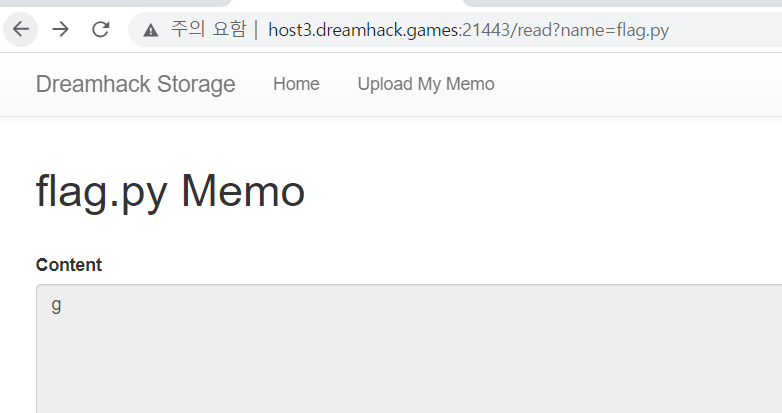
들어가서 봐보면 별 내용이 없길래
../를 통해 디렉터리를 이동해주었더니
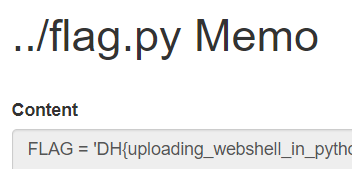
플래그가 나왔다.
