STAGE 1-3 Cookie&Session
Cookie
클라이언트의 IP주소, User-Agent(사용자를 대표하는 컴퓨터 프로그램=브라우저)매번 변경될 수 o
HTTP 프로토콜의 특징: Connectionless(하나의 요청에 하나의 응답을 한 후 연결 종료), Stateless(통신이 끝난 후 정보 저장 x)
->웹 서버가 클라이언트를 기억할 수 x
그래서 탄생한게 !! Cookie
쿠키: key+value
구성: 이름, 값, 유효시간, 도메인, 경로
유효한 시간 지정 가능, 클라이언트에 저장됨
서버가 클라이언트에 쿠키 발급하면 서버에 요청을 보낼 때마다 쿠키를 같이 전송
서버는 클라이언트의 요청에 포함된 쿠키 확인
쿠키를 통해 정보 기록 후 쿠키를 통해 판단
서버 통신 때마다 전송되기 때문에 리소스 낭비 발생 가능 -> Modern Storage APIs 권장
서버의 쿠키 설정: HTTP 응답 헤더에 쿠키 설정 헤더 추가
HTTP/1.1 200 OK
Server: Apache/2.4.29 (Ubuntu)
Set-Cookie: name=test;
Set-Cookie: age=30; Expires=Fri, 30 Sep 2022 14:54:50 GMT;
...
클라이언트의 쿠키 설정: 자바스크립트 사용해 쿠키 설정
document.cookie = "name=test;"
document.cookie = "age=30; Expires=Fri, 30 Sep 2022 14:54:50 GMT;"
악의적인 클라이언트는 쿠키 정보 변조해 서버에 요청 가능
Session
쿠키에 인증 상태를 저장하지만 클라이언트가 인증 정보를 변조할 수 없게 하기 위한 것
인증 정보를 서버에 저장하고 해당 데이터에 접근할 수 있는 키를 만들어 클라이언트에 전달하는 방식으로 작동
서버에서 클라이언트를 구분하기 위해 세션ID 부여
세션에 해당하는 이용자의 인증 상태 훔치기 -> 세션 하이재킹
Cookie
이 문제로 실습을 해보자
들어가면
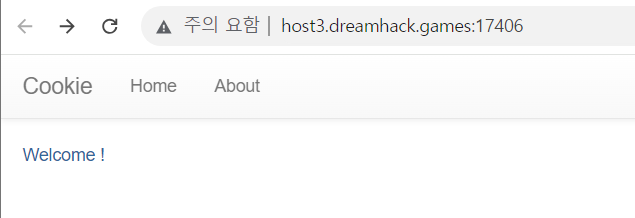
welcome ! 과 함께 로그인을 할 수 있다.
소스코드랑 같이 문제를 풀어보아야겠다.
#!/usr/bin/python3
from flask import Flask, request, render_template, make_response, redirect, url_for

app = Flask(__name__)

try:
    FLAG = open('./flag.txt', 'r').read()
except:
    FLAG = '[**FLAG**]'

users = {
    'guest': 'guest',
    'admin': FLAG
}

@app.route('/')
def index():
    username = request.cookies.get('username', None)
    #request.cookies.get(): 쿠키값 불러오기, 이용자가 전송한 쿠키의 username 가져옴
    if username:
        return render_template('index.html', text=f'Hello {username}, {"flag is " + FLAG if username == "admin" else "you are not admin"}')
    return render_template('index.html')
    #username==admin인 경우 플래그 출력

@app.route('/login', methods=['GET', 'POST'])
def login():
    if request.method == 'GET':
        return render_template('login.html')
    elif request.method == 'POST':
        username = request.form.get('username')
        password = request.form.get('password')
        try:
            pw = users[username]
        except:
            return '<script>alert("not found user");history.go(-1);</script>'
        if pw == password:
            resp = make_response(redirect(url_for('index')) )
            resp.set_cookie('username', username)
            return resp
        return '<script>alert("wrong password");history.go(-1);</script>'

app.run(host='0.0.0.0', port=8000)
코드를 살펴보면 guest:guest로 로그인 할 수 있다.
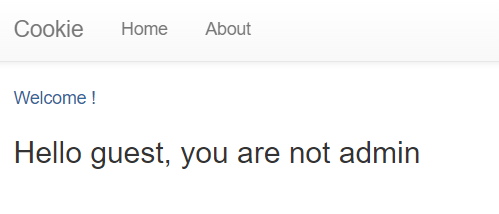
admin으로 로그인하면 flag가 나오는 듯 하다.
개발자 도구를 켜서
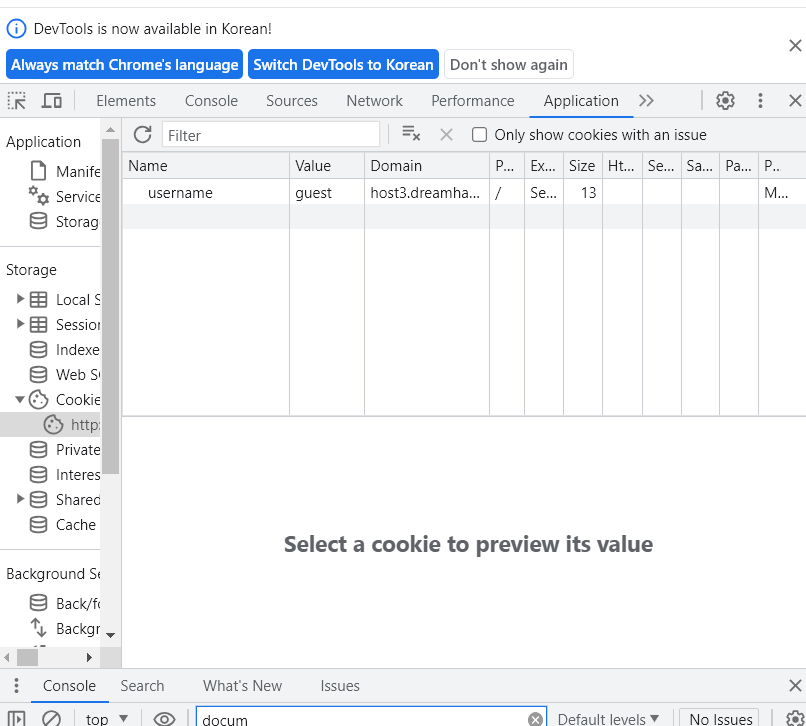
쿠키의 value를 admin으로 바꾸어보았다.
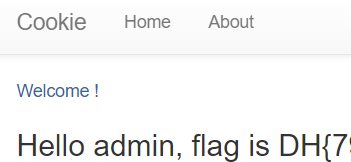
손쉽게 해결!
session-basic
admin 계정으로 로그인하면 플래그를 획득할 수 있다고 한다.
#!/usr/bin/python3
from flask import Flask, request, render_template, make_response, redirect, url_for

app = Flask(__name__)

try:
    FLAG = open('./flag.txt', 'r').read()
except:
    FLAG = '[**FLAG**]'

users = {
    'guest': 'guest',
    'user': 'user1234',
    'admin': FLAG
}


# this is our session storage
session_storage = {
}


@app.route('/')
def index():
    session_id = request.cookies.get('sessionid', None)
    try:
        # get username from session_storage
        username = session_storage[session_id]
    except KeyError:
        return render_template('index.html')

    return render_template('index.html', text=f'Hello {username}, {"flag is " + FLAG if username == "admin" else "you are not admin"}')


@app.route('/login', methods=['GET', 'POST'])
def login():
    if request.method == 'GET':
        return render_template('login.html')
    elif request.method == 'POST':
        username = request.form.get('username')
        password = request.form.get('password')
        try:
            # you cannot know admin's pw
            pw = users[username]
        except:
            return '<script>alert("not found user");history.go(-1);</script>'
        if pw == password:
            resp = make_response(redirect(url_for('index')) )
            session_id = os.urandom(32).hex()
            session_storage[session_id] = username
            resp.set_cookie('sessionid', session_id)
            return resp
        return '<script>alert("wrong password");history.go(-1);</script>'


@app.route('/admin')
def admin():
    # developer's note: review below commented code and uncomment it (TODO)

    #session_id = request.cookies.get('sessionid', None)
    #username = session_storage[session_id]
    #if username != 'admin':
    #    return render_template('index.html')

    return session_storage


if __name__ == '__main__':
    import os
    # create admin sessionid and save it to our storage
    # and also you cannot reveal admin's sesseionid by brute forcing!!! haha
    session_storage[os.urandom(32).hex()] = 'admin'
    print(session_storage)
    app.run(host='0.0.0.0', port=8000)
guest:guest, user:user1234, admin: FLAG이다.
admin으로 로그인 성공 시 플래그가 출력될 것이다.
먼저 guest:guest로 로그인해보자
cookie 문제처럼
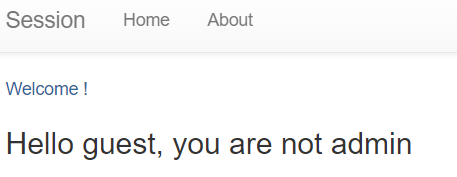
출력된다.
cookie 문제와 다른점은 sessionid가 계속해서 바뀌는 것이다.
개발자도구를 키고 console 창에서 document.cookie를 입력해주었더니

sessionid를 보여주었다.
그런데 이것도 계속해서 바뀌는 sessionid 중 하나였다.
뭐지 싶어서 코드를 다시 살펴봤는데,
@app.route('/admin')
def admin():
    # developer's note: review below commented code and uncomment it (TODO)

    #session_id = request.cookies.get('sessionid', None)
    #username = session_storage[session_id]
    #if username != 'admin':
    #    return render_template('index.html')

    return session_storage
개발자의 노트가 적혀있다고 한다. 그래서 uri에 넣고 검색해주었더니

admin의 sessionid로 예상되는 sessionid가 나왔다.
그래서 개발자 도구를 켜주고 sessionid의 value에 넣어주었더니
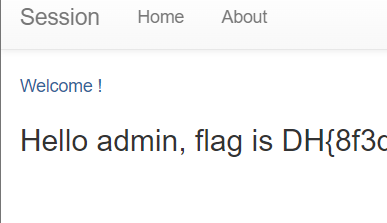
성공했다.
Same Origin Policy (SOP)
클라이언트 입장에서 가져온 데이터를 악의적인 페이지에서 읽을 수 없도록 하는 것
same Origin일 때만 정보를 읽을 수 있음
Origin
구성 요소: 프로토콜, 스키마, 포트, 호스트
모두 일치해야 동일하다고 봄
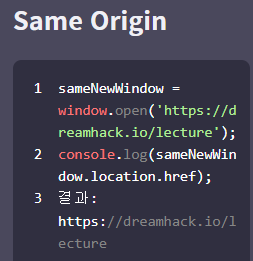
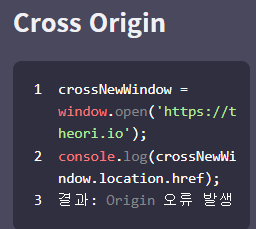
위에서처럼 외부 출처에서 불러온 데이터를 읽으려고 할 때 오류가 발생해 읽지 못함
그렇지만 쓰는 것은 가능
브라우저가 SOP에 구애 받지 않고 외부 출처에 대한 접근을 허용하는 경우:
<img>, <style>, <script>
//등의 리소스를 불러오는 태그
각 서비스의 호스트가 다른 환경에서, SOP 적용 받지 않고 리소스를 공유하고 싶을 때:
교차 출처 리소스 공유 (Cross Origin Resource Sharing, CORS) 사용
CORS: HTTP헤더에 기반하여 Cross Origin 간에 리소스를 공유하는 방법
발신측에서 CORS 헤더 설정해 요청하면 수신 측에서 헤더를 구분해 정해진 규칙에 맞게 데이터를 가져갈 수 있음
JSON with Padding (JSONP):
스크립트 태그로 Cross Origin의 데이터 불러옴
스크립트 태그 내에서 데이터를 자바스크립트 코드로 인식하기에 Callback 함수 이용해야함
거의 사용하지 않음
알게 된 코드:
request.cookies.get(): 쿠키값 불러오기
window.open: 새로운 창 띄우기
object.location.href: 객체가 가리키고 있는 URL 주소 읽어오기
document.getElementById('~~~'): HTML 요소를 읽거나 바꾸고 싶을 때 사용
onload(): 이벤트 핸들러, 성공적으로 객체가 로드되었을 때 동작
