무엇?
URL을 열거나, 이메일, 전화, 문자 메시지 등을 보내기 위해 사용하는 패키지
여기서는 url 여는 걸 다룬다.
설치
url_launcher공식문서
1. 설치
flutter pub add url_launcher- configuration 추가
IOS
<key>LSApplicationQueriesSchemes</key>
<array>
  <string>sms</string>
  <string>tel</string>
</array>
Android
<queries>
  <!-- If your app checks for SMS support -->
  <intent>
    <action android:name="android.intent.action.VIEW" />
    <data android:scheme="sms" />
  </intent>
  <!-- If your app checks for call support -->
  <intent>
    <action android:name="android.intent.action.VIEW" />
    <data android:scheme="tel" />
  </intent>
  <!-- If your application checks for inAppBrowserView launch mode support -->
  <intent>
    <action android:name="android.support.customtabs.action.CustomTabsService" />
  </intent>
</queries>
어떤 종류의 스키마를 이용하고 싶은지 명시하는 것
스키마 종류
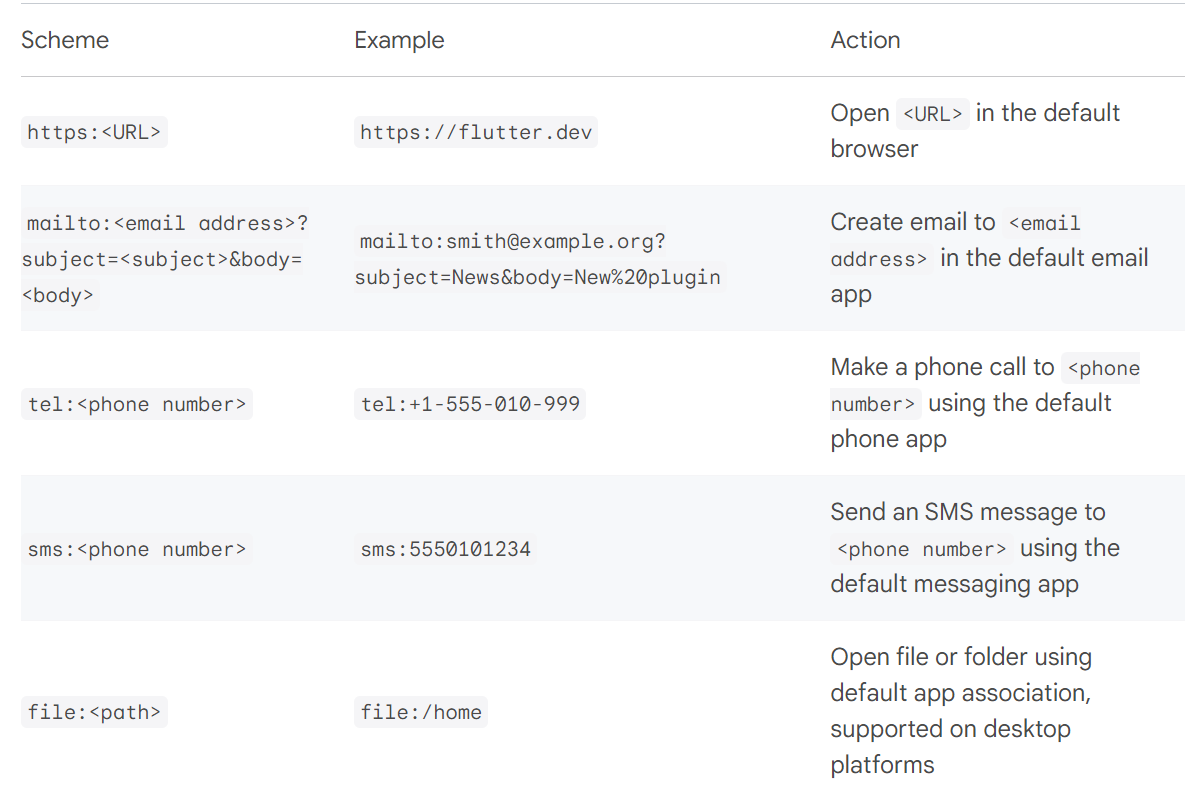
안드로이드 수정 파일 경로 : android > app > main > AndroidMainifest.xml
IOS 경로 : ios > Runner > info.plist
안드로이드 추가 예시 - https
<queries>
        <intent>
            <action android:name="android.intent.action.VIEW" />
            <data android:scheme="https" />
        </intent>
        <intent>
            <action android:name="android.support.customtabs.action.CustomTabsService" />
        </intent>
</queries>- 수정 끝나면 Flutter이외의 파일을 수정했으니 rebuild(hot reloading안됨)
준비 끝
이전 포스트에 이어서
launchUrl
ListView의 에피소트를 tap하면 해당 회차의 url이 열리도록 했다.
그런데 아래처럼 시간이 아무리 지나도 로딩 상태가 됐다.
링크를 google.com으로 바꿔도 동일증상. 로딩이 끝나도 화면이 나오지 않는다.
에러 해결을 위한 참고
위 링크는 아예 인터넷이 안되는거라 나랑 연관이 없을 것 같지만 일단 시도
- cold booting
- 다른 emulator사용
- DNS 고정으로 변경 8.8.8.8, 8.8.8.4
- manifest.xml 수정
- AVD 설정에서 내가 만든 앱 삭제 후 재실행
모두 해결 안 됨.
실행기기를 AVD가 아니라 내 핸드폰으로 설정하고 실행해보니 잘 동작함(USB 디버깅)
이 방식은 디버깅이 끝나면 연결을 끊는 것 같은데 마치 설치된 앱처럼 동작한다.
(물론 home으로 가거나 종료 후에는 핸드폰에서 다시 접속할 수 없는듯)
결국 다른 방법으로
launchUrl을 살펴보면 다양한 기능 중에
mode: LaunchMode.inAppWebView로 수정하고 실행하면 잘 출력되는 걸 볼 수 있음. 정말 앱에서 실행하듯이 보는 것임.
- platformDefault : 기본값
- externalNonBrowserApplication : 외부 브라우저 앱으로 실행(ex. chrome)
- inAppBrowserView : 앱 기본 브라우저로 실행(platformDefault 인 듯)
- inAppWebView : 앱처럼 실행
configuration
await launchUrl(
      url,
      mode: LaunchMode.inAppBrowserView,
      browserConfiguration: const BrowserConfiguration(
        showTitle: true,
      ),
    );
이렇게도 할 수 있는데 그냥 title보여주는 게 끝이다.
externalNonBrowserApplication, inAppBrowserView는 실행해도 계속 흰 화면만 나온다(무한로딩)