2025 / 10 / 14
-
AbilitySystemComponent
- AbilitySystemComponent.h를 살펴보며 알게된 점이나 궁금한 점을 정리해본다.
- GameplayAbility, GameplayEffect, GameplayAttributes
/** * UAbilitySystemComponent * * A component to easily interface with the 3 aspects of the AbilitySystem: * * GameplayAbilities: * -Provides a way to give/assign abilities that can be used (by a player or AI for example) * -Provides management of instanced abilities (something must hold onto them) * -Provides replication functionality * -Ability state must always be replicated on the UGameplayAbility itself, but UAbilitySystemComponent provides RPC replication * for the actual activation of abilities * * GameplayEffects: * -Provides an FActiveGameplayEffectsContainer for holding active GameplayEffects * -Provides methods for applying GameplayEffects to a target or to self * -Provides wrappers for querying information in FActiveGameplayEffectsContainers (duration, magnitude, etc) * -Provides methods for clearing/remove GameplayEffects * * GameplayAttributes * -Provides methods for allocating and initializing attribute sets * -Provides methods for getting AttributeSets * */-
AbilitySystemComponent 헤더 초반에 쓰여진 코멘트.
UAbilitySystemComponent의 주 목적은 AbilitySystem의 3요소인 GameplayAbilities, GameplayEffects, GameplayAttributes와의 간편한 상호작용을 위한 인터페이스로서의 역할이라고 쓰여져 있다.- GameplayAbilities
- 사용할 수 있는 어빌리티를 제공하거나 할당받기 위한 경로 제공
- 인스턴스된 어빌리티를 관리할 수 있는 방법 제공
(어떤 클래스는 어빌리티를 지니고 있어야 하므로) - 레플리케이션 기능 제공
- GameplayEffects
- FActiveGameplayEffectsContainer를 통해 GameplayEffect를 지니고 있을 수 있게 함.
- GameplayEffect를 타겟 또는 스스로에게 적용하기 위한 함수 제공
- FActiveGameplayEffectsContainers 내부의 정보를 쿼리하기 위한 래퍼 함수 제공
(GameplayEffect의 지속시간, magnitude (강도) 등) - GameplayEffect를 제거하기 함수 제공
- GameplayAttributes
- AttributeSet을 할당 및 초기화 하기 위한 함수 제공
- AttributeSet에 접근(Get)하기 위한 함수 제공
- GameplayAbilities
-
GameplayAbilities, GameplayEffect, AttributeSet에서 발생하는 특정 상황의 이벤트에 대한 델리게이트도 제공한다.
/** Called when a targeting actor rejects target confirmation */ DECLARE_MULTICAST_DELEGATE_OneParam(FTargetingRejectedConfirmation, int32); // 타겟 액터가 타겟 확인을 거부했을 시 /** Called when ability fails to activate, passes along the failed ability and a tag explaining why */ DECLARE_MULTICAST_DELEGATE_TwoParams(FAbilityFailedDelegate, const UGameplayAbility*, const FGameplayTagContainer&); // 어빌리티 작동이 실패했을 때, 해당 어빌리티와 실패 이유에 대한 정보를 FGameplayTagContainer로 반환 /** Called when ability ends */ DECLARE_MULTICAST_DELEGATE_OneParam(FAbilityEnded, UGameplayAbility*); // 어빌리티 종료 시 /** Notify interested parties that ability spec has been modified */ DECLARE_MULTICAST_DELEGATE_OneParam(FAbilitySpecDirtied, const FGameplayAbilitySpec&); // 어빌리티 스펙에 변경점이 생겼을 시 /** Notifies when GameplayEffectSpec is blocked by an ActiveGameplayEffect due to immunity */ DECLARE_MULTICAST_DELEGATE_TwoParams(FImmunityBlockGE, const FGameplayEffectSpec& /*BlockedSpec*/, const FActiveGameplayEffect* /*ImmunityGameplayEffect*/); // 이펙트가 현재 활성화 된 이펙트의 면역 효과로 인해 블록됐을 시 // UAbilitySystemComponent 클래스 내부 /** Used to register callbacks to ability-key input */ DECLARE_DYNAMIC_MULTICAST_DELEGATE_OneParam(FAbilityAbilityKey, /*UGameplayAbility*, Ability, */int32, InputID); /** Used to register callbacks to confirm/cancel input */ DECLARE_DYNAMIC_MULTICAST_DELEGATE(FAbilityConfirmOrCancel); /** Delegate for when an effect is applied */ DECLARE_MULTICAST_DELEGATE_ThreeParams(FOnGameplayEffectAppliedDelegate, UAbilitySystemComponent*, const FGameplayEffectSpec&, FActiveGameplayEffectHandle); // 이펙트가 적용됐을 시 -
델리게이트들은 GameplayEffectTypes.h, GameplayAbilityTypes.h 등에 선언된 것들도 있다.
(FOnActiveGameplayEffectStackChange, FGameplayAbilityDelegate 등)
-
- GameplayTag
- AbilitySystemComponent는 IGameplayTagAssetInterface를 상속하므로
해당 인터페이스의 함수들을 구현한다.```cpp FORCEINLINE bool HasMatchingGameplayTag(FGameplayTag TagToCheck) const override { return GameplayTagCountContainer.HasMatchingGameplayTag(TagToCheck); } FORCEINLINE bool HasAllMatchingGameplayTags(const FGameplayTagContainer& TagContainer) const override { return GameplayTagCountContainer.HasAllMatchingGameplayTags(TagContainer); } FORCEINLINE bool HasAnyMatchingGameplayTags(const FGameplayTagContainer& TagContainer) const override { return GameplayTagCountContainer.HasAnyMatchingGameplayTags(TagContainer); } FORCEINLINE void GetOwnedGameplayTags(FGameplayTagContainer& TagContainer) const override { TagContainer.Reset(); TagContainer.AppendTags(GameplayTagCountContainer.GetExplicitGameplayTags()); } ```
- AbilitySystemComponent는 IGameplayTagAssetInterface를 상속하므로
- GameplayCues, AnimMontage 등
- OwnerActor, AvatarActor로 실제 소유자와 소유자를 대표하는 액터 개념도 확인 가능.
-
GameplayEffectDelegates
- FOnGameplayEffectAppliedDelegate
// AbilitySystemComponent.h /** Called on server whenever a GE is applied to self. This includes instant and duration based GEs. */ FOnGameplayEffectAppliedDelegate OnGameplayEffectAppliedDelegateToSelf; /** Called on server whenever a GE is applied to someone else. This includes instant and duration based GEs. */ FOnGameplayEffectAppliedDelegate OnGameplayEffectAppliedDelegateToTarget; /** Called on both client and server whenever a duraton based GE is added (E.g., instant GEs do not trigger this). */ FOnGameplayEffectAppliedDelegate OnActiveGameplayEffectAddedDelegateToSelf; /** Called on server whenever a periodic GE executes on self */ FOnGameplayEffectAppliedDelegate OnPeriodicGameplayEffectExecuteDelegateOnSelf; /** Called on server whenever a periodic GE executes on target */ FOnGameplayEffectAppliedDelegate OnPeriodicGameplayEffectExecuteDelegateOnTarget; // AuraAbilitySystemComponent.cpp void UAuraAbilitySystemComponent::AbilityActorInfoSet() { OnGameplayEffectAppliedDelegateToSelf.AddUObject(this, &UAuraAbilitySystemComponent::EffectApplied); } void UAuraAbilitySystemComponent::EffectApplied(UAbilitySystemComponent* AbilitySystemComponent, const FGameplayEffectSpec& EffectSpec, FActiveGameplayEffectHandle ActiveEffectHandle) { // Broadcast Informations for Widgets FGameplayTagContainer TagContainer; EffectSpec.GetAllAssetTags(TagContainer); EffectAssetTags.Broadcast(TagContainer); }- GameplayEffect 적용 시 호출되는 FOnGameplayEffectAppliedDelegate 델리게이트 OnGameplayEffectAppliedDelegateToSelf에 바인딩하여 GameEffect의 AssetTags에 표기된 GameplayTag들을 전파하려 한다.
- 이를 위해 FOnGameplayEffectAppliedDelegate에 바인딩 하는 함수 EffectApplied()와, 해당 바인딩 작업을 처리할 함수 AbilityActorInfoSet()를 작성한다.
- FGameplayEffectSpec은 GameplayEffect가 소유한 GameplayTag들을 반환하는 각종 함수를 제공하며, AssetTag들을 모두 얻기 위해서는 GetAllAssetTags()를 호출하여, 정보를 넘겨받을 FGameplayTagContainer 변수를 매개변수로 전달하면 된다.
- 이렇게 정보를 얻은 FGameplayTagContainer를 다시 AuraAbilitySystemComponent에 작성한 델리게이트 FEffectAssetTag로 Broadcast() 해주면 된다.
- AuraAbilitySystemComponent는 각 캐릭터, 즉 AuraCharacterBase 상속 클래스들에 부착되는 컴포넌트이므로, 해당 클래스가 초기화 될 때 바인딩 작업을 처리하는 것이 적절한 타이밍이라고 볼 수 있다.
따라서, 기존 AuraPlayerCharacter에서만 작성해두었던 InitAbilityActorInfo()를 AuraCharacterBase의 가상함수로 변경하고, 이를 AuraPlayerCharacter와 AuraEnemyCharacter가 오버라이드 하는 식으로 변경한다.```cpp void AAuraPlayerCharacter::InitAbilityActorInfo() { AAuraPlayerState* AuraPlayerState = GetPlayerState<AAuraPlayerState>(); check(AuraPlayerState); AuraPlayerState->GetAbilitySystemComponent()->InitAbilityActorInfo(AuraPlayerState, this); Cast<UAuraAbilitySystemComponent>(AuraPlayerState->GetAbilitySystemComponent())->AbilityActorInfoSet(); AbilitySystemComponent = AuraPlayerState->GetAbilitySystemComponent(); AttributeSet = AuraPlayerState->GetAttributeSet(); if (AAuraPlayerController* AuraPlayerController = Cast<AAuraPlayerController>(GetController())) { if (AAuraHUD* AuraHUD = Cast<AAuraHUD>(AuraPlayerController->GetHUD())) { AuraHUD->InitOverlay(AuraPlayerController, AuraPlayerState, AbilitySystemComponent, AttributeSet); } } } void AAuraEnemyCharacter::InitAbilityActorInfo() { AbilitySystemComponent->InitAbilityActorInfo(this, this); Cast<UAuraAbilitySystemComponent>(AbilitySystemComponent)->AbilityActorInfoSet(); } ```
- Lambda 식을 사용한 델리게이트 바인딩
- AuraAbilitySystemComponent에서 GameplayEffect 적용 시 해당 이펙트의 AssetTags 정보를 델리게이트로 전파하는 것은 현재로선 아이템 획득 시 특정한 메세지가 호출되는 기능을 구현하기 위해서이다.
- 따라서 AuraAbilitySystemComponent의 델리게이트 FEffectAssetTag에 바인딩할 가장 적절한 클래스는 OverlayWidgetController이다.
(NVC모델의 형태로 UI 클래스들의 의존성 관계를 구현하고 있기 때문에,
Model에 해당하는 AbilitySystemComponent에 대한 참조를 이미 보유하고 있기 때문)- OverlayWidgetController는 이미 체력/마나 변경 시 이를 전파하기 위한 델리게이트들을 바인딩하는 함수 BindCallbacksToDepenedencies()가 존재한다.
(AuraHUD에서 호출) - BindCallbacksToDependencies()에서 FEffectAssetTag에 함수를 바인딩하되, 멤버 함수를 너무 늘리는 것을 방지하기 위해 Lambda 함수를 활용한다.
-
람다식 작성 방법
[Capture](Parameters){ ... function ... }Cast<UAuraAbilitySystemComponent>(AbilitySystemComponent) ->EffectAssetTags.AddLambda( [this](const FGameplayTagContainer& AssetTags) { for (const FGameplayTag& Tag : AssetTags) { // Tag에 따른 처리... } }); -
언리얼 델리게이트에서는 람다 함수를 바인딩 하는 방법으로 AddLambda()를 제공한다.
-
람다는 익명 함수이므로, 해당 함수는 ‘프로젝트 내’에 존재한다는 것은 알지만, 설령 해당 함수가 OverlayWidgetController.cpp에 작성되었다 한들 특정 클래스 내부에 존재한다는 사실은 모르는 상태이다.
- 따라서, 람다 내부에서 특정 클래스의 함수를 호출하는 경우, [Capture]란에 해당 클래스를 표기해주어야 한다.
-
- OverlayWidgetController는 이미 체력/마나 변경 시 이를 전파하기 위한 델리게이트들을 바인딩하는 함수 BindCallbacksToDepenedencies()가 존재한다.
- FOnGameplayEffectAppliedDelegate
-
UI Widget Data Table
-
GameplayTag 정보를 이용한 메세지 출력을 위한 기반 작업
-
OverlayWidgetController.h에 FUIWidget 구조체를 선언한다.
FUIWidget 구조체는 각종 위젯들이 OverlayWidgetController로부터 정보를 받아오기 위한 델리게이트 FMessageWidgetRowSignature로 반환할 정보들을 묶어두었다.USTRUCT(BlueprintType) struct FUIWidgetRow : public FTableRowBase { GENERATED_BODY() UPROPERTY(EditAnywhere, BlueprintReadOnly) FGameplayTag MessageTag = FGameplayTag(); UPROPERTY(EditAnywhere, BlueprintReadOnly) FText Message = FText::GetEmpty(); UPROPERTY(EditAnywhere, BlueprintReadOnly) TSubclassOf<UAuraUserWidget> MessageWidget; UPROPERTY(EditAnywhere, BlueprintReadOnly) UTexture2D* Image = nullptr; }; DECLARE_DYNAMIC_MULTICAST_DELEGATE_OneParam(FMessageWidgetRowSignature, FUIWidgetRow, Row); UPROPERTY(EditDefaultsOnly, BlueprintReadOnly, Category = "Widget Data") TObjectPtr<UDataTable> MessageWidgetDataTable; -
또한, DataTable 변수인 MessageWidgetDataTable을 선언하고, 이를 에디터의 BP_OverlayWidgetController에서 할당해준다.
-
FUIWidget 구조체를 통해 생성한 데이터 테이블이 필요하므로 이를 선언하고 세팅해준다.
각 메세지 위젯이 노출시킬 메세지, 이미지 등을 세팅하며, Row의 이름은 태그의 이름과 동일하게 세팅해야 한다.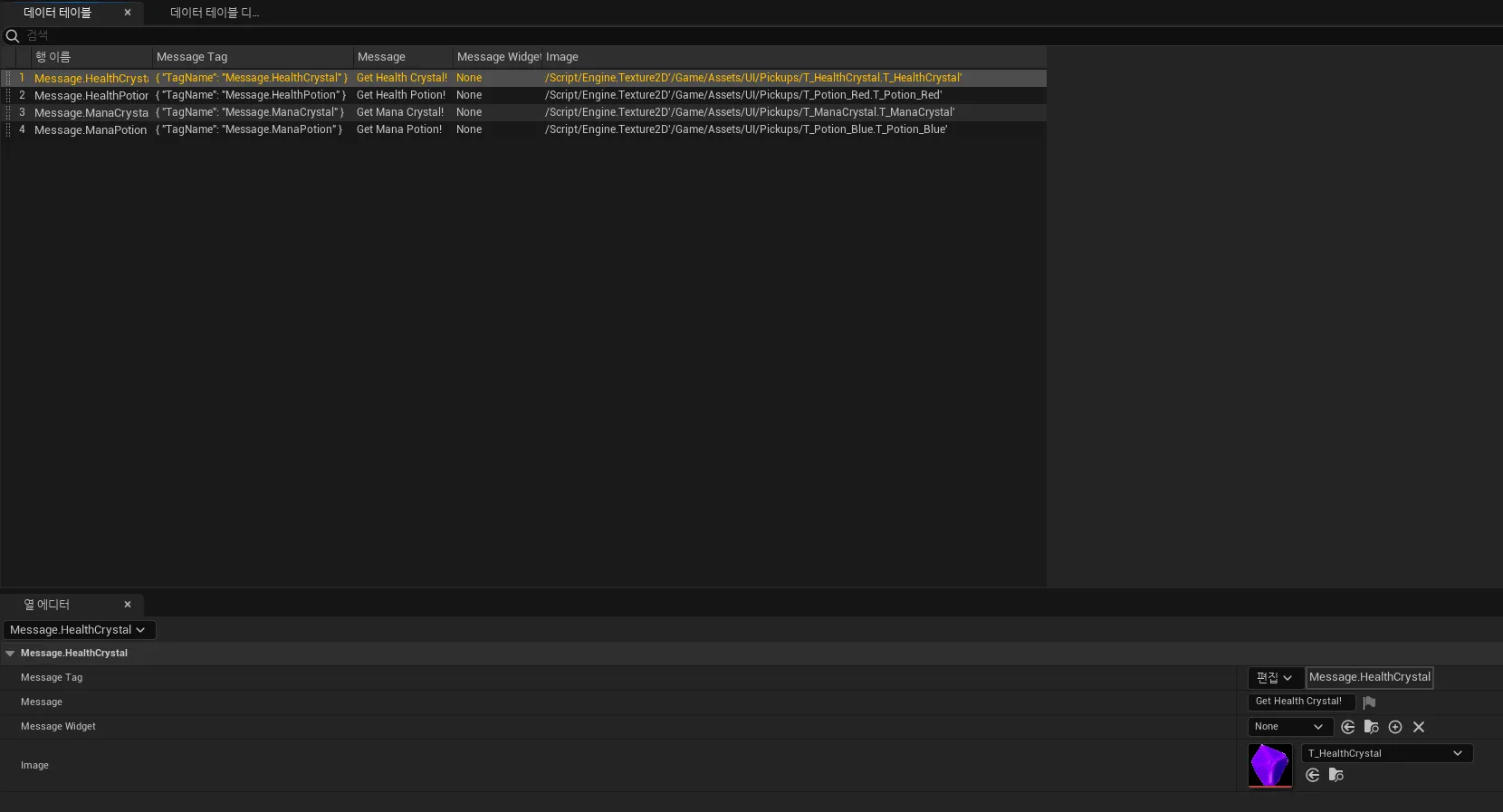
- 이렇게 세팅한 데이터 테이블은 FMessageWidgetRowSignature 바인드 함수에서 사용한다. ```cpp Cast<UAuraAbilitySystemComponent>(AbilitySystemComponent)->EffectAssetTags.AddLambda( [this](const FGameplayTagContainer& AssetTags) { for (const FGameplayTag& Tag : AssetTags) { FGameplayTag MessageTag = FGameplayTag::RequestGameplayTag(FName("Message")); if (Tag.MatchesTag(MessageTag)) { // Find Row From MessageWidgetDataTable const FUIWidgetRow* Row = GetDataTableRowByTag<FUIWidgetRow>(MessageWidgetDataTable, Tag); MessageWidgetRowDelegate.Broadcast(*Row); } } }); ```- 람다 함수에서 태그가 일치하는 지 검사하고, 델리게이트를 발송하는 처리를 해준다.
FGameplayTag는 RequestGameplayTag(), MatchesTag()와 같은 여러 함수를 제공한다.- RequestGameplayTag()는 프로젝트 세팅에서 확인할 수 있는 GameplayTag 중 매개변수로 넘겨받은 FName 타입과 일치하는 태그가 있으면 이를 반환해준다.
- MatchesTag()는 태그와 일치하는 태그가 존재하는지에 따라 bool값을 반환해준다.
이 때, MatchesTag()는 비교할 전체 태그 내부에 매개변수로 넘겨받은 태그가 모두 포함되어 있어야만 true를 반환하며, 그렇지 않으면 false를 반환한다.- 예를 들어, “Message.HealthPotion”.MatchesTag(”Message”)인 경우 true를,
”Message”.MatchesTag(”Message.HealthPotion”)인 경우는 false를 반환한다.
- 예를 들어, “Message.HealthPotion”.MatchesTag(”Message”)인 경우 true를,
- 람다 함수에서 태그가 일치하는 지 검사하고, 델리게이트를 발송하는 처리를 해준다.
-
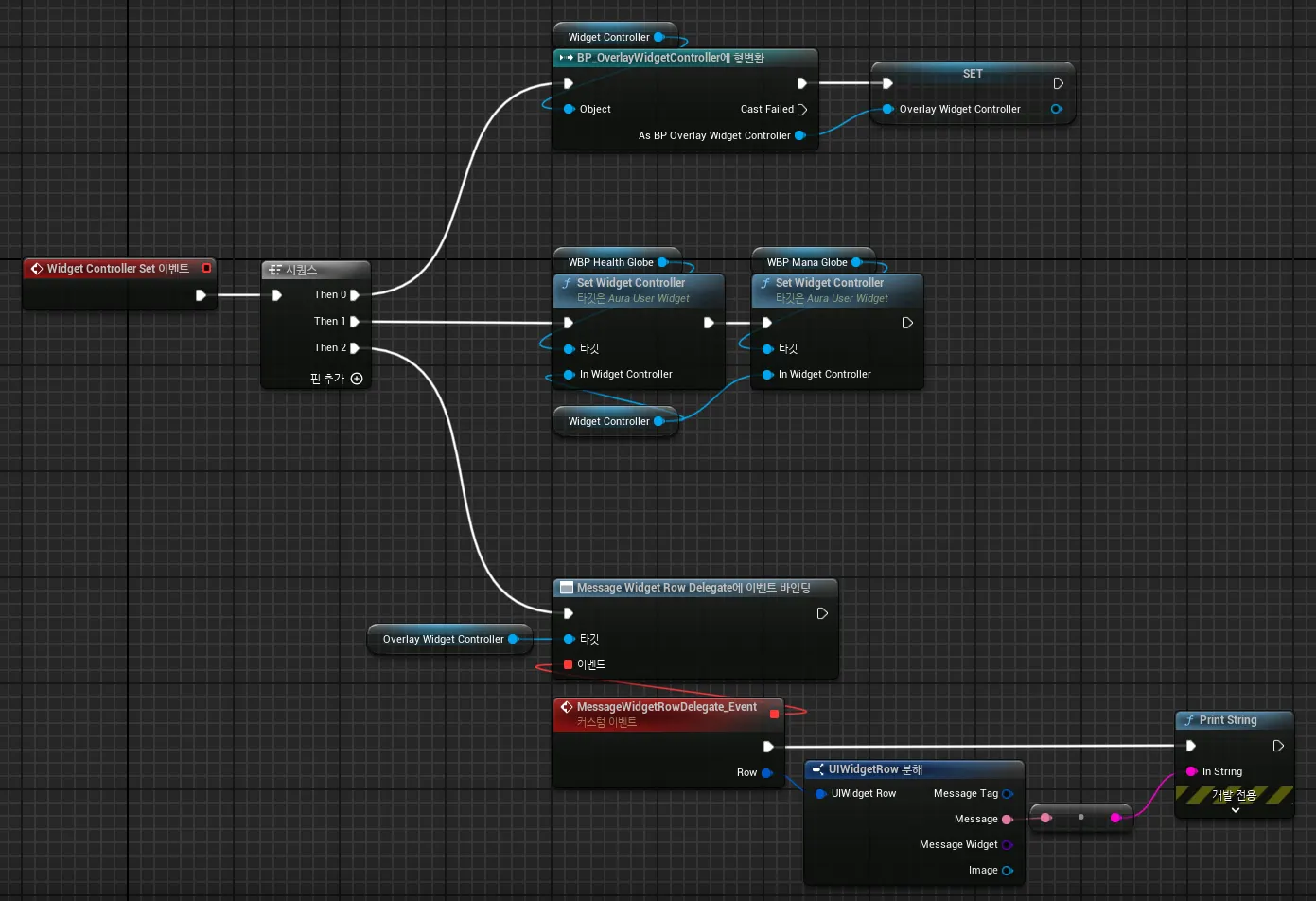
델리게이트는 블루프린트 WBP_Overlay에서 바인딩한다.
-
-
