2025 / 10 / 20
-
Attribute Based Modifiers
- GameplayEffect 블루프린트에서 Modifier 설정 시 Magnitude Calcuation Type을 Attribute Based로 설정하면 다른 Attribute 기반으로 Modifier 값을 설정할 수 있음.
- Backing Attribute에서 영향을 받을 Attribute를 결정하고, Attribute Source를 설정하여 해당 Attribute가 GameplayEffect 기준 Source/Target 중 어느 쪽에서 참조할 것인지를 결정함.
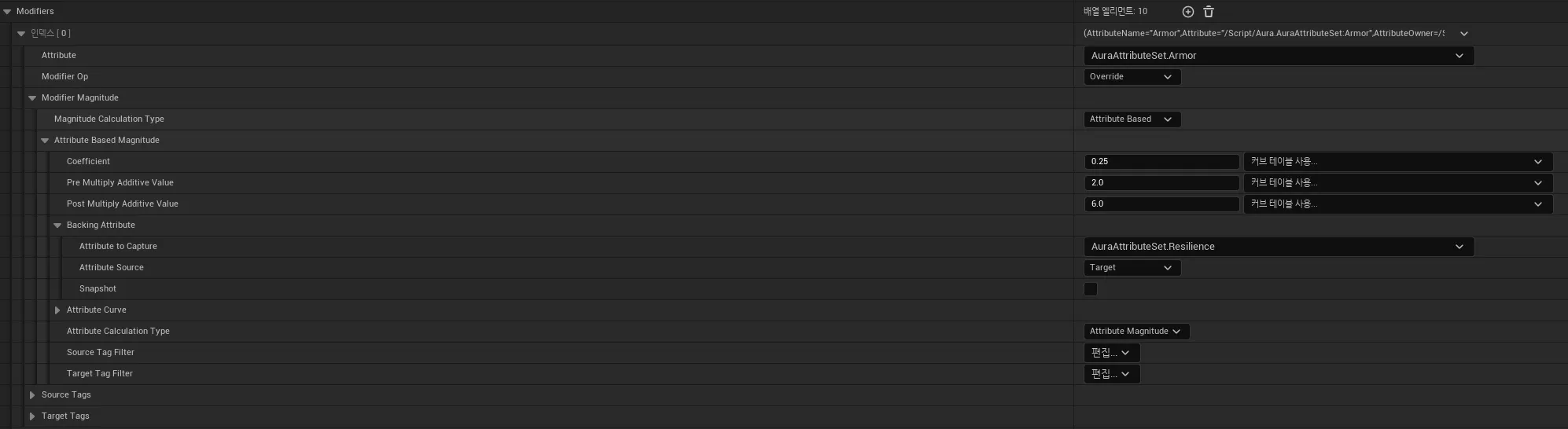
- Modifier Op에서 Add, Multiply, Divide, Override를 설정할 수 있으며,
이를 통해 값을 더하거나, 곱하거나, 나누거나, 덮어씌울 수 있다. - Attribute 하나에 여러 개의 Attribute Modifier를 설정할 수 있으며, 이 경우 위에서부터 차례대로 계산하는 방식이다.
- SourceTags, TargetTags에서 적용 시 필요한 태그, 무시할 태그를 설정할 수 있다.
-
Modifier Coefficients
- Modifier의 Coeffeicient, Pre Multiply Additive Value, Post Multiply Additive Value
Coefficient(Value + PreMultiplyAdditiveValue) + PostMultiplyAdditiveValue- 예를 들어, AuraAttributeSet에 Armor라는 이름의 Attribute를 정의하고,
이를 AuraAttributeSet의 Resilience 기반으로 설정한 다음 값을 10으로 설정한 후,
Coefficient는 0.25, Pre Multiply Additive Value는 2, Post Multiply Additive Value는 6으로 설정한 경우, Armor의 값은 0.25(10 + 2) + 6 = 9가 된다.
- Modifier의 Coeffeicient, Pre Multiply Additive Value, Post Multiply Additive Value
-
Custom Calculations (Modifier Magnitude Calculations)
-
GameplayEffect에서 제공되는 Modifier Coefficient를 제외하고도, 커스텀 계산식을 만들어서 사용할 수도 있음.
-
UGameplayModMagnitudeCalculation를 상속하는 클래스를 생성
#include "CoreMinimal.h" #include "GameplayModMagnitudeCalculation.h" #include "MMC_MaxHealth.generated.h" UCLASS() class AURA_API UMMC_MaxHealth : public UGameplayModMagnitudeCalculation { GENERATED_BODY() public: UMMC_MaxHealth(); virtual float CalculateBaseMagnitude_Implementation(const FGameplayEffectSpec& Spec) const override; private: FGameplayEffectAttributeCaptureDefinition VigorDefinition; };-
UGameplayModMagnitudeCalculation 클래스 내부에는 BlueprintNativeEvent인 CalculateBaseMagnitude()가 존재한다.
따라서 CalculateBaseMagnitude_Implementation() 오버라이드 함수를 선언한다.
- BlueprintNativeEvent는 C++ 클래스에서 함수명에_Implementation을 붙인 동일한 반환형과 매개변수를 지닌 함수를 선언함으로서 C++ 측에서 일종의 부모 함수를 만들어 사용하는 것이 가능한 함수 지정자이다.
(블루프린트 측에서 구현하여 오버라이드 하는 것이 가능한 함수이다)
- BlueprintImplementableEvent의 경우는 C++ 헤더에서 함수의 선언만 하고, 구현 자체는 완전히 블루프린트 측에 맡기지만, BlueprintNativeEvent는 C++ 측에서 함수의 기본 구현이 가능하다는 점에서 차이가 존재한다. -
FGameplayEffectAttributeCaptureDefinition 변수를 선언하여 참조하려 하는 다른 Attribute를 담을 수 있게 한다.
#include "AbilitySystem/MMC/MMC_MaxHealth.h" #include "AbilitySystem/AuraAttributeSet.h" #include "Interaction/CombatInterface.h" UMMC_MaxHealth::UMMC_MaxHealth() { VigorDefinition.AttributeToCapture = UAuraAttributeSet::GetVigorAttribute(); VigorDefinition.AttributeSource = EGameplayEffectAttributeCaptureSource::Target; VigorDefinition.bSnapshot = false; RelevantAttributesToCapture.Add(VigorDefinition); } float UMMC_MaxHealth::CalculateBaseMagnitude_Implementation(const FGameplayEffectSpec& Spec) const { const FGameplayTagContainer* SourceTags = Spec.CapturedSourceTags.GetAggregatedTags(); const FGameplayTagContainer* TargetTags = Spec.CapturedTargetTags.GetAggregatedTags(); FAggregatorEvaluateParameters EvaluationParameters; EvaluationParameters.SourceTags = SourceTags; EvaluationParameters.TargetTags = TargetTags; float Vigor = 0.f; GetCapturedAttributeMagnitude(VigorDefinition, Spec, EvaluationParameters, Vigor); Vigor = FMath::Max(0.f, Vigor); ICombatInterface* CombatInterface = Cast<ICombatInterface>(Spec.GetContext().GetSourceObject()); const int32 PlayerLevel = CombatInterface ? CombatInterface->GetPlayerLevel() : 1; return 80.f + Vigor * 2.5f + PlayerLevel * 10.f; } -
생성자에서 FGameplayEffectAttributeCaptureDefinition 변수의 AttributeToCapture, AttributeSource, bSnapShot을 초기화 해준다.
(GameplayEffect 블루프린트에서 Attribute Based Magnitude를 설정해주던 것과 동일) -
FGameplayTagContainer* 변수 SourceTags, TargetTags를 선언하여 Spec으로부터 CapturedSourceTags, CapturedTargetTags의 GetAggregatedTags()를 담아준다.
FAggregatorEvaluateParameters 변수를 선언하여 SourceTags, TargetTags를 각각 담아준다. -
GetCapturedAttributeMagnitude()를 호출하여, 필요한 변수들을 담아준다.
이 함수를 통해 Attribute Magnitude에 접근하여 해당 값을 가져올 수 있다.
(Attribute의 Base Value나 Bonus Magnitude가 아닌 호출 시점에 계산된 값을 가져옴) -
이후 계산하고자 하는 값을 반환하면 끝이다.
-
ICombatInterface는 PlayerLevel에 접근하기 쉽게 하기 위해 생성한 UInterface로, AuraCharacterBase에서 상속하여, AuraPlayerCharacter 및 AuraEnemyCharacter에서 구현하며, AuraPlayerCharacter는 AuraPlayerState에 정의된 Level 값을 반환한다.
(플레이어의 경우는 PlayerState에, 몬스터는 AuraEnemyCharacter에서 각각 AttributeSet 및 AbilitySystemComponent에 접근하기 때문)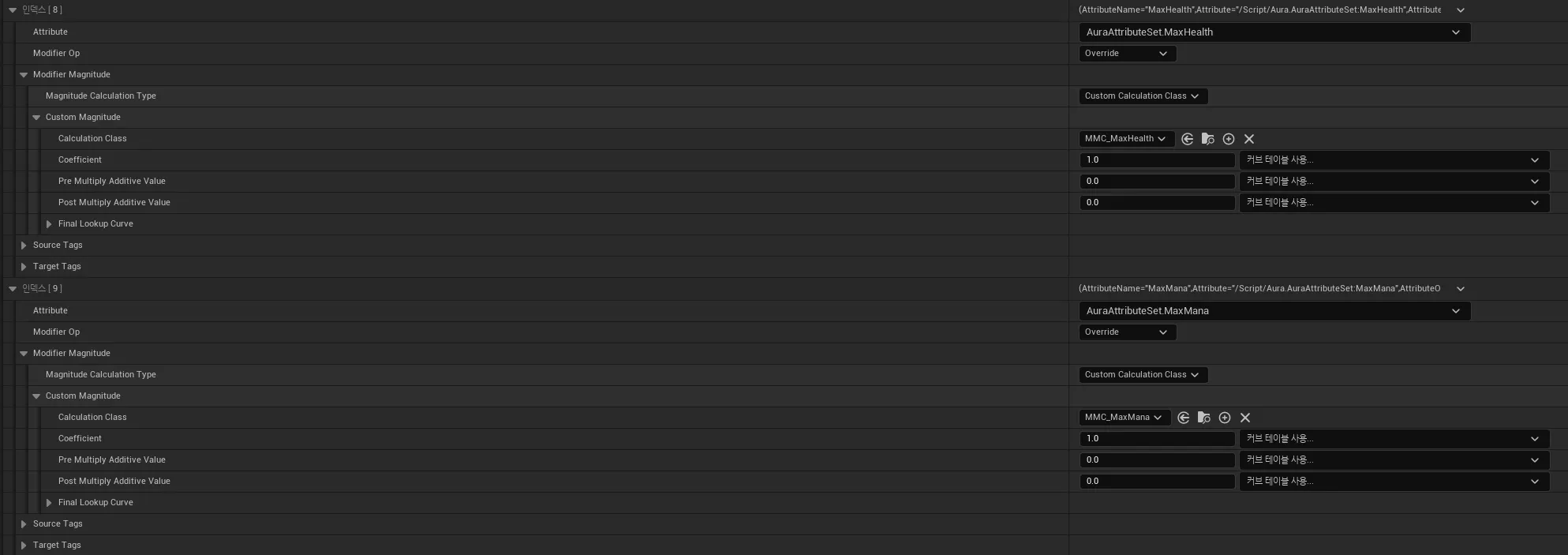
-
Modifier Magnitude에서 Magnitude Calculation Type을 Custom Calculation Class로 변경하고, 생성한 UGameplayModMagnitudeCalculation 상속 클래스를 등록한다.
Custom Calculation Class 또한 Coefficient, Pre Multiply Additive Value, Post Multiply Additive Value를 사용할 수 있다.
-
-
