-
Ability Task
-
GameplayAbility가 작업을 수행하기 위해 사용하는 일꾼 같은 개념.
즉각적으로, 또는 시간에 걸쳐서 사용할 수 있음. -
기본적으로 제공되는 PlayMontageAndWait과 같은 AbilityTask도 있으며,
사용자가 직접 AbilityTask를 작성하여 사용하는 것도 가능함.-
PlayMontageAndWait
```cpp // Copyright Epic Games, Inc. All Rights Reserved. #pragma once #include "CoreMinimal.h" #include "UObject/ObjectMacros.h" #include "Animation/AnimInstance.h" #include "Abilities/Tasks/AbilityTask.h" #include "AbilityTask_PlayMontageAndWait.generated.h" DECLARE_DYNAMIC_MULTICAST_DELEGATE(FMontageWaitSimpleDelegate); /** Ability task to simply play a montage. Many games will want to make a modified version of this task that looks for game-specific events */ UCLASS() class GAMEPLAYABILITIES_API UAbilityTask_PlayMontageAndWait : public UAbilityTask { GENERATED_UCLASS_BODY() // PlayMontageAndWait 노드의 여러 Output 핀들은 아래의 델리게이트 변수 선언을 통해 가능한 것이다. UPROPERTY(BlueprintAssignable) FMontageWaitSimpleDelegate OnCompleted; UPROPERTY(BlueprintAssignable) FMontageWaitSimpleDelegate OnBlendOut; UPROPERTY(BlueprintAssignable) FMontageWaitSimpleDelegate OnInterrupted; UPROPERTY(BlueprintAssignable) FMontageWaitSimpleDelegate OnCancelled; UFUNCTION() void OnMontageBlendingOut(UAnimMontage* Montage, bool bInterrupted); UFUNCTION() void OnMontageInterrupted(); UFUNCTION() void OnMontageEnded(UAnimMontage* Montage, bool bInterrupted); /** * Start playing an animation montage on the avatar actor and wait for it to finish * If StopWhenAbilityEnds is true, this montage will be aborted if the ability ends normally. It is always stopped when the ability is explicitly cancelled. * On normal execution, OnBlendOut is called when the montage is blending out, and OnCompleted when it is completely done playing * OnInterrupted is called if another montage overwrites this, and OnCancelled is called if the ability or task is cancelled * * @param TaskInstanceName Set to override the name of this task, for later querying * @param MontageToPlay The montage to play on the character * @param Rate Change to play the montage faster or slower * @param StartSection If not empty, named montage section to start from * @param bStopWhenAbilityEnds If true, this montage will be aborted if the ability ends normally. It is always stopped when the ability is explicitly cancelled * @param AnimRootMotionTranslationScale Change to modify size of root motion or set to 0 to block it entirely * @param StartTimeSeconds Starting time offset in montage, this will be overridden by StartSection if that is also set */ UFUNCTION(BlueprintCallable, Category="Ability|Tasks", meta = (DisplayName="PlayMontageAndWait", HidePin = "OwningAbility", DefaultToSelf = "OwningAbility", BlueprintInternalUseOnly = "TRUE")) static UAbilityTask_PlayMontageAndWait* CreatePlayMontageAndWaitProxy(UGameplayAbility* OwningAbility, FName TaskInstanceName, UAnimMontage* MontageToPlay, float Rate = 1.f, FName StartSection = NAME_None, bool bStopWhenAbilityEnds = true, float AnimRootMotionTranslationScale = 1.f, float StartTimeSeconds = 0.f); virtual void Activate() override; /** Called when the ability is asked to cancel from an outside node. What this means depends on the individual task. By default, this does nothing other than ending the task. */ virtual void ExternalCancel() override; virtual FString GetDebugString() const override; protected: virtual void OnDestroy(bool AbilityEnded) override; /** Checks if the ability is playing a montage and stops that montage, returns true if a montage was stopped, false if not. */ bool StopPlayingMontage(); FOnMontageBlendingOutStarted BlendingOutDelegate; FOnMontageEnded MontageEndedDelegate; FDelegateHandle InterruptedHandle; UPROPERTY() TObjectPtr<UAnimMontage> MontageToPlay; UPROPERTY() float Rate; UPROPERTY() FName StartSection; UPROPERTY() float AnimRootMotionTranslationScale; UPROPERTY() float StartTimeSeconds; UPROPERTY() bool bStopWhenAbilityEnds; }; ```-
CreatePlayMontageAndWaitProxy() 함수가 바로 GameplayAbility에서 PlayMontageAndWait 노드를 호출할 수 있게 해주는 함수이다.
- Static 선언되어, AbilityTask의 NewAbilityTask() 함수를 통해 클래스 스스로의 포인터를 반환하는 함수이며, 호출 시 자신이 보유한 MontageToPlay, Rate, StartSection 등의 변수를 초기화 하도록 되어있는 일종의 정적 팩토리 함수이다.
-
Delegate를 상당히 많이 사용하는 모습을 볼 수 있다.
void UAbilityTask_PlayMontageAndWait::Activate() { if (Ability == nullptr) { return; } bool bPlayedMontage = false; if (UAbilitySystemComponent* ASC = AbilitySystemComponent.Get()) { const FGameplayAbilityActorInfo* ActorInfo = Ability->GetCurrentActorInfo(); UAnimInstance* AnimInstance = ActorInfo->GetAnimInstance(); if (AnimInstance != nullptr) { if (ASC->PlayMontage(Ability, Ability->GetCurrentActivationInfo(), MontageToPlay, Rate, StartSection, StartTimeSeconds) > 0.f) { // Playing a montage could potentially fire off a callback into game code which could kill this ability! Early out if we are pending kill. if (ShouldBroadcastAbilityTaskDelegates() == false) { return; } InterruptedHandle = Ability->OnGameplayAbilityCancelled.AddUObject(this, &UAbilityTask_PlayMontageAndWait::OnMontageInterrupted); BlendingOutDelegate.BindUObject(this, &UAbilityTask_PlayMontageAndWait::OnMontageBlendingOut); AnimInstance->Montage_SetBlendingOutDelegate(BlendingOutDelegate, MontageToPlay); MontageEndedDelegate.BindUObject(this, &UAbilityTask_PlayMontageAndWait::OnMontageEnded); AnimInstance->Montage_SetEndDelegate(MontageEndedDelegate, MontageToPlay); ACharacter* Character = Cast<ACharacter>(GetAvatarActor()); if (Character && (Character->GetLocalRole() == ROLE_Authority || (Character->GetLocalRole() == ROLE_AutonomousProxy && Ability->GetNetExecutionPolicy() == EGameplayAbilityNetExecutionPolicy::LocalPredicted))) { Character->SetAnimRootMotionTranslationScale(AnimRootMotionTranslationScale); } bPlayedMontage = true; } } else { ABILITY_LOG(Warning, TEXT("UAbilityTask_PlayMontageAndWait call to PlayMontage failed!")); } } else { ABILITY_LOG(Warning, TEXT("UAbilityTask_PlayMontageAndWait called on invalid AbilitySystemComponent")); } if (!bPlayedMontage) { ABILITY_LOG(Warning, TEXT("UAbilityTask_PlayMontageAndWait called in Ability %s failed to play montage %s; Task Instance Name %s."), *Ability->GetName(), *GetNameSafe(MontageToPlay),*InstanceName.ToString()); if (ShouldBroadcastAbilityTaskDelegates()) { OnCancelled.Broadcast(); } } SetWaitingOnAvatar(); }- AnimInstance에서 AnimMontage를 작동시키는 방식은 AnimMontage의 인스턴스를 생성하는 것으로 보이는데, 이 때 각 AnimMontage의 인스턴스를 담는 FAnimMontageInstance의 델리게이트에 AbilityTask_PlayMontageAndWait에서 선언한 델리게이트 변수에 바인딩을 실시하여 넘겨주는 것이다.
- 다만, PlayMontageAndWait은 GameplayAbility가 아닌 일반적으로 사용하는 PlayMontage 노드에서 제공하는 OnNotifyBegin, OnNotifyEnd 등 AnimNotify를 활용하는 델리게이트가 존재하지 않는다.
- Aura의 파이어볼트 애니메이션에서, 애니메이션 시작과 동시에 파이어볼트가 날아가기보단, 지팡이를 앞으로 뻗는 순간 날아가는 것이 자연스러우므로 이를 위한 작업이 필요하다.
-
GameplayEvents - Spawn Firebolt
- PlayMontageAndWait 노드를 활용하여, 애님 노티파이를 사용할 수 있도록 해본다.
- WaitGameplayEvent와 커스텀 AnimNotify를 사용한다.
- GameplayAbility 블루프린트에서 WaitGameplayEvent 노드를 PlayMontageAndWait 다음에 호출한다.
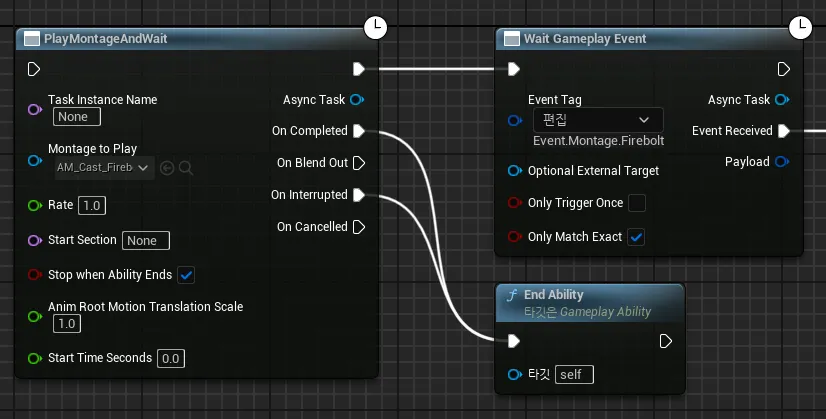
- WaitGameplayEvent는 GameplayTag를 입력받으며, 동일한 GameplayTag가 호출될 시 이에 반응하여 EventReceived 노드에 연결된 로직을 실행한다.
(EventReceived라는 변수명을 지닌 델리게이트가 존재한다고 보면 된다.) - AnimNotify를 상속하여 새로운 블루프린트를 생성한다.
상속한 AnimNotify는 ReceivedNotify 함수를 오버라이드한다.
- PlayMontageAndWait 노드를 활용하여, 애님 노티파이를 사용할 수 있도록 해본다.
-
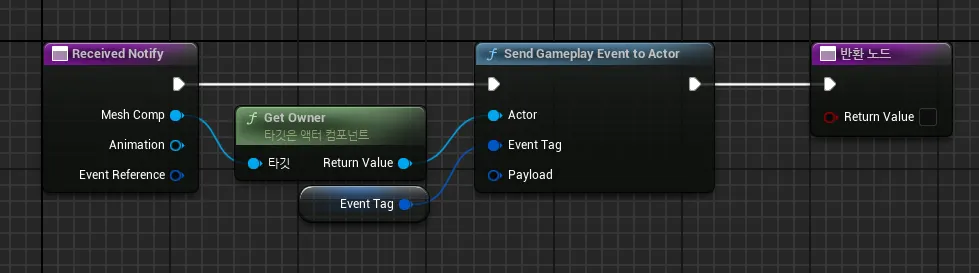
-
SendGameplayEventToActor를 통해 GameplayTag를 특정 액터에게 호출한다.
(GameplayTag에 해당하는 GameplayEvent가 특정 액터에게 발생했다고 알림)- AnimMontage에서 직접 생성한 AnimNotify를 원하는 구간에 설정하고, GameplayTag를 설정한다.
-
GameplayEvent의 WaitForGameplayEvent 노드의 EventReceived 부분에 투사체를 발사하는 로직을 호출해주면 된다.
(AuraProjectileSpell 클래스에서 ActivateAbility()에서 실행되던 투사체 발사를 별도의 함수를 생성하여 분리해주면 쉽게 처리 가능)```cpp void UAuraProjectileSpell::SpawnProjectile() { const bool bIsServer = GetAvatarActorFromActorInfo()->HasAuthority(); if (!bIsServer) return; ICombatInterface* CombatInterface = Cast<ICombatInterface>(GetAvatarActorFromActorInfo()); if (CombatInterface) { const FVector SocketLocation = CombatInterface->GetCombatSocketLocation(); FTransform SpawnTransform; SpawnTransform.SetLocation(SocketLocation); // TODO: Set Projectile Rotation AAuraProjectile* Projectile = GetWorld()->SpawnActorDeferred<AAuraProjectile>( ProjectileClass, SpawnTransform, GetOwningActorFromActorInfo(), Cast<APawn>(GetOwningActorFromActorInfo()), ESpawnActorCollisionHandlingMethod::AlwaysSpawn); // TODO: Set Projectile Properties (Give Projectile a GameplayEffectSped for causing Damage) Projectile->FinishSpawning(SpawnTransform); } } ```-
Custom Ability Task - Spawn Firebolt from right Location
-
커스텀 AbilityTask를 생성하여 GameplayAbility에서 사용해본다.
현재는#include "CoreMinimal.h" #include "Abilities/Tasks/AbilityTask.h" #include "TargetDataUnderCursor.generated.h" DECLARE_DYNAMIC_MULTICAST_DELEGATE_OneParam(FCursorTargetDataDelegate, const FVector&, Data); UCLASS() class AURA_API UTargetDataUnderCursor : public UAbilityTask { GENERATED_BODY() public: UFUNCTION(BlueprintCallable, Category = "Ability|Tasks", meta = (DisplayName = "Target Data Under Cursor", HidePin = "OwningAbility", DefaultToSelf = "OwningAbility", BlueprintInternalUseOnly = "true")) static UTargetDataUnderCursor* CreateTargetDataUnderCursor(UGameplayAbility* OwningAbility); UPROPERTY(BlueprintAssignable) FCursorTargetDataDelegate OnCursorLocation; private: UFUNCTION() virtual void Activate() override; }; -
AbilityTask_PlayMontageAndWait 등 기존에 존재하던 AbilityTask 클래스를 참고하면 된다.
-
다른 AbilityTask가 그렇듯이, 스스로의 포인터를 반환하는 static 함수를 선언한다.
매개변수로는 UGameplayAbility*가 필요하다. 이 AbilityTask가 어떤 Ability의 작업을 처리하고 있는지를 알아야 하기 때문이다.-
함수의 UFUNCTION() 매크로의 지정자가 중요한 편이다.
- 블루프린트 호출 가능해야 하므로 BlueprintCallable로 지정한다.
- meta에서 HidePin과 DefaultToSelf를 통해 매개변수 OwningAbility가 노출되지 않도록 하고, 기본적으로 호출하는 클래스 Self를 넘겨받도록 한다.
- BlueprintInternalUseOnly를 true로 설정해준다.
-
AbilityTask의 Activate()를 오버라이드 함수로 선언한다.
AbilityTask 커스텀 가능한 실질적인 기능은 해당 함수에 작성하게 된다. -
델리게이트를 선언하고, 해당 델리게이트를 UPROPERTY(BlueprintAssignable)로 지정해준다.
이 AbilityTask의 목적은 투사체를 발사할 위치를 얻는 것이기 때문에, 여기에서는 FVector 1개의 매개변수를 지니는 델리게이트를 선언했다.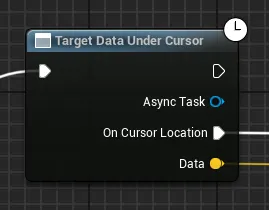
이를 통해 블루프린트에서 CreateTargetDataUnderCursor()를 호출 시, 스스로의 인스턴스가 반환되며, 기본 Output 핀 뿐만 아니라 델리게이트로 선언한 변수에 따라 추가로 Output 핀이 존재하게 된다.
#include "AbilitySystem/AbilityTasks/TargetDataUnderCursor.h" #include "AbilitySystemComponent.h" UTargetDataUnderCursor* UTargetDataUnderCursor::CreateTargetDataUnderCursor(UGameplayAbility* OwningAbility) { UTargetDataUnderCursor* MyObj = NewAbilityTask<UTargetDataUnderCursor>(OwningAbility); return MyObj; } void UTargetDataUnderCursor::Activate() { if (Ability == nullptr) return; FHitResult HitResult; APlayerController* PC = Ability->GetCurrentActorInfo()->PlayerController.Get(); bool bIsHit = PC->GetHitResultUnderCursor(ECC_Visibility, false, HitResult); if (bIsHit) { FVector HitLocation = HitResult.Location; OnCursorLocation.Broadcast(HitLocation); } }- 생성자에서 스스로를 NewAbilityTask()를 통해 생성하여 반환해준다.
초기화해야 하는 매개변수가 있는 경우, 여기서 초기화 해 줄 수 있다. - Activate() 함수는 PlayerController의 GetHitResultUnderCursor()를 통해 커서 아래 위치를 향해 Trace를 실시하며, Hit 값이 존재한다면 해당 위치를 반환한다.
이 때, 생성한 델리게이트 (OnCursorLocation)을 통해 이를 Broadcast() 한다면, 해당 부분에서 블루프린트상의 AbilityTask의 노드의 OnCursorLocation에 연결한 부분이 실행되게 된다.
- 단, 이대로는 솔로 플레이나 서버 측에서는 별 문제가 없지만, 클라이언트의 위치값이 서버측에 제대로 반영되지 않는 문제가 발생하게 되어 수정이 필요하다.
-
-
-
Target Data
-
GAS는 서버/클라이언트로부터 TargetData를 전송하는 기능을 내장하고 있음.
-
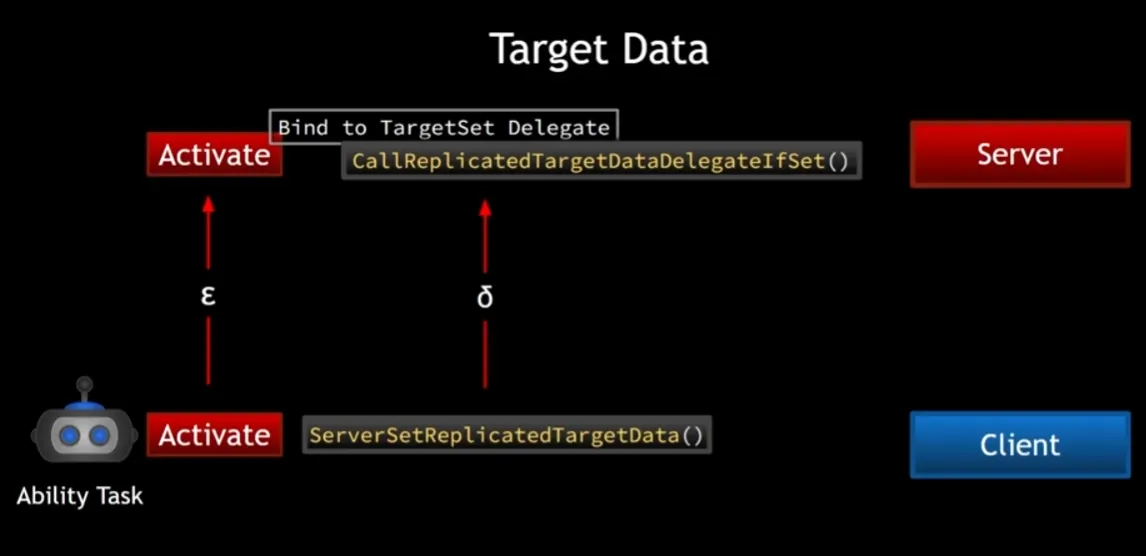
클라이언트 측에서 AbilityTask의 Activate()를 호출 → 서버에서도 얼마 간의 시간 이후 Activate()가 호출될 것임. (네트워크 전송으로 인한 지연 시간 발생)
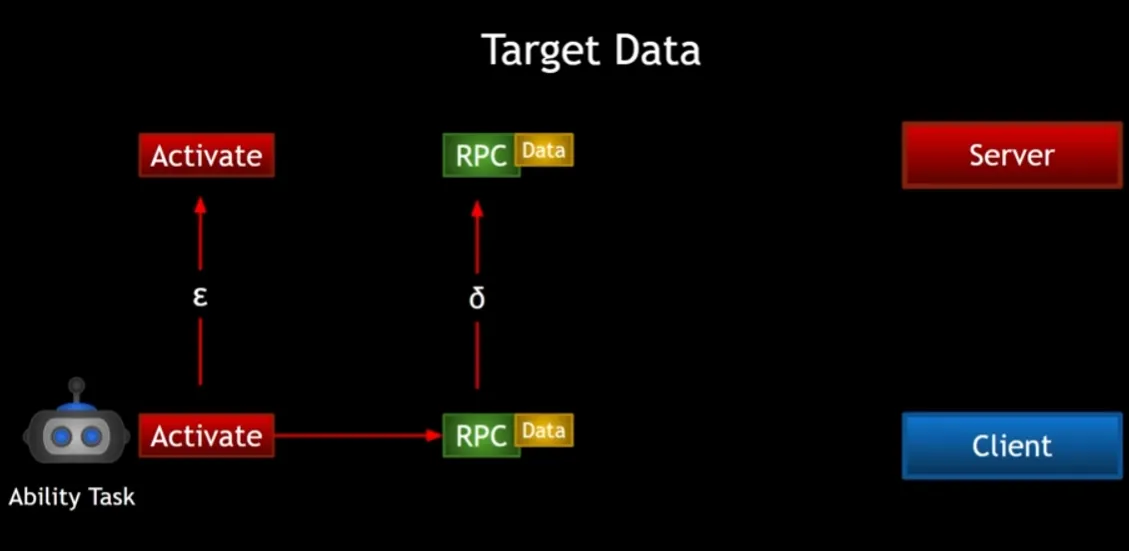
- 하지만 Activate() 뿐만 아니라, 위치값과 같은 데이터들 또한 클라이언트 측에서 서버로 전송하려면 Replication을 이용해야 하고, 이 또한 네트워크 전송 시간이 소요된다.
- 문제는, 이러한 시간은 정확히 얼마나 걸릴 지 알 수가 없고 유동적이며, 이러한 상황에 따라 서버 측에서 데이터를 전송받기 전에 함수가 실행되버려 의도한 대로 작동하지 않는 경우가 발생할 수 있다는 것임.
-
TargetData는 이러한 문제점을 해소하기 위해 GAS가 제공하는 기능임.
FGameplayAbilityTargetData를 상속하는 여러 형태의 자료형이며, ServerSetReplicatedTargetData()등의 함수를 통해 TargetData를 서버측에 전송하고,
이를 TargetSet(FAbilityTargetDataSetDelegate) 델리게이트로 Broadcast()함.
따라서, 서버 측에서 TargetSet에 바인딩 된 콜백이 있다면, TargetData를 수신 가능함.
AbilityTargetDataMap 맵으로 AbilitySpec과 TargetData를 매핑함.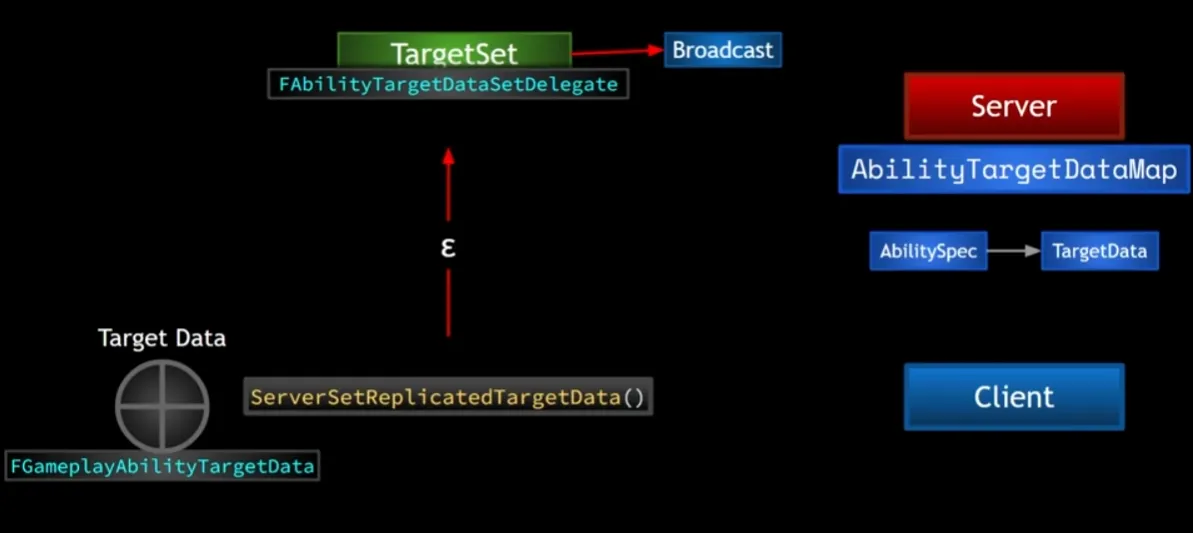
-
혹시나 TargetData의 Broadcast()가 먼저 이루어져도, 안전장치의 개념으로 CallReplicatedTargetDataDelegateIfSet()를 사용함.
-
-
-
-
