-
Orient Projectile Direction/Rotation / Shoot Projectile on Air
-
투사체를 스폰했을 때, 투사체가 날아가는 방향을 바라보고 있도록 수정하는 작업이다.
// SpawnProjectile()의 매개변수로 const FVector& 추가 -> 목표 지점의 위치를 알기 위함 void UAuraProjectileSpell::SpawnProjectile(const FVector& ProjectileTargetLocation) { const bool bIsServer = GetAvatarActorFromActorInfo()->HasAuthority(); if (!bIsServer) return; ICombatInterface* CombatInterface = Cast<ICombatInterface>(GetAvatarActorFromActorInfo()); if (CombatInterface) { // 목표 지점의 위치에서 생성 지점의 위치를 빼면 해당 방향을 가리키는 벡터를 쉽게 얻을 수 있음 const FVector SocketLocation = CombatInterface->GetCombatSocketLocation(); FRotator Rotation = (ProjectileTargetLocation - SocketLocation).Rotation(); Rotation.Pitch = 0.f; FTransform SpawnTransform; SpawnTransform.SetLocation(SocketLocation); SpawnTransform.SetRotation(Rotation.Quaternion()); AAuraProjectile* Projectile = GetWorld()->SpawnActorDeferred<AAuraProjectile>( ProjectileClass, SpawnTransform, GetOwningActorFromActorInfo(), Cast<APawn>(GetOwningActorFromActorInfo()), ESpawnActorCollisionHandlingMethod::AlwaysSpawn); // Setup GameplayEffectSpec... Projectile->FinishSpawning(SpawnTransform); } }-
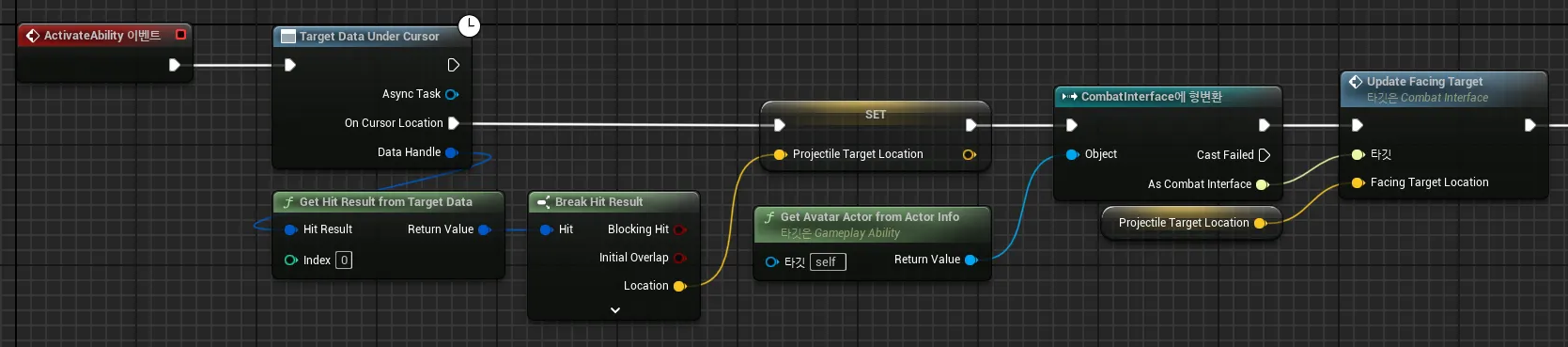
ProjectileTargetLocation의 값은 실제로 SpawnProjectile()을 호출하는 GameplayAbility 블루프린트에서 세팅해주면 된다.
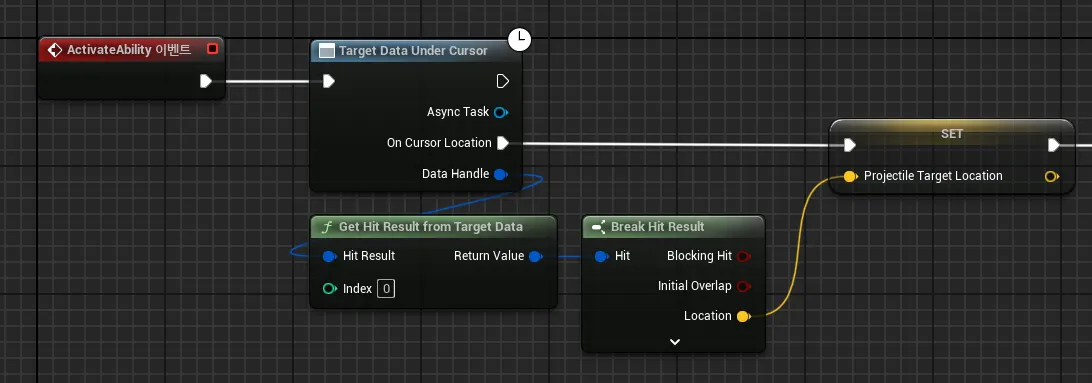
- TargetDataUnderCursor AbilityTask를 통해 얻어진 DataHandle(FGameplayAbilityTargetDataHandle)을 통해 GetHitResultFromTargetData()를 손쉽게 호출하여 사용할 수 있다.
-
-
Shift 키를 통해 허공에 파이어볼트를 발사할 수 있도록 수정
- 테스트의 용이성 및 게임 플레이적으로 필요할 수 있기 때문에 제자리에서 허공에 스킬을 사용할 수 있도록 하려 함.
// AuraPlayerController.h에 새로운 변수 및 함수 선언 private: void ShiftPressed() { bShiftKeyDown = true; } void ShiftReleased() { bShiftKeyDown = false; } bool bShiftKeyDown = false; UPROPERTY(EditAnywhere, Category = "Input") TObjectPtr<UInputAction> ShiftAction; // AuraPlayerController.cpp void AAuraPlayerController::SetupInputComponent() { Super::SetupInputComponent(); UAuraInputComponent* AuraInputComponent = CastChecked<UAuraInputComponent>(InputComponent); AuraInputComponent->BindAction(MoveAction, ETriggerEvent::Triggered, this, &AAuraPlayerController::Move); AuraInputComponent->BindAction(ShiftAction, ETriggerEvent::Triggered, this, &AAuraPlayerController::ShiftPressed); AuraInputComponent->BindAction(ShiftAction, ETriggerEvent::Completed, this, &AAuraPlayerController::ShiftReleased); AuraInputComponent->BindAbilityAction(InputConfig, this, &ThisClass::AbilityInputTagPressed, &ThisClass::AbilityInputTagReleased, &ThisClass::AbilityInputTagHeld); } void AAuraPlayerController::AbilityInputTagReleased(FGameplayTag InputTag) { if (!InputTag.MatchesTagExact(FAuraGameplayTags::Get().InputTag_LMB)) { if (GetASC()) { GetASC()->AbilityInputTagReleased(InputTag); } return; } if (GetASC()) { GetASC()->AbilityInputTagReleased(InputTag); } // 적을 타게팅 중이지도, Shift 키를 누르지도 않은 경우 if (!bTargeting && !bShiftKeyDown) { if (GetASC()) { const APawn* ControlledPawn = GetPawn(); if (FollowTime <= ShortPressThreshold && ControlledPawn) { if (UNavigationPath* NavPath = UNavigationSystemV1::FindPathToLocationSynchronously(this, ControlledPawn->GetActorLocation(), CachedDestination)) { Spline->ClearSplinePoints(); for (const FVector& PointLoc : NavPath->PathPoints) { Spline->AddSplinePoint(PointLoc, ESplineCoordinateSpace::World); } CachedDestination = NavPath->PathPoints[NavPath->PathPoints.Num() - 1]; bAutoRunning = true; } } FollowTime = 0.f; bTargeting = false; } } } void AAuraPlayerController::AbilityInputTagHeld(FGameplayTag InputTag) { if (!InputTag.MatchesTagExact(FAuraGameplayTags::Get().InputTag_LMB)) { if (GetASC()) { GetASC()->AbilityInputTagHeld(InputTag); } return; } // 적을 타게팅 중이거나, Shift 키가 눌린 경우 if (bTargeting || bShiftKeyDown) { if (GetASC()) { GetASC()->AbilityInputTagHeld(InputTag); } } else { FollowTime += GetWorld()->GetDeltaSeconds(); if (CursorHit.bBlockingHit) { CachedDestination = CursorHit.ImpactPoint; } if (APawn* ControlledPawn = GetPawn<APawn>()) { const FVector WorldDirection = (CachedDestination - ControlledPawn->GetActorLocation()).GetSafeNormal(); ControlledPawn->AddMovementInput(WorldDirection); } } }- AuraPlayerController에서 키 입력에 관한 함수를 담당하기 때문에, 이곳에 관련 기능을 추가하면 됨.
- Shift키를 누른 상태에서 좌클릭 시에는 적을 클릭하지 않더라도 스킬을 사용하도록 할 것이므로, bool 타입의 bShiftKeyDown 변수를 추가하고, Shift 키가 눌렸다면 bShiftKeyDown을 true로, 눌리지 않았다면 false로 전환하기 위한 함수를 추가한 후, 기존에 했던 것과 같은 방식으로 AuraInputComponent(EnhancedInputComponent)에 입력 액션 바인딩을 실시함.
- AbilityInputTagHeld()와 AbilityInputTagReleased()에 bShiftKeyDown을 포함하도록 조건문을 수정함.
- 에디터에서 Shift 키를 위한 입력 액션을 생성하고, 입력 매핑 컨텍스트에 세팅해주면 됨.
- 테스트의 용이성 및 게임 플레이적으로 필요할 수 있기 때문에 제자리에서 허공에 스킬을 사용할 수 있도록 하려 함.
-
-
Motion Warping
-
투사체를 발사할 때, 캐릭터가 투사체를 던지는 방향을 바라보도록 하려고 함.
-
엔진에서 제공하는 Motion Warping 컴포넌트를 사용하여 구현함.
-
플러그인에서 Motion Warping 플러그인을 설치함.
-
Motion Warping을 사용할 캐릭터 블루프린트에 Motion Warping 컴포넌트를 추가함.
-
애니메이션 몽타주의 노티파이에서 Motion Warping을 적용할 구간에 Motion Warping 노티파이 윈도우를 설정하고, 디테일 패널에서 설정함.
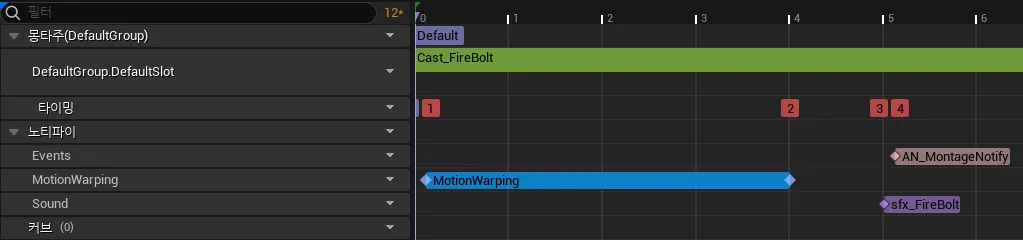
- RootMotionModifier를 설정함.
- SkewWarp로 설정 후, WarpTargetName은 임의의 이름을 지정해 줌.
이 Motion Warping은 Location은 변경하지 않고 Rotation만 변경할 예정이므로, Warp Translation은 체크 해제하고, Rotation Type을 Facing으로 설정함.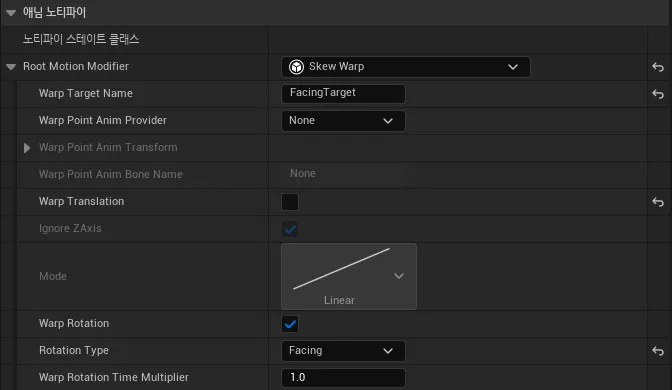
- SkewWarp로 설정 후, WarpTargetName은 임의의 이름을 지정해 줌.
- RootMotionModifier를 설정함.
-
-
캐릭터 블루프린트에 설정한 MotionWarping 컴포넌트를 통해 여러 함수를 호출할 수 있는데, 이 중에서 현재는 투사체를 날릴 목표 지점의 위치를 통해서 MotionWarping을 적용하려는 것이기 때문에, AddOrUpdateTargetFromLocation()을 사용함.
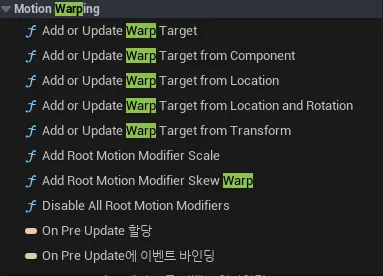
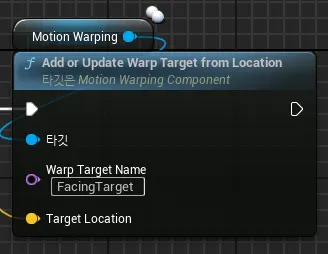
- 이 때, WarpTargetName은 반드시 애니메이션 몽타주에서 설정한 것과 일치해야 함.
-
AddOrWarpTargetFromLocation()는 캐릭터 블루프린트에서 호출해야되는 함수이며, 매개변수로 FVector값인 목표 지점을 넘겨주어야 하는데, 이를 이벤트로 감싸서 GameplayAbility에서 호출하도록 한다.
- 이 때, GameplayAbility가 특정한 캐릭터 클래스에 대한 레퍼런스를 지녀야 하는 것은 최대한 막는 것이 좋으며, 이럴 때 활용하기 좋은 것이 인터페이스이다.
- 클래스의 경우, 부모 클래스를 활용할 수 있다 한들 그 사용 범위가 한정되는 것은 마찬가지이나, 인터페이스의 경우 어느 클래스이냐에 상관 없이 상속할 수 있으며, 세부 구현 내용도 상속된 클래스마다 다르게 작성할 수 있기 때문에 다형성 확보에 용이하다.
-
ICombatInterface에 UpdateFacingTarget()이라는 이름의 BlueprintImplementable 함수를 선언하고, 이를 캐릭터 블루프린트에서 이용하도록 한다.
#pragma once #include "CoreMinimal.h" #include "UObject/Interface.h" #include "CombatInterface.generated.h" UINTERFACE(MinimalAPI, BlueprintType) class UCombatInterface : public UInterface { GENERATED_BODY() }; /** * */ class AURA_API ICombatInterface { GENERATED_BODY() public: virtual int32 GetPlayerLevel(); virtual FVector GetCombatSocketLocation(); // 블루프린트에서 구현하는 함수로, virtual로 선언하지 않고, cpp 파일에 구현하지도 않는다. UFUNCTION(BlueprintImplementableEvent, BlueprintCallable) void UpdateFacingTarget(const FVector& FacingTargetLocation); };-
생성한 이벤트는 BlueprintImplementable이므로 캐릭터 블루프린트에서 구현한다.
MotionWarping 컴포넌트의 AddOrUpdateWarpTargetFromLocation()을 호출해주면 된다.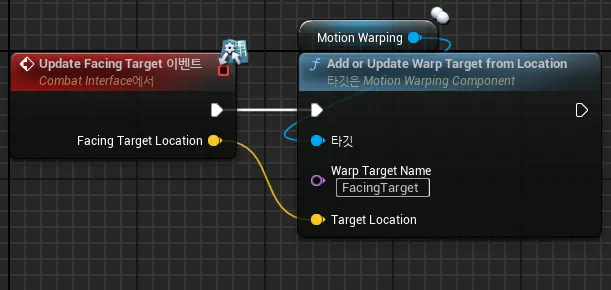
-
-
GameplayAbility는 GetAvatarActorFromActorInfo() 함수를 제공하여 현재 이 GameplayAbility를 사용하는 AvatarActor에 대한 정보를 쉽게 얻어올 수 있게 해주므로, 이를 통해 캐릭터 블루프린트의 ICombatInterface 함수인 UpdateFacingTarget()을 호출하여, 매개변수로는 ProjectileTargetLocation을 넘겨주면 된다.
-
-
Projectile Impact - Collision Channel
-
투사체의 VFX, SFX 적용 및 Collision 채널 적용까지 완료된 AuraProjectile 클래스
// AuraProjectile.h

#pragma once

#include "CoreMinimal.h"
#include "GameFramework/Actor.h"
#include "GameplayEffectTypes.h"
#include "AuraProjectile.generated.h"

class USphereComponent;
class UProjectileMovementComponent;
class UNiagaraSystem;

UCLASS()
class AURA_API AAuraProjectile : public AActor
{
	GENERATED_BODY()

public:
	AAuraProjectile();

	UPROPERTY(VisibleAnywhere)
	TObjectPtr<UProjectileMovementComponent> ProjectileMovement;

protected:
	virtual void BeginPlay() override;
	virtual void Destroyed() override;

	UFUNCTION()
	void OnSphereOverlap(UPrimitiveComponent* OverlappedComponent,
		AActor* OtherActor,
		UPrimitiveComponent* OtherComp,
		int32 OtherBodyIndex,
		bool bFromSweep,
		const FHitResult& SweepResult
	);

private:
	UPROPERTY(VisibleAnywhere)
	TObjectPtr<USphereComponent> Sphere;

	UPROPERTY(EditDefaultsOnly)
	float LifeSpan = 15.f;

	UPROPERTY(EditAnywhere)
	TObjectPtr<USoundBase> HissSFX;

	UPROPERTY(EditAnywhere)
	TObjectPtr<UNiagaraSystem> ImpactVFX;

	UPROPERTY(EditAnywhere)
	TObjectPtr<USoundBase> ImpactSFX;

	UPROPERTY()
	TObjectPtr<UAudioComponent> Hiss;

	bool bHit = false;
};
// AuraProjectile.cpp #include "Actor/AuraProjectile.h" #include "Components/SphereComponent.h" #include "Components/AudioComponent.h" #include "GameFramework/ProjectileMovementComponent.h" #include "Kismet/GameplayStatics.h" #include "NiagaraFunctionLibrary.h" #include "AbilitySystemBlueprintLibrary.h" #include "AbilitySystemComponent.h" #include "Aura/Aura.h" // Sets default values AAuraProjectile::AAuraProjectile() { PrimaryActorTick.bCanEverTick = false; bReplicates = true; Sphere = CreateDefaultSubobject<USphereComponent>(TEXT("Sphere")); SetRootComponent(Sphere); Sphere->SetCollisionObjectType(ECC_Projectile); Sphere->SetCollisionEnabled(ECollisionEnabled::QueryOnly); Sphere->SetCollisionResponseToAllChannels(ECR_Ignore); Sphere->SetCollisionResponseToChannel(ECC_WorldDynamic, ECR_Overlap); Sphere->SetCollisionResponseToChannel(ECC_WorldStatic, ECR_Overlap); Sphere->SetCollisionResponseToChannel(ECC_Pawn, ECR_Overlap); ProjectileMovement = CreateDefaultSubobject<UProjectileMovementComponent>(TEXT("ProjectileMovement")); ProjectileMovement->InitialSpeed = 550.f; ProjectileMovement->MaxSpeed = 550.f; ProjectileMovement->ProjectileGravityScale = 0.f; } void AAuraProjectile::BeginPlay() { Super::BeginPlay(); SetLifeSpan(LifeSpan); Sphere->OnComponentBeginOverlap.AddDynamic(this, &AAuraProjectile::OnSphereOverlap); Hiss = UGameplayStatics::SpawnSoundAttached(HissSFX, Sphere); } void AAuraProjectile::Destroyed() { if (!bHit && !HasAuthority()) { UGameplayStatics::PlaySoundAtLocation(this, ImpactSFX, GetActorLocation(), FRotator::ZeroRotator); UNiagaraFunctionLibrary::SpawnSystemAtLocation(this, ImpactVFX, GetActorLocation()); Hiss->Stop(); } Super::Destroyed(); } void AAuraProjectile::OnSphereOverlap(UPrimitiveComponent* OverlappedComponent, AActor* OtherActor, UPrimitiveComponent* OtherComp, int32 OtherBodyIndex, bool bFromSweep, const FHitResult& SweepResult) { UGameplayStatics::PlaySoundAtLocation(this, ImpactSFX, GetActorLocation(), FRotator::ZeroRotator); UNiagaraFunctionLibrary::SpawnSystemAtLocation(this, ImpactVFX, GetActorLocation()); Hiss->Stop(); if (HasAuthority()) { Destroy(); } else { bHit = true; } } -
투사체의 VFX와 SFX
- AuraProjectile 클래스에 UNiagaraSystem 및 USoundBase를 지정하는 TObjectPtr 변수를 하나씩 생성한다.
(UNiagaraSystem은 Build.cs에 Niagara를 DependencyModules에 명시해주어야 정상적으로 사용이 가능하다. 필요하다면 솔루션을 다시 생성해야 한다.)```cpp UPROPERTY(EditAnywhere) TObjectPtr<USoundBase> HissSFX; UPROPERTY(EditAnywhere) TObjectPtr<UNiagaraSystem> ImpactVFX; UPROPERTY(EditAnywhere) TObjectPtr<USoundBase> ImpactSFX; UPROPERTY() TObjectPtr<UAudioComponent> Hiss; bool bHit = false; ``` - 투사체의 OnSphereOverlap()에서 VFX와 SFX를 재생해주면 된다.
나이아가라 시스템의 경우는 UNiagaraFunctionLibrary의 SpawnSystemAtLocation()을 호출하면 되며, 사운드의 경우 UGameplayStatics의 PlaySoundAtLocation()을 이용한다.
투사체가 날아갈 때의 SFX의 경우는 BeginPlay()에서 SpawnSoundAttached()로 재생해주면 액터의 컴포넌트에 부착된 소리를 재생할 수 있다.```cpp void AAuraProjectile::BeginPlay() { Super::BeginPlay(); SetLifeSpan(LifeSpan); Sphere->OnComponentBeginOverlap.AddDynamic(this, &AAuraProjectile::OnSphereOverlap); Hiss = UGameplayStatics::SpawnSoundAttached(HissSFX, Sphere); } void AAuraProjectile::Destroyed() { if (!bHit && !HasAuthority()) { UGameplayStatics::PlaySoundAtLocation(this, ImpactSFX, GetActorLocation(), FRotator::ZeroRotator); UNiagaraFunctionLibrary::SpawnSystemAtLocation(this, ImpactVFX, GetActorLocation()); Hiss->Stop(); } Super::Destroyed(); } void AAuraProjectile::OnSphereOverlap(UPrimitiveComponent* OverlappedComponent, AActor* OtherActor, UPrimitiveComponent* OtherComp, int32 OtherBodyIndex, bool bFromSweep, const FHitResult& SweepResult) { UGameplayStatics::PlaySoundAtLocation(this, ImpactSFX, GetActorLocation(), FRotator::ZeroRotator); UNiagaraFunctionLibrary::SpawnSystemAtLocation(this, ImpactVFX, GetActorLocation()); Hiss->Stop(); if (HasAuthority()) { Destroy(); } else { bHit = true; } } ``` - 이 때, 서버와 클라이언트 사이에서 OnSphereOverlap()과 Destroyed()의 호출 순서가 서로 다른 문제가 발생할 수 있다. 예를 들어, 서버 측에서 OnSphereOverlap() 호출에 의해 Destroy()가 호출되는데, Destroy()의 Replicate가 먼저 이루어지는 경우이다. - 이러한 경우 클라이언트 측의 투사체에서 이펙트나 사운드가 재생되지 않을 수 있기 때문에, 이러한 예외 사항에 대한 처리가 필요하다. - 따라서, 이를 위한 bool형 변수 bHit를 생성하고, Destroyed() 호출 시 bHit가 false인 경우에는 클라이언트 측에서 이펙트와 사운드를 자체적으로 재생하도록 한다.
- AuraProjectile 클래스에 UNiagaraSystem 및 USoundBase를 지정하는 TObjectPtr 변수를 하나씩 생성한다.
-
투사체가 불필요한 액터에 닿지 않도록 Collision 채널을 설정한다.
-
현재 투사체는 적에게 닿으면 이펙트를 재생하고 사라지지만, 적 뿐만이 아니라 불필요한 대상, 예를 들면 화염 함정이나 포션같은 아이템에 닿아도 사라지는 문제가 있다.
-
이 문제를 해결하기 위한 방법 자체는 간단하게 Collision 채널을 수정해주는 것이다.
- 프로젝트 세팅→엔진→콜리젼에서 ‘Object Channels’에 새로운 채널을 추가한다.
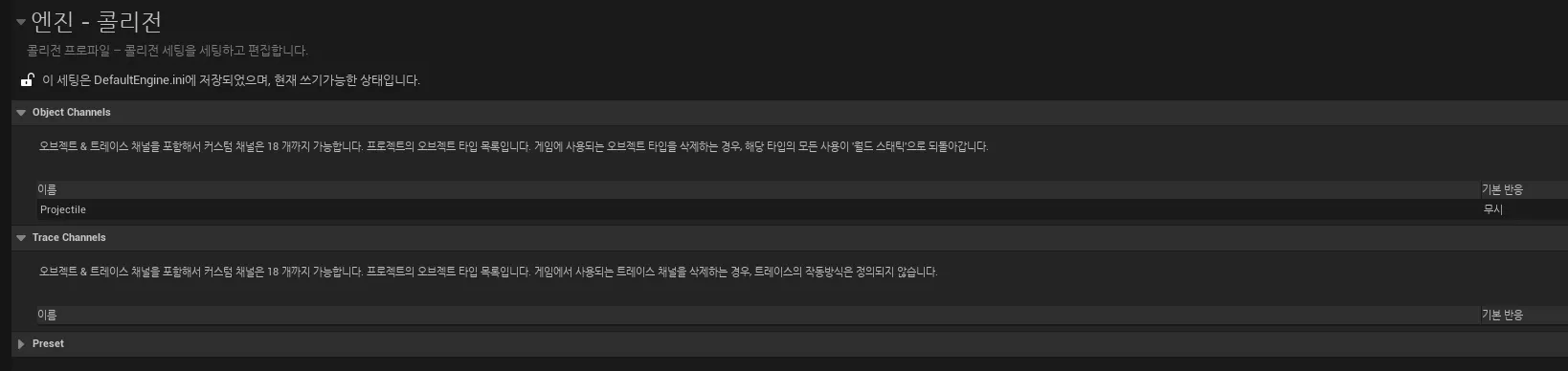
- 투사체의 콜리젼 프리셋에서 콜리젼 오브젝트 타입을 새로 생성한 채널로 설정한다.
블루프린트에서 설정하는 것도 되고, C++ 클래스에서 SetCollisionObjectType()을 통해 설정하는 것 또한 가능하다.
- 프로젝트 세팅에서 새로 생성한 콜리젼 오브젝트 채널은 C++상에서ECollisionChannel::ECC_GameTraceChannel1와 같은 방식으로 표기된다.
가장 처음 추가된 채널이므로 GameTraceChannel1이며, 그 이후로 추가된 것은 GameTraceChannel2 … 순으로 뒤의 수가 커진다.
다만, 이렇게 표기하면 추후 알아보기 위해서 다시 프로젝트 세팅을 확인해야 하는 등 번거로워질 수 있으므로, 프로젝트 헤더 등에 define을 사용하여 별도로 정의해두는 것도 좋은 방법이다. - 투사체에 공격당하거나, 투사체를 막을 수 있는 액터들에 대해서 콜리젼 세팅을 해 주면 된다.
- 프로젝트 세팅→엔진→콜리젼에서 ‘Object Channels’에 새로운 채널을 추가한다.
-
-
-
Projectile GameplayEffect
- 투사체가 닿는 상대에게 피해를 주도록 만든다.
// AuraProjectile.h public: UPROPERTY(BlueprintReadWrite, meta = (ExposeOnSpawn = true)) FGameplayEffectSpecHandle DamageEffectSpecHandle; // AuraProjectile.cpp void AAuraProjectile::OnSphereOverlap(UPrimitiveComponent* OverlappedComponent, AActor* OtherActor, UPrimitiveComponent* OtherComp, int32 OtherBodyIndex, bool bFromSweep, const FHitResult& SweepResult) { UGameplayStatics::PlaySoundAtLocation(this, ImpactSFX, GetActorLocation(), FRotator::ZeroRotator); UNiagaraFunctionLibrary::SpawnSystemAtLocation(this, ImpactVFX, GetActorLocation()); Hiss->Stop(); if (HasAuthority()) { if (UAbilitySystemComponent* TargetASC = UAbilitySystemBlueprintLibrary::GetAbilitySystemComponent(OtherActor)) { TargetASC->ApplyGameplayEffectSpecToSelf(*DamageEffectSpecHandle.Data.Get()); } Destroy(); } else { bHit = true; } }-
AuraProjectile 클래스에 FGameplayEffectSpecHandle 타입의 변수를 추가한다.
(FGameplayEffect가 아닌 FGameplayEffectSpecHandle인 이유는, GameplayEffect 클래스 자체는 AuraProjectile을 직접 발사하는 GameplayAbility 클래스에서 지정하는 것이 좋아보이기 때문이다.) -
AuraProjectile의 OnSphereOverlap()에서 매개변수 AActor*인 OtherActor로부터 UAbilitySystemBlueprintLibrary의 GetAbilitySystemComponent()를 통해 AbilitySystemComponent를 얻어온 후, 이를 통해 ApplyGameplayEffectSpecToSelf()로 AuraProjectile 클래스 자체의 FGameplayEffectSpecHandle을 넘겨주면 투사체가 닿은 대상에게 GameplayEffect가 적용되게 된다.
-
AuraProjectile의 FGameplayEffectSpecHandle는 클래스 자체서는 아무 곳에서도 초기화 해 주는 곳이 없기 때문에 이대로는 nullptr이다.
FGameplayEffectSpecHandle을 초기화해주는 작업은 이 투사체를 스폰할 GameplayAbility에서 실시한다.#pragma once #include "CoreMinimal.h" #include "AbilitySystem/Abilities/AuraGameplayAbility.h" #include "AuraProjectileSpell.generated.h" class AAuraProjectile; UCLASS() class AURA_API UAuraProjectileSpell : public UAuraGameplayAbility { GENERATED_BODY() protected: virtual void ActivateAbility( const FGameplayAbilitySpecHandle Handle, const FGameplayAbilityActorInfo* ActorInfo, const FGameplayAbilityActivationInfo ActivationInfo, const FGameplayEventData* TriggerEventData) override; UFUNCTION(BlueprintCallable, Category = "Projectile") virtual void SpawnProjectile(const FVector& ProjectileTargetLocation); UPROPERTY(EditAnywhere, BlueprintReadOnly) TSubclassOf<AAuraProjectile> ProjectileClass; // GameplayEffect 클래스 - C++에서 선언하고 블루프린트 에디터에서 지정 UPROPERTY(EditDefaultsOnly, BlueprintReadOnly) TSubclassOf<UGameplayEffect> DamageEffectClass; }; // AuraProjectileSpell.cpp void UAuraProjectileSpell::SpawnProjectile(const FVector& ProjectileTargetLocation) { const bool bIsServer = GetAvatarActorFromActorInfo()->HasAuthority(); if (!bIsServer) return; ICombatInterface* CombatInterface = Cast<ICombatInterface>(GetAvatarActorFromActorInfo()); if (CombatInterface) { const FVector SocketLocation = CombatInterface->GetCombatSocketLocation(); FRotator Rotation = (ProjectileTargetLocation - SocketLocation).Rotation(); Rotation.Pitch = 0.f; FTransform SpawnTransform; SpawnTransform.SetLocation(SocketLocation); SpawnTransform.SetRotation(Rotation.Quaternion()); AAuraProjectile* Projectile = GetWorld()->SpawnActorDeferred<AAuraProjectile>( ProjectileClass, SpawnTransform, GetOwningActorFromActorInfo(), Cast<APawn>(GetOwningActorFromActorInfo()), ESpawnActorCollisionHandlingMethod::AlwaysSpawn); // AvatarActor의 AbilitySystemComponent에 대한 참조 획득 const UAbilitySystemComponent* SourceASC = UAbilitySystemBlueprintLibrary::GetAbilitySystemComponent(GetAvatarActorFromActorInfo()); // AbilitySystemComponent를 통해 FGameplayEffectSpecHandle 생성 const FGameplayEffectSpecHandle SpecHandle = SourceASC->MakeOutgoingSpec(DamageEffectClass, GetAbilityLevel(), SourceASC->MakeEffectContext()); Projectile->DamageEffectSpecHandle = SpecHandle; Projectile->FinishSpawning(SpawnTransform); } } -
AuraProjectileSpell GameplayAbility 클래스에 GameplayEffect 타입의 변수를 추가하고, 에디터에서 설정할 수 있도록 한다.
-
GameplayAbility는 자신을 사용한 액터에 대한 정보를 얻어올 수 있으므로, GetAvatarActorFromActorInfo()를 통해 UAbilitySystemBlueprintLibrary::GetAbilitySystemComponent()로 AbilitySystemComponent를 얻어와, 이를 통해 FGameplayAbilitySpecHandle을 생성한다.
-
이렇게 생성된 FGameplayEffectSpecHandle을 생성된 투사체의 변수 초기화에 사용해주면 된다.
-
- 투사체가 닿는 상대에게 피해를 주도록 만든다.
-
Enemy Health Bar
-
기존에 제작한 ProgressBar를 참고하여 적 캐릭터들의 머리 위에 표시할 체력바를 만들어본다.
-
AuraUserWidget의 WidgetController의 변수 타입은 UObject이므로, 언리얼 상의 그 어떤 오브젝트라도 레퍼런스로 지정할 수 있다.
따라서 적 체력바 위젯인 WBP_EnemyHealthBar의 WidgetController는 AuraEnemyCharacter로 한다. (BP_Character_EnemyBase) -
AuraEnemyCharacter 클래스에 UWidgetComponent 변수를 추가해준다.
cpp의 생성자에서 CreateDefaultObject()로 초기화해주고, BeginPlay()에서 WidgetController 세팅 등 필요한 과정을 진행해준다.AAuraEnemyCharacter::AAuraEnemyCharacter() { GetMesh()->SetCollisionResponseToChannel(ECC_Visibility, ECR_Block); AbilitySystemComponent = CreateDefaultSubobject<UAuraAbilitySystemComponent>("AbilitySystemComponent"); AbilitySystemComponent->SetIsReplicated(true); AbilitySystemComponent->SetReplicationMode(EGameplayEffectReplicationMode::Minimal); AttributeSet = CreateDefaultSubobject<UAuraAttributeSet>("AttributeSet"); HealthBarWidget = CreateDefaultSubobject<UWidgetComponent>("HealthBar"); HealthBarWidget->SetupAttachment(GetRootComponent()); } void AAuraEnemyCharacter::BeginPlay() { Super::BeginPlay(); InitAbilityActorInfo(); /* HealthBar Widget Bindings Start */ if (UAuraUserWidget* HealthBar = Cast<UAuraUserWidget>(HealthBarWidget->GetUserWidgetObject())) { HealthBar->SetWidgetController(this); } if (const UAuraAttributeSet* AuraAS = Cast<UAuraAttributeSet>(AttributeSet)) { AbilitySystemComponent->GetGameplayAttributeValueChangeDelegate(AuraAS->GetHealthAttribute()).AddLambda( [this](const FOnAttributeChangeData& Data) { OnHealthChanged.Broadcast(Data.NewValue); }); AbilitySystemComponent->GetGameplayAttributeValueChangeDelegate(AuraAS->GetMaxHealthAttribute()).AddLambda( [this](const FOnAttributeChangeData& Data) { OnMaxHealthChanged.Broadcast(Data.NewValue); }); OnHealthChanged.Broadcast(AuraAS->GetHealth()); OnMaxHealthChanged.Broadcast(AuraAS->GetMaxHealth()); } /* HealthBar Widget Bindings End */ } -
이미 OverlayWidgetController, AttributeMenuWidgetController를 각각 만들어보면서 어느정도 익숙해진 과정이지만, 다시 한 차례 복습하자면
-
AbilitySystemComponent를 통해 AttributeSet의 Attribute가 변화할 때 호출되는 델리게이트를 GetGameplayAttributeValueChangeDelegate()를 통해 얻어올 수 있으며, 여기에 직접 생성한 델리게이트가 Broadcast() 되도록 AddLambda()를 통해 바인딩을 실시한다.
(물론 람다식이 아니라 직접 함수를 생성해서 바인딩해도 되지만, 어차피 다른 곳에서 사용할 함수가 아니기 때문에, 람다식으로 1번만 쓰는 것이 코드를 깔끔하게 유지하기에 좋다) -
필요한 바인딩을 마치면, 체력바 게이지를 초기화해주어야 하므로 1차례 직접 Broadcast()를 실행해준다.
-
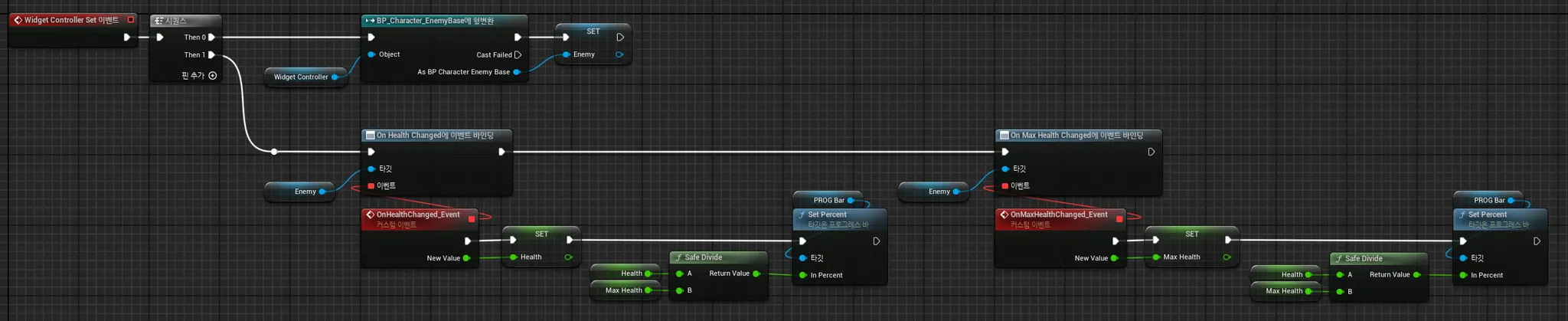
WBP_EnemyHealthBar에서는 직접 생성한 델리게이트들에 바인딩하여 필요한 동작을 한다.
여기서는 체력바 게이지를 조절해주는 작업을 하면 된다.
-
-
