-
Meta Attribute
-
현재까지의 GameplayEffect를 통한 데미지 적용 방식은 하드코딩된 방식이었음.
하지만 실제 게임에선, 데미지를 두고 캐릭터간의 능력치를 통한 계산을 거친 값을 적용함.
- Attribute를 직접 바꾸기보다는 중간 계산을 위한 일종의 임시(Placeholder) Attribute를 제작하여, 해당 Attribute를 통해 필요한 계산을 다 마친 후 그 값을 적용하는 방식을 사용함.
이러한 임시 Attribute를 Meta Attribute라고 부름.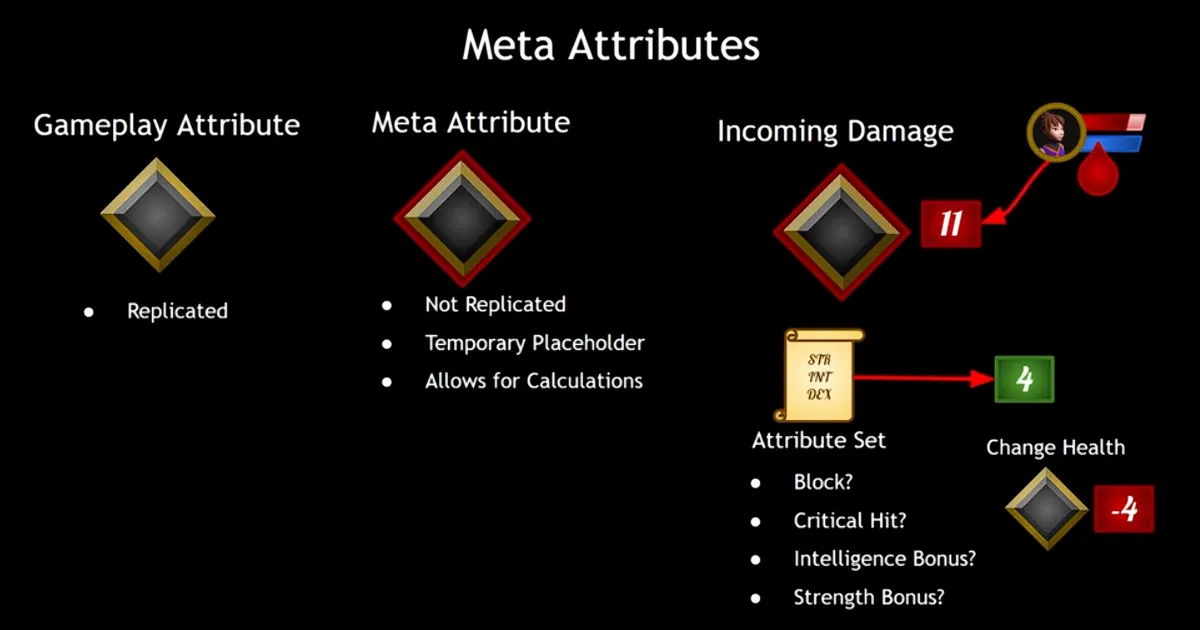
- 일반적인 Gameplay Attribute와 다르게, Replicate되지 않으며 순수하게 계산만을 위한 임시 Attribute이다.
- 이와 같은 식으로 Attribute를 복제하여 사용했을 때에 얻는 이점은 뭐가 있을까?
우선, PostGameplayEffectExecute()와 같은 함수에서, 들어오는 데미지가 특정 Attribute인 경우에만 데미지 계산을 허용하도록 할 수 있다. - GameplayEffect가 데미지를 직접 결정하지 않도록 할 수 있다.
- Meta Attribute가 적용되는 순간에 여러 이벤트를 적용할 수 있다.
- 이와 같은 식으로 Attribute를 복제하여 사용했을 때에 얻는 이점은 뭐가 있을까?
- 일반적인 Gameplay Attribute와 다르게, Replicate되지 않으며 순수하게 계산만을 위한 임시 Attribute이다.
-
AuraAttributeSet에 Meta Attribute 개념을 적용하기 위한 준비를 한다.
// AuraAttributeSet.h /* Meta Attributes Start */ UPROPERTY(BlueprintReadOnly, Category = "Meta Attributes") FGameplayAttributeData IncomingDamage; ATTRIBUTE_ACCESSORS(UAuraAttributeSet, IncomingDamage); /*Meta Attributes End */ // AuraAttributeSet.cpp void UAuraAttributeSet::PostGameplayEffectExecute(const FGameplayEffectModCallbackData& Data) { Super::PostGameplayEffectExecute(Data); FEffectProperties EffectProperties; SetEffectProperties(Data, EffectProperties); if (Data.EvaluatedData.Attribute == GetHealthAttribute()) { SetHealth(FMath::Clamp(GetHealth(), 0.f, GetMaxHealth())); } if (Data.EvaluatedData.Attribute == GetManaAttribute()) { SetMana(FMath::Clamp(GetMana(), 0.f, GetMaxMana())); } // Attribute가 IncomingDamage인 경우인지를 검사 if (Data.EvaluatedData.Attribute == GetIncomingDamageAttribute()) { const float LocalIncomingDamage = GetIncomingDamage(); SetIncomingDamage(0.f); if (LocalIncomingDamage > 0.f) { const float NewHealth = GetHealth() - LocalIncomingDamage; SetHealth(FMath::Clamp(NewHealth, 0.f, GetMaxHealth())); const bool bFatal = NewHealth <= 0.f; // Something to do when getting Fatal Damage } } }- 데미지를 적용하기 위한 GameplayEffect 블루프린트인 GE_Damage는 Modifier→Attribute를 IncomingDamage로 변경해준다.
(Damage라고 이름 붙인 GameplayTag를 그대로 이용하는 것이 아닌, 각 캐릭터의 AttributeSet(AuraAttributeSet)에 존재하는 IncomingDamage라는 이름의 Attribute로 변환하여 데미지 계산 후, 이를 이용하여 체력을 감소시키는 방식이기 때문) - GameplayEffect에서
Modifier→Modifier Magnitude→Modifier Op을 ‘Set By Caller’로 변경한다.- Set By Caller는 키-값 방식으로 동작하고, 키는 FGameplayTag이다.
따라서 AuraGameplayTags에 데미지에 해당하는 FGameplayTag를 생성한다.```cpp /* Damage Tag */ FGameplayTag Damage; GameplayTags.Damage = UGameplayTagsManager::Get() .AddNativeGameplayTag(FName("Damage"), FString("Damage")); ```
- Set By Caller는 키-값 방식으로 동작하고, 키는 FGameplayTag이다.
- GameplayEffect가 아닌 GameplayAbility가 데미지를 설정하는 주체가 되게 하고 싶으므로, 우선 첫 GameplayAbility인 AuraProjectileSpell에서 GameplayEffectSpecHandle을 설정하는 부분에서 아래와 같은 코드를 작성한다.
void UAuraProjectileSpell::SpawnProjectile(const FVector& ProjectileTargetLocation) { // ... const UAbilitySystemComponent* SourceASC = UAbilitySystemBlueprintLibrary::GetAbilitySystemComponent(GetAvatarActorFromActorInfo()); const FGameplayEffectSpecHandle SpecHandle = SourceASC->MakeOutgoingSpec(DamageEffectClass, GetAbilityLevel(), SourceASC->MakeEffectContext()); FAuraGameplayTags GameplayTags = FAuraGameplayTags::Get(); // SetByCaller UAbilitySystemBlueprintLibrary::AssignTagSetByCallerMagnitude(SpecHandle, GameplayTags.Damage, 25.f); Projectile->DamageEffectSpecHandle = SpecHandle; Projectile->FinishSpawning(SpawnTransform); } }- GameplayEffect에서는 Modifier Magnitude를
Set By Caller로 설정 후, Set By Caller Magnitude의 DataTag를 설정해주면 된다. - AssignTagSetByCallerMagnitude()는 즉, ‘특정한 GameplayEffect의 Modifier들 중, 일치하는 Data Tag를 지닌 Set By Caller Magnitude를 찾아 해당 값을 넘겨받은 값대로 설정하라’와 같은 의미를 지닌 함수이다.
- AssignTagSetByCallerMagnitude()에서 넘겨줄 수치는 FScalableFloat를 이용해본다.
FScalableFloat는 Modifier에서 Scalable Float를 선택했을 때와 마찬가지로, Curve 내에서의 특정한 값과 배수를 지정해 줄 수 있는 타입이다.```cpp UPROPERTY(EditDefaultsOnly, BlueprintReadOnly, Category = "Damage") FScalableFloat Damage; const float ScaledDamage = Damage.GetValueAtLevel(GetAbilityLevel()); ```
- GameplayEffect에서는 Modifier Magnitude를
- 데미지를 적용하기 위한 GameplayEffect 블루프린트인 GE_Damage는 Modifier→Attribute를 IncomingDamage로 변경해준다.
-

저는 게임 개발자로 일하고 싶어요