본 내용은 인프런의 이도원님의 SpringCloud 강의를 참고하여 작성되었습니다.0. Filter란?
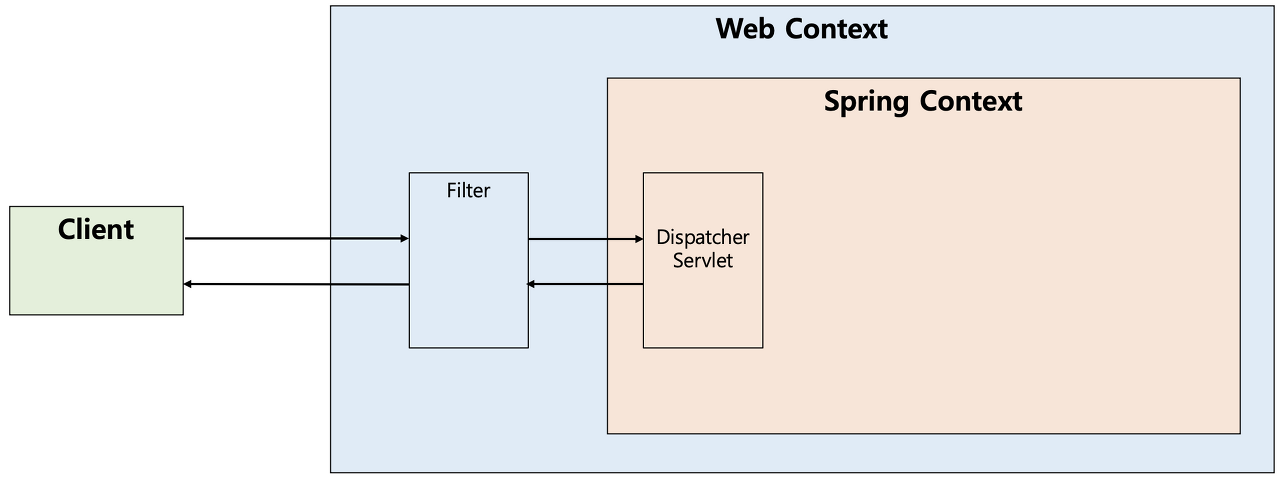
필터(Filter)는 J2EE 표준 스펙 기능으로 Dispatcher Servlet에 요청이 전달되기 전/후에 url 패턴에 맞는 모든 요청에 대해 부가작업을 처리할 수 있는 기능을 제공한다.
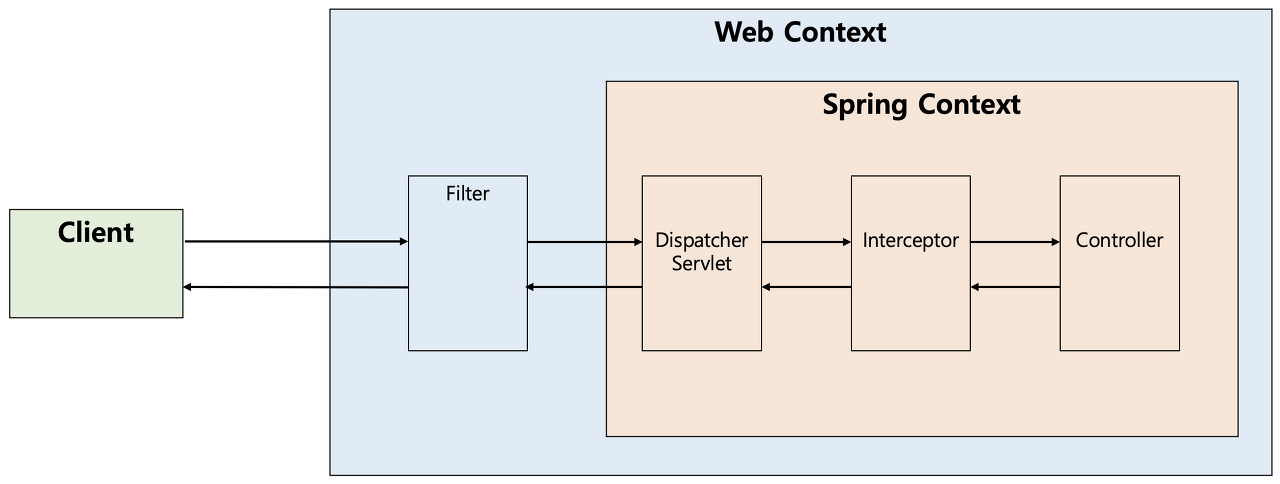
Dispatcher Servlet은 스프링의 가장 앞단에 존재하는 Front Controller로서, Filter는 스프링 범위 밖에서 처리가 되는 것으로, 스프링 컨테이너가 아닌 톰캣과 같은 웹 컨테이너(서블릿 컨테이너)에 의해 관리가 되는 것이고(스프링 빈으로 등록은 된다), 디스패처 서블릿 전/후에 처리하는 것이다. 이러한 과정을 그림으로 표현하면 다음과 같다.
0-1. Interceptor란?
1. 왜 사용할까?
API Gateway의 기능중 하나인 Filter에 대해 알아보자!
ApiGateway Filter 설정 정보를 지정하는 두 가지 방법이 있다. (yml, Configuration)
1. application.yml
spring:
  cloud:
    gateway:
      routes:
        - id: user-service
          uri: http://localhost:8081/
          predicates:
            - Path=/user-service/**
          filters:
            - AddRequestHeader=user-request, user-request-header2
            - AddResponseHeader=user-response, user-response-header2

        - id: second-service
          uri: http://localhost:8082/
          predicates:
            - Path=/second-service/**
          filters:
            - AddRequestHeader=first-request, first-request-header2
            - AddResponseHeader=first-response, first-response-header2
2. Configuration (java)
@Configuration
public class FilterConfig {

    @Bean
    public RouteLocator gatewayRoutes(RouteLocatorBuilder builder) {
        // filter를 통해 request, response Header 에 K-V 형식의 데이터를 추가할 수 있다.
        return builder.routes()
                .route(r -> r.path("/first-service/**")
                        .filters(f -> f.addRequestHeader("first-request", "first-request-header")
                                       .addResponseHeader("first-response", "first-response-header"))
                        .uri("http://localhost:8081"))
                .build();
    }
}
Configuration 방식은 Filter를 적용할 수 있으며 요청, 응답 헤더에 데이터를 추가한 뒤 특정 uri로 Routing 할 수 있다.
Controller
@RestController
@Slf4j
public class UserController {

    @GetMapping("/message")
    public String message(@RequestHeader("user-request") String header) {
        log.info(header);
        return "Hello World in User Service";
    }
}
ApiGateway에 의해 Routing 되었다면 포트가 일치하는 서버의 Controller에 매핑되며 @RequestHeader에 일치하는 header를 가진 요청을 받아올 수 있다.
log를 찍어 확인해보자!
2023-10-04 17:53:48.053  INFO 7348 --- [nio-8081-exec-5] c.b.u.controller.UserController :
user-request-header2
따라서, SpringCloud의 Filter를 활용하여 요청을 가로채어 Request, Response에 대한 Header를 변경할 수 있다는 점을 알아보았다.
1. CustomFilter
CustomFilter
@Component
@Slf4j
public class CustomFilter extends AbstractGatewayFilterFactory<CustomFilter.Config> {

    public CustomFilter() {
        super(Config.class);
    }

    @Override
    public GatewayFilter apply(Config config) {
        // Custom Pre Filter
        return (exchange, chain) -> {
            ServerHttpRequest request = exchange.getRequest();
            ServerHttpResponse response = exchange.getResponse();

            log.info("Custom PRE filter: request id -> {}", request.getId());

            // Custom Post Filter
            return chain.filter(exchange).then(Mono.fromRunnable(() -> {
                log.info("Custom POST filter: response id -> {}", response.getStatusCode());
            }));
        };
    }

    public static class Config {
        // Put the Configuration properties
    }
}
CustomFilter 는 자유롭게 로그를 출력하거나 사용자 인증, locale 변경 등이 가능한 사용자 정의 필터이다.
커스텀 필터를 사용하기 위해서는 AbstractGatewayFilterFactory가 구현하는 GatewayFilterFactory 인터페이스의 apply 메서드를 재정의해야 한다.
람다식을 사용하여 GatewayFilter를 인스턴스 생성없이 return 해보자.
public interface GatewayFilter extends ShortcutConfigurable {

	/**
	 * Name key.
	 */
	String NAME_KEY = "name";

	/**
	 * Value key.
	 */
	String VALUE_KEY = "value";

	/**
	 * Process the Web request and (optionally) delegate to the next {@code WebFilter}
	 * through the given {@link GatewayFilterChain}.
	 * @param exchange the current server exchange
	 * @param chain provides a way to delegate to the next filter
	 * @return {@code Mono<Void>} to indicate when request processing is complete
	 */
	Mono<Void> filter(ServerWebExchange exchange, GatewayFilterChain chain);

}
GatewayFilter 인터페이스의 filter 메서드를 재정의하여 GatewayFilter 타입으로 return 해주면 된다.
application.yml
spring:
  application:
    name: apigateway-service

  cloud:
    gateway:
      routes:
        - id: user-service
          uri: http://localhost:8081/
          predicates:
            - Path=/user-service/**
          filters:
#            - AddRequestHeader=user-request, user-request-header2
#            - AddResponseHeader=user-response, user-response-header2
            - CustomFilter

        - id: second-service
          uri: http://localhost:8082/
          predicates:
            - Path=/second-service/**
          filters:
#            - AddRequestHeader=first-request, first-request-header2
#            - AddResponseHeader=first-response, first-response-header2
            - CustomFilter
CustomFilter의 구현이 끝났다면 yml 설정파일의 filter에 CustomFilter를 추가해주자.
ApiGateway에 의해 Routing 되면서 filter가 적용된다. log를 찍어 확인해보자!
2023-10-04 19:00:11.883  INFO 10469 --- [ctor-http-nio-3] c.b.a.filter.CustomFilter :
Custom PRE filter: request id -> b2b0718d-3
2023-10-04 19:00:11.917  INFO 10469 --- [ctor-http-nio-3] c.b.a.filter.CustomFilter :
Custom POST filter: response id -> 200 OK
로깅 이외에도 JWT 토큰을 필터링 단계에서 인증이 가능하다고 한다.
2. GloablFilter
CustomFilter의 경우에는 적용하고 싶은 라우팅 정보에 모두 추가해줘야하는 반면, GlobalFilter는 모든 라우팅 정보에 대해 Filter를 적용할 수 있다.
ApiGateway에 의해 요청이 Routing 되면서 GlobalFilter -> filter 순서로 적용이 된다. log를 찍어 확인해보자!
2023-10-04 19:50:44.198  INFO 12925 --- [ctor-http-nio-3] c.b.a.filter.GlobalFilter :
Global Filter baseMsg: Spring Cloud Gateway Global Filter
2023-10-04 19:50:44.199  INFO 12925 --- [ctor-http-nio-3] c.b.a.filter.GlobalFilter :
Global Filter Start: request id -> 2808cd2e-1
2023-10-04 19:50:44.199  INFO 12925 --- [ctor-http-nio-3] c.b.a.filter.CustomFilter :
Custom PRE filter: request id -> 2808cd2e-1
2023-10-04 19:50:44.765  INFO 12925 --- [ctor-http-nio-3] c.b.a.filter.CustomFilter :
Custom POST filter: response id -> 200 OK
2023-10-04 19:50:44.768  INFO 12925 --- [ctor-http-nio-3] c.b.a.filter.GlobalFilter :
Global Filter End: request code -> 200 OK
3. LoggingFilter