Fetch API
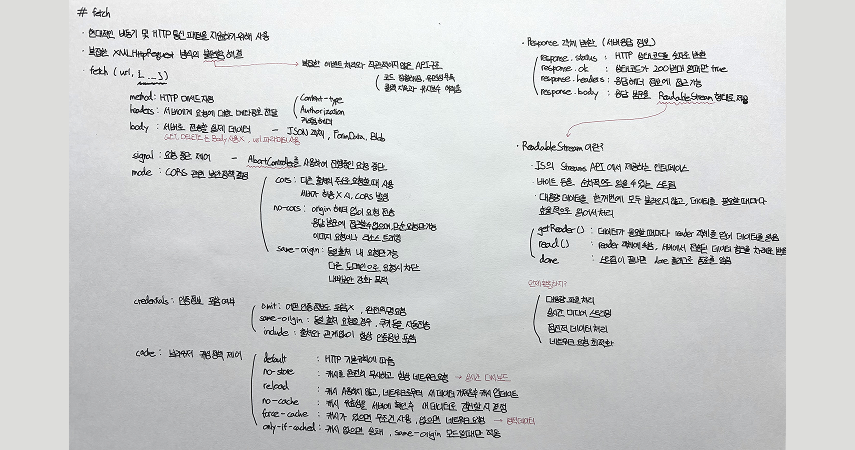
Fetch API는 네트워크 요청을 위한 현대적인 JavaScript 인터페이스로, XMLHttpRequest(XHR)의 복잡함을 해결하고 Promise 기반의 직관적인 비동기 처리를 제공한다.
과거 AJAX와 XHR의 한계
- 브라우저에서 서버 통신을 위해 XMLHttpRequest(XHR) 객체를 사용했다.
- 비동기 요청은 가능했지만 복잡한 이벤트 처리와 직관적이지 않은 API 구조로 코드가 장황했다.
- 콜백과 이벤트를 연결하다 보면 콜백 지옥과 유지보수 어려움이 발생했다.
Promise 기반 API의 필요성
- ES6에서 Promise가 표준화되면서 네트워크 통신도 Promise 패턴으로 처리할 필요가 생겼다.
- XHR은 입력, 출력, 상태 변경을 하나의 객체에 모두 담아 상태 관리를 어렵게 했다.
fetch() 파라미터
첫 번째는 URL 이고, 두 번째는 요청 옵션을 담은 객체다.
fetch(url, {
  method: "POST", // *GET, POST, PUT, DELETE 등
  mode: "cors", // no-cors, *cors, same-origin
  cache: "no-cache", // *default, no-cache, reload, force-cache, only-if-cached
  credentials: "same-origin", // include, *same-origin, omit
  headers: {
    "Content-Type": "application/json",
    // 'Content-Type': 'application/x-www-form-urlencoded',
  },
  redirect: "follow", // manual, *follow, error
  referrerPolicy: "no-referrer", // no-referrer, *no-referrer-when-downgrade, origin, origin-when-cross-origin, same-origin, strict-origin, strict-origin-when-cross-origin, unsafe-url
  body: JSON.stringify(data), // body의 데이터 유형은 반드시 "Content-Type" 헤더와 일치해야 함
});
method: HTTP 메서드 지정
각 메서드는 명확한 용도를 가진다. GET과 DELETE는 body 없이 요청하고, POST, PUT, PATCH는 Content-Type과 body를 함께 설정한다.
- GET: 데이터 조회
- POST: 새로운 데이터 생성
- PUT: 데이터 전체 교체
- PATCH: 데이터 부분 수정
- DELETE: 데이터 삭제
headers: 요청 헤더 설정
헤더는 서버에게 요청에 대한 메타 정보를 전달한다.
Content-Type: 전송하는 데이터의 형식을 명시한다.
'Content-Type': 'application/json'
Authorization: 인증 토큰을 전달할 때 사용한다.
'Authorization': 'Bearer eyJhbGciOiJIUzI1NiIsInR5cCI6IkpXVCJ9...'
커스텀 헤더: X- 접두사를 붙여 팀 내부 규약용 헤더를 만들 수 있다.
'X-Custom-Header': 'custom-value'body: 요청 본문
서버로 전송할 실제 데이터를 담는다. GET과 DELETE는 body를 사용하지 않으며 URL 파라미터로 정보를 전달한다.
body: JSON.stringify({
    name: 'user',
    role: 'developer'
})
다양한 형식의 데이터를 담을 수 있다.
- JSON 객체 (JSON.stringify() 필요)
- FormData (파일 업로드)
- Blob (바이너리 데이터)
mode: CORS 요청 모드
CORS(Cross-Origin Resource Sharing) 보안 정책을 결정한다. 브라우저가 어떤 요청을 허용할지, 자바스크립트가 응답을 읽을 수 있는지를 제어한다.
cors
- 다른 출처(origin)로 요청할 때 사용한다.
- 브라우저가 Origin 헤더를 붙이고, 서버는 Access-Control-Allow-Origin 헤더를 반환해야 한다.
- 외부 API 호출 시 일반적으로 사용된다.
no-cors
- Origin 헤더 없이 요청하고, 응답을 "불투명 상태(opaque)"로 처리한다.
- 응답 본문에 접근할 수 없으며 단순 요청만 가능하다.
- 이미지 요청이나 외부 리소스 트래킹에 사용된다.
same-origin
- 동일 출처 내 요청만 가능하다.
- 내부 보안 강화 목적으로 사용된다.
credentials: 인증 정보 포함 여부
쿠키나 인증 헤더 같은 자격 증명을 포함할지 지정한다. 로그인 이후 쿠키 기반 세션을 유지하려면 이 옵션이 중요하다.
- omit: 어떠한 인증 정보도 포함하지 않는다.
- same-origin: 동일 출처일 경우에만 쿠키 등을 자동 전송한다.
- include: 출처와 관계없이 항상 인증 정보를 포함한다. 서버도 Access-Control-Allow-Credentials: true를 설정해야 한다.
cache: 브라우저 캐싱 정책 제어
브라우저의 캐싱 전략을 선택할 수 있다.
- default: HTTP 기본 규칙을 따른다.
- no-store: 캐시를 무시하고 항상 네트워크 요청한다.
- reload: 캐시를 쓰지 않고 네트워크에서 새 데이터를 가져온 후 캐시를 업데이트한다.
- no-cache: 캐시 유효성을 서버에 확인 후 갱신 여부를 결정한다.
- force-cache: 캐시가 있으면 무조건 사용하고, 없으면 네트워크 요청한다.
- only-if-cached: 캐시가 없으면 실패한다. same-origin 모드에서만 작동한다.
실시간 대시보드는 no-store 를, 정적 데이터는 force-cache 가 효율적이다.
signal: 요청 중단 제어
AbortController를 사용해 진행 중인 요청을 안전하게 중단할 수 있다.
const controller = new AbortController();
const signal = controller.signal;
const url = "video.mp4";

const downloadBtn = document.querySelector("#download");
const abortBtn = document.querySelector("#abort");

downloadBtn.addEventListener("click", async () => {
  try {
    const response = await fetch(url, { signal });
    console.log("다운로드 완료", response);
  } catch (error) {
    console.error(`다운로드 오류: ${error.message}`);
  }
});

abortBtn.addEventListener("click", () => {
  controller.abort();
  console.log("다운로드 중단됨");
});
Response 객체
fetch 가 반환하는 Response 객체는 서버의 응답 정보를 담고 있다.
fetch("https://example.com")
  .then(response => {
  console.log(response.status);  // 200
  console.log(response.ok);      // true
})| 속성 | 설명 |
|---|---|
| response.status | HTTP 상태 코드 (200, 404, 500 등) |
| response.statusText | 상태 코드 메시지 (HTTP/2는 미지원) |
| response.ok | 상태 코드가 200번대일 때 true |
| response.headers | 응답 헤더 정보 접근 |
| response.body | ReadableStream 형태의 응답 본문 |
response.json()
서버 응답 본문은 스트림 형태로 전달되므로 바로 읽을 수 없다.
async function logJSONData() {
  const response = await fetch("http://example.com/movies.json");
  const jsonData = await response.json();
  console.log(jsonData);
}
response.json() 은 다음을 수행한다.
- 스트림 데이터를 끝까지 읽어 모은다
- JSON 형식으로 파싱한다
- JavaScript 객체로 변환하여 반환한다
response.json() 은 Promise를 반환하므로 두 가지 방식으로 처리할 수 있다.
// then 체이닝
fetch(url)
  .then(res => res.json())
  .then(data => console.log(data));

// async/await
async function fetchData() {
  const response = await fetch(url);
  const data = await response.json();
  console.log(data);
}
ReadableStream
ReadableStream은 Streams API에서 제공하는 인터페이스로, 데이터를 순차적으로 읽을 수 있는 스트림이다. 대용량 데이터를 한꺼번에 불러오지 않고 필요할 때마다 효율적으로 처리할 수 있다.
주요 특징
- 순차적 데이터 읽기 가능
- 비동기 처리로 애플리케이션이 멈추지 않음
- 메모리 효율적인 대용량 데이터 처리
- 이벤트 및 Promise 기반 읽기 제어
동작 원리
fetch API에서 response.body 는 ReadableStream 형태로 제공된다:
response.body로 ReadableStream 인스턴스를 얻는다getReader()메서드로 리더를 얻는다read()메서드로 데이터 청크를 비동기로 받는다done이 false일 때마다 청크(value)를 제공하고, true가 되면 종료된다- Uint8Array 형태의 청크를 TextDecoder로 텍스트 변환한다
활용 방안
- 대용량 파일 처리: 청크 단위 처리로 메모리 사용 최소화
- 실시간 미디어 스트리밍: 오디오/비디오 버퍼링으로 사용자 경험 향상
- 점진적 데이터 처리: 서버 데이터를 청크 단위로 실시간 파싱
- 네트워크 요청 최적화: 응답을 청크 단위 비동기 처리로 UI 응답성 향상
- 파이프라인 구성: TransformStream과 결합해 데이터 변환/압축/암호화 구현
예시 코드
async function fetchAndStream() {
  const response = await fetch('https://jsonplaceholder.typicode.com/posts');

  if (!response.body) {
    console.error('ReadableStream not supported in this environment.');
    return;
  }

  const reader = response.body.getReader();
  const decoder = new TextDecoder('utf-8');

  let done = false;

  while (!done) {
    const { value, done: streamDone } = await reader.read();
    done = streamDone;
    if (value) {
      const textChunk = decoder.decode(value, { stream: true });
      // 출력 일부만 추출 (앞 100자, 뒤 100자)
      const preview = textChunk.length > 200
		  ? textChunk.slice(0, 100) + ' ... ' + textChunk.slice(-100)
		  : textChunk;
      console.log('--- 출력 내용 시작 ---');
      console.log(preview);
      console.log('--- 출력 내용 끝 ---');
    }
  }

  console.log('스트림 완료');
}

fetchAndStream();
네트워크 속도별 스트림 처리 차이
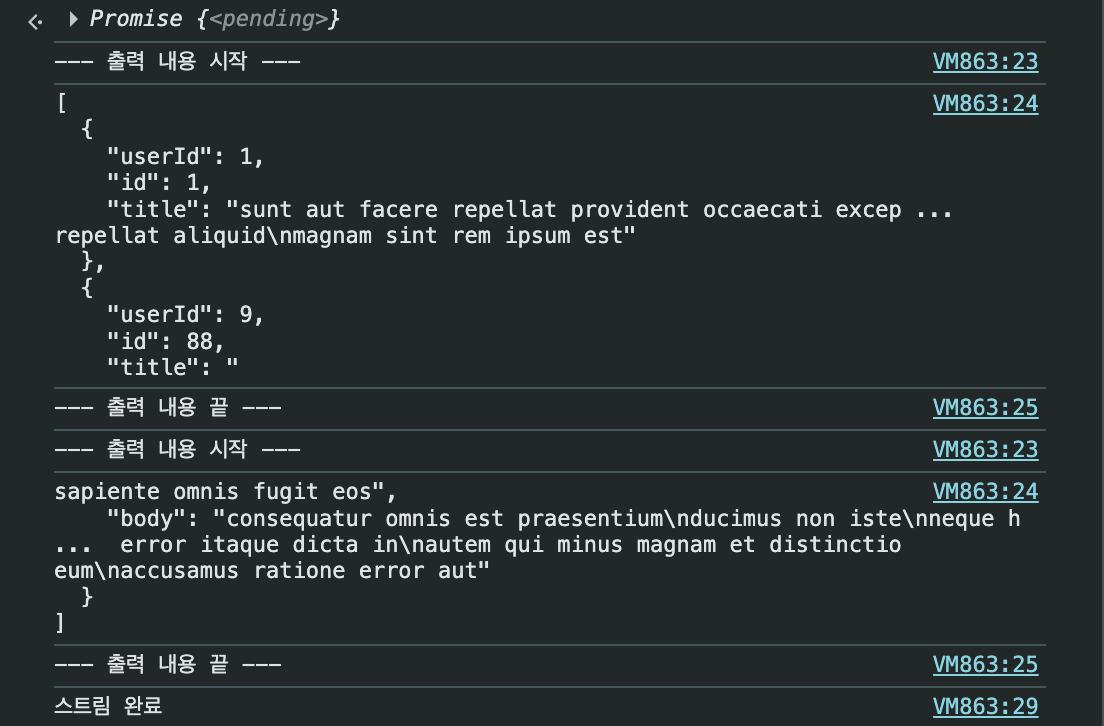
ReadableStream은 네트워크 속도에 따라 청크를 받는 횟수가 달라진다. 같은 데이터라도 네트워크가 느리면 더 작은 단위로 나뉘어 전송되기 때문에 반복문이 더 많이 실행된다.
네트워크: 제한 없음
- 청크를 크게 받아 반복문 실행 횟수가 적다
네트워크: 느린 4G
- 청크를 작게 나눠 받아 반복문 실행 횟수가 많다
- 동일한 데이터지만 더 많은 청크로 분할되어 처리된다
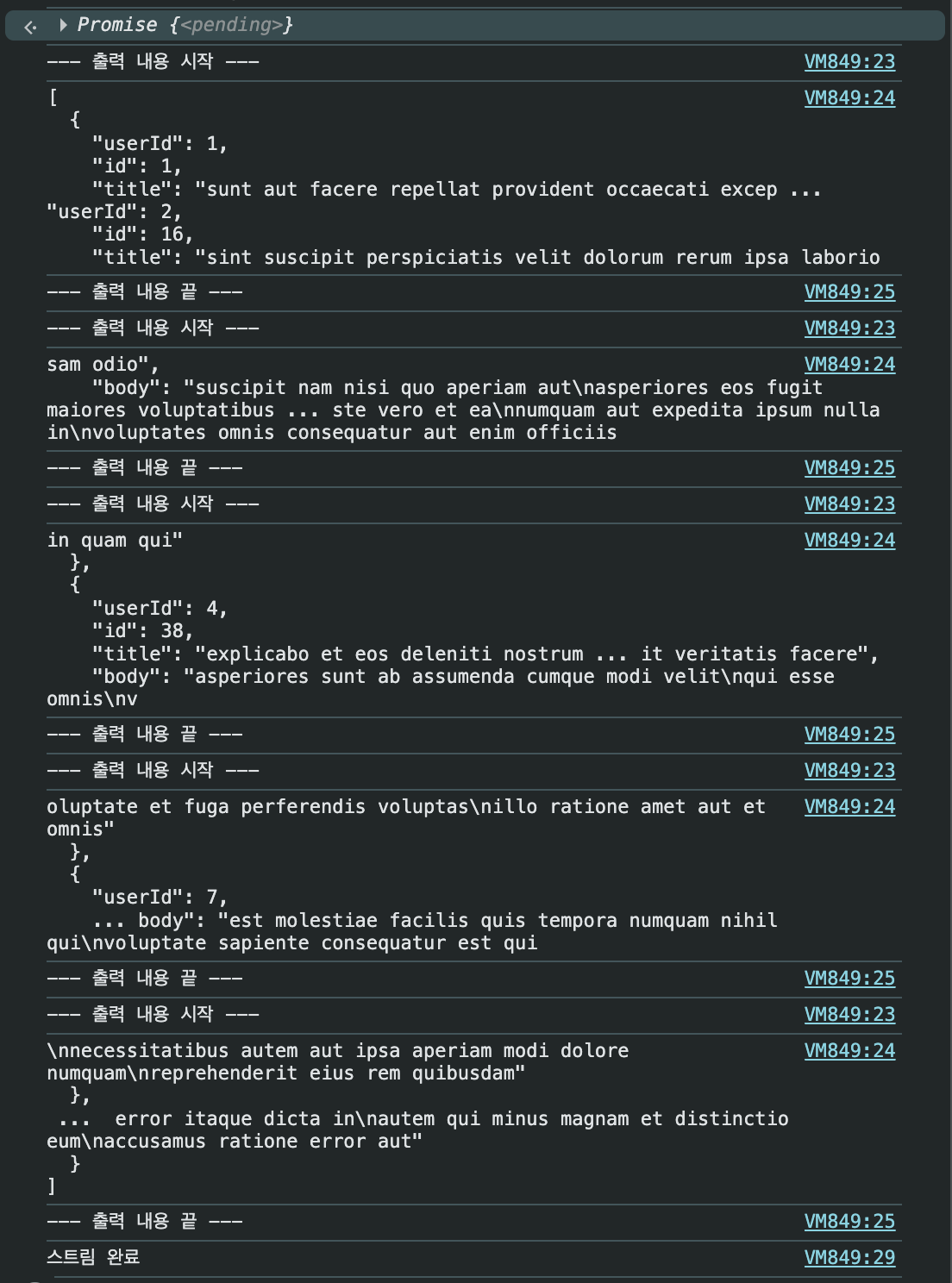
이처럼 ReadableStream은 네트워크 상황에 따라 유연하게 데이터를 처리하며, 느린 환경에서도 메모리를 효율적으로 사용할 수 있다.