MSW 사용해보기 -1 (+ ApolloClient)
이전 시간에는 msw를 세팅해보았다
이제는 네트워크요청을 가로채서 세팅한 응답값을 리턴해보겠다
개발환경
next v14 (page 라우팅)
apolloClient v3.6
msw v2
✅ 단일 서버 Mocking
여러 서버에 대한 임의의 응답값을 리턴해줄 수 있지만 일단은 1개의 endpoint에 대한 과정을 정리하겠다.
// pages/mocks/handlers.ts
import { graphql } from "msw";

export const LIST_POSTS = gql`
  query ListPosts
 {
    posts {
      id
      title
      content
    }
  }
`;

const allPosts = new Map([
  [
    "1",
    {
      id: "e82f332c-a4e7-4463-b440-59bc91792634",
      title: "Introducing a new JavaScript runtime",
      content: "asdf",
    },
  ],
  [
    "2",
    {
      id: "64734573-ce54-435b-8528-106ac03a0e11",
      title: "Common software engineering patterns",
      content: "123123",
    },
  ],
]);

export const handlers = [
  graphql.query("ListPosts", ({ query, variables }) => {
  	if(variables 조건문){
    	return HttpResponse.json({
        	errors:[{message:"error"}]
        })
    }
    return HttpResponse.json({
      data: {
        posts: Array.from(allPosts.values()),
      },
    });
  })
];
HttpResponse.json에는 data, error둘다 응답값으로 사용가능하고
variables에 따라서 다양한 응답값을 만들 수 있다.
handlers안에서 query명을 넣게 되면 해당 쿼리명으로 요청들어오는 것들을 모두 가로챌수 있다.
클라이언트에서는 평소대로 useQuery를 이용해서 사용하면 된다.
//client
useQuery(LIST_POSTS,{
 ...
})
그런데 안된다

❓왜
혹시 몰라서 기존 프로젝트에서 우리가 사용하는 client말고 가장 기본적으로 apolloClient를 세팅해서 연결해봤다
const client = new ApolloClient({
  link: new HttpLink({
    uri: ... // GraphQL 서버의 URL
  }),

  cache: new InMemoryCache(),
});
const TestPage = () => {
  const { data } = useQuery(LIST_POSTS, {
    client,
    variables: {},
  });
  console.log("TEST >>> ", data);
  return <div></div>;
};
export default TestPage;
이렇게 하면 화면에 data가 잘 출력되는걸로 봐선 우리 프로젝트의 aplloClient에 문제가 있어보인다.
어느 부분때문에 안되는건지 속성등을 하나씩 삭제해가면서 디버깅을 해보았다.
우리 프로젝트의 apolloClient는 간략하게 아래와 같다
   new ApolloClient({
      link: from([retryLink, errorLink, authLink, splitLink]),
      uri,
      ...
여러 link들 중에서 new BatchHttpLink()를 사용하는 곳이 문제가 되었다.
aplloClient의 링크관련 내용 업로드 예정
왜 msw에서 HttpLink 는 되고 BatchHttpLink는 문제가 될까?
BatchHttpLink는 여러 Query를 모아서 서버로 요청을 보내도록 하는 link이다
이와 같은 Query batching은 GraphQL기본 사양은 아니고 apolloClient측에서 별도로 성능을 강화하기 위해 만든 기능이기에 msw는 이에 대한 처리는 제공해주지 않는다.
아래 github에 들어가보면 msw개발자가 했던 말중에 이런말이 있다
"MSW는 특정 클라이언트에 맞춰서 제공하진 않을 것이다."
[github] Support batched GraphQL queries
대신 클라이언트쪽에서 배치된 쿼리를 감지하고 래핑을 해제하는 방식을 msw공식문서에 올려놨다. 🙏
const batchedGraphQLQuery = (url: string, handlers: GraphQLHandler[]) => {
  return http.post(url, async ({ request }) => {
    const payload = await request.clone().json();

    // 배치쿼리가 아니면 무시하라
    if (!Array.isArray(payload)) {
      return;
    }
    const responses = await Promise.all(
      payload.map(async query => {
      // 동일한 URL로 배열로 들어온 요청들을 각각 하나씩 요청으로 만듬
        const queryRequest = new Request(request, {
          body: JSON.stringify(query),
        });
		// 요청핸들러 목록에 개별 쿼리 요청값이 있는지 확인
        const response = await getResponse(handlers, queryRequest);
		// 모의응답값이 있으면 모의응답값을 반환하고 없으면 서버로 요청하여 응답값을 확인
        return response || fetch(bypass(queryRequest));
      }),
    );
	// 전체 일괄 처리된 쿼리에 대한 응답값을 queryData에 담는다.
    const queryData = await Promise.all(
      responses.map(response => response?.json()),
    );

    return HttpResponse.json(queryData);
  });
};

const graphqlHandlers = [
  graphql.query("ListPosts", ({ query, request }) => {
    return HttpResponse.json({
      data: {
        posts: Array.from(allPosts.values()),
      },
    });
  }),
];
export const handlers = [
  batchedGraphQLQuery(
    ... //graphql 서버 uri,
    graphqlHandlers,
  ),
];
batchedGraphQLQuery()함수를 거치게 되면 아래와 같이 실행된다
- 배치쿼리안에 있는 요청(=쿼리)들을 map으로 순회하면서 handlers안에 있는 모의응답으로 지정해둔 요청이 있는지 확인
- 모의응답이 있다면 해당 응답값을 리턴
- 없다면 네트워크를 요청 그대로 실행하여 서버로부터 받은 데이터를 리턴
위 과정을 거치면 아래처럼 원하는 모의응답값을 제대로 받을 수 있게된다.
🚧 Warning: intercepted a request without a matching request handler
경고가 너무 많이뜨던데 읽어보니 핸들러에 등록안된 요청을 뺏어갔댄다
난 내가 등록한 경로에 특정 쿼리에 대해서만 요청을 뺏길 원한다.
[MSW] Warning: intercepted a request without a matching request handler:

  • GET ...

If you still wish to intercept this unhandled request, please create a request handler for it.
Read more: https://mswjs.io/docs/getting-started/mocks
공식문서를 살펴보니 serviceWorker객체에 핸들러에 없는 요청들에 대한 작업을 추가할 수 있는 속성이 있었다
나는 bypass옵션을 주어 핸들러에 없는 요청들은 경고없이 그대로 서버로 데이터를 요청하도록 했다.
//pages/mocks/MSWComponent.tsx
worker.start({
	onUnhandledRequest:bypass
})
기본이 warn이고 다른 속성엔 error,bypass가 있다
warn: 경고문구를 콘솔창에 띄우고 서버로 요청보내기
error: 에러발생 및 요청 진행안함
bypass: 콘솔창에 노출없이 서버로 요청보내기
🧐 서버에서 모킹 연결한건 어떻게 확인하지?
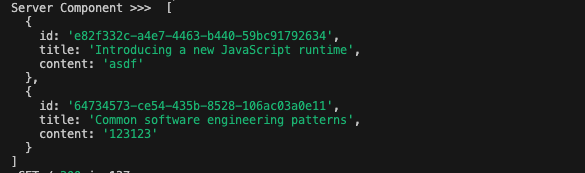
React Server Component(이하 RSC) 혹은 getServerSideProps를 만들어서 확인해보면 된다
- RSC는 page routing에서는 제공하지 않고 app routing에서만 제공하기 때문에 새로운 프로젝트에서 간단하게 실험해봤다.
handler
const allPosts = new Map([
  [
    "1",
    {
      id: "e82f332c-a4e7-4463-b440-59bc91792634",
      title: "Introducing a new JavaScript runtime",
      content: "asdf",
    },
  ],
  [
    "2",
    {
      id: "64734573-ce54-435b-8528-106ac03a0e11",
      title: "Common software engineering patterns",
      content: "123123",
    },
  ],
]);

export const handlers=[
  http.get("https://localhosts/posts", () => {
    return HttpResponse.json({
      data: {
        posts: Array.from(allPosts.values()),
      },
    });
  }),
]
RSC (app routing)
const TestServer = async () => {
  const data = await fetch("https://localhosts/posts");
  const jsonData = await data.json();

  console.log("Server Component >>> ", jsonData);
  return (
    <div>
      {jsonData.map((item, index) => {
        return <div key={index}>{item.title}</div>;
      })}
    </div>
  );
};
export default TestServer;
getServerSideProps (page routing)
export const getServerSideProps = async () => {
  const data = await fetch("https://localhosts/posts");
  const jsonData = await data.json();

  console.log("Server Component >>> ", jsonData);
  return {
  	props:{
    	data:jsonData
    }
  }
};
export default TestServer;
터미널창에 잘 나타남을 확인 할 수 있다.
❗️ 주의
() => Promise<EmotionJSX.Element>' is not a valid JSX element type.RSC는 async component로 생성되어 기존 typescript는 이를 에러로 판단한다.
에러가 뜬다면 typescript >5.1.3, @types/react > 18.2.8
버전을 업그레이드 해주면된다
혹은
{/ @ts-expect-error Async Server Component /}
이 문구를 RSC호출하는 코드 상단에 넣어주면된다.
✅ 다중 서버 Mocking
여러 서버에 보내는 요청에 대한 모의응답값을 보내기 위해선 graphql.link()에 graphql서버를 각각 넣고 해당 서버에 query를 등록하면 된다.
const graphqlServer1 = graphql.link("https://.../graphql");
const graphqlServer2 = graphql.link("https://.../graphql");
const graphqlServer1Handlers = [
  graphqlServer1.query("ListPosts", ({ query, request }) => {
    return HttpResponse.json({
      data: {
        posts: Array.from(allPosts.values()),
      },
    });
  }),
];
const graphqlServer2Handlers = [
  graphqlServer2.query("ListPosts2", ({ query, request }) => {
    return HttpResponse.json({
      data: {
        posts: Array.from(allPosts1.values()),
      },
    });
  }),
];
export const handlers = [
  batchedGraphQLQuery(
    "https://.../graphql", // graphqlServer1 서버주소
    graphqlServer1Handlers,
  ),
  batchedGraphQLQuery(
    "https://.../graphql", // graphqlServer2 서버주소
    graphqlServer2Handlers,
  ),
];
결론
온갖 삽질을 해가며 열심히 msw의 세팅을 맞췄다. 이제 더미데이터가 아니라 쿼리를 실제로 사용하며 개발을 진행할 수 있게 되었다 🥳
생각보다 오래걸리긴했지만 팀에 도움이 되었으면 한다
