[SK shieldus Rookies 19기] 4.2. 애플리케이션 보안(7). beebox 가상머신, 입력 데이터 검증, 리다이렉션, 포워드
SK shieldus Rookies

업로드 취약점 = 위험한 형식 파일 업로드
가이드
개요
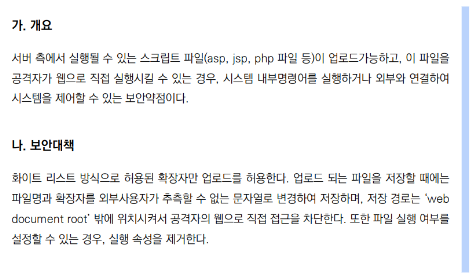
파일 업로드 기능이 제공되는 경우,
파일의 크기와 개수, 종류를 제한하지 않고, 외부에서 접근 가능한 경로에 업로드 파일을 저장하는 경우 발생
~~~~~~~~~~~~~~~~~~  ~~~~~~~~~~~~~~~~~~~~  ~~~~~~~~~~~~~~~~~~~~~~~~~~~~~~~~~~~~~~~~~~~~~~
|                    |                     |
|                    |                     +-- URL을 통해서 접근 가능한 경로에 위치 ⇒ Web Document Root 아래에 위치
|                    |
|                    +-- 바이러스와 같은 파일을 업로드해서 해당 서버를 악성코드 유포지로 활용
|                        서버에서 실행 가능한 파일을 업로드해서 실행 ⇒ 웹쉘(WebShell)
|                                                                       ~~~~~~~~~~~~~~
+-- 서버의 연결 및 디스크 자원을 고갈시켜 정상적인 서비스를 방해        운영체제 명령어 삽입 공격을 쉽게 할 수 있도록
                                                                        서버에서 실행 가능한 언어를 이용해서
                                                                        하나 파일로 만든 웹 애플리케이션
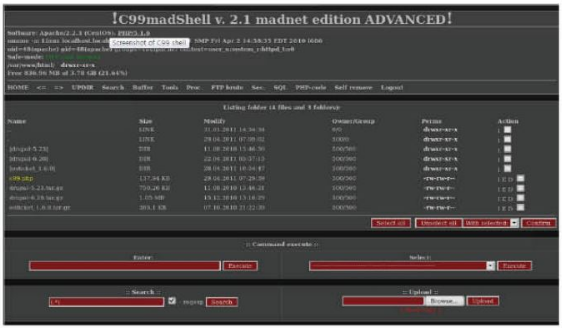
webshell opensource project 로 검색하면 다양한 언어로 만들어진 웹쉘 파일을 쉽게 구할 수 있음
예) https://github.com/tennc/webshell


파일 업로드 기능이 제공을 확인하는 방법
<form enctype="multipart/form-data"	method="post" ... > 	⇐ https://developer.mozilla.org/ko/docs/Web/HTML/Element/form
    <input type="file" ... >
</form>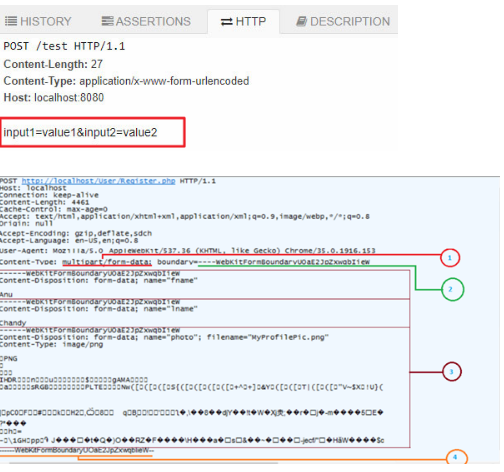
방어기법
1. 업로드 파일의 크기와 개수를 제한한다.
	⇒ 설계 시 제공하는 서비스에 맞는 적절한 크기와 개수를 정의하는 것이 필요
2. 파일의 종류를 제한한다.
⇒ 업로드 가능한 파일의 종류를 미리 정의하고 정의된 범위 내에서만 업로드를 허용한다.
                               ~~~~~~~~~~~~~~~~~~~~~~~~~~~~~~~~~~~~~~~~~~~~~~~~
                               허용 목록 (화이트 리스트) 방식으로 제한
⇒ 파일 종류를 비교하는 방법
1)확장자 = 파일명이 어떻게 끝나는가로 판단 (예: test.gif.jsp)
2)Content-Type
3)File Signature	 = Magic Number	⇐ https://www.garykessler.net/library/file_sigs.html
3. 업로드 파일을 외부에서 접근할 수 없는 경로에 저장한다.
~~~~~~~~~~~~~~~~~~~~~~~~~~~~~~~~~~~~~~~~~~
Web (Document) Root 밖
4. 업로드 파일의 이름을 외부에서 알 수 없는 형태로 변경해서 알 수 없는 경로에 저장한다.
5. 업로드 파일의 실행 속성을 제거하고 저장한다.
Kali 가상머신에서 beebox로 접속
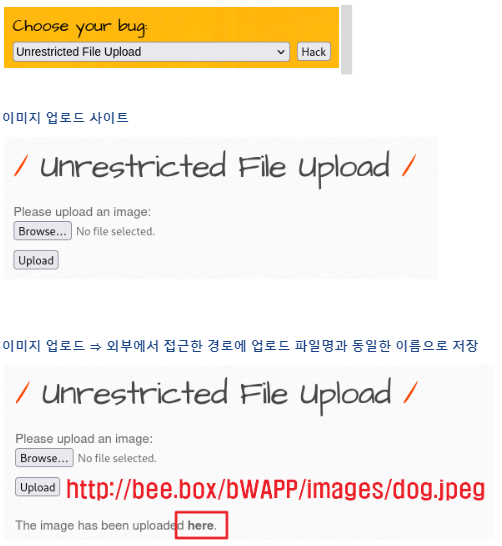
서버에서 실행 가능한 파일을 업로드 ⇒ PHP로 만들어진 웹쉘을 다운로드해서 업로드
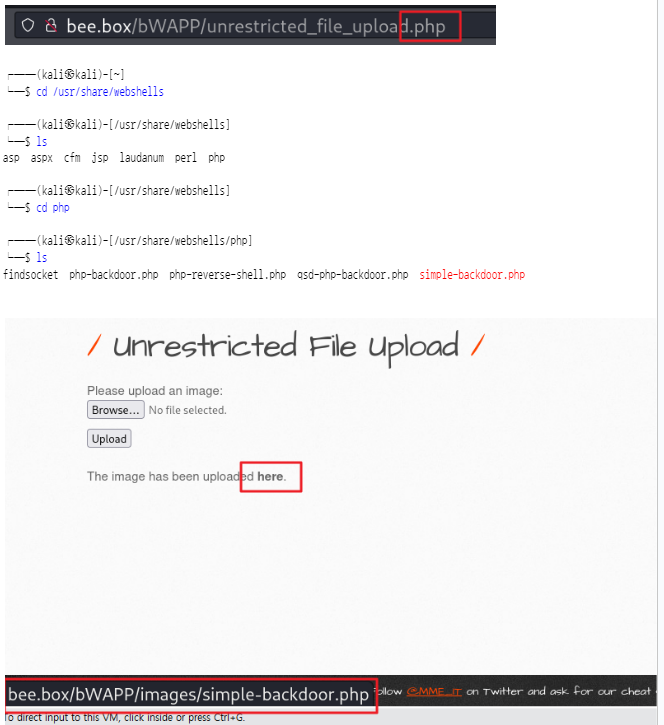
/usr/share/webshells/php/simple-backdoor.php 파일을 업로드 ⇒ here 마우스를 올려 보면 링크 정보가 출력됨 ⇒ 정상적으로 업로드된 것을 확인할 수 있음
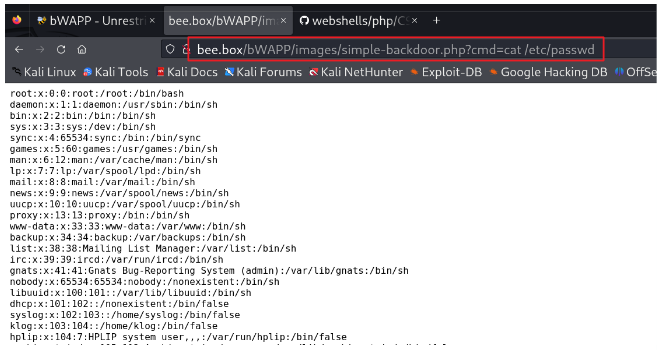
해당 주소로 이동 ⇒ 업로드한 웹쉘 파일을 실행
cmd 요청 파라미터에 서버에서 실행할 명령어를 전달 ⇒ 명령어의 실행 결과가 화면에 출력
취약한 소스 코드 확인 (beebox 가상머신에서)
bee@bee-box:~$ sudo gedit /var/www/bWAPP/unrestricted_file_upload.php

<?php
include("security.php");
include("security_level_check.php");
include("functions_external.php");
include("selections.php");

if(isset($_POST["form"]))
{

    $file_error = "";

    switch($_COOKIE["security_level"])
    {
        case "0" : 					⇐ https://www.php.net/manual/en/function.move-uploaded-file.php
            move_uploaded_file($_FILES["file"]["tmp_name"], "images/" . $_FILES["file"]["name"]);
            break;             ~~~~~~~~~~~~~~~~~~~~~~~~~~~  ~~~~~~~~~~~~~~~~~~~~~~~~~~~~~~~~~~~
                               업로드 파일을                현재 디렉터리의 images 아래에 업로드 파일명으로 저장
        case "1" :
            $file_error = file_upload_check_1($_FILES["file"]);

            if(!$file_error)
            {
                move_uploaded_file($_FILES["file"]["tmp_name"], "images/" . $_FILES["file"]["name"]);
            }
            break;

        case "2" :
            $file_error = file_upload_check_2($_FILES["file"], array("jpg","png"));
            if(!$file_error)
            {
                move_uploaded_file($_FILES["file"]["tmp_name"], "images/" . $_FILES["file"]["name"]);
            }
            break;

        default :
            move_uploaded_file($_FILES["file"]["tmp_name"],"images/" . $_FILES["file"]["name"]);
            break;
    }
}

?>

		... 생략 ...
    <?php

    if(isset($_POST["form"]))
    {

        if(!$file_error)
        {

            echo "The image has been uploaded <a href=\"images/" . $_FILES["file"]["name"] . "\" target=\"_blank\">here</a>.";

        }

        else
        {

            echo "<font color=\"red\">" . $file_error . "</font>";

        }

    }

    ?>
보안 등급이 중간인 경우 파일 확장자를 블랙리스트를 이용해서 제한하고 있음
function file_upload_check_1($file, $file_extensions = array("asp", "aspx", "dll", "exe", "jsp", "php"), $directory = "images")
{
    $file_error = "";

    // Checks if the input field is empty
    if($file["name"] == "")
    {
        $file_error = "Please select a file...";
        return $file_error;
    }

    // Checks if there is an error with the file
    switch($file["error"])
    // URL: http://php.net/manual/en/features.file-upload.errors.php
    {
        case 1 : $file_error = "Sorry, the file is too large. Please try again...";
                 break;

        case 2 : $file_error = "Sorry, the file is too large. Please try again...";
                 break;

        case 3 : $file_error = "Sorry, the file was only partially uploaded. Please try again...";
                 break;

        case 6 : $file_error = "Sorry, a temporary folder is missing. Please try again...";
                 break;

        case 7 : $file_error = "Sorry, the file could not be written. Please try again...";
                 break;

        case 8 : $file_error = "Sorry, a PHP extension stopped the file upload. Please try again...";
                 break;
    }

    if($file_error)
    {
        return $file_error;
    }

    // Breaks the file in pieces (.) All pieces are put in an array
    $file_array = explode(".", $file["name"]);				⇐ 확장자 검증을 위해서 .을 기준으로 분리

    // Puts the last part of the array (= the file extension) in a new variabele
    // Converts the characters to lower case
    $file_extension = strtolower($file_array[count($file_array) - 1]);	⇐ 확장자를 소문자로 변환

    // Searches if the file extension exists in the 'allowed' file extensions array
    if(in_array($file_extension, $file_extensions))			⇐ 제한 목록에 포함되어 있는 경우 오류 처리
    {
       $file_error = "Sorry, the file extension is not allowed. The following extensions are blocked: <b>" . join(", ", $file_extensions) . "</b>";

       return $file_error;
    }

    // Checks if the file already exists in the directory
    if(is_file("$directory/" . $file["name"]))				⇐ 동일한 파일이 존재하는지 검증
    {
        $file_error = "Sorry, the file already exists. Please rename the file...";
    }

    return $file_error;
}
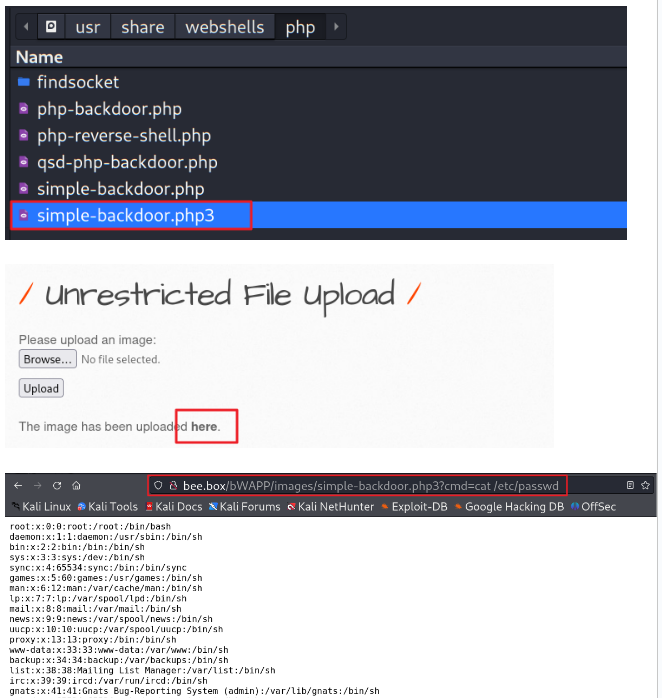
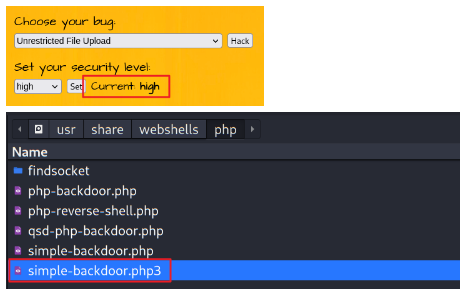
파일 확장자를 PHP3로 변경해서 업로드 ⇒ 블랙리스테에는 PHP3가 포함되어 있지 않음
┌──(kali㉿kali)-[/usr/share/webshells/php]
└─$ sudo cp simple-backdoor.php simple-backdoor.php3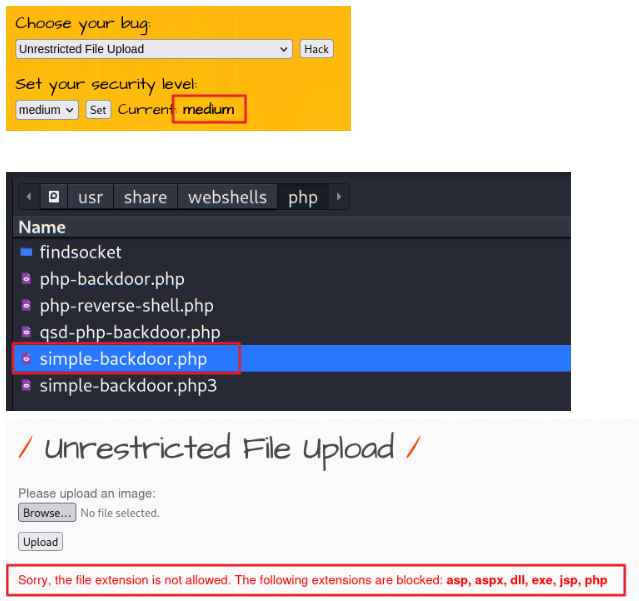
보안 등급이 가장 높은 경우 화이트 리스트 방식으로 확장자를 제한하고 있음
function file_upload_check_2($file, $file_extensions = array("jpeg", "jpg", "png", "gif"), $directory = "images")
{
		... 생략 ...


    // Searches if the file extension exists in the 'allowed' file extensions array
    if(!in_array($file_extension, $file_extensions))	⇐ 화이트 리스트에 포함되지 않은 확장자인 경우 오류 처리
    {
       $file_error = "Sorry, the file extension is not allowed. Only the following extensions are allowed: <b>" . join(", ", $file_extensions) . "</b>";

       return $file_error;
    }
... 생략 ... 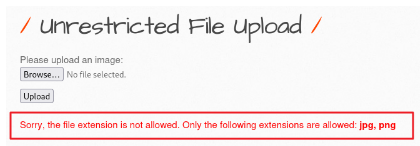
웹 루트 밖에 업로드 파일을 저장하면 주소를 통해서 접근하는 것이 불가능 ⇒ 다운로드 기능이 필요
예를 들어, 업로드 파일이 /data/images/myimage.gif 형태로 저장되어 있다면
                         ~
                         해당 서버의 루트 디렉터리를 의미

<img src="/data/images/myimage.gif"> 또는 <a href="/data/images/myimage.gif" > 형태로 접근이 불가
          ~~~~~~~~~~~~~~~~~~~~~~~~                 ~~~~~~~~~~~~~~~~~~~~~~~~
          |  WEB_DOCUMENT_ROOT/data/images/myimage.gif 의미
          +-- 웹 루트 디렉터리를 의미 = 웹 서버에서 설정한 기준 디렉터리 (bWAPP의 경우 /var/www 디렉터리를 지정)


<img src="download?file=/data/images/myimage.gif"> 또는 <a href="download?file=/data/images/myimage.gif">
          ~~~~~~~~                                               ~~~~~~~~
          요청 파라미터로 전달된 경로의 파일을 읽어서 응답으로 반환

이때 가급적이면 업로드 파일이 저장되어 있는 경로는 외부에 노출되지 않는 것 안전
<img src="download?file=myimage.gif"> 또는 <a href="download?file=myimage.gif">
          ~~~~~~~~                                               ~~~~~~~~
          요청 파라미터로 전달된 파일을 해당 서버의 /data/images 디렉터리에서 읽어서 응답으로 반환
                                                    ~~~~~~~~~~~~~~~~~~~~~
                                                    업로드 파일을 저장하고 있는 디렉터리
다운로드 기능을 구현할 때 유의해야 할 사항 ⇒ 지정된 경로를 벗어나서 파일을 읽지 못하도록 제한 ⇒ 경로 조작 취약점(path traversal)에 노출될 수 있음
download?file=myimage.gif
==========================
with open('/data/images/' + file, 'r') as f:
    return f.read()


download?file=../../../../../../../../../etc/passwd			⇒ 시스템 파일을 다운로드할 수 있음
              ~~~~~~~~~~~~~~~~~~~~~~~~~~ ~~~~~~~~~~
               |                          +-- 알려진 시스템 파일에 접근
               +-- 루트 디렉터리가 나올 때까지 상위 디렉터리로 이동
/var/www/bWAPP/unrestricted_file_upload.php 파일에서 업로드 취약점을 제거
<?php
/*
bWAPP, or a buggy web application, is a free and open source deliberately insecure web application.
It helps security enthusiasts, developers and students to discover and to prevent web vulnerabilities.
bWAPP covers all major known web vulnerabilities, including all risks from the OWASP Top 10 project!
It is for security-testing and educational purposes only.
Enjoy!
Malik Mesellem
Twitter: @MME_IT
bWAPP is licensed under a Creative Commons Attribution-NonCommercial-NoDerivatives 4.0 International License (http://creativecommons.org/licenses/by-nc-nd/4.0/). Copyright © 2014 MME BVBA. All rights reserved.
*/
include("security.php");
include("security_level_check.php");
include("functions_external.php");
include("selections.php");
if(isset($_POST["form"]))
{
$file_error = "";
switch($_COOKIE["security_level"])
{
case "0" :
move_uploaded_file($_FILES["file"]["tmp_name"], "images/" . $_FILES["file"]["name"]);
break;
case "1" :
$file_error = file_upload_check_1($_FILES["file"]);
if(!$file_error)
{
move_uploaded_file($_FILES["file"]["tmp_name"], "images/" . $_FILES["file"]["name"]);
}
break;
case "2" :
$file_error = file_upload_check_2($_FILES["file"], array("jpg","png"));
if(!$file_error)
{
move_uploaded_file($_FILES["file"]["tmp_name"], "/data/images/" . $_FILES["file"]["name"]);
⇐ 외부에서 접근할 수 없는 경로에 파일을 저장하도록 수정
}
break;
default :
move_uploaded_file($_FILES["file"]["tmp_name"],"images/" . $_FILES["file"]["name"]);
break;
}
}
?>
<!DOCTYPE html>
<html>
<head>
<meta http-equiv="Content-Type" content="text/html; charset=UTF-8">
<!--<link rel="stylesheet" type="text/css" href="https://fonts.googleapis.com/css?family=Architects+Daughter">-->
<link rel="stylesheet" type="text/css" href="stylesheets/stylesheet.css" media="screen" />
<link rel="shortcut icon" href="images/favicon.ico" type="image/x-icon" />
<!--<script src="//html5shiv.googlecode.com/svn/trunk/html5.js"></script>-->
<script src="js/html5.js"></script>
<title>bWAPP - Unrestricted File Upload</title>
</head>
<body>
<header>
<h1>bWAPP</h1>
<h2>an extremely buggy web app !</h2>
</header>
<div id="menu">
<table>
<tr>
<td><a href="portal.php">Bugs</a></td>
<td><a href="password_change.php">Change Password</a></td>
<td><a href="user_extra.php">Create User</a></td>
<td><a href="security_level_set.php">Set Security Level</a></td>
<td><a href="reset.php" onclick="return confirm('All settings will be cleared. Are you sure?');">Reset</a></td>
<td><a href="credits.php">Credits</a></td>
<td><a href="http://itsecgames.blogspot.com" target="_blank">Blog</a></td>
<td><a href="logout.php" onclick="return confirm('Are you sure you want to leave?');">Logout</a></td>
<td><font color="red">Welcome <?php if(isset($_SESSION["login"])){echo ucwords($_SESSION["login"]);}?></font></td>
</tr>
</table>
</div>
<div id="main">
<h1>Unrestricted File Upload</h1>
<form action="<?php echo($_SERVER["SCRIPT_NAME"]);?>" method="POST" enctype="multipart/form-data">
<p><label for="file">Please upload an image:</label><br />
<input type="file" name="file"></p>
<input type="hidden" name="MAX_FILE_SIZE" value="10">
<!-- <input type="hidden" name="MAX_FILE_SIZE" value="100000"> -->
<input type="submit" name="form" value="Upload">
</form>
<br />
<?php
if(isset($_POST["form"]))
{
if(!$file_error)
{
echo "The image has been uploaded <a href=\"/data/images/" . $_FILES["file"]["name"] . "\" target=\"_blank\">here</a>.";
echo "<img src=\"/data/images/" . $_FILES["file"]["name"] . "\">";
} ⇐ 업로드된 파일에 대한 링크(<a>)와 출력(<img>)을 저장된 경로로 수정
→ 주소를 통해서 접근할 수 없으므로 링크도 출력도 되지 않음
else
{
echo "<font color=\"red\">" . $file_error . "</font>";
}
}
?>
</div>
<div id="side">
<a href="http://twitter.com/MME_IT" target="blank_" class="button"><img src="./images/twitter.png"></a>
<a href="http://be.linkedin.com/in/malikmesellem" target="blank_" class="button"><img src="./images/linkedin.png"></a>
<a href="http://www.facebook.com/pages/MME-IT-Audits-Security/104153019664877" target="blank_" class="button"><img src="./images/facebook.png"></a>
<a href="http://itsecgames.blogspot.com" target="blank_" class="button"><img src="./images/blogger.png"></a>
</div>
<div id="disclaimer">
<p>bWAPP is licensed under <a rel="license" href="http://creativecommons.org/licenses/by-nc-nd/4.0/" target="_blank"><img style="vertical-align:middle" src="./images/cc.png"></a> © 2014 MME BVBA / Follow <a href="http://twitter.com/MME_IT" target="_blank">@MME_IT</a> on Twitter and ask for our cheat sheet, containing all solutions! / Need an exclusive <a href="http://www.mmebvba.com" target="_blank">training</a>?</p>
</div>
<div id="bee">
<img src="./images/bee_1.png">
</div>
<div id="security_level">
<form action="<?php echo($_SERVER["SCRIPT_NAME"]);?>" method="POST">
<label>Set your security level:</label><br />
<select name="security_level">
<option value="0">low</option>
<option value="1">medium</option>
<option value="2">high</option>
</select>
<button type="submit" name="form_security_level" value="submit">Set</button>
<font size="4">Current: <b><?php echo $security_level?></b></font>
</form>
</div>
<div id="bug">
<form action="<?php echo($_SERVER["SCRIPT_NAME"]);?>" method="POST">
<label>Choose your bug:</label><br />
<select name="bug">
<?php
// Lists the options from the array 'bugs' (bugs.txt)
foreach ($bugs as $key => $value)
{
$bug = explode(",", trim($value));
// Debugging
// echo "key: " . $key;
// echo " value: " . $bug[0];
// echo " filename: " . $bug[1] . "<br />";
echo "<option value='$key'>$bug[0]</option>";
}
?>
</select>
<button type="submit" name="form_bug" value="submit">Hack</button>
</form>
</div>
</body>
</html>bee-box 가상머신에 파일을 저장하는 디렉터리를 생성
bee@bee-box:~$ sudo mkdir -p /data/images
bee@bee-box:~$ ls /data/images
bee@bee-box:~$ sudo chown root:www-data /data/images
bee@bee-box:~$ sudo chmod 777 /data/images
kali 가상머신에서 이미지 파일을 업로드
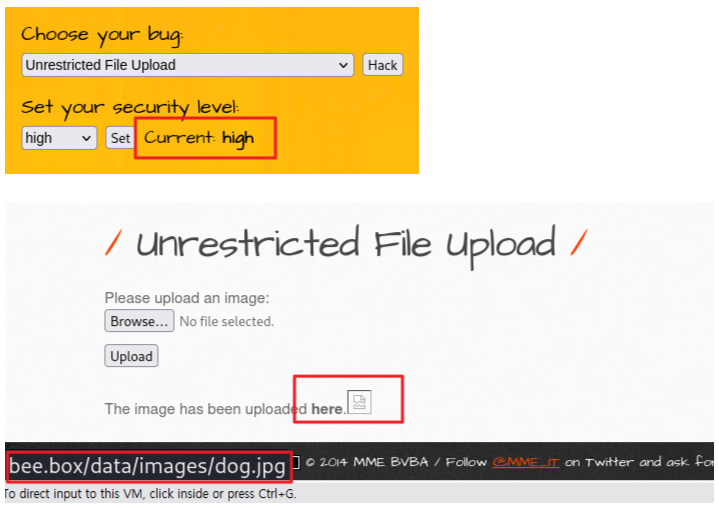
⇒ 웹 루트 디렉터리 아래에 존재하지 않는 디렉터리와 파일을 참조하므로 링크도 동작하지 않고 이미지도 나타나지 않음


bee@bee-box:~$ ls /data/images
dog.jpg						⇐ 지정한 디렉터리에 파일이 저장된 것을 확인
다운로드 기능을 추가 (bee-box)
bee@bee-box:~$ sudo gedit /var/www/bWAPP/download.php
<?php
  $target_Dir = "/data/images/";
  $file = $_GET['file'];
  $down = $target_Dir.$file;
  $filesize = filesize($down);

  if(file_exists($down)){
    header("Content-Type:application/octet-stream");
    header("Content-Disposition:attachment;filename=$file");
    header("Content-Transfer-Encoding:binary");
    header("Content-Length:".filesize($target_Dir.$file));
    header("Cache-Control:cache,must-revalidate");
    header("Pragma:no-cache");
    header("Expires:0");
    if(is_file($down)){
        $fp = fopen($down,"r");
        while(!feof($fp)){
          $buf = fread($fp,8096);
          $read = strlen($buf);
          print($buf);
          flush();
        }
        fclose($fp);
    }
  } else{
    ?><script>alert("존재하지 않는 파일입니다.")</script><?
  }
?>
링크와 이미지 출력에 반영
    if(isset($_POST["form"]))
    {

        if(!$file_error)
        {

/*
            echo "The image has been uploaded <a href=\"/data/images/" . $_FILES["file"]["name"] . "\" target=\"_blank\">here</a>.";

	    echo "<img src=\"/data/images/" . $_FILES["file"]["name"] . "\">";
*/
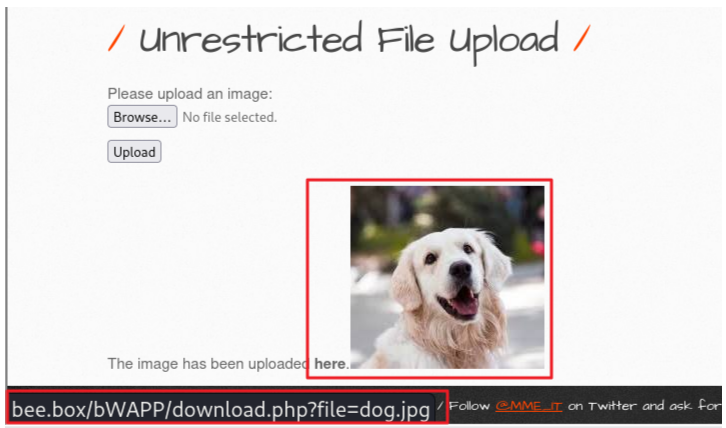
            echo "The image has been uploaded <a href=\"download.php?file=" . $_FILES["file"]["name"] . "\" target=\"_blank\">here</a>.";

	    echo "<img src=\"download.php?file=" . $_FILES["file"]["name"] . "\">";


        }

        else
        {

            echo "<font color=\"red\">" . $file_error . "</font>";

        }

    }
링크와 이미지가 출력되는 것을 확인
파일명에 경로조작 문자열과 함께 시스템 파일명을 함께 전달
┌──(kali㉿kali)-[~]
└─$ curl -v  http://bee.box/bWAPP/download.php?file=../../../../../../../etc/passwd
                                                      ~~~~~~~~~~~~~~~~~~~~ ~~~~~~~~~~
*   Trying 192.168.40.130:80...                       경로조작 문자열      시스템 파일 경로
* Connected to bee.box (192.168.40.130) port 80
> GET /bWAPP/download.php?file=../../../../../../../etc/passwd HTTP/1.1
> Host: bee.box
> User-Agent: curl/8.4.0
> Accept: */*
>
< HTTP/1.1 200 OK
< Date: Tue, 19 Mar 2024 04:41:12 GMT
< Server: Apache/2.2.8 (Ubuntu) DAV/2 mod_fastcgi/2.4.6 PHP/5.2.4-2ubuntu5 ith Suhosin-Patch mod_ssl/2.2.8 OpenSSL/0.9.8g
< X-Powered-By: PHP/5.2.4-2ubuntu5
< Content-Disposition: attachment;filename=../../../../../../../etc/passwd
< Content-Transfer-Encoding: binary
< Content-Length: 2217
< Cache-Control: cache,must-revalidate
< Pragma: no-cache
< Expires: 0
< Content-Type: application/octet-stream
<
root:x:0:0:root:/root:/bin/bash
daemon:x:1:1:daemon:/usr/sbin:/bin/sh
bin:x:2:2:bin:/bin:/bin/sh
sys:x:3:3:sys:/dev:/bin/sh
sync:x:4:65534:sync:/bin:/bin/sync
games:x:5:60:games:/usr/games:/bin/sh
man:x:6:12:man:/var/cache/man:/bin/sh
lp:x:7:7:lp:/var/spool/lpd:/bin/sh
mail:x:8:8:mail:/var/mail:/bin/sh
news:x:9:9:news:/var/spool/news:/bin/sh
uucp:x:10:10:uucp:/var/spool/uucp:/bin/sh
proxy:x:13:13:proxy:/bin:/bin/sh
www-data:x:33:33:www-data:/var/www:/bin/sh
backup:x:34:34:backup:/var/backups:/bin/sh
list:x:38:38:Mailing List Manager:/var/list:/bin/sh
irc:x:39:39:ircd:/var/run/ircd:/bin/sh
gnats:x:41:41:Gnats Bug-Reporting System (admin):/var/lib/gnats:/bin/sh
nobody:x:65534:65534:nobody:/nonexistent:/bin/sh
libuuid:x:100:101::/var/lib/libuuid:/bin/sh
dhcp:x:101:102::/nonexistent:/bin/false
syslog:x:102:103::/home/syslog:/bin/false
klog:x:103:104::/home/klog:/bin/false
hplip:x:104:7:HPLIP system user,,,:/var/run/hplip:/bin/false
avahi-autoipd:x:105:113:Avahi autoip daemon,,,:/var/lib/avahi-autoipd:/bin/false
gdm:x:106:114:Gnome Display Manager:/var/lib/gdm:/bin/false
pulse:x:107:116:PulseAudio daemon,,,:/var/run/pulse:/bin/false
messagebus:x:108:119::/var/run/dbus:/bin/false
avahi:x:109:120:Avahi mDNS daemon,,,:/var/run/avahi-daemon:/bin/false
polkituser:x:110:122:PolicyKit,,,:/var/run/PolicyKit:/bin/false
haldaemon:x:111:123:Hardware abstraction layer,,,:/var/run/hald:/bin/false
bee:x:1000:1000:bee,,,:/home/bee:/bin/bash					⇐ beebox 웹 서버 사용자 계정
mysql:x:112:124:MySQL Server,,,:/var/lib/mysql:/bin/false
sshd:x:113:65534::/var/run/sshd:/usr/sbin/nologin
dovecot:x:114:126:Dovecot mail server,,,:/usr/lib/dovecot:/bin/false
smmta:x:115:127:Mail Transfer Agent,,,:/var/lib/sendmail:/bin/false
smmsp:x:116:128:Mail Submission Program,,,:/var/lib/sendmail:/bin/false
neo:x:1001:1001::/home/neo:/bin/sh
alice:x:1002:1002::/home/alice:/bin/sh
thor:x:1003:1003::/home/thor:/bin/sh
wolverine:x:1004:1004::/home/wolverine:/bin/sh
johnny:x:1005:1005::/home/johnny:/bin/sh
selene:x:1006:1006::/home/selene:/bin/sh
postfix:x:117:129::/var/spool/postfix:/bin/false
proftpd:x:118:65534::/var/run/proftpd:/bin/false
ftp:x:119:65534::/home/ftp:/bin/false
snmp:x:120:65534::/var/lib/snmp:/bin/false
ntp:x:121:131::/home/ntp:/bin/false
* Connection #0 to host bee.box left intact
Python 시큐어코딩 가이드
입력 데이터 검증 및 표현
SQL 삽입, 코드 삽입, 경로 조작 및 자원 삽입
외부 입력값이 자원 식별자로 사용되는 경우
              ~~~~
              파일, 소켓, 포트, 연결, ...
그 값을 검증, 제한하지 않고 사용하지 않으면 권한 밖 자원에 대해 접근할 수 있고 자원을 선점하거나 충돌시켜 정상적인 서비스를 방해
pybo\urls.py
from django.urls import path
from . import views

app_name = 'pybo'

urlpatterns = [
    path('', views.index, name='index'),
    path('<int:question_id>/', views.detail, name="detail"),
    path('answer/create/<int:question_id>', views.answer_create, name='answer_create'),
    path('question/create/', views.question_create, name='question_create'),
    path('download/', views.download, name='download'),
]
pybo\views.py
from django.shortcuts import render, get_object_or_404, redirect
from .models import Question
from .forms import QuestionForm
from django.utils import timezone
import subprocess
import os

def index(request):
    question_list = Question.objects.order_by('-create_date')

    context = { 'question_list': question_list }

    return render(request, 'pybo/question_list.html', context)

def download(request):
    request_file = request.GET.get('request_file')
    (filename, file_ext) = os.path.splitext(request_file)
    file_ext = file_ext.lower()
    if file_ext not in ['.txt', '.csv']:
        return render(request, 'pybo/error.html', {'error':'파일을 열 수 없습니다.'})

    with open(request_file) as f:
        data = f.read()
        return render(request, 'pybo/success.html', {'data':data})
templates\pybo\error.html
{% extends 'base.html' %}

{% block content %}
<div class="container my-3">
    {{ error }}
</div>
{% endblock %}
templates\pybo\success.html
{% extends 'base.html' %}

{% block content %}
<div class="container my-3">
    {{ data }}
</div>
{% endblock %}
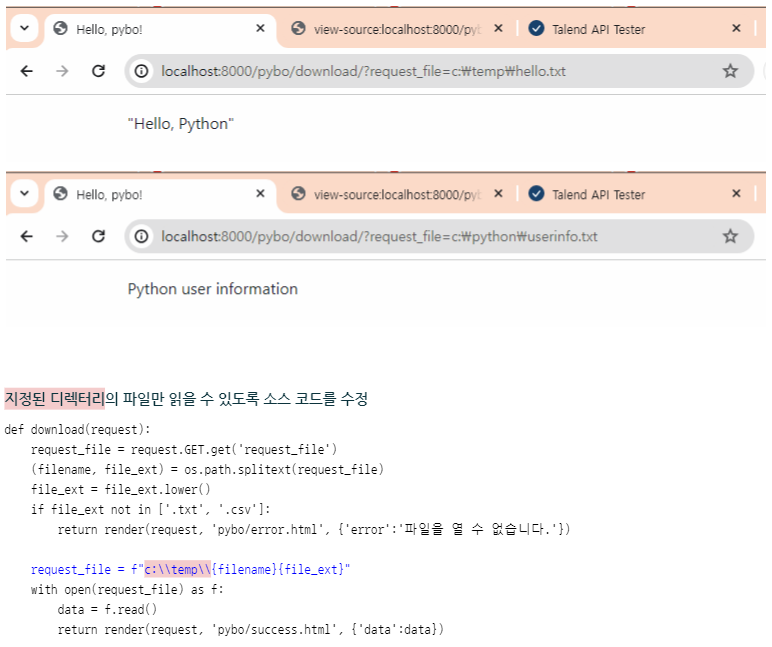
테스트 파일을 생성
c:\Users\crpark> echo "Hello, Python" > c:\temp\hello.txt			⇐ 웹 페이지에서 접근할 수 있는 파일

c:\Users\crpark> type c:\temp\hello.txt
"Hello, Python"

c:\Users\crpark> echo Python user information > c:\python\userinfo.txt	⇐ 웹 페이지에서 접근할 수 없는 파일

c:\Users\crpark> type c:\python\userinfo.txt
Python user information
개발서버 실행
(mysite) c:\python\projects\mysite> python manage.py runserverrequest_file 요청 파라미터의 값으로 확장자가 txt인 파일을 전달 ⇒ 확장자만 txt 또는 csv이면 파일의 위치와 관계없이 읽어서 출력이 가능
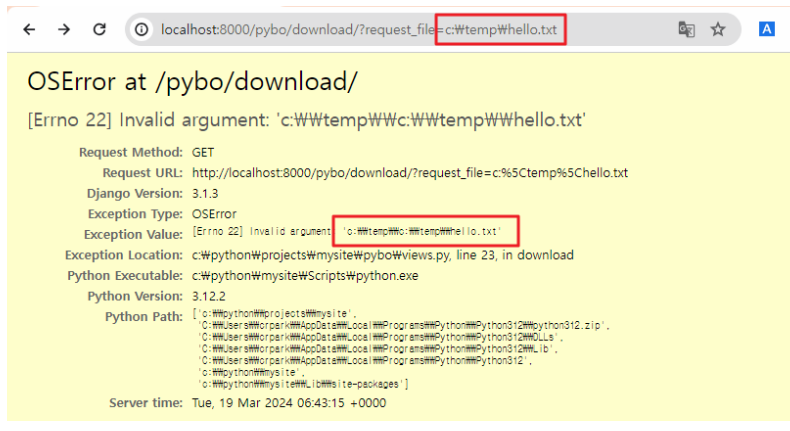
파일 경로를 전달하면 오류가 발생하는 것을 확인
파일명만 전달하는 경우, 소스 코드에 정의된 경로와 결합해서 파일을 접근

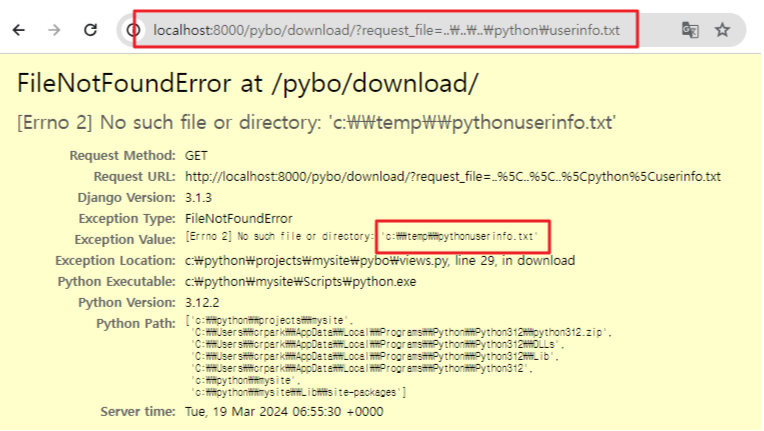
경로 조작 문자열과 함께 전달하는 경우 지정된 경로를 벗어나 파일에 접근이 가능

파일 이름에 경로 조작 문자열을 제거하고 사용하도록 소스 코드를 수정
def download(request):
    request_file = request.GET.get('request_file')
    (filename, file_ext) = os.path.splitext(request_file)
    file_ext = file_ext.lower()
    if file_ext not in ['.txt', '.csv']:
        return render(request, 'pybo/error.html', {'error':'파일을 열 수 없습니다.'})

    filename = filename.replace('.', '')
    filename = filename.replace('/', '')
    filename = filename.replace('\\', '')

    request_file = f"c:\\temp\\{filename}{file_ext}"
    with open(request_file) as f:
        data = f.read()
        return render(request, 'pybo/success.html', {'data':data})
경로 조작 문자열을 포함해서 요청하면 오류가 발생 ⇒ 해당 파일이 지정된 디렉터리에 존재하지 않기 때문
4. 크로스사이트 스크립트(XSS)
유형 1 : Reflective XSS (or Non-persistent XSS)
유형 2 : Persistent XSS (or Stored XSS)
유형 3 : DOM XSS (or Client-Side XSS)
5. 운영체제 명령어 삽입
pybo\urls.py
from django.urls import path
from . import views

app_name = 'pybo'

urlpatterns = [
    path('', views.index, name='index'),
    path('<int:question_id>/', views.detail, name="detail"),
    path('answer/create/<int:question_id>', views.answer_create, name='answer_create'),
    path('question/create/', views.question_create, name='question_create'),
    path('download/', views.download, name='download'),
    path('execute/app/<str:app_name>', views.execute_app, name='execute_app'),
]
pybo\views.py 파일에 함수를 추가
def execute_app(request, app_name):
    os.system(app_name)
    return render(request, 'pybo/success.html', {'data': f'{app_name}을 실행했습니다.'})
http://localhost:8000/pybo/execute/app/notepad 주소로 요청 시 메모장이 실행되는 것을 확인
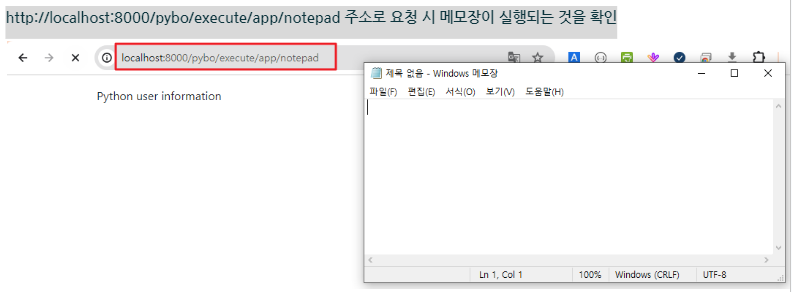
http://localhost:8000/pybo/execute/app/어플리케이션이름 형식으로 요청하면 의도(계획)하지 않은 어플리케이션이 실행
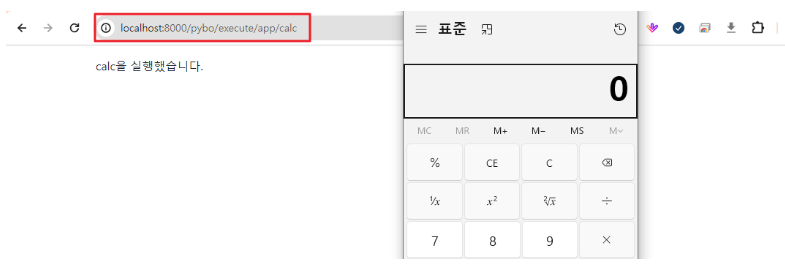
웹 페이지에서 실행할 수 있는 어플리케이션을 제한하는 방식으로 프로그램을 수정
ALLOW_PROGRAM = ['notepad', 'calc']		# 허용 목록(white list)

def execute_app(request, app_name):
    if app_name in ALLOW_PROGRAM:
        os.system(app_name)
        return render(request, 'pybo/success.html', {'data': f'{app_name}을 실행했습니다.'})
    else:
        return render(request, 'pybo/error.html', {'error': f'{app_name}을 실행할 수 없습니다.'})
/pybo/execute/cmd/?cmd=실행할명령어 형식으로 요청했을 때 명령어 실행 결과를 화면에 하도록 코드를 추가해 보세요. (안전하지 않은 코드를 참조)
pybo\urls.py
urlpatterns = [
    path('', views.index, name='index'),
    path('<int:question_id>/', views.detail, name="detail"),
    path('answer/create/<int:question_id>', views.answer_create, name='answer_create'),
    path('question/create/', views.question_create, name='question_create'),
    path('download/', views.download, name='download'),
    path('execute/app/<str:app_name>', views.execute_app, name='execute_app'),
    path('execute/cmd/', views.execute_cmd, name='execute_cmd'),
]
pybo\views.py
from django.utils.safestring import mark_safe

def execute_cmd(request):
    cmd = request.GET.get('cmd','')
    result = subprocess.check_output(cmd, shell=True, encoding='MS949')
    data = mark_safe(f'<pre>{cmd}을 실행했습니다.\n {result}</pre>')
    return render(request, 'pybo/success.html', {'data': data})
실행될 수 있는 명령어를 제한하지 않았기 때문에 의도하지 않은 명령어가 실행될 수 있음 ⇒ 실행할 명령어를 허용목록 방식으로 제한
ALLOW_COMMANDS = ['dir', 'whoami']

def execute_cmd(request):
    cmd = request.GET.get('cmd','')
    if cmd in ALLOW_COMMANDS:
        result = subprocess.check_output(cmd, shell=True, encoding='MS949')
        data = mark_safe(f'<pre>{cmd}을 실행했습니다.\n {result}</pre>')
        return render(request, 'pybo/success.html', {'data': data})
    else:
        return render(request, 'pybo/error.html', {'error': f'{cmd}는 실행할 수 없습니다.'})
6. 위험한 형식 파일 업로드
7. 신뢰되지 않은 URL주소로 자동접속 연결 ⇒ Open Redirection
https://developer.mozilla.org/ko/docs/Web/HTTP/Redirections
리다이렉션(redirection)
login          login?id=aaa&pw=bbb     ~~~~~~~~~~> 요청 파라미터로 전달된 값을 이용해서 일치하는 정보를 조회
ID: aaa                                                      |
PW: bbb                                                      |
                  200 OK                                     |
로그인 페이지  <~~~~~~~~~~~~~~~~~~~~~~~~~~~~~~~~~  일치하는 정보가 없으면
+ 실패 메시지     로그인 실패 메시지

                  GET login?id=aaa&pw=bbb HTTP/1.1
login           ---------------------------------> 요청 파라미터로 전달된 값을 이용해서 일치하는 정보를 조회
ID: aaa                                                      |
PW: bbb           307 Temporary Redirect HTTP/1.1            |
               +---------------<-----------------  일치하는 정보가 있으면
               |  Location: main
               |   						⇐ 요청(login)을 다른 요청(main)으로 변경해서 전달
               |  GET main HTTP/1.1			 	  사용자는 리다이렉트 과정에 참여하지 않음
               +--------------->-----------------+  main
                                                 |
                   200 OK HTTP/1.1               |
메인 페이지    <---------------------------------+
포워드(forward)
                  GET login?id=aaa&pw=bbb HTTP/1.1
login           ---------------------------------> 요청 파라미터로 전달된 값을 이용해서 일치하는 정보를 조회
ID: aaa                                                 |
PW: bbb                                                 |
                                                   일치하는 정보가 있으면
                                                      /
                  200 OK HTTP/1.1                    | 	⇐ 서버 내부에서 다른 응답을 제공
메인 페이지    <---------------------------------  main
리다이렉트 방법
HTTP 리다이렉션
HTML 리다이렉션
JavaScript 리다이렉션