
아이스브레이킹
오늘 조가 바뀌었다. 가뜩이나 온라인인데 새로운 사람들과 어색하지 않을까 걱정도 있었지만, 몇몇 분들은 또 같은 조이기도 하고, 다들 좋으신 분들이셔서 크게 어색하지 않게 대화 나눈 것 같다. 수업을 며칠 듣고 나서 하는 아이스브레이킹일아 할 말도 많았구 ㅎ 앞으로도 잘부탁 드립니다~ 오늘도 파이팅!
데이터베이스 접속
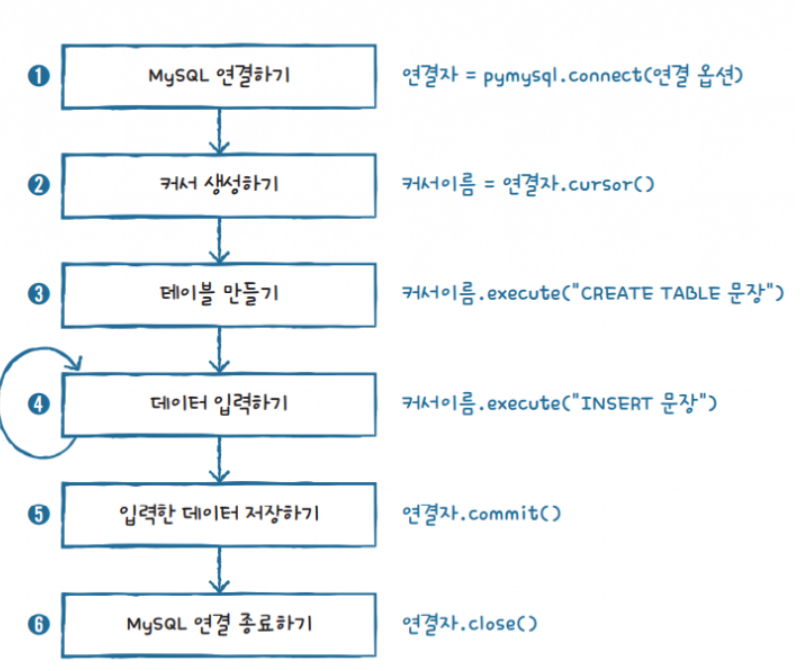
pymysql.connect(host="localhost", 		# 데이터베이스 주소
  port=3306, 			# 데이터베이스 서비스 포트 (MySQL 기본 포트: 3306)
  user="springboot", 		# 데이터베이스 접속 계정
  passwd="p@ssw0rd", 		# 데이터베이스 사용자 패스워드
  db="sampledb"		# 사용할 데이터베이스/스키마
  autocommit=True|False	# INSERT, UPDATE, DELETE 구문 실행 결과를 자동으로 반영할지 여부를 설정
  cursorclass=pymysql.cursors.DictCursor	# SELECT 결과를 컬럼명과 값으로 구성된 dict 타입으로 반환
)
with pymysql.connect(host="localhost", port=3306, user="springboot", passwd="p@ssw0rd", db="sampledb") as conn:- cursorclass를 지정하지 않으면 SELECT 결과를 값으로 구성된 튜플 타입으로 반환
(1, '홍길동', 23, 'hong@test.com')
with pymysql.connect(host="localhost", port=3306, user="springboot", passwd="p@ssw0rd", db="sampledb", cursorclass=pymysql.cursors.DictCursor) as conn:- cursorclass를 pymysql.cursors.DictCursor으롯 설정하면 SELECT 결과를 컬럼 이름과 값으로 구성된 딕셔너리를 반환
{'member_id': 1, 'member_name': '홍길동', 'member_age': 23, 'member_email': 'hong@test.com'}
데이터 추가 기능 구현
import pymysql
from faker import Faker


try:
    with pymysql.connect(host="localhost", port=3306, user="springboot", passwd="p@ssw0rd", db="sampledb", cursorclass=pymysql.cursors.DictCursor) as conn:


        curr = conn.cursor()


        fake = Faker('ko-KR')
        for i in range(10):
            query = f"insert into members (member_name, member_age, member_email) values ('{fake.name()}', {fake.pyint(10, 30)}, '{fake.email()}')"
            print(query)
            curr.execute(query)


except pymysql.MySQLError as e:
    print(e)
-
select * from members;
-
데이터베이스 연결 시 autocommit 을 True로 설정
import pymysql
from faker import Faker


try:
    with pymysql.connect(host="localhost", port=3306, user="springboot", passwd="p@ssw0rd", db="sampledb", cursorclass=pymysql.cursors.DictCursor, autocommit=True) as conn:
                                                       ~~~~~~~~~~~~~~~
        curr = conn.cursor()


        fake = Faker('ko-KR')
        for i in range(10):
            query = f"insert into members (member_name, member_age, member_email) values ('{fake.name()}', {fake.pyint(10, 30)}, '{fake.email()}')"
            print(query)
            curr.execute(query)


        # conn.commit()	⇐ commit() 함수를 호출하지 않아도 변경사항이 DB에 반영되는 것을 확인할 수 있음


except pymysql.MySQLError as e:
print(e) - 데이터 추가 후 조회하도록 수정
fetchone() - 커서로부터 하나의 행(레코드)을 반환
import pymysql
from faker import Faker

try:
    with pymysql.connect(host="localhost", port=3306, user="springboot", passwd="p@ssw0rd", db="sampledb", cursorclass=pymysql.cursors.DictCursor) as conn:

        curr = conn.cursor()

        fake = Faker('ko-KR')
        for i in range(10):
            query = f"insert into members (member_name, member_age, member_email) values ('{fake.name()}', {fake.pyint(10, 30)}, '{fake.email()}')"
            print(query)
            curr.execute(query)

        conn.commit()

        query = "select * from members"
        curr.execute(query)

        # 조회 결과를 하나씩 가져오기
        while True:
            result = curr.fetchone()
            if result == None: break
            print(result)


except pymysql.MySQLError as e:
print(e) - fetchall() - 커서로부터 모든 행(레코드)을 반환
import pymysql
from faker import Faker

try:
    with pymysql.connect(host="localhost", port=3306, user="springboot", passwd="p@ssw0rd", db="sampledb", cursorclass=pymysql.cursors.DictCursor) as conn:

        curr = conn.cursor()

        fake = Faker('ko-KR')
        for i in range(10):
            query = f"insert into members (member_name, member_age, member_email) values ('{fake.name()}', {fake.pyint(10, 30)}, '{fake.email()}')"
            print(query)
            curr.execute(query)

        conn.commit()

        query = "select * from members"
        curr.execute(query)

        # 모든 조회 결과를 반환
        results = curr.fetchall()
        for result in results:
            print(result)

except pymysql.MySQLError as e:
print(e) - fetchmany(n) - 커서로부터 n개의 행(레코드)을 반환
import pymysql
from faker import Faker

try:
    with pymysql.connect(host="localhost", port=3306, user="springboot", passwd="p@ssw0rd", db="sampledb", cursorclass=pymysql.cursors.DictCursor) as conn:

        curr = conn.cursor()

        fake = Faker('ko-KR')
        for i in range(10):
            query = f"insert into members (member_name, member_age, member_email) values ('{fake.name()}', {fake.pyint(10, 30)}, '{fake.email()}')"
            print(query)
            curr.execute(query)

        conn.commit()

        query = "select * from members"
        curr.execute(query)

        # 조회 결과의 일부를 반환
        results = curr.fetchmany(10)			⇐ 조회 결과의 첫부분 부터 10개를 가져와서 반환
        for result in results:
            print(result)

        print("*" * 10)

        results = curr.fetchmany(10)			⇐ 그 다음(11번째) 부터 10개를 가져와서 반환
        for result in results:
            print(result)

except pymysql.MySQLError as e:
print(e) - 입력한 내용과 일치하는 데이터를 조회
import pymysql

try:
    with pymysql.connect(host="localhost", port=3306, user="springboot", passwd="p@ssw0rd", db="sampledb", cursorclass=pymysql.cursors.DictCursor) as conn:

        curr = conn.cursor()

        name = input("검색할 이름을 입력하세요 : ")

        query = f"select * from members where member_name = '{name}'"
        curr.execute(query)

        results = curr.fetchall()
        for result in results:
            print(f"ID : {result['member_id']}")			⇐ 컬럼의 이름으로 값을 추출하는 것이 가능
            print(f"이름 : {result['member_name']}")
            print(f"나이 : {result['member_age']}")
            print(f"이메일 : {result['member_email']}")

except pymysql.MySQLError as e:
print(e) - 입력한 내용을 포함하고 있는 데이터를 조회
import pymysql

try:
    with pymysql.connect(host="localhost", port=3306, user="springboot", passwd="p@ssw0rd", db="sampledb", cursorclass=pymysql.cursors.DictCursor) as conn:

        curr = conn.cursor()

        name = input("검색할 이름을 입력하세요 : ")

        query = f"select * from members where member_name like '%{name}%'"
        count = curr.execute(query)			⇐ SELECT 구문인 경우 조회 결과 개수를 반환
        print(f"총 {count}건을 조회했습니다.")	   INSERT, UPDATE, DELETE 구문인 경우 등록, 수정, 삭제된 행의
   개수를 반환

        results = curr.fetchall()
        print(f"총 {len(results)}건을 조회했습니다.")
        for result in results:
            print(f"ID : {result['member_id']}")
            print(f"이름 : {result['member_name']}")
            print(f"나이 : {result['member_age']}")
            print(f"이메일 : {result['member_email']}")

except pymysql.MySQLError as e:
print(e) - 아래와 같은 입력을 전달하는 경우 모든 데이터가 조회되어서 반환되는 것을 확인할 수 있음
검색할 이름을 입력하세요 : a' or 'a' = 'a' or 'a
총 71건을 조회했습니다.
query = f"select * from members where member_name like '%{name}%'"- 입력값이 결합된 쿼리의 형태
select * from members where member_name like '%a' or 'a' = 'a' or 'a%'
                            ~~~~~~~~~~~~~~~~~~~~~    ~~~~~~~~~
                                                     항상 참이 되는 조건


                   쿼리를 조작할 수 있는 문자(' or = 등)를 포함한 입력
                   ~~~~~~~~~~~
원래 의도와 다르게 외부 입력값에 의해 쿼리의 구조와 의미가 변경되어서 실행 ⇒ SQL 인젝션
~~~~~~~~~                                                  ~~~~
이름에 특정 글자가 포함된 회원을 조회                      모든 회원 데이터를 조회하는 것으로 변경
- 구조화된 쿼리를 실행하는 형태로 변경
import pymysql

try:
    with pymysql.connect(host="localhost", port=3306, user="springboot", passwd="p@ssw0rd", db="sampledb", cursorclass=pymysql.cursors.DictCursor) as conn:

        curr = conn.cursor()

        name = input("검색할 이름을 입력하세요 : ")

        query = "select * from members where member_name like %s"
        count = curr.execute(query, (name,))
        print(f"총 {count}건을 조회했습니다.")

        results = curr.fetchall()
        print(f"총 {len(results)}건을 조회했습니다.")
        for result in results:
            print(f"ID : {result['member_id']}")
            print(f"이름 : {result['member_name']}")
            print(f"나이 : {result['member_age']}")
            print(f"이메일 : {result['member_email']}")

except pymysql.MySQLError as e:
    print(e)
검색할 이름을 입력하세요 : a' or 'a' = 'a' or 'a
총 0건을 조회했습니다.
해당 입력을 통해서 생성되는 쿼리는 ~~ ~~ ~~ ~~ ~~ ⇐ 홑따움표가 이스케이프 처리되서 문자 그 자체로
select * from members where member_name like 'a\' or \'a\' = \'a\' or \'a' 해석
~ ~
| |
+---------------------------+
%s = 문자열 데이터
정규표현식
문자열 데이터에 특정 패턴을 이용해서 검색, 추출, 치환하는 기능
https://docs.python.org/ko/3/library/re.html
- 숫자 하나
[0123456789]		⇐ 대괄호 → 나열된 데이터 중 하나
[0-9]			⇐ 대괄호 내의 - ⇒ 가질 수 있는 값의 범위
\d- 알파벳 소문자 한 글자
[abcdefghijklmnopqrstuvwxyz]
[a-z]- 알파벳 대문자 한 글자
[ABCDEFGHIJKLMNOPQRSTUVWXYZ]
[A-Z]- 알파벳 대소문자 관계 없이 한 글자
[abcdefghijklmnopqrstuvwxyzABCDEFGHIJKLMNOPQRSTUVWXYZ]
[a-zA-Z]- 16진수 한 글자
[0-9a-fA-F]- 문자열의 시작을 지정
^ ⇐ circumflex, carrot, hat, cap- 문자열의 끝을 지정
$- 한글 한 글자
[ㄱ-힣]- 반복회수를 지정 ⇒ ? * + {m} {m,n} 등으로 표현
\d?		⇒ 숫자 0회 또는 1회
\d*		⇒ 숫자 0회 이상
\d+		⇒ 숫자 1회 이상
\d{m}		⇒ 숫자 m개
\d{m, n} 	⇒ 숫자 m개 ~ n개
import re
p = re.compile('[a-z]+')
print("match 결과 " + "*" * 10)
result = p.match('python')
print(result) # <re.Match object; span=(0, 6), match='python'>
result = p.match('3 python')
print(result) # None
result = p.match('life is too short')
print(result) # <re.Match object; span=(0, 4), match='life'>
print("search 결과 " + "*" * 10)
result = p.search('python')
print(result) # <re.Match object; span=(0, 6), match='python'>
result = p.search('3 python')
print(result) # <re.Match object; span=(2, 8), match='python'>
result = p.search('life is too short')
print(result) # <re.Match object; span=(2, 8), match='python'>
print("findall 결과 " + "*" * 10)
results = p.findall('life is too short')
print(results) # ['life', 'is', 'too', 'short']results = p.findall('3 python')
print(results) # ['python']
print("finditer 결과 " + "*" * 10)
results = p.finditer('life is too short')
print(results) # <callable_iterator object at 0x000002232E003310>
for result in results: print(result)
# <re.Match object; span=(0, 4), match='life'>
# <re.Match object; span=(5, 7), match='is'>
# <re.Match object; span=(8, 11), match='too'>
# <re.Match object; span=(12, 17), match='short'>
results = p.finditer('3 python')
print(results) # <callable_iterator object at 0x000002232E0024A0>
for result in results: print(result)
# <re.Match object; span=(2, 8), match='python'>import re
p = re.compile('[a-z]+')
result = p.search('3 python')
type(result)
print("매치된 문자열 : " + result.group()) # python
print("매치된 문자열의 시작 위치(인덱스) : " + str(result.start())) # 2
print("매치된 문자열의 끝 위치(인덱스) : " + str(result.end())) # 8
print("매치된 문자열의 (시작, 끝) 튜플 : " + str(result.span())) # (2, 8)import re
# p = re.compile('[a-z]+')
# result = p.search('3 python')
result = re.search('[a-z]+', '3 python')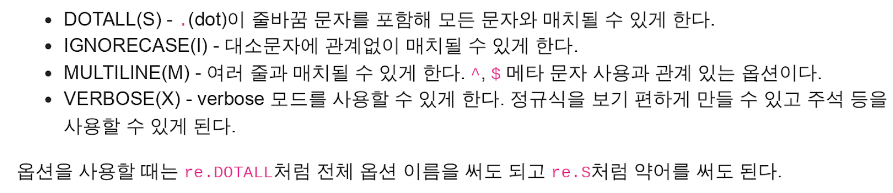
import re


p = re.compile('a.b')
result = p.match('a\nb')
print(result)               # None


p = re.compile('a.b', re.DOTALL)
result = p.match('a\nb')
print(result)               # <re.Match object; span=(0, 3), match='a\nb'>
import re
p = re.compile('[a-z]+')
result = p.match('python')
print(result) # <re.Match object; span=(0, 6), match='python'>
result = p.match('Python')
print(result) # None
result = p.match('PYTHON')
print(result) # None
p = re.compile('[a-z]+', re.IGNORECASE)
result = p.match('python')
print(result) # <re.Match object; span=(0, 6), match='python'>
result = p.match('Python')
print(result) # <re.Match object; span=(0, 6), match='python'>
result = p.match('PYTHON')
print(result) # <re.Match object; span=(0, 6), match='python'>import re
p = re.compile(r'^python\s\w+')
result = p.findall('''python one\nlife...\npython two\nyour nedd python\npython threee
life is too short
python two
your nedd python
python three''')
print(result) # ['python one']
p = re.compile(r"^python\s\w+", re.MULTILINE)
result = p.findall('''python one
life is too short
python two
your nedd python
python three''') # ['python one', 'python two', 'python three']
print(result) 실습
==========================
메뉴
--------------------------
Q : 종료			⇒ 프로그램을 종료
I : 등록			⇒ 등록 화면으로 이동
S : 검색			⇒ 검색 화면으로 이동
==========================
메뉴를 선택하세요 >>>


==========================
회원 등록
--------------------------
이름 : 홍길동
나이 : 23
이메일 : hong@test.com
==========================
Y : 등록 / N : 취소		⇒ Y → members 테이블에 입력한 내용을 저장 → 등록했습니다. 출력 후 메뉴 화면으로 이동
				   N → 메뉴 화면으로 이동


==========================
회원 검색
--------------------------
이름 : 길동
==========================
Y : 검색 / N : 취소		⇒ Y → members 테이블에 like 검색 → 검색 결과 화면으로 이동
				   N → 메뉴 화면으로 이동


==========================
회원 검색 결과 (OO건)
--------------------------
1 : 홍길동			⇐ 검색 결과를 회원아이디 : 회원이름 형식으로 나열
2 : 고길동			   검색 결과가 없는 경우 "일치하는 결과 없음" 출력
3 : 신길동
==========================
번호 : 상세 조회 / N : 취소	⇒ 번호(회원 아이디) → 회원 상세 조회 화면으로 이동
				   N → 메뉴 화면으로 이동


==========================
회원 상세 조회
--------------------------
아이디 : 1
이름 : 홍길동
나이 : 23
이메일 : hong@test.com
==========================
U : 수정 D : 삭제 / Y : 메뉴로 이동
⇒ D → 해당 회원 삭제 후 "삭제했습니다" 메시지를 출력하고 메뉴 화면으로 이동
   U → 수정 화면으로 이동
				   N → 메뉴 화면으로 이동

==========================
회원 수정
--------------------------
아이디 : 1			⇐ 회원 정보를 보여주고,
이름 : 홍길동
나이 : 23
이메일 : hong@test.com
==========================
나이 : 43
이메일 : gildong@test.com
수정할까요? (Y : 수정 / N : 메뉴로 이동)
				⇐ Y → 나이와 이메일을 입력 받아서 수정 후 "수정했습니다." 메시지를 출력하고
        메뉴 화면으로 이동
N → 메뉴 화면으로 이동- 실습코드
import pymysql
import re


# 화면 출력에 사용되는 함수들
def print_double_line():
    print("======================================")


def print_single_line():
    print("--------------------------------------")


def print_title(title):
    print()
    print_double_line()
    print(title)
    print_single_line()


def print_tail():
    print_double_line()


def show_menu_page():
    print_title("메뉴")
    print("I: 회원 정보를 등록합니다.")
    print("S: 회원을 LIKE 검색합니다.")
    print("Q: 프로그램을 종료합니다.")
    print_tail()


def check_input(message, valid_inputs, line_yn=False):
    if line_yn: print("--------------------------------------")


    while True:
        i = input(message + " >>> ").upper()
        if i in valid_inputs:
            return i
        else:
            print("잘못된 입력입니다. 확인 후 다시 입력해 주세요.")


def main():
    show_menu_page()


    menu = check_input("메뉴를 선택하세요. (I: 등록 / S: 검색 / Q: 종료)", ("I", "S", "Q"))
    if menu == "Q":
        print("프로그램을 종료합니다.")
    elif menu == "I":
        do_insert()
    elif menu == "S":
        do_search()


def do_insert():
    print_title("회원 등록")

    name = input("이름 : ")
    age = int(input("나이 : "))
    email = input("이메일 : ")


    # TODO 형식 검증 후 메시지 출력


    yn = check_input("등록하시겠습니까? (Y: 등록 / N: 취소)", ("Y", "N"), True)
    if yn == "N":
        print("회원 등록을 취소합니다.")


    elif yn == "Y":
        query = "insert into members (member_name, member_age, member_email) value (%s, %s, %s)"


        with pymysql.connect(host="localhost", port=3306, user="springboot", password="p@ssw0rd", db="sampledb") as connection:
            cursor = connection.cursor()
            count = cursor.execute(query, (name, age, email))
            if count == 1:
                print("회원 정보를 정상적으로 등록했습니다.")
                connection.commit()
            else:
                print("회원 정보를 등록하는데 실패했습니다.")
                connection.rollback()
    main()


def do_search():


    print_title("회원 검색")
    name = input("이름 : ")
    print_tail()

    yn = check_input("검색하시겠습니까? (Y: 검색 / N: 취소)", ("Y", "N"))
    if yn == "N":
        print("회원 검색을 취소합니다.")

    elif yn == "Y":
        with pymysql.connect(host="localhost", port=3306, user="springboot", password="p@ssw0rd", db="sampledb", cursorclass=pymysql.cursors.DictCursor) as connection:
            query = "select * from members where member_name like %s"
            cursor = connection.cursor()
            count = cursor.execute(query, ("%"+name+"%",))
            members = cursor.fetchall()

            print_title(f"검색 결과 (총 {count}건)")


            if count == 0:
                print("일치하는 결과가 없습니다. ")
            else:
                ids = []
                for member in members:
                    ids.append(str(member['member_id']))
                    print(f"{member['member_id']} : {member['member_name']}")

                do_detail(ids)

    main()


def do_detail(ids):
    mid = check_input("상세 정보를 조회하시겠습니까? (회원번호: 상세조회)", ids, True)
    if mid == "N":
        print("상세 조회를 취소합니다.")
        return
    else:
        with pymysql.connect(host="localhost", port=3306, user="springboot", password="p@ssw0rd", db="sampledb", cursorclass=pymysql.cursors.DictCursor) as connection:
            query = "select * from members where member_id = %s"
            cursor = connection.cursor()
            cursor.execute(query, (mid,))
            member = cursor.fetchone()


            print_title("회원 상세 조회")
            print(f"ID: {member['member_id']}")
            print(f"이름: {member['member_name']}")
            print(f"나이: {member['member_age']}")
            print(f"이메일: {member['member_email']}")


            udn = check_input("회원 정보를 수정 또는 삭제하시겠습니까? (U: 수정 / D: 삭제 / N: 메인 화면으로 이동)", ("U", "D", "N"), True)
            if udn == "U":
                do_update(member['member_id'])
            elif udn == "D":
                do_delete(member['member_id'])
            elif udn == "N":
                return


def do_delete(id):
    yn = check_input("회원 정보를 삭제하시겠습니까? (Y: 삭제 / N: 취소)", ("Y", "N"))
    if yn == "N":
        print("회원 정보 삭제를 취소합니다.")
    elif yn == "Y":
        query = "delete from members where member_id = %s"
        with pymysql.connect(host="localhost", port=3306, user="springboot", password="p@ssw0rd", db="sampledb", autocommit=True) as connection:
            cursor = connection.cursor()
            count = cursor.execute(query, (id,))
            if count == 1:
                print("회원 정보를 정상적으로 삭제했습니다.")
            else:
                print("회원 정보를 삭제하는데 실패했습니다.")


def do_update(id):
    with pymysql.connect(host="localhost", port=3306, user="springboot", password="p@ssw0rd", db="sampledb", cursorclass=pymysql.cursors.DictCursor) as connection:
        query = "select * from members where member_id like %s"
        cursor = connection.cursor()
        cursor.execute(query, (id,))
        member = cursor.fetchone()


        print_title("회원 정보 수정")
        print(f"ID: {member['member_id']}")
        print(f"이름: {member['member_name']}")
        print(f"나이: {member['member_age']}")
        print(f"이메일: {member['member_email']}")
        print_tail()


        age = int(input("변경할 나이 : "))
        email = input("변경할 이메일 : ")


        # TODO 형식 검증 후 메시지 출력


        yn = check_input("회원 정보를 수정하시겠습니까?", ("Y", "N"), True)
        if yn == "N":
            print("회원 정보 수정을 취소합니다.")
        else:
            query = "update members set member_age = %s, member_email = %s where member_id = %s"
            cursor = connection.cursor()
            count = cursor.execute(query, (age, email, id))
            if count == 1:
                print("회원 정보를 정상적으로 수정했습니다.")
                connection.commit()
            else:
                print("회원 정보를 수정하는데 실패했습니다.")
                connection.rollback()


if __name__ == "__main__":
    main()
Today is...

.....
ㅎㅎㅋ쿠ㅜㅠㅠㅎㅎㅋ쿠ㅜㅠㅠ
내일 웹사이트 만드는 장고를 배운다고 한다.
프로젝트 중에 취약 웹사이트 만드는 경우도 있다고 해서
내일 수업이 기대가 된다.

It's log on my way to whitehack