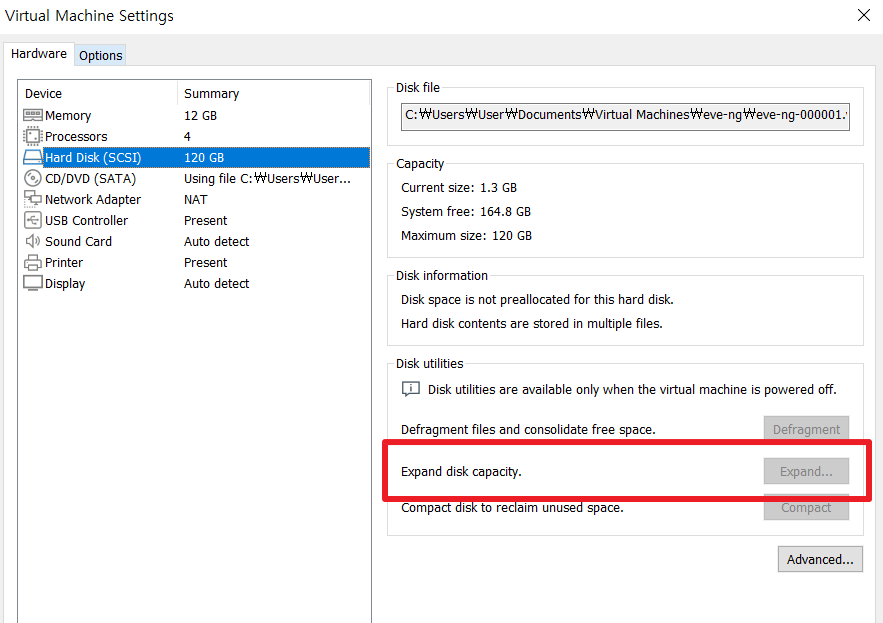
After expanding th VM disk size from 40G to 120G...
The following by GPT...
root@eve-ng:~# parted /dev/sda
GNU Parted 3.4
Using /dev/sda
Welcome to GNU Parted! Type 'help' to view a list of commands.
(parted) resizepart 3 129GB
(parted) quit
Information: You may need to update /etc/fstab.

root@eve-ng:~# partprobe /dev/sda
root@eve-ng:~# fdisk -l
Disk /dev/loop0: 63.91 MiB, 67014656 bytes, 130888 sectors
Units: sectors of 1 * 512 = 512 bytes
Sector size (logical/physical): 512 bytes / 512 bytes
I/O size (minimum/optimal): 512 bytes / 512 bytes


Disk /dev/loop1: 86.99 MiB, 91213824 bytes, 178152 sectors
Units: sectors of 1 * 512 = 512 bytes
Sector size (logical/physical): 512 bytes / 512 bytes
I/O size (minimum/optimal): 512 bytes / 512 bytes


Disk /dev/loop2: 63.95 MiB, 67051520 bytes, 130960 sectors
Units: sectors of 1 * 512 = 512 bytes
Sector size (logical/physical): 512 bytes / 512 bytes
I/O size (minimum/optimal): 512 bytes / 512 bytes


Disk /dev/loop3: 87.04 MiB, 91267072 bytes, 178256 sectors
Units: sectors of 1 * 512 = 512 bytes
Sector size (logical/physical): 512 bytes / 512 bytes
I/O size (minimum/optimal): 512 bytes / 512 bytes


Disk /dev/loop4: 40.43 MiB, 42393600 bytes, 82800 sectors
Units: sectors of 1 * 512 = 512 bytes
Sector size (logical/physical): 512 bytes / 512 bytes
I/O size (minimum/optimal): 512 bytes / 512 bytes


Disk /dev/loop5: 38.83 MiB, 40714240 bytes, 79520 sectors
Units: sectors of 1 * 512 = 512 bytes
Sector size (logical/physical): 512 bytes / 512 bytes
I/O size (minimum/optimal): 512 bytes / 512 bytes


Disk /dev/sda: 120 GiB, 128849018880 bytes, 251658240 sectors
Disk model: VMware Virtual S
Units: sectors of 1 * 512 = 512 bytes
Sector size (logical/physical): 512 bytes / 512 bytes
I/O size (minimum/optimal): 512 bytes / 512 bytes
Disklabel type: gpt
Disk identifier: 41FAFACE-643B-4BCC-A886-3D577FCD4906

Device       Start       End   Sectors  Size Type
/dev/sda1     2048      4095      2048    1M BIOS boot
/dev/sda2     4096   4198399   4194304    2G Linux filesystem
/dev/sda3  4198400 251658206 247459807  118G Linux filesystem


Disk /dev/mapper/ubuntu--vg-ubuntu--lv: 38 GiB, 40797995008 bytes, 79683584 sectors
Units: sectors of 1 * 512 = 512 bytes
Sector size (logical/physical): 512 bytes / 512 bytes
I/O size (minimum/optimal): 512 bytes / 512 bytes
root@eve-ng:~# ^C
root@eve-ng:~# vgscan
  Found volume group "ubuntu-vg" using metadata type lvm2
root@eve-ng:~# vgchange -ay
  1 logical volume(s) in volume group "ubuntu-vg" now active
root@eve-ng:~# ^C
root@eve-ng:~# pvresize /dev/sda3
  Physical volume "/dev/sda3" changed
  1 physical volume(s) resized or updated / 0 physical volume(s) not resized
root@eve-ng:~# ^C
root@eve-ng:~# ^M
: command not found
root@eve-ng:~#
root@eve-ng:~# lvextend -l +100%FREE /dev/ubuntu-vg/ubuntu-lv
  Size of logical volume ubuntu-vg/ubuntu-lv changed from <38.00 GiB (9727 extents) to <118.00 GiB (30207 extents).
  Logical volume ubuntu-vg/ubuntu-lv successfully resized.
root@eve-ng:~# ^C
root@eve-ng:~# resize2fs /dev/ubuntu-vg/ubuntu-lv
resize2fs 1.46.5 (30-Dec-2021)
Filesystem at /dev/ubuntu-vg/ubuntu-lv is mounted on /; on-line resizing required
old_desc_blocks = 5, new_desc_blocks = 15
The filesystem on /dev/ubuntu-vg/ubuntu-lv is now 30931968 (4k) blocks long.

root@eve-ng:~# ^C
root@eve-ng:~# df -h
Filesystem                         Size  Used Avail Use% Mounted on
tmpfs                              1.2G  1.8M  1.2G   1% /run
/dev/mapper/ubuntu--vg-ubuntu--lv  116G   33G   79G  30% /
tmpfs                              5.9G     0  5.9G   0% /dev/shm
tmpfs                              5.0M     0  5.0M   0% /run/lock
tmpfs                              5.9G     0  5.9G   0% /run/qemu
/dev/sda2                          2.0G  288M  1.6G  16% /boot
tmpfs                              1.2G  4.0K  1.2G   1% /run/user/0
이어서 GPT의 설명
1. 디스크 크기 증가
디스크 크기를 증가시키기 위해서는 물리적인 디스크의 크기를 확장하는 것이 필요합니다. 이 작업은 보통 하드웨어나 가상화 환경에서 수행됩니다.

2. 파티션 확장
디스크 크기가 증가하면, 기존의 파티션도 새로 확장된 공간을 인식할 수 있도록 조정해야 합니다. parted를 사용하여 파티션의 끝 지점을 새로 할당된 공간까지 확장합니다. 이 과정은 다음과 같은 이유로 필요합니다:

기존 파티션의 크기 제한: 기존 파티션이 새로 할당된 디스크 공간을 포함하지 않기 때문에, 파티션의 크기를 늘려야 합니다.
파티션 테이블 업데이트: 새로운 디스크 공간을 사용할 수 있도록 파티션 테이블을 업데이트합니다.
3. LVM (Logical Volume Manager) 관련 작업
LVM을 사용하는 경우, 다음 작업이 필요합니다:

물리 볼륨 (PV) 크기 조정:

명령어: pvresize /dev/sda3
설명: 파티션이 확장된 후, LVM에 이 변경 사항을 반영해야 합니다. pvresize 명령어는 LVM이 새로 확장된 물리적 공간을 인식하게 만듭니다.
논리 볼륨 (LV) 확장:

명령어: lvextend -l +100%FREE /dev/ubuntu-vg/ubuntu-lv
설명: LVM의 논리 볼륨은 물리 볼륨의 공간을 논리적으로 분할하여 사용합니다. 이 명령어는 논리 볼륨이 물리적으로 할당된 전체 공간을 사용할 수 있도록 확장합니다.
4. 파일 시스템 확장
파일 시스템은 논리 볼륨 위에 있는 실제 저장 구조입니다. 논리 볼륨이 확장된 후에는 파일 시스템도 그 크기를 조정해야 합니다.

명령어: resize2fs /dev/ubuntu-vg/ubuntu-lv
설명: 이 명령어는 파일 시스템이 논리 볼륨의 새 크기를 인식하고, 새로 확장된 공간을 사용할 수 있도록 만듭니다.
요약
디스크 확장: 물리적으로 디스크의 크기를 늘립니다.
파티션 확장: 새로 할당된 공간을 포함하도록 파티션을 확장합니다.
LVM 조정:
물리 볼륨을 새로 할당된 공간까지 확장합니다.
논리 볼륨을 새로 할당된 공간까지 확장합니다.
파일 시스템 확장: 논리 볼륨의 새 크기를 파일 시스템이 인식하도록 조정합니다.
이렇게 하면 디스크의 전체 공간이 운영 체제에서 사용할 수 있도록 됩니다. 추가로 궁금한 점이 있으면 언제든지 질문해 주세요!