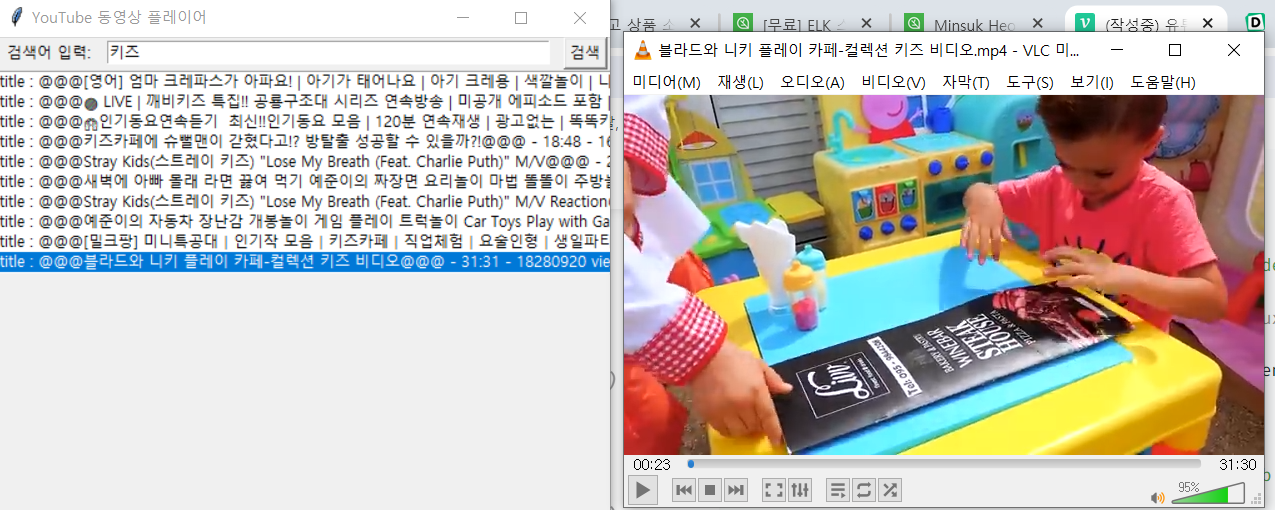
조잡한 유튜브 플레이어
동영상 검색 youtubesearchpython
-> 동영상 목록(단순 텍스트 출력) 클릭
-> 동영상 다운 pytube
-> 동영상 실행 vlc player(10초 스킵, 재생, 정지)
chat gpt 가 만들어준 코드에 몇 가지 오류 수정하니까 잘 됨.
문제는 키즈영상 제외하고는 연령제한 때문에 구글 api로 가져와야 함(pytube X)
그냥 나중에 써먹을 수 있을까봐
저장
from tkinter import *
from pytube import YouTube
from youtubesearchpython import SearchVideos
import subprocess, json, re, os

class YouTubePlayer:
    def __init__(self, master):
        self.master = master
        master.title("YouTube 동영상 플레이어")

        self.search_text = StringVar()

        Label(master, text="검색어 입력:").grid(row=0, column=0)
        Entry(master, textvariable=self.search_text, width=50).grid(row=0, column=1)
        Button(master, text="검색", command=self.search_videos).grid(row=0, column=2)

        # 키 입력 이벤트 바인딩
        master.bind("<space>", self.toggle_play_pause)
        master.bind("<Left>", self.skip_backward)
        master.bind("<Right>", self.skip_forward)

        self.video_listbox = Listbox(master, width=70)
        self.video_listbox.grid(row=1, column=0, columnspan=3)

        self.video_listbox.bind('<Double-1>', self.play_selected_video)

    def search_videos(self):
        search_query = self.search_text.get()
        search_results = SearchVideos(search_query, offset=1, mode="json", max_results=10).result()
        #input(search_results)

        search_results = json.loads(search_results)['search_result']
        self.video_listbox.delete(0, END)

        for video in search_results:
            self.video_listbox.insert(END, f"title : @@@{video['title']}@@@ - {video['duration']} - {video['views']} views - id : {video['id']}")

    def play_selected_video(self, event):
        selected_index = self.video_listbox.curselection()[0]
        selected_video = self.video_listbox.get(selected_index)
        title = re.findall(r'title \: @@@(.+?)@@@', selected_video)[0]
        video_id = selected_video.split("- id : ")[1]
        video_url = f"https://www.youtube.com/watch?v={video_id}"
        self.play_video(title, video_url)
        #self.download_video(title, video_url)

    def download_video(self, title, video_url):
        yt = YouTube(video_url)
        stream = yt.streams.filter(progressive=True, file_extension='mp4').first()
        stream.download(filename=title+'.mp4')
        video_path = title+'.mp4'

    def play_video(self, title, video_url):
        yt = YouTube(video_url)
        stream = yt.streams.filter(progressive=True, file_extension='mp4').first()
        stream.download(filename=title+'.mp4')
        video_path = title+'.mp4'


        # VLC player 사용
        if os.name == 'nt':
            vlc_path = r'C:\Program Files\VideoLAN\VLC\vlc.exe'  # Windows에서 VLC 설치된 경로
        else:
            vlc_path = '/usr/bin/vlc'  # Linux 등에서 VLC 설치된 경로

        self.player_process = subprocess.Popen([vlc_path, video_path])  # VLC 실행

    def toggle_play_pause(self, event):
        if hasattr(self, 'player_process'):
            self.player_process.stdin.write(b' ')

    def skip_backward(self, event):
        if hasattr(self, 'player_process'):
            self.player_process.stdin.write(b'\x1b[D' * 10)

    def skip_forward(self, event):
        if hasattr(self, 'player_process'):
            self.player_process.stdin.write(b'\x1b[C' * 10)

def main():
    root = Tk()
    player = YouTubePlayer(root)
    root.mainloop()

if __name__ == "__main__":
    main()