⏪ 이전 글 (useState)
https://velog.io/@wowalswjd/about-React-useState
이전 글에서 useState에 대해 살펴보았다.
useState는 컴포넌트에 state 변수를 추가할 수 있는 React Hook으로,
이 Hook을 이용하면 함수형 컴포넌트에서도 쉽게 상태 관리를 할 수 있었으며, UI에 실시간으로 상태 반영이 가능하다.
하지만 useState의 경우 state 로직이 복잡해질 경우 코드가 복잡해진다는 문제가 있었는데,
이는 비슷한 상태 관리 Hook인 useReducer로 대신 사용해서 해결할 수 있다.
🧾 참고 문서 :
https://ko.react.dev/reference/react/useReducer
https://ko.react.dev/learn/extracting-state-logic-into-a-reducer
🔗 이미지 출처 :
https://www.jstopics.com/reactjs/usereducer-with-typescript
✅ useReducer
- 컴포넌트에
reducer를 추가하는 React Hookreducer함수란? state에 대한 로직을 넣는 곳
useState와 비슷하게 함수형 컴포넌트에서 상태 관리할 때 사용
📌 사용 방법 요약
reducer함수 작성
function reducer(state, action) {
  // ...
}- 이 때,
action은state업데이트를 위한 정보라고 생각하면 됨
reducer와 연결된state와dispatch를 선언
const [state, dispatch] = useReducer(reducer, 초기값, 초기화함수?); - component에
dispatch와type을 작성
<button onClick={()=> dispatch({ type: 'TYPE' })}>action</button>- UI에 상태 반영
<div>{state}</div>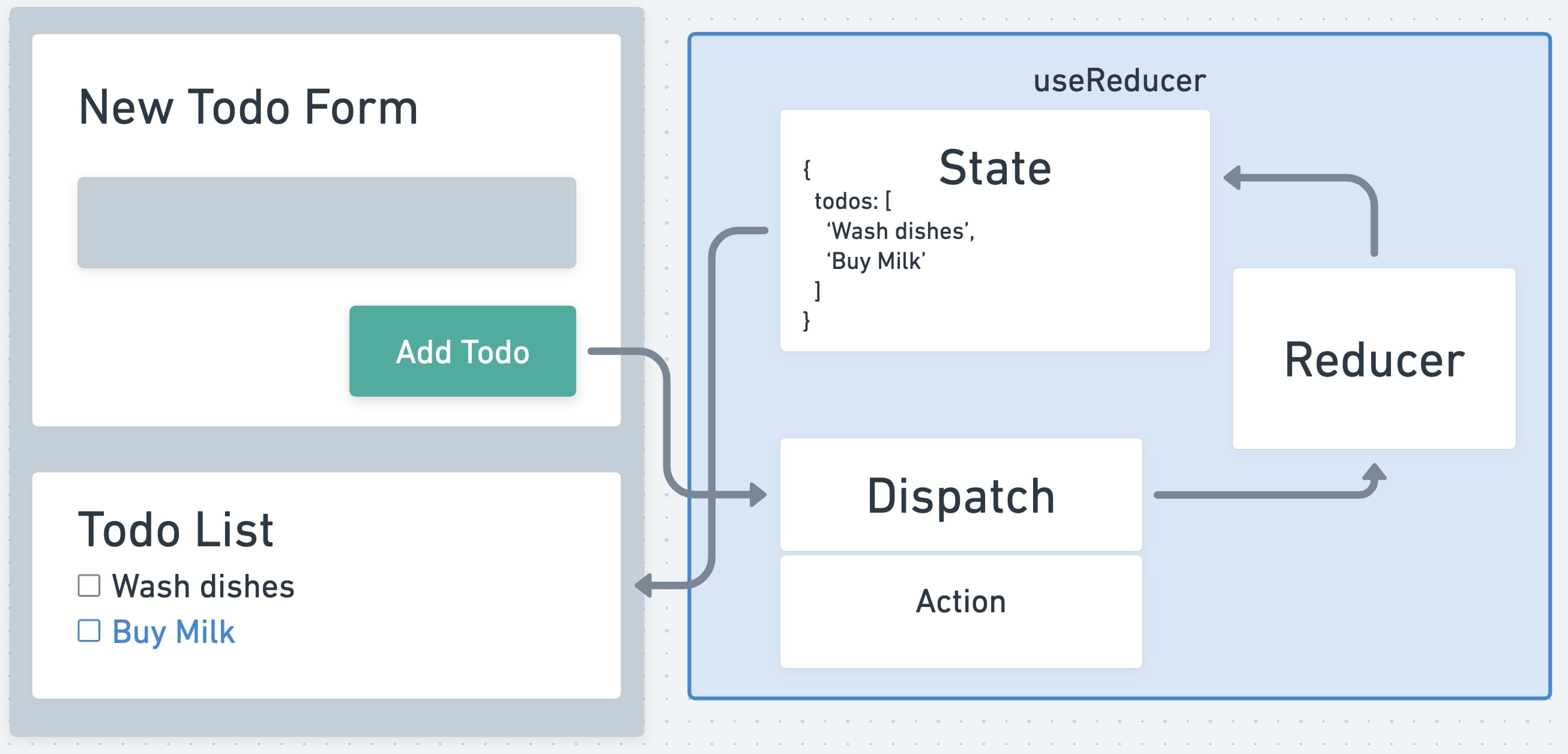
💡 useReducer(reducer, initialArg, init?)
매개변수
reducer: state가 어떻게 업데이트 되는지 지정하는 리듀서 함수.
- 반드시 순수 함수(=외부 상태 의존하지 않고 예측 가능한 값 반환) 여야 함.
state와action을 인수로 받아야 하고, 다음 state를 반환해야 함.state와action은 모든 데이터 타입 할당 가능
function reducer(state, action) {
  // ...
  return 변경된state
}
initialArg: 초기 state 값.
- 모든 데이터 타입 할당 가능
- 초기 state가 어떻게 계산되는지는 다음
init인수에 따라 달라짐.
- 선택사항
init: 초기 state를 반환하는 초기화 함수.
- 이 함수를 인수로 넣을 경우, 초기 state는
init(initialArg)를 호출한 결과가 할당됨. - 이 함수를 생략할 경우, 초기 state는
initialArg로 설정됨.
반환값
2개의 엘리먼트로 구성된 배열을 반환함.
- 현재
state
첫번째 렌더링에서의 state는
init이 있을 경우 init(initialArg)init이 생략되었을 경우 initialArg로 설정됨.
dispatch함수
dispatch는 state를 새로운 값으로 업데이트하고 리렌더링을 일으킴.setState같은 개념이나, action 정보를 reducer에 넘기는 역할임.
주의 사항
useReducer는 Hook이므로 컴포넌트의 최상위 레벨이나 직접 만든 Hook에서만 호출 가능.- 반복문이나 조건문 안에서는 호출 불가. 필요한 경우 새 컴포넌트를 만들어서 옮겨야 함.
dispatch함수를useEffect의 의존성 배열 안에 추가해도 useEffect가 다시 실행되지 않음.dispatch함수는 React 내부적으로, 상태 업데이트 함수로만 정의됨.- 따라서 항상 동일한 참조를 가지므로 (즉, 렌더링 될 때마다 새로운 함수가 생성되지 않으므로)
useEffect에서는 의존성 배열이 변경되지 않았다고 판단하여 다시 실행시키지 않음.
💡 dispatch 함수
state를 새로운 값으로 업데이트하고 리렌더링을 일으키는 함수.dispatch함수 (action객체 정보 전달)
->reducer함수 (state업데이트 로직 실행)
-> 변경된state반영
const [state, dispatch] = useReducer(reducer, { age: 42 });

function handleClick() {
  dispatch({ type: 'incremented_age' });
  // ...
매개변수
action: 사용자에 의해 수행된 활동. (ex. add, delete ...)
- 모든 데이터 타입 할당 가능
- 일반적으로는 type 속성을 가진 객체를 사용하며, 이외에 추가적으로 속성을 추가할 수 있음
{
  type: 'what_happened', // 필수
  id: 1, // 다른 필드는 이곳에 (선택)
}
반환값
- 반환값 없음.
주의 사항
dispatch는 다음 렌더링을 위해서 state를 업데이트함.- 따라서
dispatch를 호출한 후 바로 state를 읽으면 호출 이전 값을 얻게 됨.
- 따라서
- 새로 전달한 값이 현재 state와 동일할 경우 React는 최적화를 위해 컴포넌트 리렌더링을 하지 않음
- React는 state 업데이트를 일괄적으로(batch) 처리함.
- 따라서 이벤트 핸들러와
set function이 호출된 후에 화면이 업데이트됨. (하나의 이벤트 중에 여러 번 렌더링 되는 것 방지 위함)
- 따라서 이벤트 핸들러와
💡 사용 예제
0. 기본적인 사용법
import { useReducer } from 'react';

function reducer(state, action) {
  // ...
}

function MyComponent() {
  const [state, dispatch] = useReducer(reducer, { age: 42 });
// ...state를reducer로 관리하기 위해
useReducer를 컴포넌트의 최상단에서 호출
function handleClick() {
  dispatch({ type: 'incremented_age' });
}state값을 업데이트할 때는dispatch함수 사용.dispatch함수 인자로는action객체를 넣어주어야 함
1. 컴포넌트에 reducer 추가하기
-
아래 예제는 카운터 예제
import { useReducer } from 'react';

function reducer(state, action) {
  if (action.type === 'incremented_age') {
    return {
      age: state.age + 1
    };
  }
  throw Error('Unknown action.');
}

export default function Counter() {
  const [state, dispatch] = useReducer(reducer, { age: 42 });

  return (
    <>
      <button onClick={() => {
        dispatch({ type: 'incremented_age' })
      }}>
        Increment age
      </button>
      <p>Hello! You are {state.age}.</p>
    </>
  );
}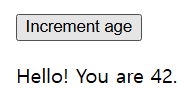
- 버튼을 누를 때
dispatch함수로incremented_age라는 업데이트 정보(=action)를 보내면 reducer함수에서action정보를 받고,
action type이incremented_age일 때 실행하는 로직 (age: state.age + 1)을 실행하고 그 값을 return함- 변경된 state 값이 UI에 반영됨
2. reducer 함수 작성하기
-
reducer함수의 기본 틀은 아래와 같음.function reducer(state, action) { // ... } -
각 action type별 처리 로직은
switch 문으로 작성하는게 일반적임.function reducer(state, action) { switch (action.type) { case 'incremented_age': { return { name: state.name, age: state.age + 1 }; } case 'changed_name': { return { name: action.nextName, age: state.age }; } } throw Error('Unknown action: ' + action.type); } -
action은 어떤 형태로도 작성 가능하나,type속성을 가진 객체로 사용하는 것이 일반적임.type은reducer가 다음state를 계산하기 위한 최소한의 정보를 포함해야 함.
function Form() {
  const [state, dispatch] = useReducer(reducer, { name: 'Taylor', age: 42 });

  function handleButtonClick() {
    dispatch({ type: 'incremented_age' });
  }

  function handleInputChange(e) {
    dispatch({
      type: 'changed_name',
      nextName: e.target.value
    });
  }
  // ...
3. 객체, 배열 state 업데이트 예제
- state는 읽기 전용으로 간주됨.
- 따라서 아래와 같이 state를 직접 변경하면 안됨
function reducer(state, action) { switch (action.type) { case 'incremented_age': { // 🚩 Don't mutate an object in state like this: state.age = state.age + 1; return state; } - 대신 아래와 같은 방법으로 새로운 객체를 반환해야 함
- state를 복사하여 새로운 값을 만든 다음, (주로 spread 연산자
...사용) - 새로운 값에서 필요한 부분만 변경해야 함
function reducer(state, action) {
  switch (action.type) {
    case 'incremented_age': {
      // ✅ Instead, return a new object
      return {
        ...state,
        age: state.age + 1
      };
    }
-
아래 예제는 투두 리스트 (배열 state)을
useReducerHook을 이용해 업데이트하는 예제import { useReducer } from 'react'; import AddTask from './AddTask.js'; import TaskList from './TaskList.js'; function tasksReducer(tasks, action) { switch (action.type) { case 'added': { return [...tasks, { id: action.id, text: action.text, done: false }]; } case 'changed': { return tasks.map(t => { if (t.id === action.task.id) { return action.task; } else { return t; } }); } case 'deleted': { return tasks.filter(t => t.id !== action.id); } default: { throw Error('Unknown action: ' + action.type); } } } export default function TaskApp() { const [tasks, dispatch] = useReducer( tasksReducer, initialTasks ); function handleAddTask(text) { dispatch({ type: 'added', id: nextId++, text: text, }); } function handleChangeTask(task) { dispatch({ type: 'changed', task: task }); } function handleDeleteTask(taskId) { dispatch({ type: 'deleted', id: taskId }); } return ( <> <h1>Prague itinerary</h1> <AddTask onAddTask={handleAddTask} /> <TaskList tasks={tasks} onChangeTask={handleChangeTask} onDeleteTask={handleDeleteTask} /> </> ); } let nextId = 3; const initialTasks = [ { id: 0, text: 'Visit Kafka Museum', done: true }, { id: 1, text: 'Watch a puppet show', done: false }, { id: 2, text: 'Lennon Wall pic', done: false } ];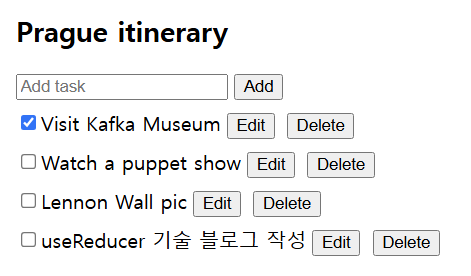
4. 초기 state 재생성 방지하기
-
React는 초기 state를 저장한 후, 다음 렌더링에서는 이를 무시함.
-
아래 예제에서
createInitialState(username)는 원래 의도와는 달리 매 렌더링 때마다 함수가 호출되는 문제가 발생함.function createInitialState(username) { // ... } function TodoList({ username }) { const [state, dispatch] = useReducer(reducer, createInitialState(username)); // ... -
함수가 큰 배열이나 무거운 연산을 다룰 경우에는 성능상 낭비가 되므로,
useReducer의 3번째 인수에초기화 함수를 전달하는 것이 좋음.function createInitialState(username) { // ... } function TodoList({ username }) { const [state, dispatch] = useReducer(reducer, username, createInitialState); // ...
🚨 TroubleShooting
1. dispatch 함수로 action을 호출해도 이전 state 값이 로그에 출력될 때
-
예제
function handleClick() { console.log(state.age); // 42 dispatch({ type: 'incremented_age' }); // Request a re-render with 43 console.log(state.age); // Still 42! setTimeout(() => { console.log(state.age); // Also 42! }, 5000); } -
🤔 Why?
state는 스냅샷 같이 동작하므로, 리렌더링 기준으로 업데이트되기 때문.
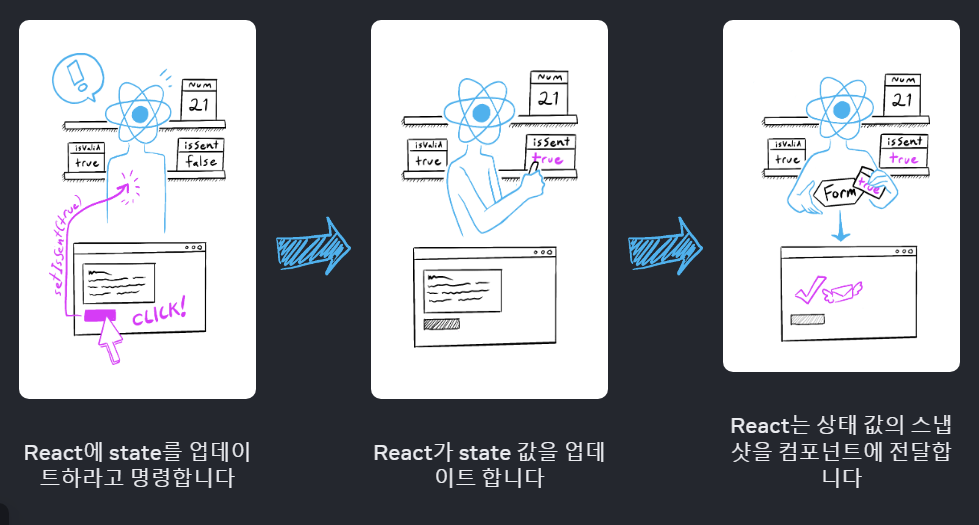
dispatch함수의 호출은 현재 동작하고 있는 코드의 state를 바로 변경하는 것이 아니라,
새로운 state로 업데이트하게끔 요청을 보낼 뿐이기 때문에
이미 실행중인 이벤트 핸들러의 변수에 영향을 미치지 않음. -
😇 해결 방안)
다음 state 값을 알고 싶다면,reducer함수를 직접 호출해서 다음 값 계산하기const action = { type: 'incremented_age' }; dispatch(action); const nextState = reducer(state, action); console.log(state); // { age: 42 } console.log(nextState); // { age: 43 }
2. dispatch 함수로 action을 호출해도 화면이 바뀌지 않을 때
- 🤔 Why?
React는Object.is()로 비교한 뒤 다음 state가 이전 state와 같으면 업데이트를 무시하기 때문
객체나 배열의 state를 직접 변경할 때 주로 발생function reducer(state, action) { switch (action.type) { case 'incremented_age': { // 🚩 Wrong: mutating existing object state.age++; return state; } case 'changed_name': { // 🚩 Wrong: mutating existing object state.name = action.nextName; return state; } // ... } } - 😇 해결 방안)
객체나 배열 state를 변경하는 대신 항상 교체하기- state는 읽기 전용이므로, 직접 교체하면 안됨
function reducer(state, action) {
  switch (action.type) {
    case 'incremented_age': {
      // ✅ Correct: creating a new object
      return {
        ...state,
        age: state.age + 1
      };
    }
    case 'changed_name': {
      // ✅ Correct: creating a new object
      return {
        ...state,
        name: action.nextName
      };
    }
    // ...
  }
}
3. reducer state 일부가 dispatch된 이후에 undefined가 될 때
-
🤔 Why?
기존 state를 복사해 사용하지 않고 직접 변경하려고 할 때 주로 발생 -
😇 해결 방안)
새로운 state를 반환할 때 모든 case에서 기존 값을 복사하기function reducer(state, action) { switch (action.type) { case 'incremented_age': { return { ...state, // Don't forget this! age: state.age + 1 }; } // ...
4. reducer state 전체가 dispatch된 이후에 undefined가 될 때
-
🤔 Why?
case 중 하나에return이 누락되었거나 action의 타입이 case와 짝지어지지 않을 때 발생 -
😇 해결 방안)
원인 파악 위해 switch문 밖에서 에러를throw하기
(또는TypeScript를 이용하면 실수를 방지할 수 있음)function reducer(state, action) { switch (action.type) { case 'incremented_age': { // ... } case 'edited_name': { // ... } } throw Error('Unknown action: ' + action.type); }
5. “Too many re-renders” 에러가 발생할 때
- 🤔 Why?
렌더링 중에 state를 변경하려고 한 경우에 발생- 렌더링 -> state 설정(렌더링 유발) -> 렌더링 -> state 설정(렌더링 유발) 무한 루프
- 이벤트 핸들러를 지정하는 과정에서 주로 발생함
// 🚩 잘못된 방법: 렌더링 동안 핸들러 요청
return <button onClick={handleClick()}>Click me</button>
- 😇 해결 방안)
- 이벤트 핸들러에 함수 호출 결과가 아닌, 함수 자체를 전달
// ✅ 올바른 방법: 이벤트 핸들러로 전달 return <button onClick={handleClick}>Click me</button> - 인자가 있는 경우, 인라인 함수로 전달
// ✅ 올바른 방법: **인라인 함수**로 전달
return <button onClick={(e) => handleClick(e)}>Click me</button>
- 이벤트 핸들러에 함수 호출 결과가 아닌, 함수 자체를 전달