Maven과 Gradle 두 가지 모두를 적용해 보았다.
1. 메이븐 연동하기
위의 링크를 바탕으로 Maven과 Spring을 연동하였는데, 과정 중에 에러가 나타났던 부분을 정리하였다.
A. 연동하는 과정
1. Maven으로 NPM 실행시키기
: 이 부분에서 어려움을 겪었는데, 10.22.0 버전으로 1.9.1을 실행하니 에러가 있었다. 그래서 스펙을 다음과 같이 맞추고.
<groupId>com.github.eirslett</groupId>
				<artifactId>frontend-maven-plugin</artifactId>
				<version>1.9.1</version>
<nodeVersion>v10.15.3</nodeVersion>
<npmVersion>6.4.1</npmVersion>
: 아래의 코드대로 maven에 추가하니 정상적으로 작동하였다.
<build>
		<plugins>
			<plugin>
				<groupId>org.springframework.boot</groupId>
				<artifactId>spring-boot-maven-plugin</artifactId>
			</plugin>
			<plugin>
				<groupId>com.github.eirslett</groupId>
				<artifactId>frontend-maven-plugin</artifactId>
				<version>1.9.1</version>
				<configuration>
					<workingDirectory>frontend</workingDirectory>
					<installDirectory>target</installDirectory>
				</configuration>
				<executions>
					<execution>
						<id>install node and npm</id>
						<goals>
							<goal>install-node-and-npm</goal>
						</goals>
						<configuration>
							<nodeVersion>v10.15.3</nodeVersion>
							<npmVersion>6.4.1</npmVersion>
						</configuration>
					</execution>
					<execution>
						<id>npm install</id>
						<goals>
							<goal>npm</goal>
						</goals>
						<configuration>
							<arguments>install</arguments>
						</configuration>
					</execution>
					<execution>
						<id>npm run build</id>
						<goals>
							<goal>npm</goal>
						</goals>
						<configuration>
							<arguments>run build</arguments>
						</configuration>
					</execution>
				</executions>
			</plugin>
			<plugin>
				<artifactId>maven-antrun-plugin</artifactId>
				<executions>
					<execution>
						<phase>generate-resources</phase>
						<configuration>
							<target>
								<copy todir="${project.build.directory}/classes/public">
									<fileset dir="${project.basedir}/frontend/build"/>
								</copy>
							</target>
						</configuration>
						<goals>
							<goal>run</goal>
						</goals>
					</execution>
				</executions>
			</plugin>
		</plugins>
	</build>
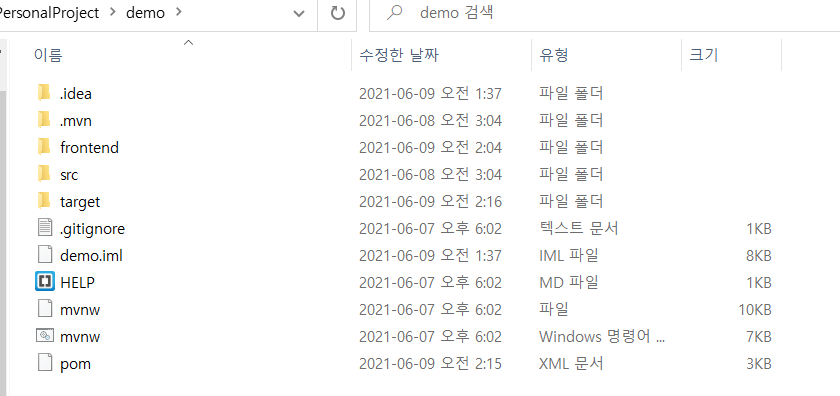
참고로, 폴더는 demo라는 백엔드 폴더에 frontend라는 리액트 파일을 다음과 같이 넣어야 한다.
B. 개인적으로 프로젝트를 실행하면서 겪은 에러들을 정리하였다.
1. 빌드할때 롬복이 제대로 실행되지 않는? 현상
java: You aren't using a compiler supported by lombok, so lombok will not work and has been disabled.
Your processor is: com.sun.proxy.$Proxy8
Lombok supports: sun/apple javac 1.6, ECJ
위의 에러가 떴을때, 다양한 방법이 있지만, 제일 최후의 방법으로 해결했는데, 내가 해결한 방법은 아래와 같았다.
Setting > Build, Execution, Deployment > Compiler > Shared build process VM options
org.apache.maven.plugins maven-resources-plugin 2.4.3-Djps.track.ap.dependencies=false
2. Web server failed to start. Port 8080 was already in use 에러
: 포트가 이미 실행중인 경우이다.
: cmd 에서 netstat -ano 문장을 실행하면, 실행중인 포트 목록이 뜬다.
: taskkill /pid XXXX /f 문장을 통하여 해당 PID번호로 종료해주면 된다.
3. 리액트 파일 내 에러
"/src/reportWebVitals.js Module not found: Can't resolve 'web-vitals' in 'E:\ReactResources\RectProjects\test-app\src'"-
다음 명령어를 치면 해결될 수도 있다
npm i web-vitals --save-dev
-
해결이 안될 경우, 지우고 다 다시 받아야 한다.
C. Solidity & truffle
1. truffle 삭제 후 버전에 맞춰 설치하는법
npm uninstall -g truffle
npm install -g truffle@5.1.62
2. Gradle 연동하기
https://hjjooace.tistory.com/entry/React-Spring-Gradle-Project-%EC%97%B0%EB%8F%99?category=0
: gradle의 경우에는 위의 사이트를 참고했다.
: 진행중 8번의 npm run eject 부분에서 에러가 발생했는데, 아래와 같았다.
Remove untracked files, stash or commit any changes, and try again.
npm ERR! code ELIFECYCLE
npm ERR! errno 1
.....
: 이를 해결하기 위해 아래의 블로그를 참조했다.
: 정리하자면, 에러가 난 부분을 지우고 다시 깔면 된다는 것이다. 난 아래와 같은 코드를 통해 해결했다.
npm uninstall react-scripts && npm install react-scripts-cssmodules && git add . && git commit -m "Save before ejecting" && yarn eject