Outlet의 기능
페이지의 특정 컴포넌트를 어느 상황에서나 항상 display 하고 싶을 때가 있다(고정된 헤더, 사이드바 등).
항상 고정되어 있어야 하는 컴포넌트 라우트에 Outlet을 넣으면, 그 자리에 자식 컴포넌트 라우트들이 들어가고, 고정 컴포넌트는 고정시키면서 자식 컴포넌트들만 새로 렌더링할 수 있다.
function Dashboard() {
  return (
    <div>
      <h1>Dashboard</h1>

      {/* This element will render either <DashboardMessages> when the URL is
          "/messages", <DashboardTasks> at "/tasks", or null if it is "/"
      */}
      <Outlet />
    </div>
  );
}

function App() {
  return (
    <Routes>
      <Route path="/" eleme`ㅇnt={<Dashboard />}>
        <Route
          path="messages"
          element={<DashboardMessages />}
        />
        <Route path="tasks" element={<DashboardTasks />} />
      </Route>
    </Routes>
  );
}Dashboard가 항상 보여지는 컴포넌트.- URL 주소가
/messages일 땐 outlet 자리에DashboardMessages가,
/tasks/일 때는DashboardTasks가 들어온다.
공식문서)
An<Outlet>should be used in parent route elements to render their child route elements. This allows nested UI to show up when child routes are rendered. If the parent route matched exactly, it will render a child index route or nothing if there is no index route.
Home.js
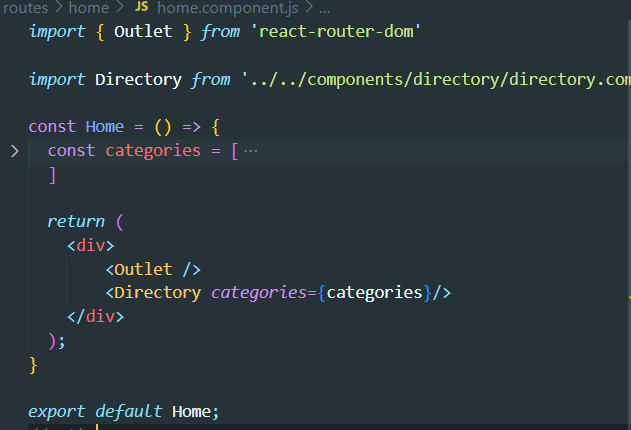
이런 경우 Directory 컴포넌트는 부모 태그가 꼭 필요해지게 되므로 div를 추가해주기.
App.js
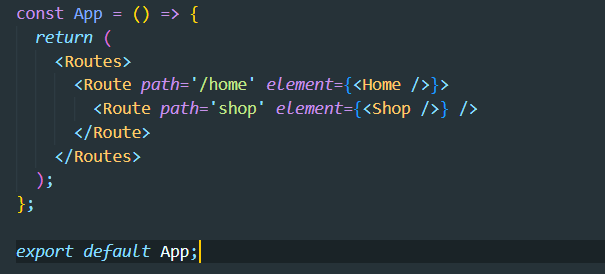
path가 지정해놓은 스트링과 정확히 일치할 때 컴포넌트를 실행시키고, 그게 아니라면 nested된 컴포넌트도 같이 디스플레이한다.
즉, http://localhost:3000/home 일 때는 Directory컴포넌트만 나타나지만
http://localhost:3000/home/shop 일 때는 Shop+Directory 로 나타난다.
(<Outlet />이 <Directory categories={categories}/> 보다 위에 있기 때문에 위에 나타남.)
index
자식 라우트에 들어가는 index는 default child routes라고 생각할 수 있음
<Route index element={<Home />} />
중간의 path='home'을 index로 바꿔주었다. 이제 Nav 컴포넌트는 항상 고정되면서, 첫 로딩 화면은 Nav+Home이 된다(디폴트).