Err1
vagrant에 tail 쓰려는데
powersherll 자체에 tail cmd 가 없음 ?
그래서 씀
get-contetnt \파일 경로,혹은 파일이름 (경로로 자도응로 잡힌다)
cat 같은 개념
get-item -Path .\파일명 | get-containt -tail 1
get-content -tail 1 .\파일명
get-content \파일경로 -wait 쓰면 전체를 다 보여주고 기다려도 준다?
batch파일로 만든다고 한다
Err2
batch 파일이 뭐지?
제타위키- batch 파일
윈도우 프롬프트 CMD 에서 순서대로 실행할 명령어들을 한번에 일괄로 실행되도록 하기 위해 작성한 명령어들의 집합파일이다
작업 명령어들을 일괄 처리할 목적으로 자주 사용한다
@echo off
start /d "C:Program Files\Google\chrome\Application\chrome.exe" /b chrome.exe
보통 위와같은 formation을 갖고있다고 함
- echo off : 이후 실행할 명령어 화면 표기 금지
- @ 해당명령어 (echo off)화면에 표기 금지
- star /d "경로" /b 실행파일 : 해당 경로의 실행파일을 실행해라
- ech on 이후 실행할 명령어 화면 표기Err3
VagrantFikle 내 shell script 설정
config.vm.provision "shell" inline <<- shell
쉘내에 cmd 설정하는 cmd
실제로 대화형 프롬프트는 vagrant 파일을 실행하는데 방해가 됌
-y 를 써야함
cofnig.vm.synced_folder는
/opt/. script > 백업파일 로컬에다 설정해야함
Err4 Windows OS : Vagrant Destroy 안 됌
시간이 가장 많이 걸린 error
Vagrant 설치 및 배포중 forti Vpn이 함께 실행됬다가 꺼져서 그런지 중간 process가 꼬임
내 터미널에 있던 에러는 캡쳐를 못해 참고 자료를 차용함 (똑같은 에러임)
에러메시지
문제의 ERROR Message
ERROR vagrant: #<Vagrant::Errors::MachineActionLockedError: An action 'up' was attempted on the machine 'default',
but another process is already executing an action on the machine.
Vagrant locks each machine for access by only one process at a time.
Please wait until the other Vagrant process finishes modifying this
machine, then try again.

If you believe this message is in error, please check the process
listing for any "ruby" or "vagrant" processes and kill them. Then
try again.>

ERROR vagrant: An action 'up' was attempted on the machine 'default',
but another process is already executing an action on the machine.
Vagrant locks each machine for access by only one process at a time.
Please wait until the other Vagrant process finishes modifying this
machine, then try again.

If you believe this message is in error, please check the process
listing for any "ruby" or "vagrant" processes and kill them. Then
try again.
정석 ❌
Vagrant  destory
Vgrant destroy [id]
Vagrant destroy -f
유사한 Err- vagrant can't running ssh because it is locked
vagrnat reload [id]
vagrant global-status --prune
vagrant up- 아래는 우분투 CMD...
killall vagrant-notify-server
vagrant plugin uninstall vagrant-notify- 다 동일 에러 메시지가 나왔다 'up'에서 'reload'로 'destory'로 cmd만 바뀐채..
위 방법으로 다 안됐으니까 쓴다
쉘 문제인가?❌
git bash 쓰다가 새 터미널 켜서 해보았지만 그대로 오류 MSg
powershell 관리자 모드로 들어가서 재시도 했으나 같은 오류 MSG
ruby랑 vagrant를 삭제해보자? ❌
$ ps -ef | grep ruby
[없을 무]
$ ps -ef | grep vagrant
[없음]
아니 ruby랑 vagrant 프로세스 잡히는게 없었다
ㅅㅂ
lock을 삭제할 수있다? 해보자? ❌
$ rm -f -r ~/.vagrant.d/data/lock*
rm: cannot remove '/c/Users/user/.vagrant.d/data/lock.machine-action-2f0a5adab373a2b2a3a34a57e13e4ed4.lock': Device or resource busy


$ rm -f -r ./folderpath
[역시 안됨]
- 이유 : vagrant.d/data/lock* 파일들을 삭제를 하려는데 device나 resurce가 바쁘셔서 삭제를 못함
- 왠지 vagrant 에러메시지에서 나온 프로세스가 신경이 쓰이기 시작함..
-
안타깝게도 lsof 는 우분투 CMD라 인식도 안도고 , 먹히지가 않았다
- git hub에서 본것중
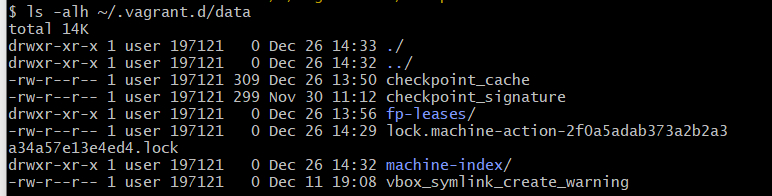
ls -alh ~/.vagrant.d/dataCMD를 써보라고 해서 써봤는데 그냥 내부 파일을 보여주는 커맨드였음
- git hub에서 본것중
해결
-
kill -9 이 생각이 났다 아니 전혀 관련없는 vagrant 오류 핸들링 자료를 보다가 생각이 들기 시작한게, 어짜피 ruby 랑 vagrant 중 vagrant는 삭제를 하는 방법이 없으니 ruby 프로세스를 삭제하면 되지 않을까?
-
PID를 찾자 해서 찾기 시작함
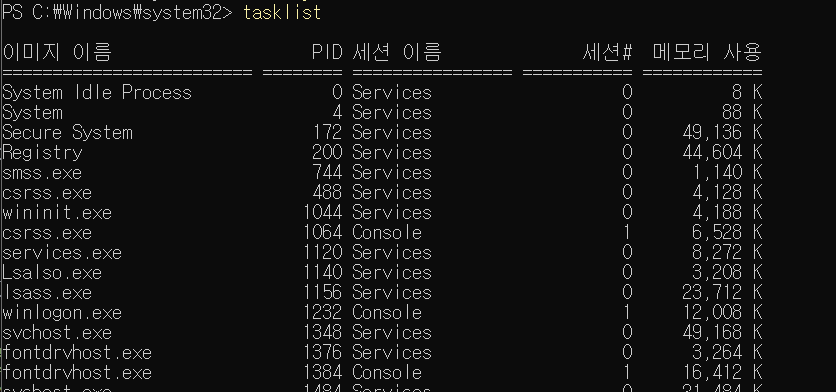
- ruby.exe 찾음

-
근데 ruby는 /F 옵션을 써야 삭제 할 수있다고 에러메시지가 나옴

-
Ruby.exe 종료 완료 후 vagrant destory 재시도
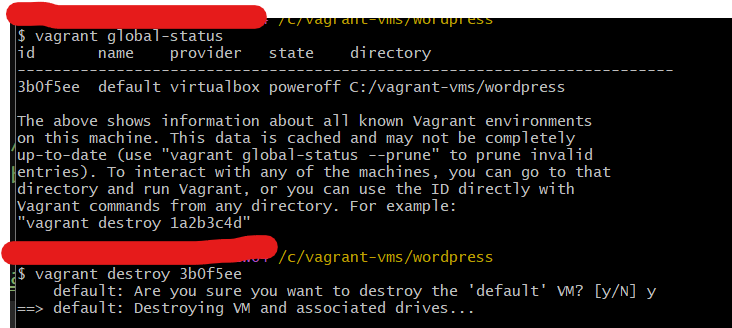

해결!