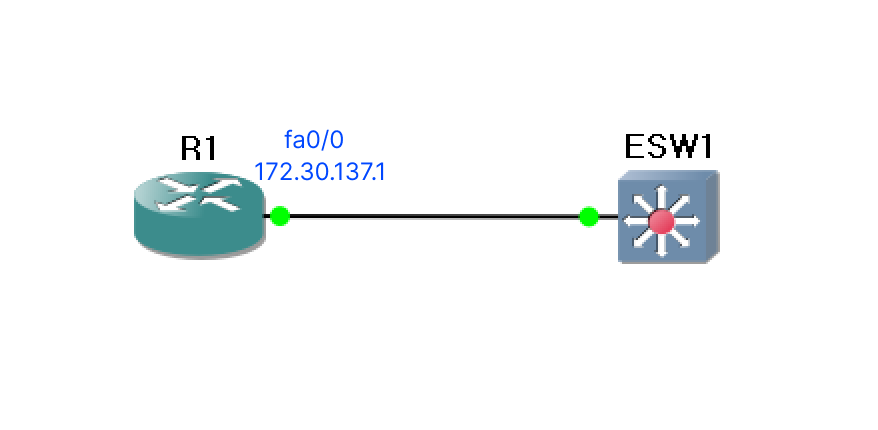
1) 공유 매체 환경
- 여러 호스트가 같은 매체(회선 - 전선이나 광섬유, 대기 공간 등)에 연결되어 있는 환경
- 동일한 충돌 영역을 공유
- 예전 버스 기반의 이더넷이나 허브 기반의 이더넷 등이 공유 매체 환경
- 두 대 이상의 호스트가 동시에 데이터를 전송하고자 하면 충돌이 발생
- 허브를 사용하는 경우 동시에 전송을 하면 충돌이 발생하고 전송하고자 하는 모든 프레임을 버리며 보내는 호스트는 충돌 이벤트를 인지하고 혼잡 신호를 송신하게 되는데 이때 모든 장비들은 프레임에 오류가 발생했고 충돌이 발생했다는 사실을 인지하고 통신을 중단. 일정 시간 동안 대기한 후 다시 전송
- 스위치를 사용하게 되면 여러 개의 트래픽 경로를 생성할 수 있다.
- 스위치는 이렇게 하나의 매체를 나누어서 전송할 수 있는데 이 나누는 단위를 마이크로 세그멘테이션이라고 합니다.
2) 기본 명령어
- 활성화
enable
- 설정 모드
configure terminal
- 이름 설정
hostname 이름
-
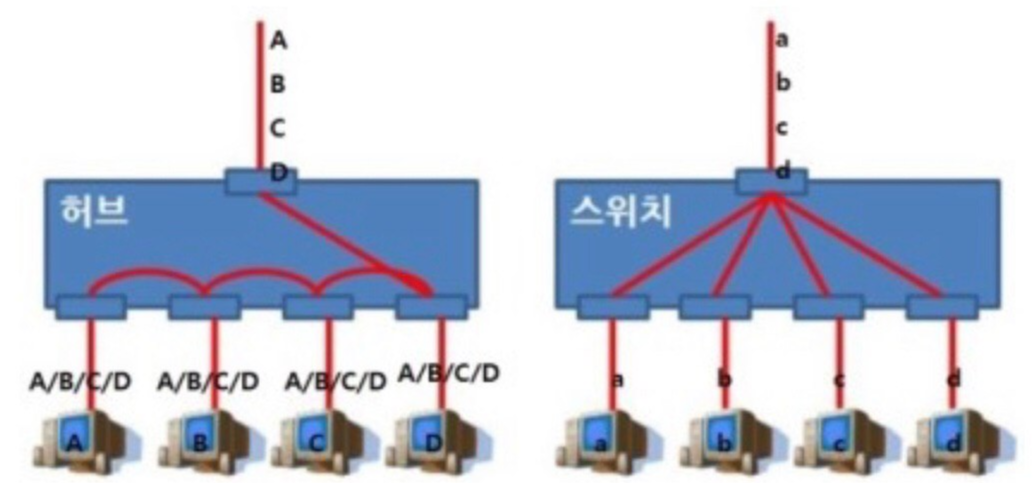
원격에서 사용하기 위해서는 vlan1 에 IP를 할당해야 한다.
configure terminal interface vlan 1 ip address 10.5.5.1 255.255.255.0 no shutdown -
스위치에서 외부 네트워크와 통신하기 위해서는 default-gateway 가 설정되어야 한다.
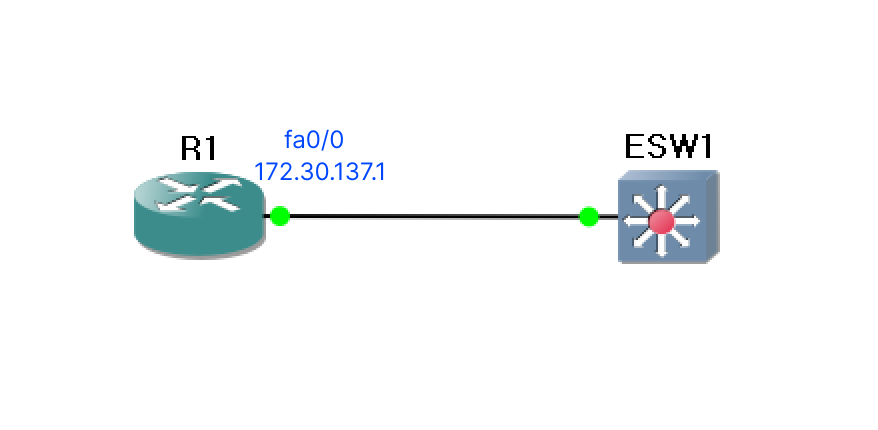
- ip default-gateway 명령을 사용해서 IP를 설정하는데, 이때 설정되는 IP는 연결된 라우터의 IP
ip default-gateway 172.30.137.1
- ip default-gateway 명령을 사용해서 IP를 설정하는데, 이때 설정되는 IP는 연결된 라우터의 IP
- 스위치 포트 설정
- 속도 설정
speed {10 | 100 | 1000 | auto}interface fa1/0 speed 100 - 듀플렉스 모드 설정
duplex {auto | full | half}duplex full - 통신 모드 분류
- Simplex : 단향 통신, 한 방향으로만 전송이 가능한 통신
- Half Duplex : 반 이중 통신, 양방향 전송이 가능하지만, 어느 한 순간에는 한 방향으로만 통신 가능, 2선식
- Full Duplex : 전 이중 통신, 동시에 양방향 전송이 가능, 4선식
- 속도 설정
-
스위치의 모든 포트는 라우터와 다르게 기본적으로 활성화되어 있다.
-
확인
show ip interface brief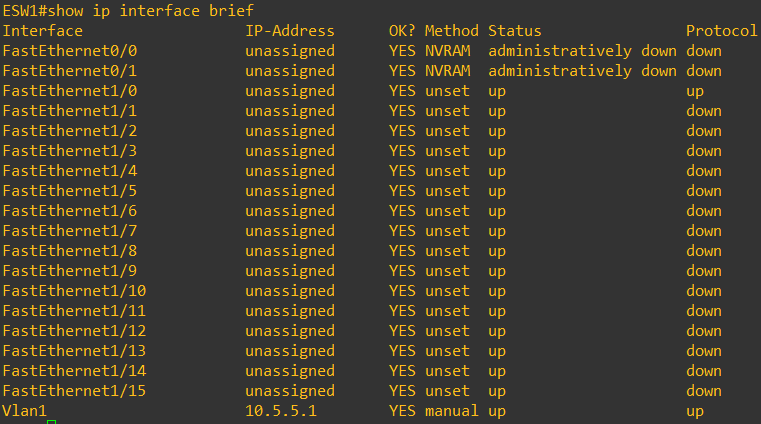
-
사용하지 않는 포트를 아무런 설정 없이 그대로 방치하면 보안에 심각한 위협이 될 수 있다.
-
사용하지 않는 포트는 shutdown 시키는 것이 좋다.
-
한꺼번에 설정하는 명령
interface range 인터페이스 - 인터페이스번호interface range fa 1/1 - 15 shutdown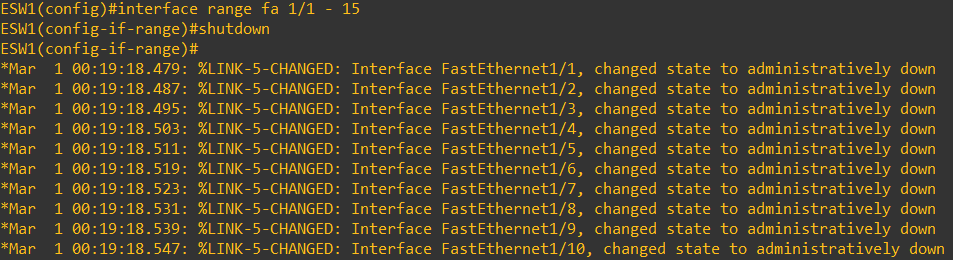
-
-
특정 인터페이스 정보 확인
show interfaces 인터페이스이름show interfaces FastEthernet 0/1
- 포트 보안 설정
: 특정 MAC Address 를 가진 장비만 접속이 가능하도록 할 수 있다.interface fa1/5 switchport mode access switchport port-security switchport port-security mac-address 실제MAC주소-
MAC 주소를 모르는 경우는 sticky 를 설정하면 처음 연결된 장비의 MAC 주소를 설정합니다.
switchport port-security mac-address sticky -
장비를 여러 개 설정
switchport port-security maximum 최대연결개수 -
설정한 장비 이외의 장비가 접속하는 경우 대응
switchport port-security violation {shutdown | protect | restrict}-
protect : 트래픽 폐기만 수행
-
restrict : 트래픽을 폐기하고, 경고 메세지 전송
-
shutdown : 트래픽을 폐기, 메세지 전송, 인터페이스 비활성화
-
보안 설정 때문에 shutdown이 되는 경우는 secure-shutdown 상태인데 이 상태에서 바로 shutdown 이 안되므로, shutdown을 하고 no shutdown을 수행
-
-
3) VLAN
- 하나의 논리적인 브로드캐스트 영역으로 여러 개의 물리적 LAN 세그먼트에 걸쳐져 있을 수 있다.
- VLAN을 이용하면 물리적으로 다른 곳에 있지만 함께 연결되어 데이터를 주고 받을 수 있도록 그룹을 생성하는 것이 가능
- 다른 세그먼트에 있는 호스트들도 VLAN을 사용하면 하나의 그룹으로 묶을 수 있고, 하나의 스위치에 있는 포트들도 서로 다른 그룹으로 묶을 수 있다.
- 하나의 LAN에 연결된 모든 장비는 동일한 브로드캐스트 도메인 내에 있다고 하는데, 의미는 LAN의 머떤 장비가 브로드캐스트 프레임을 전송하면 다른 모든 장비가 이 프래임을 수신한다는 의미
- LAN과 브로드캐스트 도메인은 동일한 개념
- 스위치는 VLAN을 사용하지 않으면 모두 동일한 브로드캐스트 도메인에 있다고 간주
- 트렁킹과 802.1Q
- 스위치에서 구현된 VLAN은 출발지 포트와 동일한 VLAN에 속한 목적지로만 트래픽을 전송
- 여러 개의 VLAN으로 구성된 스위치를 연결하려면 VLAN 개수만큼 연결이 필요
- 트렁크는 하나의 링크로 여러 개의 VLAN을 연결하는 것
- 트렁크로 설정하고자 할 때는, 인터페이스에서
switch mode trunk switchport trunk encapsulation dot1q - 원래대로 되돌릴 경우에는
switch mode access
-
VLAN 생성 및 할당
-
생성
vlan 아이디 name 이름 -
인터페이스 할당, 인터페이스 설정에 들어가서
switch port access vlan 아이디 -
기본 VLAN은 1
- VLAN 2번 3번 99번을 생성
vlan 2 name v2 exit vlan 3 name v3 exit vlan 99 name v99 exit -
인터페이스를 포트에 할당
- fastethernet 1/1 - 3 을 vlan 2에 할당
- fastethernet 1/4 - 6 을 vlan 3에 할당
interface range FastEthernet 1/1 - 3 switchport access vlan 2 exit interface range FastEthernet 1/4 - 6 switchport access vlan 3 exit -
인터페이스의 VLAN 확인
show interface 인터페이스 switchportshow interface FastEthernet1/1 switchport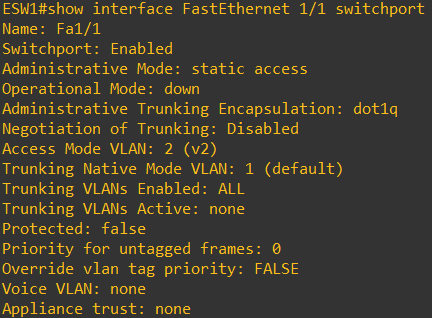
-
FastEthernet1/11 인터페이스를 Trunk 모드로 설정
configure terminal interface FastEthernet1/11 switchport mode trunk switchport trunk encapsulation dot1q -
FastEthernet1/11 인터페이스의 VLAN 확인
show interface FastEthernet1/11 switchport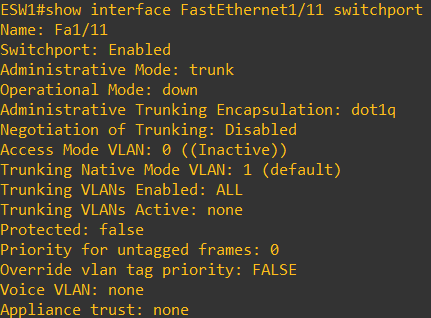
show interface FastEthernet1/11 trunk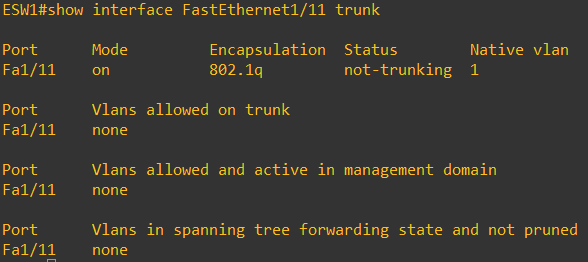
-
Native VLAN 변경
switch trunk native vlan 번호
-
