
사용량을 잘 못 설정한 경우
-
yaml 파일을 작성
apiVersion: v1 kind: Pod metadata: name: core-k8s labels: role: just-an-example app: my-example-app organization: friends-of-manning creator: bh spec: containers: - image: busybox:latest name: busybox command: ['sleep', '10000'] resources: limits: cpu: 2 requests: cpu: 1 ports: - name: webapp-port containerPort: 80 protocol: TCP -
pod 생성
kubectl apply -f pod.yml -
pod에 접속
kubectl exec -it core-k8s -- /bin/sh -
무한 작업 수행
dd if=/dev/zero of=/dev/null
-
다른 터미널에서 접속, pod 가 생성된 노드를 확인
kubectl get pods -o wide
-
노드의 컨테이너에 접속
docker exec -it kind-worker3 /bin/bash -
자원 사용량 확인
top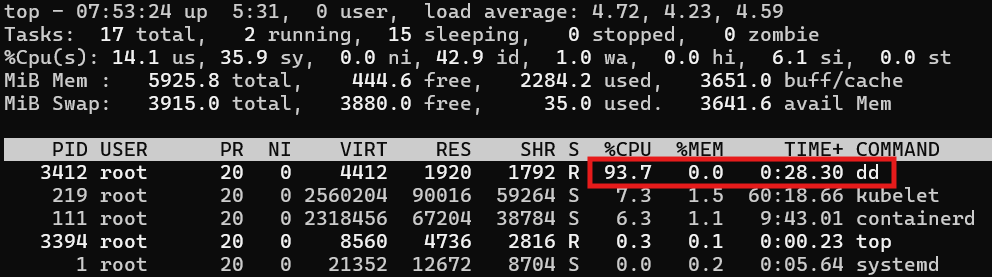
dd명령어가 CPU를 90% 이상 사용하고 있다...
- 리소스 사용량을 제한하지 않거나 제한을 하더라도 정수 단위로 설정하면 리소스 전체를 사용하는 일이 벌어질 수 있습니다.
사용량을 적절히 설정한 경우
-
yaml 파일을 수정
apiVersion: v1 kind: Pod metadata: name: core-k8s labels: role: just-an-example app: my-example-app organization: friends-of-manning creator: bh spec: containers: - image: busybox:latest name: busybox command: ['sleep', '10000'] resources: limits: cpu: .1 requests: cpu: .1 ports: - name: webapp-port containerPort: 80 protocol: TCP -
위의 과정을 다시 수행한 후 사용량 확인
top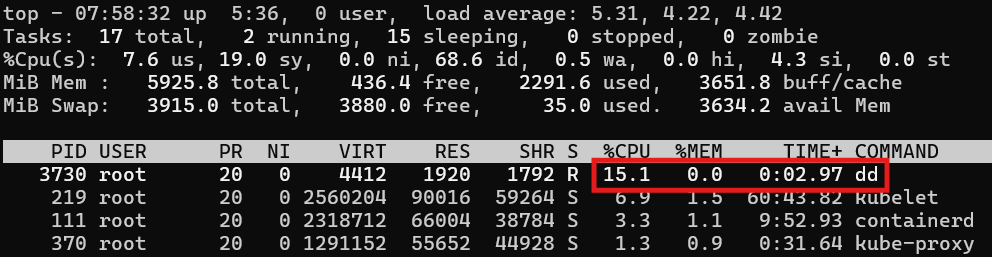
이전과 달리dd명령이 CPU 90% 이상을 사용하는 일이 발생하지 않는다.
