File 클래스
- 파일 및 디렉토리를 객체로서 관리
- 특정 파일 또는 디렉토리에 대응되는 객체를 생성
- 파일 및 디렉토리에 대한 정보를 관리하고 조작할 수 있는 다양한 메서드를 제공
- 파일 객체의 생성: 경로를 문자열로 전달, 해당 파일 또는 디렉토리 경로에 대응되는 객체 생성
File file = new File("파일 또는 디렉토리의 경로 - 문자열 경로는 상대 경로 또는 절대 경로를 사용
절대 경로 - 시스템에서 파일이나 폴더가 위치한 전체 경로
상대 경로 - 현재 작업 중인 디렉토리 기준으로 산정되는 경로
file 클래스의 다양한 메서드
String getName() - 파일 또는 디렉토리의 이름을 반환
String getPath() - 파일 또는 디렉토리의 경로 이름을 반환
String getAbsolutePath() - 파일 또는 디렉토리의 절대 경로 이름을 반환
boolean exists() - 파일 또는 디렉토리가 존재하는지 여부를 테스트
boolean isFile() - 객체가 파일인지 확인
boolean isDirectory() - 객체가 디렉토리인지 확인
boolean mkdir() - 새로운 디렉토리를 생성 (상위 디렉토리가 존재해야 함)
boolean mkdirs() - 필요한 상위 디렉토리를 포함하여 새로운 디렉토리 생성
boolean delete() - 파일 또는 디렉토리를 삭제
입출력과 스트림
입출력(I/O, Input/Output)
- 데이터의 입력(Input) / 출력(Output)
- 컴퓨터 내부 혹은 외부의 장치와 데이터를 주고 받는 행위
스트림(Stream)
- 데이터를 운반하는데 사용되는 통로
- 단방향으로만 통신 가능
- 데이터 방향에 따라 입력 스트림, 출력 스트림으로 나뉨
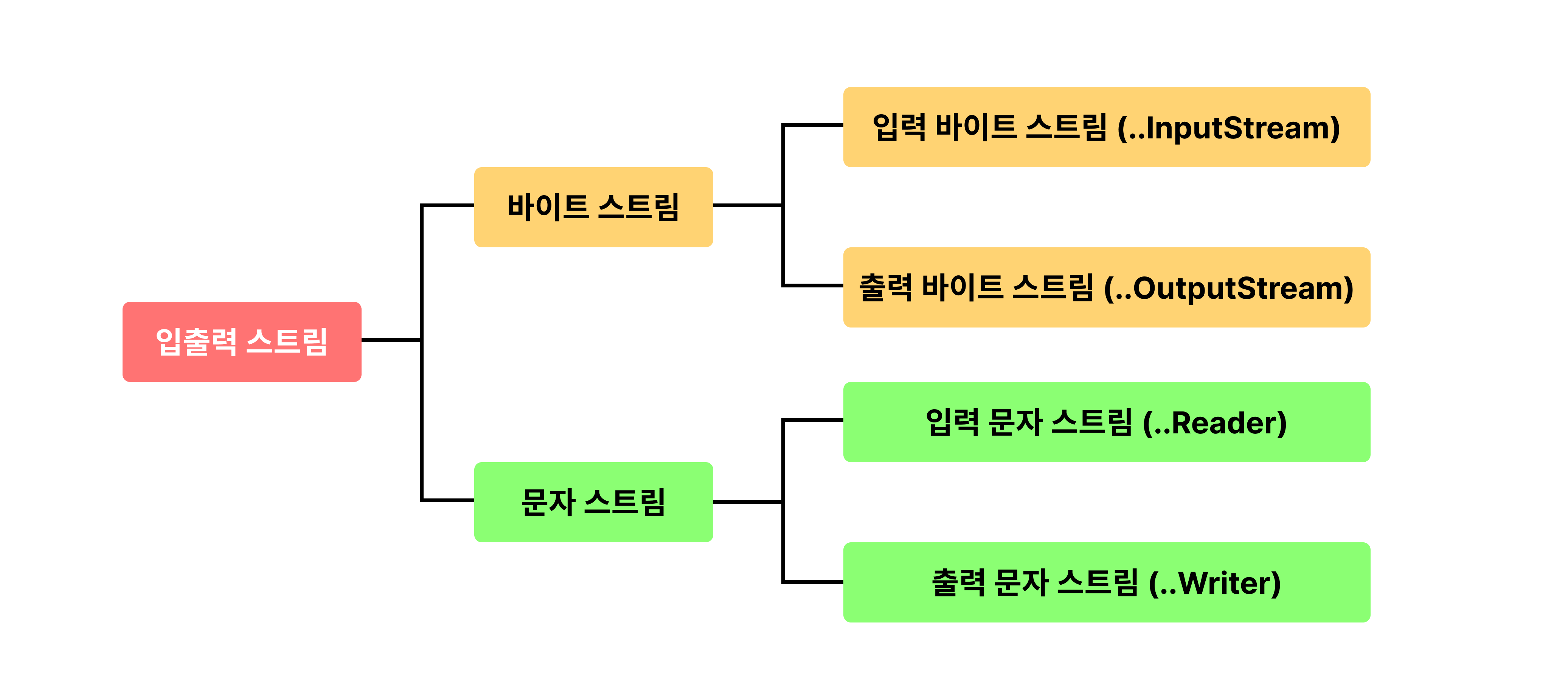
스트림 종류
- 데이터의 타입 : 바이트, 문자
- 데이터의 방향 : 입력, 출력
- 노드의 종류 : 표준 입출력, 파일, ...
- 스트림의 성격: 노드 스트림 / 보조 스트림
바이트 스트림 (Byte Stream)
- 바이트 단위로 데이터를 입력받거나 출력하기 위한 스트림 클래스
- 주로 이진 파일(이미지, 오디오, 비디오, ...)을 읽고 쓰는데 사용
- 최상위 추상 클래스: InputStream, OutputStream
- 노드 종류에 따라 다양한 구체적인 서브 클래스 사용
InputStream 클래스
- 모든 바이트 입력 스트림의 최상위 추상클래스
- 바이트 단위로 데이터를 읽기 위한 여러 메서드를 제공
- 입력 소스 -> 프로그램 방향으로 흐름
int read()
throws IOException
- 입력 스트림에서 단일 바이트를 읽음
- 읽을 데이터가 없다면 -1을 반환

int read(byte[] b)
throws IOException
- 입력 스트림에서 byte 배열만큼 데이터를 읽음
- 읽은 바이트 수를 반환

int read(byte[] b, int off, int len)
throws IOException
- 지정된 길이(len)만큼 데이터를 읽어 byte 배열의 지정된 위치(off)에 저장

void close()
throws IOException
- 스트림을 종료하고 자원을 반납함
OutputStream 클래스
- 모든 바이트 출력 스트림의 최상위 추상 클래스
- 바이트 단위로 데이터를 출력하기 위한 여러 메서드 제공
- 프로그램 -> 출력 대상 방향으로 흐름
void write(int b)
throws IOException
- 출력 스트림에 한 바이트를 씀

void write(byte[] b)
throws IOException
- 출력 스트림에ㅔ byte 배열 전체를 씀

void write(byte[] b, int off, int len)
throws IOException
- 지정된 byte 배열의 특정 부분(off 부터 len길이 만큼)을 씀

void flush()
throws IOExcepption
- 출력 스트림에 남아 있는 데이터를 강제로 출력 (버퍼링된 스트림에 유용)

void close()
throws IOException
- 스트림을 종료하고 자원을 반납함
바이트 스트림으로 이미지 출력하는 코드
import java.io.FileOutputStream;
import java.io.IOException;
import java.io.FileInputStream;
import java.io.FileNotFoundException;

public class Main {
	public static void main(String[] args) {
		FileInputStream fis = null;
		FileOutputStream fos = null;
		try {
			  fis = new FileInputStream("dog.png");
			  fos = new FileOutputStream("dog-copy.jpg");
			  int b;
			  while ((b=fis.read()) != -1) {
				  fos.write(b);
			  }
		} catch (FileNotFoundException e) {
			  System.out.println("파일 없음 이슈");
		} catch (IOException e) {
			System.out.println("더큰 통로 입출력 이슈");
		} finally {
			try {
				if (fis != null) {
					fis.close();
				}
				if (fos != null) {
					fos.close();
				}
			} catch (IOException e) {
				System.out.println();
			}
		}
	}
}
더 빠른 버전
import java.io.FileOutputStream;
import java.io.IOException;
import java.io.FileInputStream;
import java.io.FileNotFoundException;

public class Main {
	public static void main(String[] args) {
		FileInputStream fis = null;
		FileOutputStream fos = null;
		try {
			  fis = new FileInputStream("dog.png");
			  fos = new FileOutputStream("dog-copy.jpg");
			  int b;
			  byte[] buffer = new byte[100];
			  while ((b=fis.read(buffer)) != -1) {
				   fos.write(buffer,0,b);
			  }
		} catch (FileNotFoundException e) {
			  System.out.println("파일 없음 이슈");
		} catch (IOException e) {
			System.out.println("더큰 통로 입출력 이슈");
		} finally {
			try {
				if (fis != null) {
					fis.close();
				}
				if (fos != null) {
					fos.close();
				}
			} catch (IOException e) {
				System.out.println();
			}
		}
	}
}
문자 스트림 (Characater Stream)
- 바이트 스트림과는 달리 문자 단위(2byte) 단위로 데이터를 처리
- 주로 키보드에서 입력을 받거나 텍스트 파일을 읽고 쓰는 데 사용
- 문자 스트림의 최상위 추상 클래스: Reader, Writer
- FileReader와 FileWriter가 파일에 텍스트를 읽거나 쓸 때는 현재 JVM이 돌아가고 있는 시스템의 기본 문자 인코딩 방식을 사용
Reader 클래스
- 자바의 모든 문자 입력 스트림의 최상위 추상 클래스
- 문자 단위로 데이터를 입력 받기 위한 다양한 메서드 정의
int read()
throws IOException
- 입력 스트림에서 단일 문자를 읽음 (읽은 문자가 없으면 -1 반환)

int read(char[] cbuf)
throws IOException
- 입력 스트림에서 문자 배열만큼 읽음

int read(char[] cbuf, int off, int len)
throws IOException
- 저장된 길이(len)만큼 읽어 배열의 특정 위치(off)에 저장

void close()
throws IOException
- 스트림을 종료하고 자원을 반납함
Writer 클래스
- 자바의 모든 문자 출력 스트림의 최상위 추상 클래스
- 문자 단위로 데이터를 출력하기 위한 다양한 메서드 제ㅔ공
void write(int c)
throws IOException
- 단일 문자를 출력

void write(char[] cbuf)
throws IOException
- 문자 배열을 출력

void write(char[] cbuf, int off, int len)
throws IOException
- 배열의 특정 부분 (off 부터 len 만큼)을 출력

void write(String str)
throws IOException
- 문자열을 출력

void flush()
throws IOException
- 출력 스트림에 남아 있는 데이터를 강제로 출력

void close()
throws IOException
- 스트림을 종료하고 자원을 반납함
문자 스트림으로 txt파일 복사하는 코드
import java.io.FileReader;
import java.io.IOException;
import java.io.FileWriter;
import java.io.FileNotFoundException;

public class Main {
	public static void main(String[] args) {
		FileReader fis = null;
		FileWriter fos = null;
		try {
			  fis = new FileReader("dog.txt");
			  fos = new FileWriter("dog-copy1.txt");
			  int b;
			  while ((b=fis.read()) != -1) {
				   fos.write(b);
			  }
		} catch (FileNotFoundException e) {
			  System.out.println("파일 없음 이슈");
		} catch (IOException e) {
			System.out.println("더큰 통로 입출력 이슈");
		} finally {
			try {
				if (fis != null) {
					fis.close();
				}
				if (fos != null) {
					fos.close();
				}
			} catch (IOException e) {
				System.out.println();
			}
		}
	}
}
노드 스트림 (Node Stream)
- 실제 노드에 연결
- 데이터의 실제 입출력을 담당
보조 스트림 (Filter Stream)
- 실제 노드에 연결되지 않음
- 다른 스트림을 감싸서 추가적인 기능(ex. 버퍼링, 데이터 형식 변환, 객체 직렬화)을 제공
- 여러 보조 스트림을 체인 형태로 연결하여 다양한 기능을 조합할 수 있음
- 노드 스트림 없이 단독으로 사용할 수 없음
- 보조 스트림의
close()를 호출하면 노드 스트림의close()까지 호출됨
보조 스트림의 종류
- FilterInputStream, FilterOutputStream - 바이트 보조 스트림의 기본 클래스
- BufferedInputStream, BufferedOutputStream - 버퍼를 이용한 입출력 성능 향상
- BufferedReader, BufferedWriter - 버퍼를 이용한 입출력 성능 향상
- ObjectInputStream, ObjectOutputStream - 데이터를 객체 단위로 읽고 쓰는 스트림, 객체를 직렬화된 형식으로 읽고 씀
- DataInputStream, DataOutputStream - int,float과 같은 기본형 데이터를 읽고 쓰는 스트림
- InputStreamReader, OutputStreamWriter - 바이트 스트림을 문자 스트림으로 변환
객체 직렬화
직렬화
객체의 상태를 바이트 스트림으로 변환하여 저장하거나 전송할 수 있도록 하는 과정
역직렬화
직렬화된 바이트 스트림을 다시 객체로 복원하는 절차
ObjectOutputStream - 객체를 바이트 스트림으로 변환하는 스트림
ObjectInputStream - 바이트 스트림을 객체로 복원하는 스트림