Info
작성자 정보
- 작성일 : 2025-09-20
- 읽음시간 : 15~20 min
개요
최근 사내에서 로그인 보안 강화를 위해 2차 인증(MFA, Multi-Factor Authentication) 도입이 필요해졌습니다.
특히, 단순한 ID/PW 인증만으로는 계정 탈취나 비밀번호 유출 상황에 대응하기 어렵기 때문에 OTP(One-Time Password)를 통한 보조 인증이 검토되었고 구현후 공유하고자 글을 작성해봤습니다.
- 수요
- ERP 로그인 시 추가적인 보안 계층 필요
- 모바일 앱을 통한 OTP 입력 요구 증가
- 환경적 제약
- 중국에 있는 그룹사 법인은 Google 서비스 접근이 불가능 → Google Authenticator 사용이 제한됨
- 대신 사내 전 직원에게 MS 계정 발급이 되어 있으며, Microsoft Authenticator 앱은 중국에서도 다운로드 및 사용 가능
(공식 문서 참고: MS Authenticator 중국 내 다운로드 안내)
따라서, ERP 로그인 시 OTP를 2차 인증으로 붙이는 방안으로 Microsoft Authenticator 앱 기반의 OTP 인증을 검토했습니다.
MS Authenticator와 Google Authenticator
처음 OTP 인증 기능을 구현할때 MS Authenticator = MS 전용 방식으로 생각했습니다.
하지만 실제로는 MS Authenticator, Google Authenticator 둘 다 TOTP 표준(RFC 6238)을 구현한 앱 이였습니다.
즉,
- 서버에서
otpauth://totp/...형식의 QR 코드를 생성해주면 (아래 개발 절차에서 설명) - MS Authenticator, Google Authenticator 모두 동일하게 스캔 가능
- 어떤 앱으로 등록하든 같은 비밀키로 계산된 6자리 코드를 서버에서 검증 가능
다시 말해, “MS Authenticator 전용”이라는 개념은 애매함.
OTP사용은 MS/Google 어느 앱으로든 사용 가능.
다만,
- 중국 내 그룹사는 Google 앱 사용이 불가
- MS Authenticator는 회사 MS 계정을 받으며 중국, 한국 어디든 사용 가능
따라서 저는 사내 표준 앱을 MS Authenticator로 정하는 것이 합리적으로 생각했습니다.
TOTP란?
OTP는 일회용 비밀번호로, 로그인할 때마다 새로 생성되는 짧은 숫자 코드를 의미합니다.
그중 가장 많이 사용되며 MS, Google OTP 방식 또한 TOTP(Time-based One-Time Password) 입니다.
- 원리
- 서버와 클라이언트(OTP 앱)가 공유된 비밀키(Secret) 를 하나 가지고 있음
- 현재 시간을 30초 단위로 끊어서 Counter 값으로 사용(단위는 커스텀 가능)
- 비밀키 + Counter 를 HMAC-SHA1 알고리즘으로 암호화 → 6자리 숫자 생성
- 사용자가 입력한 숫자와 서버에서 계산한 숫자가 동일하면 인증 성공
- 특징
- 인터넷 연결 불필요 (앱에서 로컬 계산)
- 매 30초마다 새로운 6자리 코드 생성
- 서버와 클라이언트의 시간이 맞지 않으면 실패 → ±30초~1분 허용 윈도우 설정
OTP 인증 과정
시퀀스 다이어그램
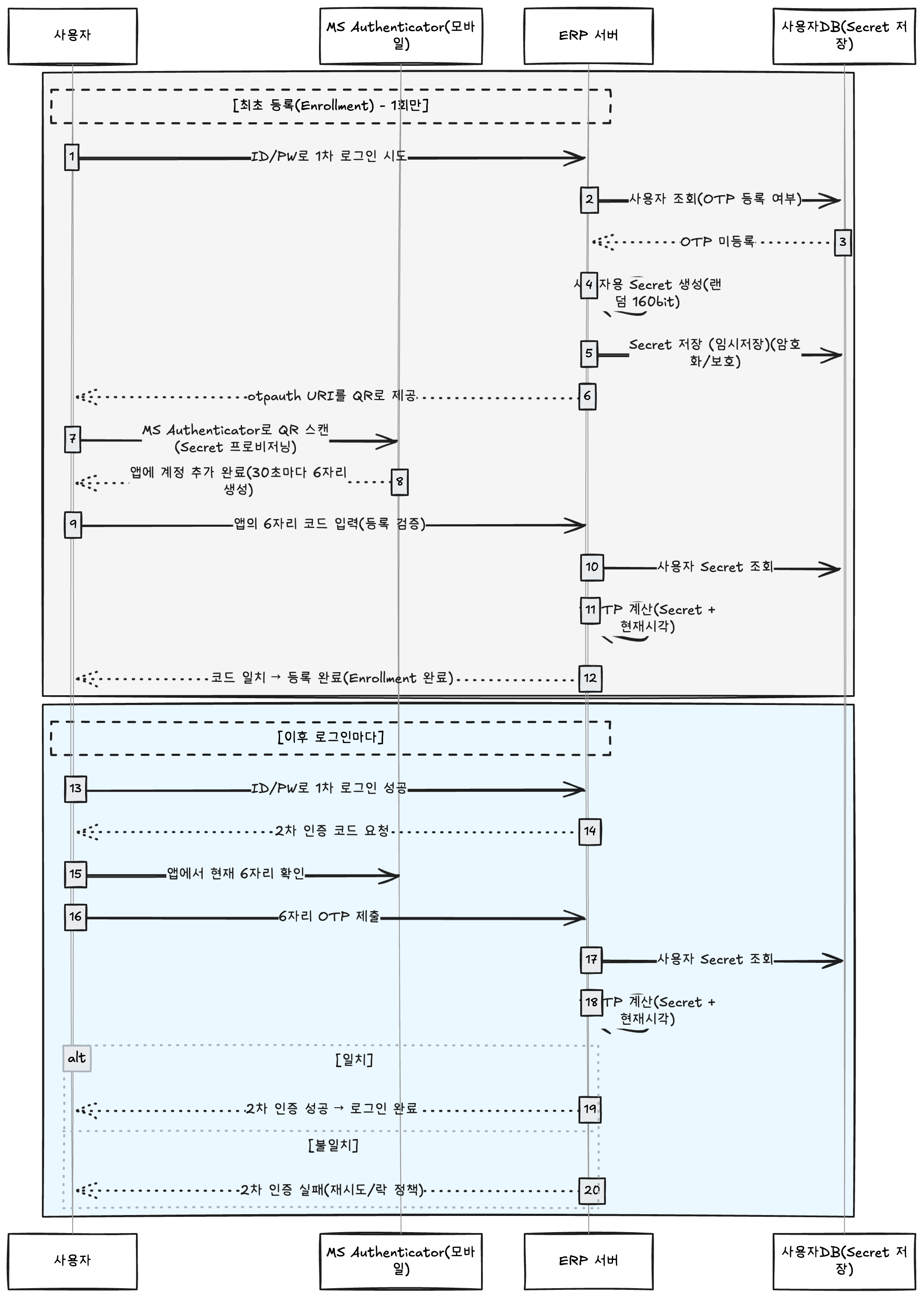
OTP 최초 등록 절차
- [로그인 시도] 사용자가 ID/PW 입력 후 로그인.
- [등록 여부 조회] 서버가 저장 공간에서(DB or 세션)
secret보유 여부 조회. - [미등록 판단]
secret == null이면 OTP 등록 플로우 진입. - [시크릿 생성] 서버가 160bit 랜덤 바이트 생성 → Base32 인코딩으로 사용자 전용 Secret 생성.
- [임시 저장] 생성한 Secret을 DB(임시 필드) 또는 세션에 임시 보관
- [QR 준비] Secret등 정보가 담긴
otpauth://totp/...URI 생성 → QR 이미지로 변환. - [QR 제공] 서버가 QR(이미지) 를 클라이언트에게 표시
- [앱 등록] 사용자가 MS Authenticator(또는 호환 앱) 으로 QR 스캔 → 앱이 Secret 저장, 30초마다 6자리 코드 생성 시작.
- [등록 검증 입력] 사용자가 앱에서 보이는 첫 6자리 코드를 서버로 제출(ID/PW와 함께 로그인 하여 OTP 등록 확인).
- [서버 검증] 서버가 임시 Secret + 현재시각으로 TOTP 계산(±1스텝 허용) → 사용자 입력 6자리와 비교.
- [등록 확정] 일치하면 임시 Secret → 사용자 저장공간(DB)에
secret정식 저장 - [정리] 임시 보관값(PENDING_SECRET/OTP_URI) 즉시 삭제, 등록 완료 응답.
- [불일치 시] 재시도 유도(타임아웃/취소 시 임시 Secret 폐기).
이후 로그인 절차
- [로그인 시도] 사용자가 ID/PW + OTP 6자리를 한 화면에서 제출(또는 ID/PW 성공 후 OTP 추가 제출).
- [등록 여부 재확인] 서버가 저장 공간(DB)에서
secret존재 확인. - [OTP 검증] 서버가 저장된
secret+ 현재시각으로 TOTP 6자리 계산 → 사용자 입력 6자리와 비교. - [성공] 일치하면 2차 인증 통과 → 로그인 완료.
- [실패] 불일치면 오류 응답
프로토타입 개발 가이드
프로젝트 개발환경 및 구조
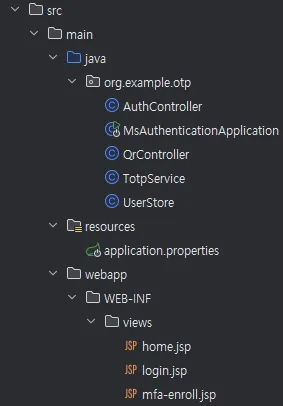
- 프로젝트 스펙 :Spring Boot 2.7.18 / Java 8 / JSP
- 프로젝트 구조
- AuthController : 로그인, 초기 OTP 등록 검증
- QrController : 초기 OTP 연동을 위한 QR 이미지 확인
- TotpService : Secret생성, otpauth uri 생성, 6자리 코드 비교 등 OTP 발급, 인증 을 위한 메소드 정의
- UserStore : 사용자 정보를 DB가 아닌 메모리에 저장하기 위한 임시 클래스
- 저장구조
DB 없이 제작한 프로토 타입이기 때문에 임시 OTP저장은 세션에 담는 방식으로 사용
- 프로젝트 시나리오
-
로그인
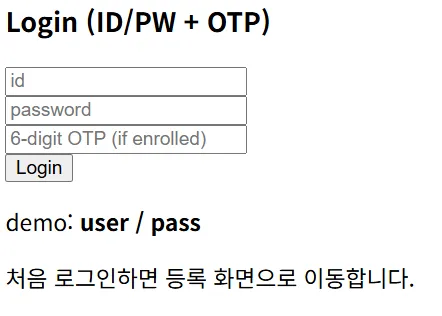
- 처음 로그인 하는경우 OTP가 없기 때문에 ID/PW만 입력 후 로그인 하면 아래와 같이 MFA 등록 화면으로 넘어감 -
앱에 OTP 등록
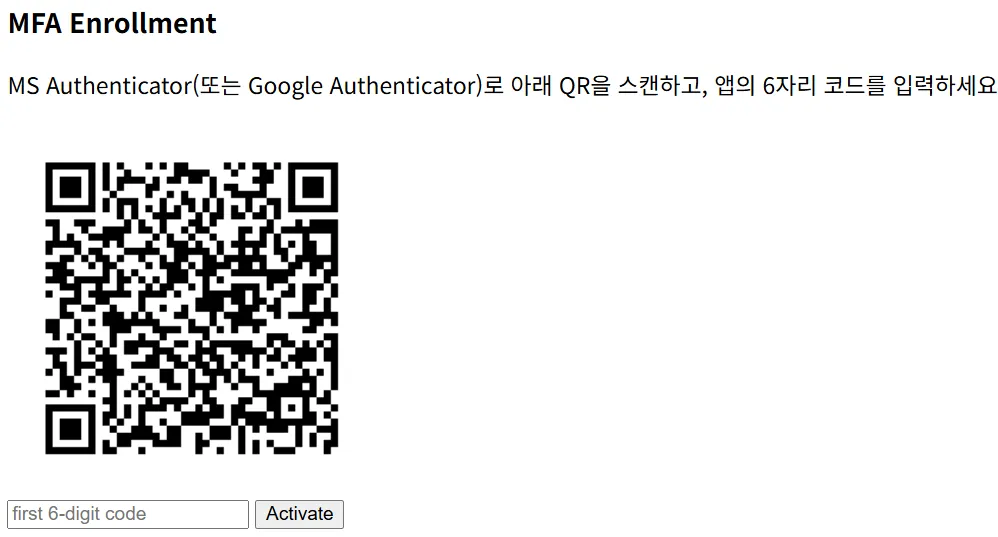
- MS or Google 앱으로 QR을 스캔하면 6자리 코드를 발급받고 아래 입력창에 해당 코드 입력 후 등록 -
등록완료
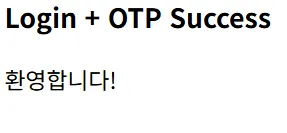
- 검증에 성공하면 연동된 Secret은 서버 내부에 저장하며 앞으로 로그인 할 때 6자리 코드 검증을 하며 2차 인증에 사용 됨1. Maven 의존성
<!-- 웹 스타터: Spring MVC + 내장 톰캣 -->
<dependency>
    <groupId>org.springframework.boot</groupId>
    <artifactId>spring-boot-starter-web</artifactId>
</dependency>
<dependency>
    <groupId>org.springframework.boot</groupId>
    <artifactId>spring-boot-starter-test</artifactId>
    <scope>test</scope>
</dependency>
<!-- JSP 엔진 -->
<dependency>
    <groupId>org.apache.tomcat.embed</groupId>
    <artifactId>tomcat-embed-jasper</artifactId>
</dependency>
<!-- TOTP -->
<dependency>
    <groupId>com.eatthepath</groupId>
    <artifactId>java-otp</artifactId>
    <version>0.4.0</version>
</dependency>
<!-- QR 생성 -->
<dependency>
    <groupId>com.google.zxing</groupId>
    <artifactId>core</artifactId>
    <version>3.5.3</version>
</dependency>
<dependency>
    <groupId>com.google.zxing</groupId>
    <artifactId>javase</artifactId>
    <version>3.5.3</version>
</dependency>
<!-- Base32 -->
<dependency>
    <groupId>commons-codec</groupId>
    <artifactId>commons-codec</artifactId>
    <version>1.15</version>
</dependency>- com.eatthepath : TOTP(RFC 6238) 6자리 코드 생성 라이브러리
- commons-codec : TOTP Secret을 Base32 문자열로 주고받기 위한 라이브러리(인/디코딩)
2. application.properties
server.port=8080

spring.mvc.view.prefix=/WEB-INF/views/
spring.mvc.view.suffix=.jsp

# MS Authenticator에 나타날 식별자 이름
app.issuer=앱에 나타낼 이름
3. UserStore
// DB 임시 대용
public class UserStore {
    public static class User {
        public String id;
        public String pw;
        public String secret; // null이면 OTP 미등록
        public User(String id, String pw) { this.id=id; this.pw=pw; }
    }

    private static final ConcurrentHashMap<String, User> DB = new ConcurrentHashMap<>();
    static {
        // 데모 계정: user / pass
        DB.put("admin", new User("admin", "admin"));
    }

    public static User get(String id){ return DB.get(id); }
    public static void save(User u){ DB.put(u.id, u); }
}
프로토 타입으로 사용자 정보를 메모리에 임시 저장하는 형태로 사용하기 위한 Class
실제 프로젝트에서는 DB에 저장하며 사용할 예정입니다.
4. TotpService
public class TotpService {

    /** 6자리 OTP (일반적) */
    private static final int DIGITS = 6;
    /** 30초 주기 (일반적) */
    private static final int PERIOD_SECONDS = 30;
    /** 서버-클라이언트 시계 오차 허용 윈도우(스텝). -1,0,+1 = ±30초 허용 */
    private static final int ALLOWED_WINDOW = 1;
    /** HMAC 알고리즘 (MS/Google 앱 기본: SHA1) */
    private static final String HMAC_ALGO = "HmacSHA1";
    /** Secret 바이트 길이(160bit 권장) */
    private static final int SECRET_BYTES = 20;

    private final SecureRandom random = new SecureRandom();
    private final Base32 base32 = new Base32(); // commons-codec

    /**
     * 사용자별 TOTP 비밀키(Secret)를 Base32로 생성한다.
     * - 이 값을 DB에 저장(암호화 권장)
     * - QR 생성 시 otpauth:// URI의 secret 파라미터로 사용
     */
    public String generateBase32Secret() {
        byte[] buf = new byte[SECRET_BYTES];
        random.nextBytes(buf);
        // Base32 인코딩(Authenticator들이 기대)
        // '=' 패딩은 보통 제거해서 표시
        return base32.encodeToString(buf).replace("=", "");
    }

    /**
     * otpauth 프로비저닝 URI 만들기. -> 앱이 QR을 읽고 파싱하는 데이터 포맷
     * - 이 문자열을 QR 이미지로 만들어 앱에서 스캔하면 계정이 추가됨.
     * - issuer: 앱에 표시될 발급자(회사명 등)
     * - accountName: "issuer:accountName" 라벨로 표시됨 (예: ASUNG-ERP:user01)
     *
     * 형식:
     *   otpauth://totp/{ISSUER}:{ACCOUNT}?secret=BASE32&issuer=ISSUER&digits=6&period=30&algorithm=SHA1
     */
    public String buildProvisioningUri(String issuer, String accountName, String base32Secret) {
        String label = url(issuer) + ":" + url(accountName);
        String params = "secret=" + url(base32Secret)
                + "&issuer=" + url(issuer)
                + "&digits=" + DIGITS
                + "&period=" + PERIOD_SECONDS
                + "&algorithm=SHA1";
        return "otpauth://totp/" + label + "?" + params;
    }

    /**
     * 사용자가 제출한 6자리 코드가 유효한지 확인한다.
     * - 동일 Secret을 가진 앱(MS/Google Authenticator)이 같은 시각대에 생성한 코드와
     *   서버 계산값이 일치하면 true.
     * - 시계 오차를 고려해 (-ALLOWED_WINDOW ~ +ALLOWED_WINDOW) 스텝까지 허용.
     */
    public boolean verifyCode(String base32Secret, int code) {
        if (base32Secret == null || base32Secret.isEmpty()) return false;
        if (code < 0) return false;

        byte[] key = decodeBase32(base32Secret);
        long nowSeconds = System.currentTimeMillis() / 1000L;
        long currentCounter = nowSeconds / PERIOD_SECONDS;

        for (int i = -ALLOWED_WINDOW; i <= ALLOWED_WINDOW; i++) {
            long counter = currentCounter + i;
            int expected = generateTotp(key, counter);
            if (expected == code) return true;
        }
        return false;
    }

    private byte[] decodeBase32(String b32) {
        // Base32는 대소문자/공백에 관대. 불필요한 공백 제거.
        String normalized = b32.trim().replace(" ", "");
        return base32.decode(normalized);
    }

    /**
     * RFC 6238 + RFC 4226(HOTP) 동적 트렁케이션
     * counter(= timeStep) 를 8바이트 big-endian으로 HMAC 계산 → 6자리 mod.
     */
    private int generateTotp(byte[] key, long counter) {
        try {
            byte[] text = new byte[8];
            // 8-byte big-endian counter
            for (int i = 7; i >= 0; i--) {
                text[i] = (byte) (counter & 0xff);
                counter >>= 8;
            }

            Mac mac = Mac.getInstance(HMAC_ALGO);
            mac.init(new SecretKeySpec(key, HMAC_ALGO));
            byte[] hash = mac.doFinal(text);

            // Dynamic truncation
            int offset = hash[hash.length - 1] & 0x0f;
            int binary = ((hash[offset] & 0x7f) << 24)
                    | ((hash[offset + 1] & 0xff) << 16)
                    | ((hash[offset + 2] & 0xff) << 8)
                    | (hash[offset + 3] & 0xff);

            int mod = (int) Math.pow(10, DIGITS); // 10^DIGITS
            int otp = binary % mod;

            // leading zero 보존은 UI에서 포맷팅(예: String.format("%06d", otp))
            return otp;
        } catch (Exception e) {
            return -1;
        }
    }

    private String url(String s) {
        try {
            return URLEncoder.encode(s, "UTF-8");
        } catch (UnsupportedEncodingException e) {
            throw new RuntimeException(e);
        }
    }
}
5. AuthController
@Controller
public class AuthController {

    private final TotpService totp = new TotpService();

    @Value("${app.issuer:YOUR-COMPANY}")
    private String issuer;

    @GetMapping({"/","/login"})
    public String loginPage(){ return "login"; }

    /**
     * 요구사항:
     * - 등록된 계정: 로그인 폼에서 ID/PW/OTP 한 번에 처리
     * - 미등록 계정: QR 발급 + 첫 6자리 검증 화면으로 이동
     */
    @PostMapping("/login")
    public String doLogin(@RequestParam String id,
                          @RequestParam String pw,
                          @RequestParam(required=false) String otp, // 문자열로 받아 선행 0 유지
                          HttpSession s, Model m){

        UserStore.User u = UserStore.get(id);
        if(u==null || !u.pw.equals(pw)){
            m.addAttribute("error","Invalid ID/PW");
            return "login";
        }

        // 미등록이면 등록 화면으로 (여기서 secret 생성)
        if(!StringUtils.hasText(u.secret)){
            String secret = totp.generateBase32Secret(); //Secret 새로 생성!!
            s.setAttribute("PENDING_UID", u.id);
            s.setAttribute("PENDING_SECRET", secret);   // 등록 완료 시 이 값이 User.secret로 저장됨
            s.setAttribute("OTP_URI", totp.buildProvisioningUri(issuer, u.id, secret));
            return "mfa-enroll";
        }

        //  등록된 계정은 로그인 폼에서 OTP 함께 검증
        if(!StringUtils.hasText(otp) || !otp.matches("\\d{6}")){
            m.addAttribute("error","Enter 6-digit OTP");
            return "login";
        }
        if(!totp.verifyCode(u.secret, Integer.parseInt(otp))){
            m.addAttribute("error","Invalid OTP");
            return "login";
        }

        // 로그인 성공
        s.setAttribute("UID", u.id);
        return "home";
    }

    /** 등록 화면에서 첫 6자리 검증 → 정식 등록(여기서 User.secret에 저장) */
    @PostMapping("/mfa/enroll")
    public String finalizeEnroll(@RequestParam String code, HttpSession s, Model m){
        String uid = (String)s.getAttribute("PENDING_UID");
        String secret = (String)s.getAttribute("PENDING_SECRET");
        if(uid==null || secret==null) return "redirect:/login";

        if(!code.matches("\\d{6}") || !totp.verifyCode(secret, Integer.parseInt(code))){
            m.addAttribute("error","Invalid first code. Try again.");
            return "mfa-enroll";
        }

        // 여기서 최종 인증이 끝났기 때문에 사용자에 secret을 저장 → 이후 로그인 검증에 사용됨
        UserStore.User u = UserStore.get(uid);
        u.secret = secret;                 // <-- secret 사용 저장(저장)
        UserStore.save(u);

        // 세션 정리 후 홈
        s.removeAttribute("PENDING_UID");
        s.removeAttribute("PENDING_SECRET");
        s.removeAttribute("OTP_URI");
        s.setAttribute("UID", uid);
        return "home";
    }
}
로그인 시 Secret이 없다면 Secret 생성 후 MFA 등록 페이지로 이동 하며 현재는 세션에 담아 두었기 때문에 동일 사용자에 한해서 등록해 놓은 PENDING_UID, PENDING_SECRET, OTP_URI 을 요청마다 사용 가능하며 이후 정식 등록 완료 시 세션을 정리합니다.
6. QrController
@Controller
public class QrController {

    @GetMapping(value = "/mfa/qr.png", produces = MediaType.IMAGE_PNG_VALUE)
    public ResponseEntity<byte[]> qr(HttpSession session) throws Exception {
        String uri = (String) session.getAttribute("OTP_URI");
        if (uri == null) {
            return ResponseEntity.badRequest().build();
        }

        QRCodeWriter writer = new QRCodeWriter();
        BitMatrix matrix = writer.encode(uri, BarcodeFormat.QR_CODE, 260, 260);
        BufferedImage img = MatrixToImageWriter.toBufferedImage(matrix);

        ByteArrayOutputStream baos = new ByteArrayOutputStream();
        ImageIO.write(img, "png", baos);

        return ResponseEntity.ok()
                .contentType(MediaType.IMAGE_PNG)
                .body(baos.toByteArray());
    }
}
7. 화면
home.jsp (로그인 성공 시 화면)
<%@ page contentType="text/html;charset=UTF-8" %>
<html>
<body>
<h3>Login + OTP Success</h3>
<p>환영합니다!</p>
</body>
</html>
login.jsp
<%@ page contentType="text/html;charset=UTF-8" %>
<html>
<body>
<h3>Login (ID/PW + OTP)</h3>
<form method="post" action="/login">
    <div><input name="id" placeholder="id"/></div>
    <div><input name="pw" type="password" placeholder="password"/></div>
    <div><input name="otp" placeholder="6-digit OTP (if enrolled)"/></div>
    <button>Login</button>
</form>

<!-- 에러 메시지 출력 -->
<p style="color:red">
    <%
        String error = (String)request.getAttribute("error");
        if(error != null){ out.print(error); }
    %>
</p>

<p>demo: <b>user / pass</b></p>
<p>처음 로그인하면 등록 화면으로 이동합니다.</p>
</body>
</html>
mfa-enroll.jsp
<%@ page contentType="text/html;charset=UTF-8" %>
<html>
<body>
<h3>MFA Enrollment</h3>
<p>MS Authenticator(또는 Google Authenticator)로 아래 QR을 스캔하고, 앱의 6자리 코드를 입력하세요.</p>
<img src="/mfa/qr.png" alt="QR"/>
<form method="post" action="/mfa/enroll">
    <input name="code" placeholder="first 6-digit code"/>
    <button>Activate</button>
</form>

<!-- 에러 메시지 출력 -->
<p style="color:red">
    <%
        String error = (String)request.getAttribute("error");
        if(error != null){ out.print(error); }
    %>
</p>
</body>
</html>