1. HTTP Client란?
Intellij IDEA에서 제공하는 플러그인으로 Restful 및 GraphQL, WebSocket 웹 서비스 내에서 파일을 생성하여 HTTP를 직접 요청하고 실행하여 응답 받을 수 있도록 하는 API 테스트를 지원하는 플러그인으로 postman을 대체할 수 있는 플러그인이다.
장점
- 별도의 툴을 설치할 필요가 없다.
- 자동 완성 기능을 제공한다.
- 간편하게 테스트 파일을 생성할 수 있다.
- 공통 설정 파일을 만들어 두고 필요에 따라 사용하여 불편함이 덜 하다.
2. HTTP Client 사용법
@RequestBody
### 회원가입
POST http://localhost:8080/users
Content-Type: application/json

{
  "accountId": "user111111",
  "password": "1q2w3e4r!@#$",
  "name": "user1",
  "email": "ydh001027@gmail.com"
}
@RequestParam
### 게시글 목록 조회
GET http://localhost:8080/posts?page=1
@PathVariable
### /posts/{id} <- path
@id = 1

### 게시글 삭제
DELETE http://localhost:8080/posts/{{id}}
accessToken: {{accessToken}}
refreshToken: {{refreshToken}}- {{변수명}} 스니펫을 활용해 변수를 사용할 수 있다.
헤더 값 저장 및 요청 값으로 보내기
### 로그인
POST http://localhost:8080/users/login
Content-Type: application/json

{
  "accountId": "user111111",
  "password": "1q2w3e4r!@#$"
}

> {%
    client.log(response.headers.valueOf("accessToken"));
    client.log(response.headers.valueOf("refreshToken"));
    client.global.set("accessToken", response.headers.valueOf("accessToken"));
    client.global.set("refreshToken", response.headers.valueOf("refreshToken"));
%}

### 로그아웃
POST http://localhost:8080/users/logout
accessToken: {{accessToken}}
refreshToken: {{refreshToken}}

> {%
    client.global.clear("accessToken");
    client.global.clear("refreshToken");
%}- 응답 헤더에서 값을 가져와 저장하고 요청 헤더로 보낼 수 있다.
form-data
### 게시글 생성
POST http://localhost:8080/posts
accessToken: {{accessToken}}
refreshToken: {{refreshToken}}
Content-Type: multipart/form-data; boundary=boundary

--boundary
Content-Disposition: form-data; name="title";

title

--boundary
Content-Disposition: form-data; name="description";

description

--boundary
Content-Disposition: form-data; name="files"; filename="image1.png";
Content-Type: image/png

< file/image1.png

--boundary
Content-Disposition: form-data; name="files"; filename="gif.gif";
Content-Type: image/gif

< file/gif.gif

--boundary
Content-Disposition: form-data; name="files"; filename="video.mp4";
Content-Type: video/mp4

< file/video.mp4- multipart/form-data content 타입으로 미디어 유형의 파일을 요청 값으로 담아 보낼 수 있다.
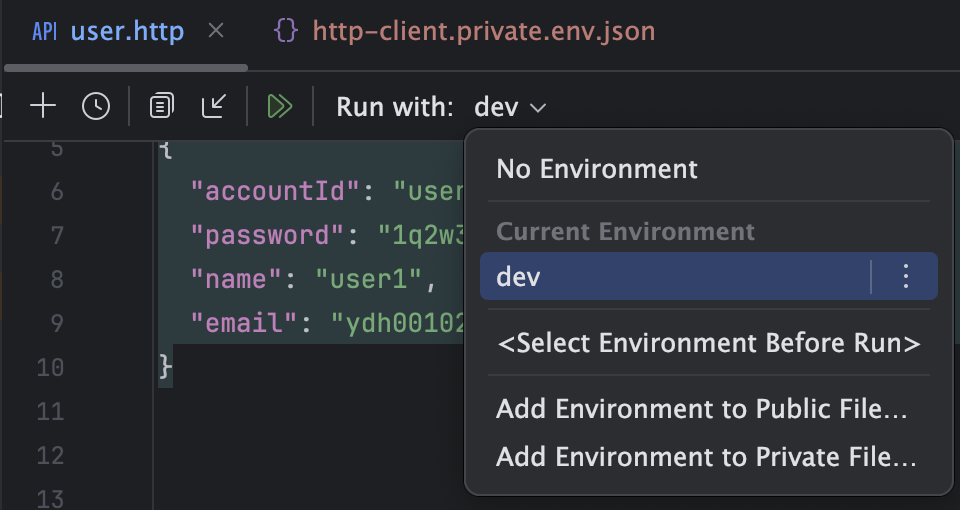
실행환경 변수 설정
http-client.private.env.json
{
  "dev": {
    "accountId": "user111111",
    "password": "1q2w3e4r!@#$"
  }
}
실행환경
### 로그인
POST http://localhost:8080/users/login
Content-Type: application/json

{
  "accountId": "{{accountId}}",
  "password": "{{password}}"
}

> {%
    client.log(response.headers.valueOf("accessToken"));
    client.log(response.headers.valueOf("refreshToken"));
    client.global.set("accessToken", response.headers.valueOf("accessToken"));
    client.global.set("refreshToken", response.headers.valueOf("refreshToken"));
%}- 실행환경을 선택 하면 해당 환경의 설정해둔 변수를 사용할 수 있다.