💡 구현하기 전에 S3 버킷 생성과 IAM 사용자 생성을 우선적으로 진행하고, S3의 퍼블릭 액세스 제한을 해제하고 ACL을 활성화 해주어야 한다.
1. S3 사용을 위한 설정
1.1 AWS 의존성 추가
implementation 'org.springframework.cloud:spring-cloud-starter-aws:2.2.6.RELEASE'1.2 application.properties 설정
# access key
cloud.aws.credentials.access-key=ACCESS_KEY
# secret key
cloud.aws.credentials.secret-key=SECRET_KEY
# 버킷 이름
cloud.aws.s3.bucketName=BUCKET_NAME
# 리전
cloud.aws.region.static=ap-northeast-2
# cloud formation 기능을 사용하지 않기 위함
cloud.aws.stack.auto=false
1.3 S3Config
package com.sparta.javafeed.config;

import com.amazonaws.auth.AWSCredentials;
import com.amazonaws.auth.AWSStaticCredentialsProvider;
import com.amazonaws.auth.BasicAWSCredentials;
import com.amazonaws.services.s3.AmazonS3;
import com.amazonaws.services.s3.AmazonS3ClientBuilder;
import org.springframework.beans.factory.annotation.Value;
import org.springframework.context.annotation.Bean;
import org.springframework.context.annotation.Configuration;

@Configuration
public class S3Config {

    @Value("${cloud.aws.credentials.access-key}")
    private String accessKey;

    @Value("${cloud.aws.credentials.secret-key}")
    private String secretKey;

    @Value("${cloud.aws.s3.bucketName}")
    private String bucketName;

    @Value("${cloud.aws.region.static}")
    private String region;

    @Bean
    public AmazonS3 amazonS3() {
        AWSCredentials basicAWSCredentials = new BasicAWSCredentials(accessKey, secretKey);

        return AmazonS3ClientBuilder.standard()
                .withCredentials(new AWSStaticCredentialsProvider(basicAWSCredentials))
                .withRegion(region).build();
    }
}
- 빈으로 등록한 AmazonS3 객체를 사용하여 파일을 S3에 업로드 할 수 있다.
2. 업로드 로직 구현
package com.sparta.javafeed.util;

import com.amazonaws.services.s3.AmazonS3;
import com.amazonaws.services.s3.internal.Mimetypes;
import com.amazonaws.services.s3.model.*;
import com.sparta.javafeed.dto.S3ResponseDto;
import com.sparta.javafeed.enums.ErrorType;
import com.sparta.javafeed.enums.ImgFileType;
import com.sparta.javafeed.enums.VideoFileType;
import com.sparta.javafeed.exception.CustomException;
import lombok.RequiredArgsConstructor;
import org.apache.tika.Tika;
import org.springframework.beans.factory.annotation.Value;
import org.springframework.stereotype.Component;
import org.springframework.util.StringUtils;
import org.springframework.web.multipart.MultipartFile;

import java.io.IOException;
import java.io.InputStream;
import java.util.UUID;

@Component
@RequiredArgsConstructor
public class S3Util {

    // AWS S3 클라이언트
    private final AmazonS3 amazonS3;
    // 파일 확장자 변조 체크
    private final Tika tika = new Tika();

    @Value("${cloud.aws.s3.bucketName}")
    private String bucketName;

    /**
     * AWS S3 파일 업로드
     *
     * @param file    파일
     * @param dirName 폴더 이름
     * @return 파일 url
     */
    public S3ResponseDto uploadFile(MultipartFile file, String dirName) {
        if (file.isEmpty()) {
            return null;
        }

        // 파일 확장자 및 용량 체크
        if ("profile".equals(dirName)) {
            validImageFile(file);
        }else {
            validFile(file);
        }

        String originName = file.getOriginalFilename(); // 원본 파일명
        String extension = StringUtils.getFilenameExtension(originName); // 확장자
        String saveName = generateSaveFilename(originName); // S3에 저장할 파일명
        String saveDir = dirName + "/" + saveName; // 저장할 폴더/저장할 파일명

        ObjectMetadata metadata = new ObjectMetadata(); // 메타데이터
        metadata.setContentType(Mimetypes.getInstance().getMimetype(saveName)); // 파일 유형
        metadata.setContentLength(file.getSize()); // 파일 크기

        try {
            // AWS S3 파일 업로드
            PutObjectResult putObjectResult = amazonS3.putObject(
                    new PutObjectRequest(bucketName, saveDir, file.getInputStream(), metadata)
                            .withCannedAcl(CannedAccessControlList.PublicRead));
        } catch (IOException e) {
            throw new CustomException(ErrorType.UPLOAD_FAILED);
        }

        // 데이터베이스에 저장할 파일이 저장된 주소와 저장된 이름
        return new S3ResponseDto(originName, saveDir, amazonS3.getUrl(bucketName, saveDir).toString(), file.getSize());
    }

    /**
     * AWS S3 파일 삭제
     * @param fileName 파일 url
     */
    public void deleteFile(String fileName) {
        DeleteObjectRequest request = new DeleteObjectRequest(bucketName, fileName);
        amazonS3.deleteObject(request);
    }

    /**
     * 비디오 파일 확장자 및 용량 체크
     * @param file 파일
     */
    private void validFile(MultipartFile file) {
        try {
            InputStream inputStream = file.getInputStream();
            String mimeType = tika.detect(inputStream);

            if (ImgFileType.isImgFileType(mimeType)) {
                ImgFileType.checkLimit(file);
            } else if (VideoFileType.isVideoFileType(mimeType)) {
                VideoFileType.checkLimit(file);
            }else {
                throw new CustomException(ErrorType.UNSUPPORTED_MEDIA_TYPE);
            }

        } catch (IOException e) {
            throw new RuntimeException(e);
        }
    }

    /**
     * 이미지 파일 확장자 및 용량 체크
     * @param file 파일
     */
    private void validImageFile(MultipartFile file) {
        try {
            InputStream inputStream = file.getInputStream();
            String mimeType = tika.detect(inputStream);

            if (ImgFileType.isImgFileType(mimeType)) {
                ImgFileType.checkLimit(file);
            }else {
                throw new CustomException(ErrorType.UNSUPPORTED_MEDIA_TYPE);
            }

        } catch (IOException e) {
            throw new RuntimeException(e);
        }
    }

    /**
     * 저장할 파일명 생성
     * @param filename 원본 파일명
     * @return 저장할 파일명
     */
    private String generateSaveFilename(final String filename) {
        String uuid = UUID.randomUUID().toString().replaceAll("-", "");
        String extension = StringUtils.getFilenameExtension(filename);
        return uuid + "." + extension;
    }
}
AmazonS3 JavaDoc
AmazonS3 (AWS SDK for Java - 1.12.740)
AmazonS3 putObject 메서드

- 위 코드에서 구현한 putObjectRequest를 사용하여 업로드하는 방법 외에도 여러 파라미터를 사용하는 방법이 있다.
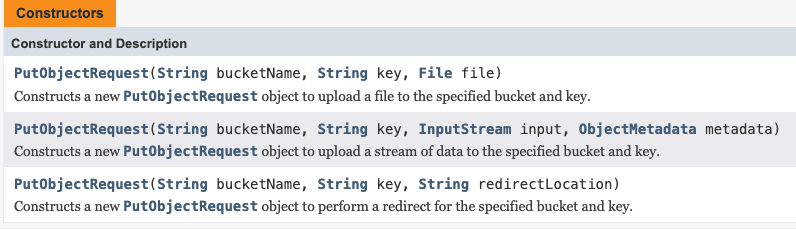
- PutObjectRequest도 생성자가 여러가지 있다. 위 코드에서는 두 번째 생성자를 사용하였다.