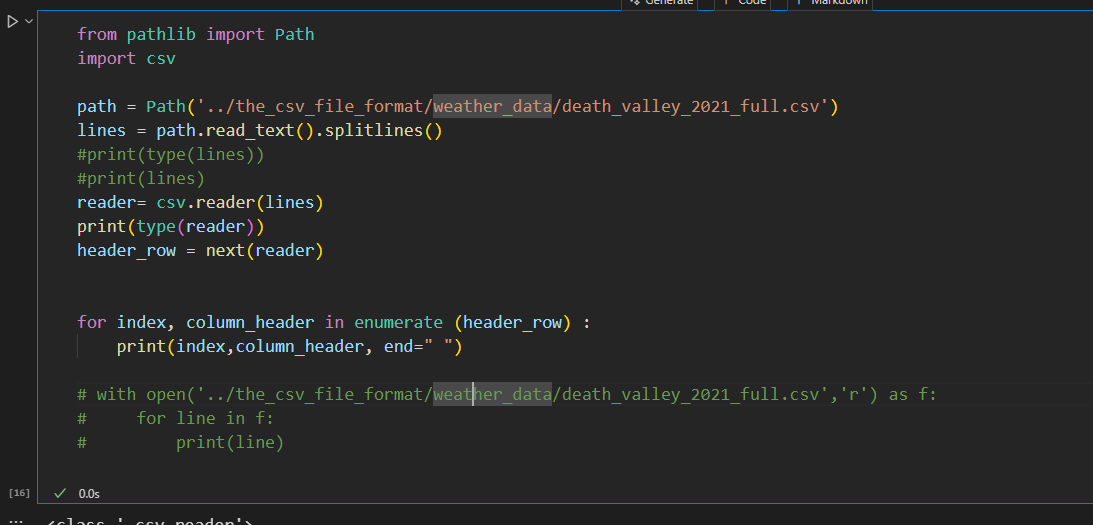
파일 접근
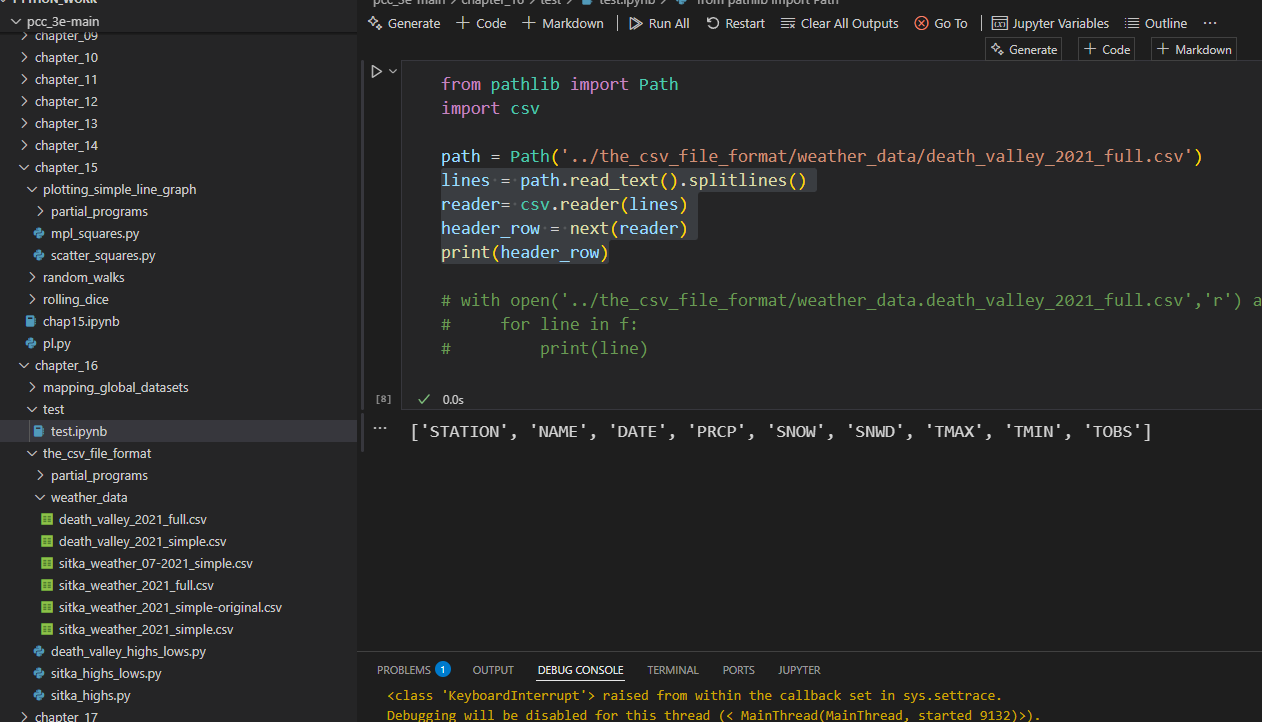
Let's break down the code you've provided and explain the meaning of each part:
Code:
lines = path.read_text().splitlines()
reader = csv.reader(lines)
header_row = next(reader)
print(header_row)
1. lines = path.read_text().splitlines()
path.read_text():- The
read_text()method is used on aPathobject (in your case,path) to read the contents of the file as a single string. - The file at the path
path(which is the CSV file'weather_data.death_valley_2021_full.csv') is opened, and its entire content is read as a single string.
- The
.splitlines():- After reading the file as a string,
.splitlines()is used to split the string into a list of lines. - This method splits the string at line breaks (newlines), so each element in the resulting
lineslist corresponds to a single line of the file. - Example: If the file content is:
header1,header2,header3 data1,data2,data3splitlines()will produce the following list:['header1,header2,header3', 'data1,data2,data3']
- After reading the file as a string,
2. reader = csv.reader(lines)
csv.reader(lines):- The
csv.reader()function from thecsvmodule is used to create a CSV reader object that can read data from a sequence of lines (like a list). - It processes the
lines(which are the lines of the CSV file that you just split) and interprets each line as a CSV record. - Each line is expected to be a comma-separated list (CSV format), so the
csv.readerwill automatically split the string in each line into individual fields based on commas.
- The
- The
readerobject is an iterable that you can loop over to access individual rows (records) in the CSV file.
3. header_row = next(reader)
next(reader):- The
next()function is used to get the next item from an iterable. In this case, it retrieves the first row from thereader. - In most CSV files, the first row is typically the header row, which contains the names of the columns.
header_rowwill now store the first row of the CSV file as a list of strings (column names).
- The
- Example:
If your CSV file looks like this:
After runningDate,Temperature,Humidity 2021-01-01,15.2,30 2021-01-02,16.1,35next(reader), the variableheader_rowwill be:['Date', 'Temperature', 'Humidity']
4. print(header_row)
print(header_row):- This simply prints the header row of the CSV file (the first row, which contains the column names).
- It will display the list of column headers in the CSV file.
Summary of What Happens:
- Read the file:
path.read_text()reads the file as a string. - Split into lines:
.splitlines()splits the string into individual lines. - Parse CSV:
csv.reader(lines)interprets each line as a CSV record, so you can process the file in a structured way. - Get header row:
next(reader)retrieves the first row, which is typically the header row of the CSV, and assigns it toheader_row. - Print header:
print(header_row)displays the header row, so you can see the column names.
Example Output:
If the CSV file is:
Date,Temperature,Humidity
2021-01-01,15.2,30
2021-01-02,16.1,35The output of print(header_row) will be:
['Date', 'Temperature', 'Humidity']이미 lines가 리스트인데 왜 csv.reader가 필요한가 ?
You're absolutely right to ask why we use csv.reader when we already have a list of lines (after using splitlines()). The key reason lies in how CSV data is structured and how csv.reader helps process that structure correctly. Let's go into more detail about this:
What Does csv.reader Do?
Even though you already have a list of lines (using .splitlines()), each line is still a string in the list. The csv.reader is specifically designed to handle CSV (Comma Separated Values) format and parse each line correctly into individual fields (values), which are usually separated by commas.
Why csv.reader Is Useful:
-
Handles CSV formatting:
- CSV files don't just have simple data separated by commas. They may also include quoted values (to handle commas inside data) or escaped characters. For example:
Here,"Name","Age","City" "John, A.", 25, "New York" "Jane", 30, "Los Angeles"csv.readerknows how to handle quoted fields, properly splitting values even if they contain commas. - Without
csv.reader, you would have to manually handle these edge cases, which can become error-prone and cumbersome.
- CSV files don't just have simple data separated by commas. They may also include quoted values (to handle commas inside data) or escaped characters. For example:
-
Splitting by commas:
- You may think that splitting by commas with
.split(',')is enough, but this doesn’t work when there are commas inside quotes or when there are extra spaces between values.csv.readertakes care of these issues automatically.
- You may think that splitting by commas with
-
Converts data into lists:
csv.readerwill take each line (a string) and split it into a list of fields, turning the CSV data into structured lists. This makes it much easier to work with each individual data field programmatically.
For example:
line = '"John, A.", 25, "New York"'After using
csv.readeron this line, it will become:['John, A.', '25', 'New York']If you were using basic string methods like
.split(','), you would end up with a faulty result:['"John', ' A."', ' 25', ' "New York"']
When You Don't Need csv.reader:
If you are certain that the file is very simple and the fields are always separated by commas with no special cases (like quoted strings or commas within data), then yes, you can just use .splitlines() and .split(',') manually to parse the data. But even in this case, it's prone to errors if the CSV file has more complex data, which is why csv.reader is generally the preferred tool for reading CSV files.
Comparing Both Approaches:
Without csv.reader:
You could split the file lines manually and split each line by commas:
lines = path.read_text().splitlines()
data = [line.split(',') for line in lines]
This works for simple CSVs, but it might break if there are quoted strings, extra spaces, or special characters.
Using csv.reader:
import csv

lines = path.read_text().splitlines()
reader = csv.reader(lines)
data = list(reader)
csv.reader automatically handles:
- Quoted fields (
"John, A."becomes a single field) - Extra spaces between fields
- Proper handling of commas inside data fields
Summary:
csv.readeris a specialized tool that takes care of parsing CSV data properly, especially when the data is more complex (e.g., with quotes or embedded commas).- Using
splitlines()andsplit(',')manually may work for very simple CSV files, but for proper handling of the format,csv.readeris a safer and more reliable option.
So, while splitlines() gives you the lines, csv.reader ensures each line is split into correctly parsed fields and handles all the complexities of the CSV format.
🔍 Code Breakdown:
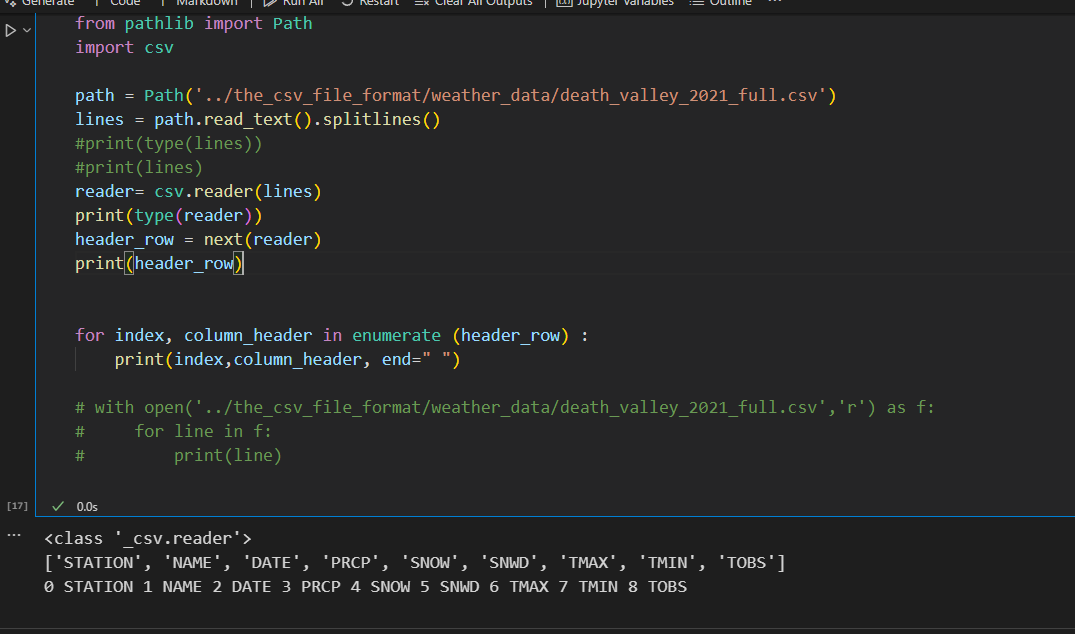
for index, column_header in enumerate(header_row):
    print(index, column_header, end=" ")
🧠 What Each Part Does:
enumerate(header_row)
enumerate()lets you loop over the listheader_row, giving you both the index (like 0, 1, 2, ...) and the value (column header name).header_rowmight look like:['Date', 'High Temp', 'Low Temp', 'Precipitation']
for index, column_header in enumerate(...)
- This means:
- On the first loop →
index = 0,column_header = 'Date' - On the second loop →
index = 1,column_header = 'High Temp' - And so on...
- On the first loop →
print(index, column_header, end=" ")
- This prints both the index and the column header on the same line, separated by spaces.
end=" "preventsprint()from going to a new line after each item. So all results are printed in one single line instead of many lines.
🖨️ Example Output:
If header_row = ['Date', 'High Temp', 'Low Temp', 'Precipitation'], the output will be:
0 Date 1 High Temp 2 Low Temp 3 Precipitation ✅ Why Use It?
- It’s a helpful way to see the structure of your CSV file — especially when you want to reference a specific column by its index later in your code.
- This is common when you're doing things like:
date_index = 0
temp_index = 1