
CSS
- HTML 로 페이지를 구성하고, CSS를 사용해서 웹 문서의 색상, 크기 등의 디자인을 함
- html에서 css적용시 head태그 안에서
<style type="text/css"></style>안에서 사용하는 것이 일반적임
선택자
- HTML 요소를 선택하고 스타일을 적용하는데 사용
선택자 { 속성 : 값; }
- 각 속성의 설정은 ';' 으로 구분
태그 선택자
*{color : 색상;} : 페이지 전체 태그에 색상 적용
p {color: 색상;} : p태그에 색상 적용
h3, h4, h5, sspan { color: 색상;} : 태그에 색상 적용
- 순서에 따라 색상이 의도한 것과 다르게 적용될 수 있음으로 적용시 주의 필요
- 그리고 태그내에서 선언시 가장 마지막에 적용한 순으로 적용됨
id 선택자
- 같은 요소라도 각기 다른 이름을 지정하여 다른 속성을 부여 할 수 있음
- CSS 에서는 id 선택자 앞에 '#'을 붙임
class 선택자
- 여러 요소 중에서 같은 이름을 갖는 요소들에게 속성을 부여 할 수 있음
- 여러개의 요소에 같은 class 명을 부여
- CSS 에서는 선택자 앞에 '.'을 붙임
예시 코드
<style type="text/css">
#select_1{color: red;}
#select_2{color: blue;}

.title{color: brown;}
h4.title{color: orange;}

.type{color: gray;
	  font-weight:30px}
</style>

<body>
<p id = "select_1">#으로 시작해서 웹페이지에서 CSS로 꾸미고자 하는 id 선택</p>
<p id = "select_2">#으로 시작해서 웹페이지에서 CSS로 꾸미고자 하는 id 선택</p>
<h3 class="title">내용</h3>
<h4 class="title">내용</h4>
</body>
하위 선택자
- 특정 태그 아래에 있는 태그를 선택할 때 사용
- 선택자 사이를 공백으로 구분
<style type="text/css">
#header h2 {color: blue;}
#section h2 {color: red;}
#content p {color: gray;}

</style>

<body>
	<h2>하위 선택자</h2>
	<div id = "header">
		<h2>header</h2>
		<div id = "nav">
			<h3>navigation</h3>
		</div>
	</div>
	<br/>
	<div id = "section">
		<h2>section</h2>
		<p>section area</p>
	</div>
	<br/>

		<div id = "heading">
		<h2>heading</h2>
		<div id = "content">
			<p>문단A</p>
			<p>문단B</p>
			<p>문단C</p>
		</div>
	</div>

</body>
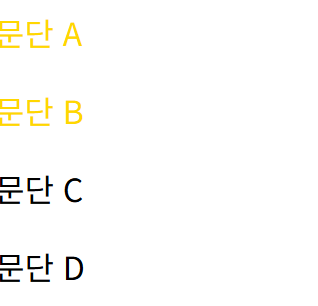
자식 선택자
- 특정 태그 아래 있는 직계 자식 태그만을 선택할 때 사용
- 선택자_A > 선택자_B
<style type="text/css">
#content > p {color: gold;}
</style>
----------------------------------------------
<body>
	<div id ="content">
		<p>문단 A</p>
		<p>문단 B</p>
		<div>
			<p>문단 C</p>
		</div>
	 </div>
	<p>문단 D</p>
</body>
실행 결과값
기본 속성 선택자
- 선택자[속성] : 특정한 속성이 있는 태그를 선택
- 선택자{속성=값] : 특정한 속성의 값이 같고, 특정값과 같은 문서 객체를 선택
<style type="text/css">
input type{color: gray;}
input[type=password] {background-color: yellow;}
</style>
-------------------------------------------------------
<body>
	<h1>기본 속성 선택자</h1>
	<br/>
	<form action="#">
		<p>text : <input type="text" id="data" name="data"/></p>
		<p>password : <input type="password" id="pwd" name="pwd"/></p>
	</form>
</body>
인접 선택자
- 현재 요소에서 뒤에 위치한 요소를 선택합니다.
- 같은 부모를 가져야 합니다.
- 인접 형제 선택자
선택자_A + 선택자_B
: 선택자_A 의 요소 바로 뒤에 위치하는 선택자_B 요소를 선택
- 일반 형제 선택자
선택자_A ~ 선택자_B
: 선택자_A 의 형제 요소중에서 선택자_A 뒤에 위치하는 선택자_B 요소를 모두 선택
<style type="text/css">
h2 + h3 { color: red;}
h2 ~ h3 { background-color: orange;}
</style>
-----------------------------------------------------
<body>
	<!-- 인접 형제 선택자 -->
  	<h1>인접 선택자</h1>
	<h3>제목 - 3</h3>
	<h2>제목 - 2</h2>
  <!-- 일반 형제 선택자 -->
	<h3>제목 - 3</h3>
	<h3>제목 - 3</h3>
	<h3>제목 - 3</h3>
	<div id="content">
		<h3>content - h3</h3>
	</div>
	<h3>제목 - 3</h3>

</body>
반응 선택자
- 링크가 걸린 문제(a태그)에 스타일을 적용합니다.
:link-> 선택자가 방문하지 않은 링크 (a태그에만 적용됨):visited-> 선택자가 방문한 링크:hover-> 선택자가 마우스가 올라갔을 때:active-> 선택자가 클릭된 상태일때
<style type="text/css">
a:link{ color: orange;}
a:visited{color: green;}
a:hover{color: red;
background-color: yellow;}
#test-1 a:active {color : blue;}
</style>
----------------------------------------------------
<body>
    <h1>반응선택자</h1>
	<h2 id = "test-1"><a href="https://www.naver.com" target ="_blank">NAVER</a></h2>
	<h2 id = "test-1"><a href="https://www.daum.net" target ="_blank">DAUM</a></h2>
</body>
구조 선택자
일반 구조 선택자
- 특정한 위치에 있는 태그를 선택합니다.
:first-child-> 형제 관계 중에서 첫번째 요소를 선택:last-child-> 형제 관계 중에서 마지막 요소를 선택:nth-child(n)-> 형제 관계 중에서 앞에서 n번째 요소를 선택:nth-last-child(n)-> 형제 관계 중에서 뒤에서 n번째 요소를 선택
형태 구조 선택자
- 일반 구조 선택자와 비슷하지만 태그 형태ㅏ르 구분합니다.
:first-of-type-> 형제 관계 중에서 첫번째로 나오는 태그를 선택:last-of-type-> 형제 관계 중에서 마지막으로 나오는 태그를 선택:nth-of-type(n)-> 형제 관계 중에서 앞에서 n번째로 나오는 태그를 선택:nth-last-of-type(n)-> 형제 관계 중에서 뒤에서 n번째로 나오는 태그를 선택
외부 스타일 시트
- 스타일 속성을 '.css' 로 저장하여 HTML문서에 파일명으로 연결 합니다.
- 태그를 사용해서 적용합니다.
선택자 우선 순위
- CSS속성을 우선적으로 적용할 것인지를 결정합니다.
- 점수가 가장 높은 선언이 우선 적용
- 점수가 같으면 가장 마지막에 선언된 것이 적용
- 선택자 우선 순위
- 인라인 선택자 1000
- in 선택자(#xxx) 100
- class 선택자(.xxx) 10
- 가상 선택자 ( :first-child) 10
- 태그 선택자 ( p, h1, ....) 1
- 전체 선택자 (*)
<link rel="stylesheet" type="text/css" href="external-style.css"/>/*external-style.css*/
@charset "UTF-8";
#external > p{
font-size: 30px;
color: pink;
}
바다속 무너 개발자