1. Filter
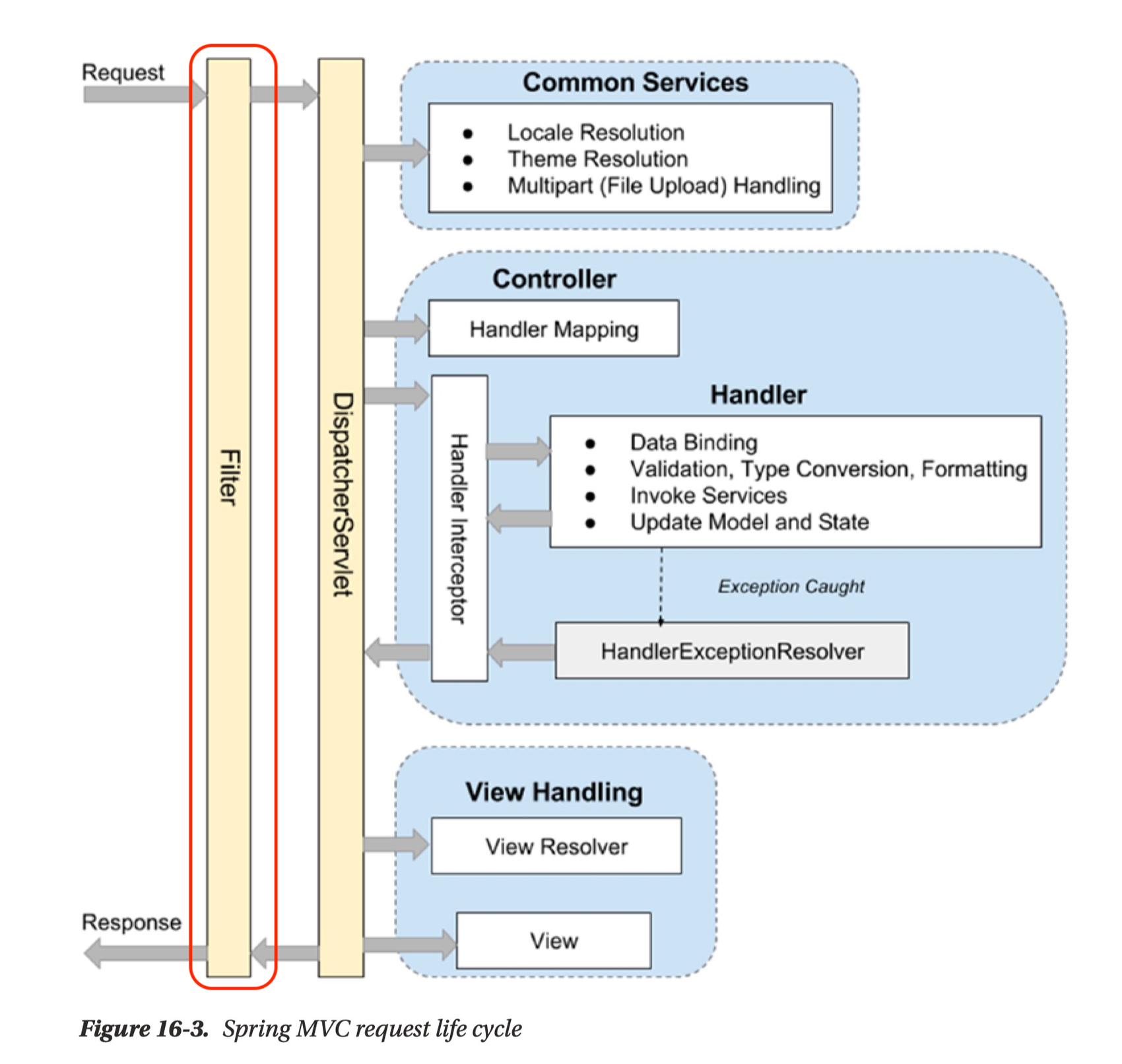
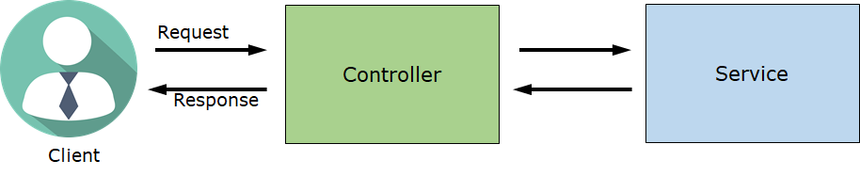
- Filter란 Web 애플리케이션에서 관리되는 영역으로 Client로 부터 오는 요청과 응답에 대해 최초/최종 단계의 위치이며 이를 통해 요청과 응답의 정보를 변경하거나 부가적인 기능을 추가할 수 있다.
- 주로 범용적으로 처리해야 하는 작업들, 예를들어 로깅 및 보안 처리에 활용
- 또한 인증, 인가와 관련된 로직들을 처리할 수도 있다.
- Filter를 사용하면 인증, 인가와 관련된 로직을 비즈니스 로직과 분리하여 관리할 수 있다는 장점이 있다.
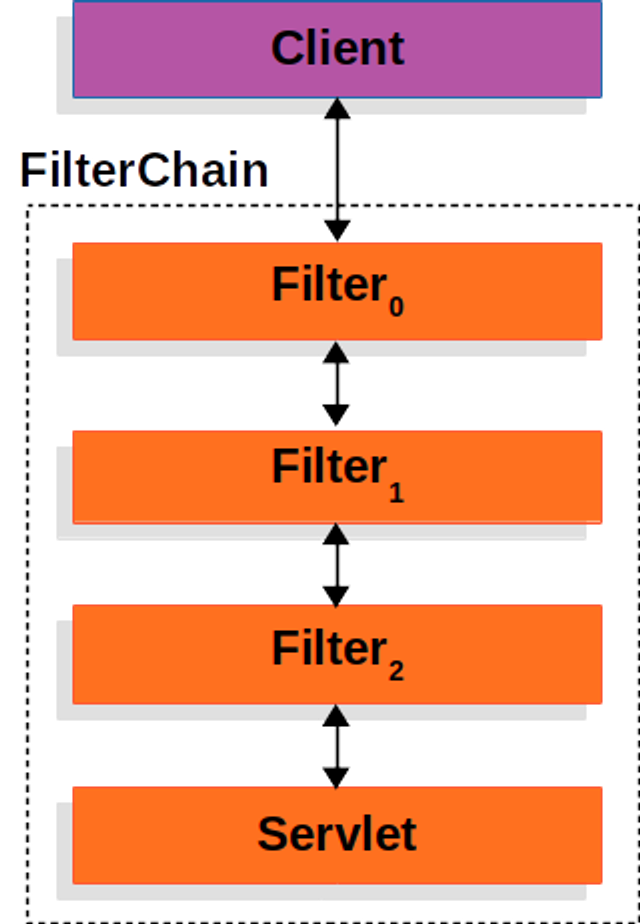
Filter는 한 개만 존재하는 것이 아니라 이렇게 여러 개가 Chain 형식으로 묶여서 처리될 수 있다.
2. Spring Security
'Spring Security' 프레임워크는 Spring 서버에 필요한 인증 및 인가를 위해 많은 기능을 제공해 줌으로써 개발의 수고를 덜어 준다. 마치 'Spring' 프레임워크가 웹 서버 구현에 편의를 제공해 주는 것과 같다.
// Security
implementation 'org.springframework.boot:spring-boot-starter-security'
@SpringBootApplication
public class SpringAuthApplication {
public static void main(String[] args) {
SpringApplication.run(SpringAuthApplication.class, args);
}
}1) CSRF (사이트 간 요청 위조, Cross-site request forgery)
- 공격자가 인증된 브라우저에 저장된 쿠키의 세션 정보를 활용하여 웹 서버에 사용자가 의도하지 않은 요청을 전달하는 것
- CSRF 설정이 되어있는 경우 html 에서 CSRF 토큰 값을 넘겨주어야 요청을 수신 가능
- 쿠키 기반의 취약점을 이용한 공격 이기 때문에 REST 방식의 API 에서는 disable 가능
- POST 요청마다 처리해 주는 대신 CSRF protection 을 disable
http.csrf((csrf) -> csrf.disable());
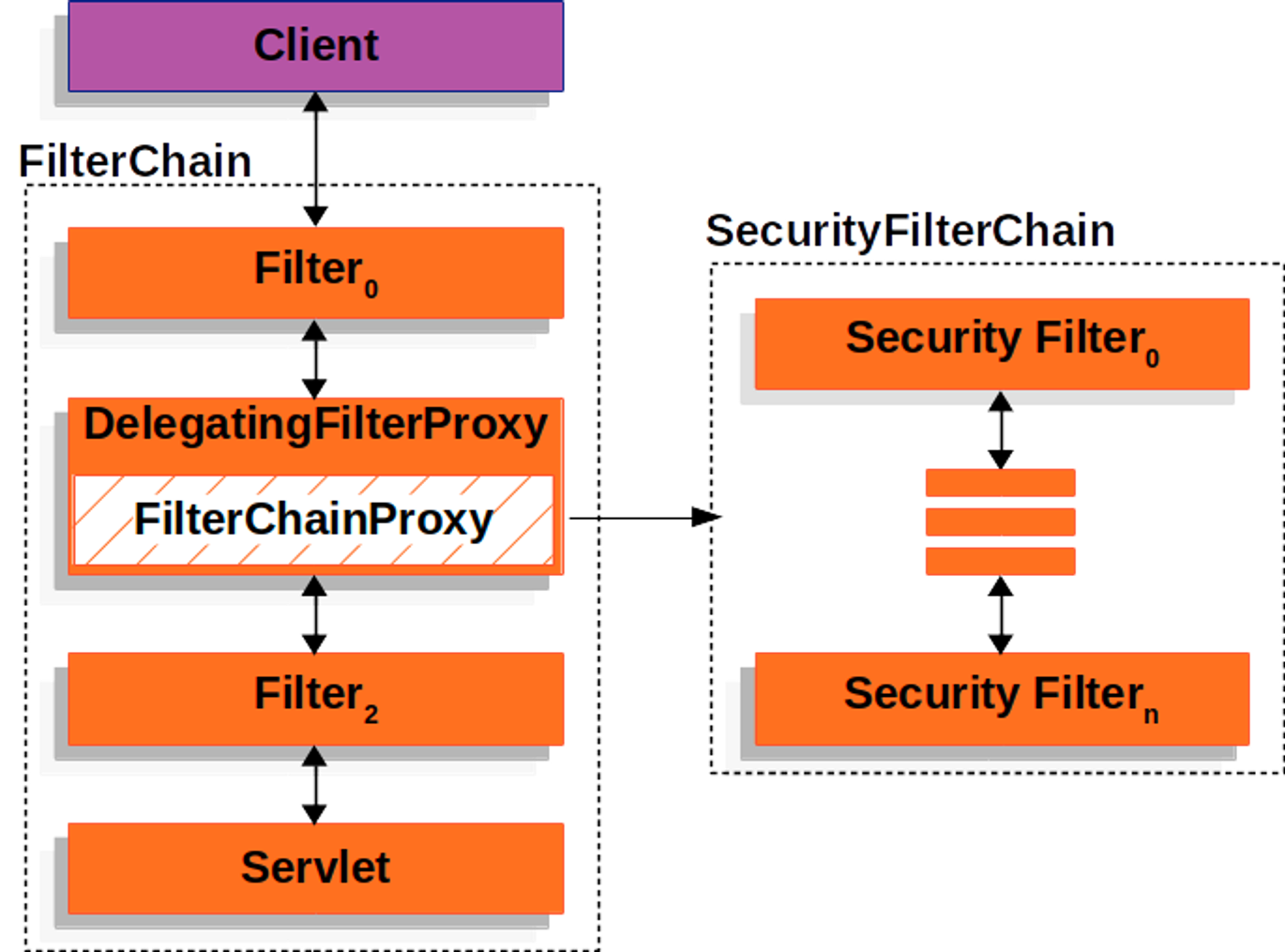
2) Spring Security - Filter Chain
- Spring에서 모든 호출은 DispatcherServlet을 통과하게 되고 이후에 각 요청을 담당하는 Controller 로 분배
- 이 때, 각 요청에 대해서 공통적으로 처리해야할 필요가 있을 때 DispatcherServlet 이전에 단계가 필요하며 이것이 Filter
3) Form Login 기반은 인증
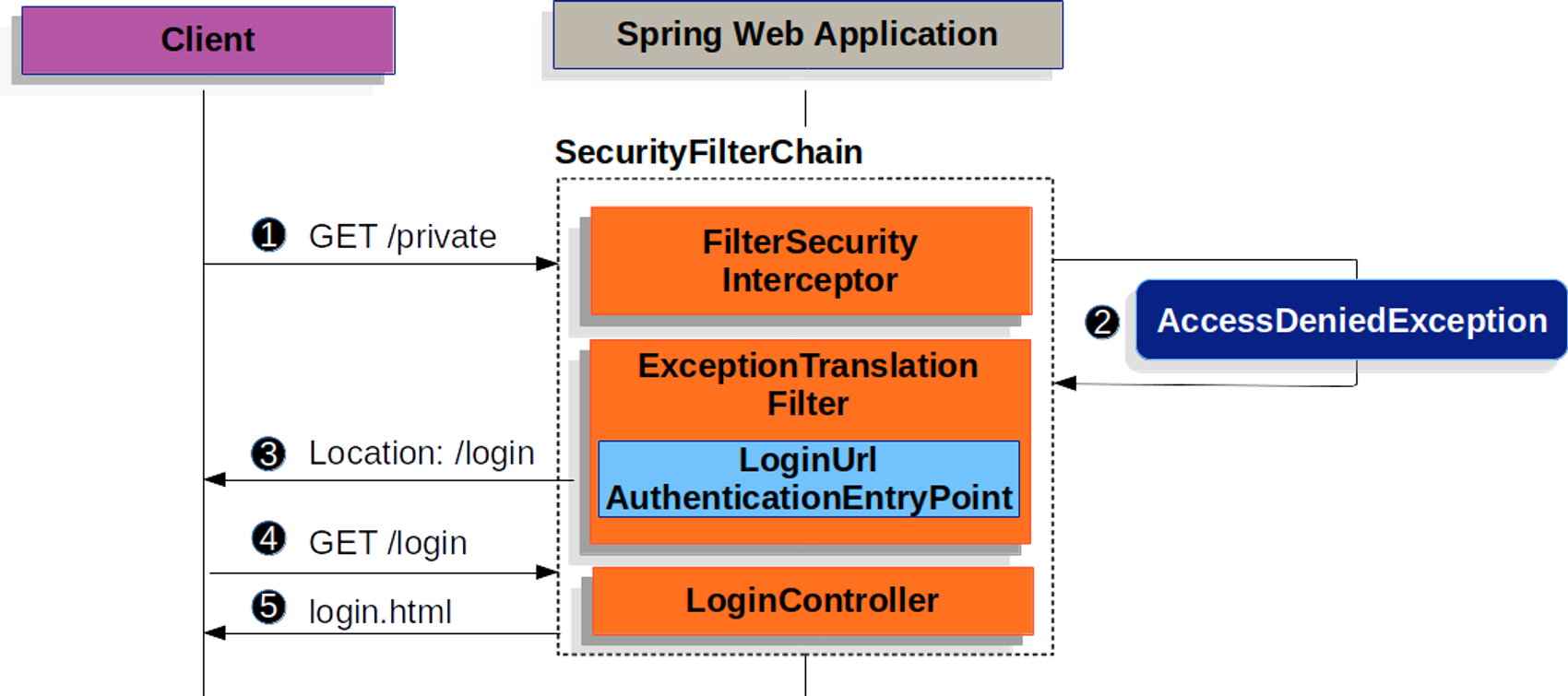
- Form Login 기반 인증은 인증이 필요한 URL 요청이 들어왔을 때 인증이 되지 않았다면 로그인 페이지를 반환하는 형태
4) UsernamePasswordAuthenticationFilter
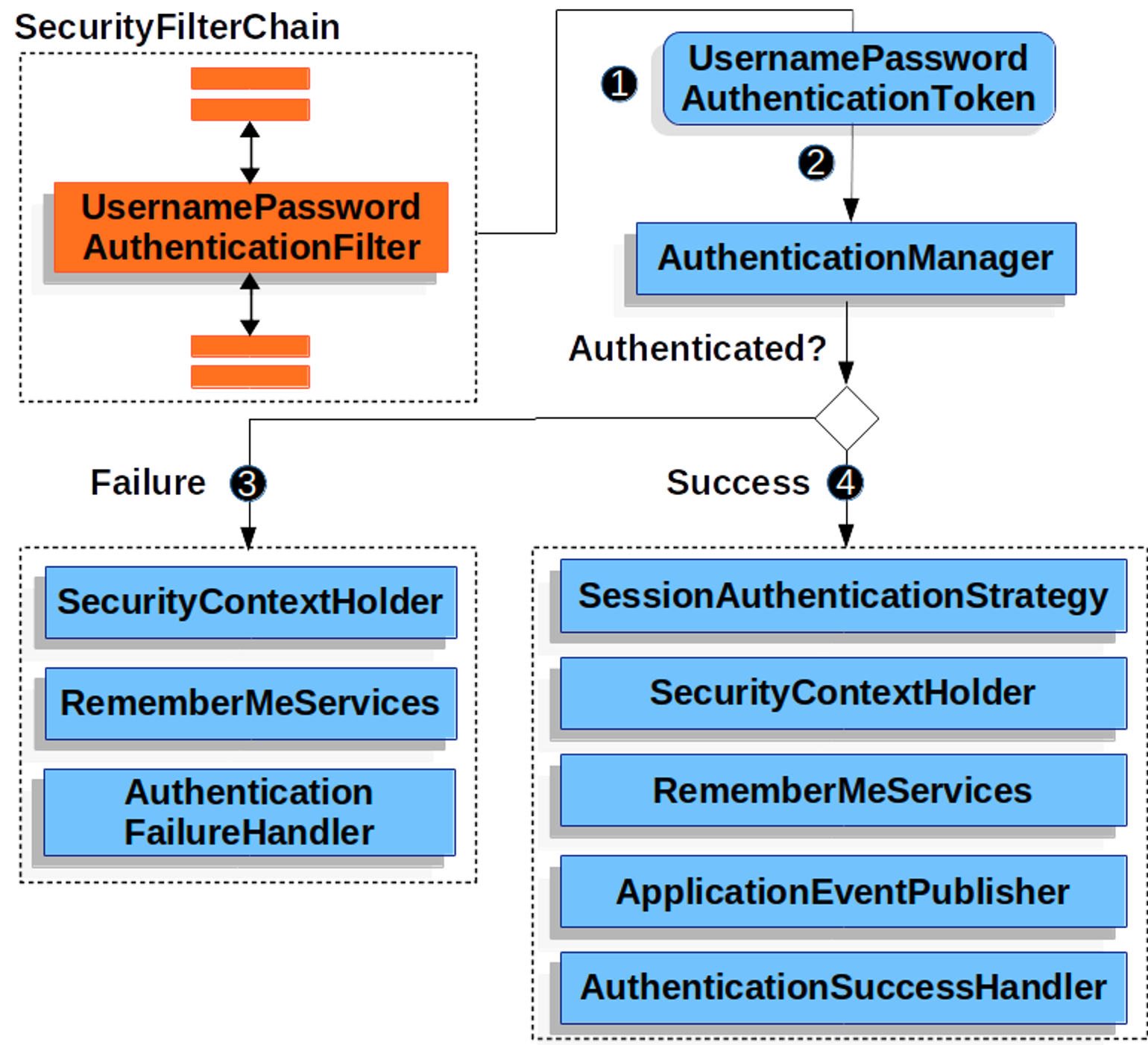
- UsernamePasswordAuthenticationFilter는 Spring Security의 필터인 AbstractAuthenticationProcessingFilter를 상속한 Filter
- 기본적으로 Form Login 기반을 사용할 때 username 과 password 확인하여 인증
- 인증 과정
- 사용자가 username과 password를 제출하면 UsernamePasswordAuthenticationFilter는 인증된 사용자의 정보가 담기는 인증 객체인 Authentication의 종류 중 하나인 UsernamePasswordAuthenticationToken을 만들어 AuthenticationManager에게 넘겨 인증을 시도
- 실패하면 SecurityContextHolder를 비운다.
- 성공하면 SecurityContextHolder에 Authentication를 세팅
4-1) SecurityContextHolder
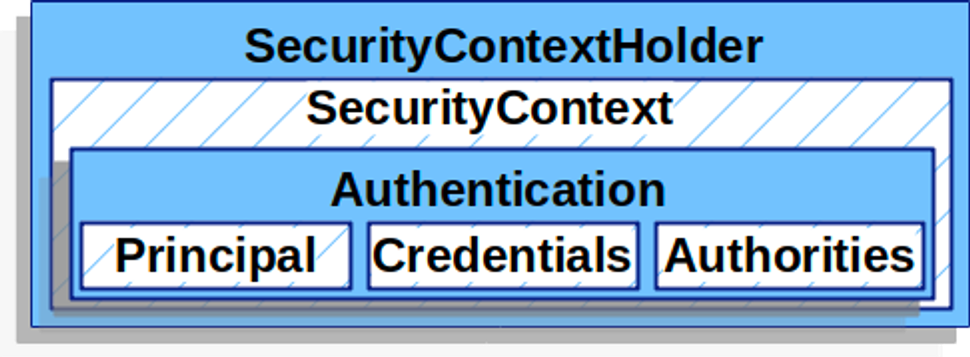
- SecurityContext는 인증이 완료된 사용자의 상세 정보(Authentication)를 저장
- SecurityContext는 SecurityContextHolder 로 접근할 수 있다.
// 예시코드
SecurityContext context = SecurityContextHolder.createEmptyContext();
Authentication authentication = new UsernamePasswordAuthenticationToken(principal, credentials, authorities);
context.setAuthentication(authentication); // SecurityContext 에 인증 객체 Authentication 를 저장합니다.

SecurityContextHolder.setContext(context);
4-2) Authentication
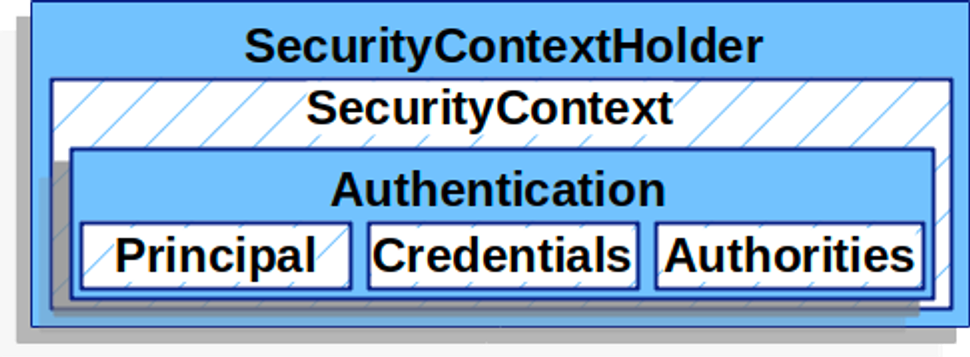
- 현재 인증된 사용자를 나타내며 SecurityContext에서 가져올 수 있다.
- principal : 사용자를 식별
- Username/Password 방식으로 인증할 때 일반적으로 UserDetails 인스턴스
- credentials : 주로 비밀번호, 대부분 사용자 인증에 사용한 후 비운다.
- authorities : 사용자에게 부여한 권한을 GrantedAuthority로 추상화하여 사용
4-3) UserDetailsService
UserDetailsService는 username/password 인증방식을 사용할 때 사용자를 조회하고 검증한 후 UserDetails를 반환합니다. Custom하여 Bean으로 등록 후 사용 가능
4-4) UserDetails
검증된 UserDetails는 UsernamePasswordAuthenticationToken 타입의 Authentication를 만들 때 사용되며 해당 인증객체는 SecurityContextHolder에 세팅됩니다. Custom하여 사용가능
3. SPring Security : 로그인
- 스프링 시큐리티 사용 전
- 스프링 시큐리티 사용 후

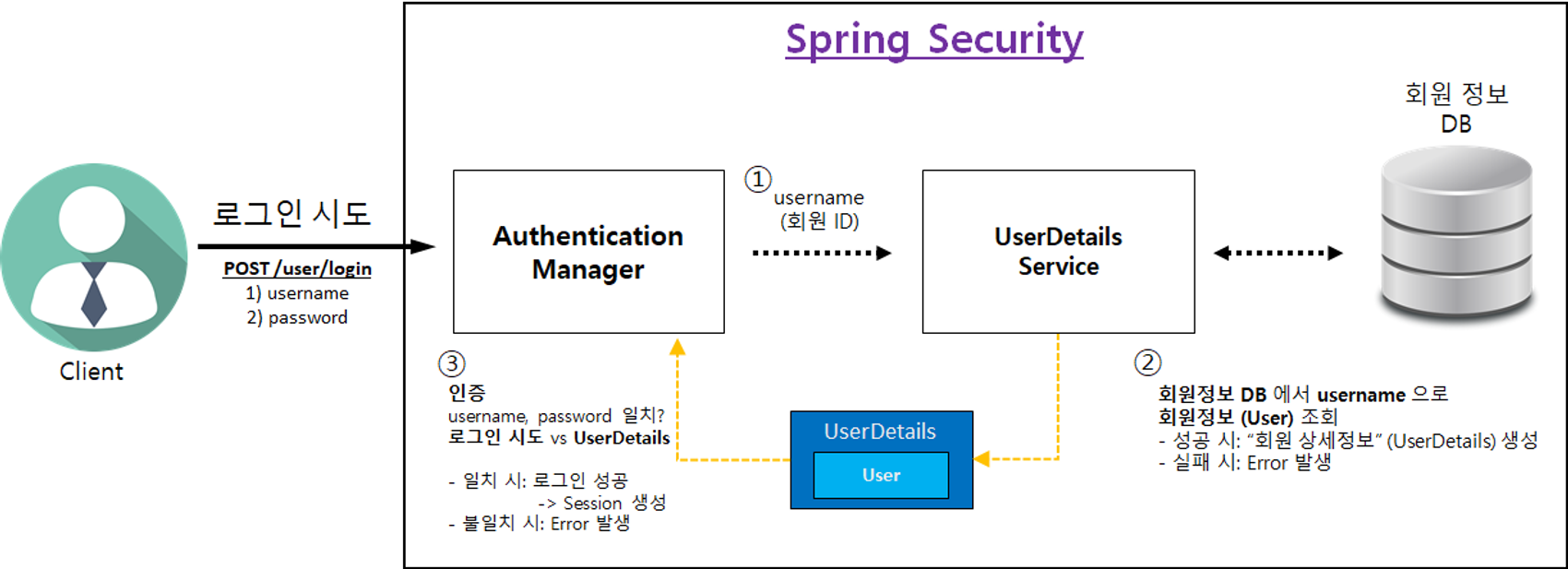
1) Spring Security 역할
- 성공 시: Controller 로 Client 요청 전달
- Client 요청 + 사용자 정보 (UserDetails)
- 실패 시: Controller 로 Client 요청 전달되지 않음
- Client 에게 Error Response 보냄
2) 로그인 처리 과정
4. 접근 불가 페이지
1) API 접근 권한 제어 이해
- '일반 사용자'는 관리자 페이지에 접속이 인가되지 않아야 한다.
2) Spring Security에 "권한(authority)" 설정 방법
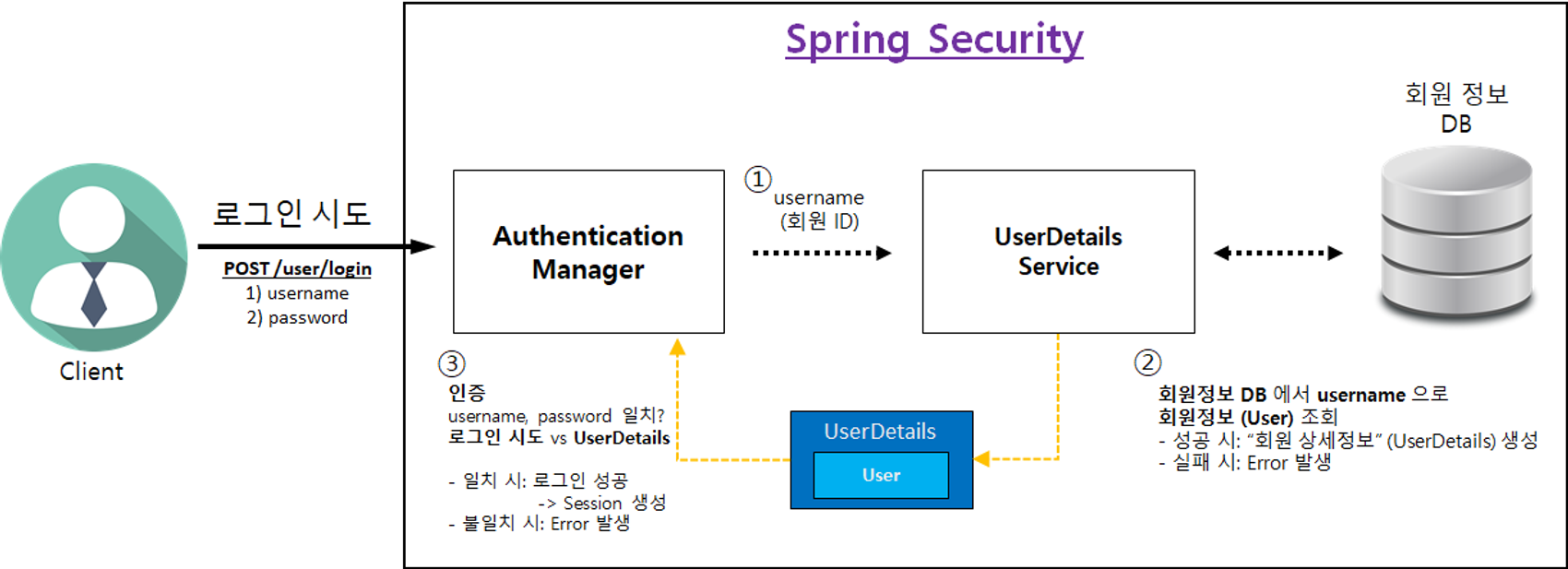
- 회원 상세정보 (UserDetailsImpl) 를 통해 "권한 (Authority)" 설정 가능합니다.
- 권한을 1개 이상 설정 가능합니다.
- "권한 이름" 규칙
- "ROLE_" 로 시작해야 함
예) "ADMIN" 권한 부여 → "ROLE_ADMIN"
"USER" 권한 부여 → "ROLE_USER"
- "ROLE_" 로 시작해야 함
5. Validation
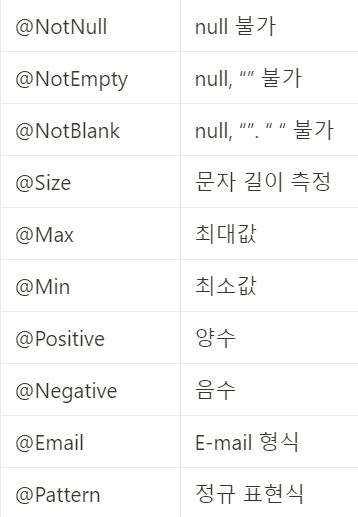
프로그래밍을 하는데에 있어서 가장 중요한 부분 중 하나이다. - 특히나 Java는 null 값에 대한 접근에 대해 NullPointerException 오류가 발행하기 때문에 이러한 부분을 예방하기 위해 Validation 즉, 검증 과정이 필요 - Spring에서는 null 확인 뿐 아니라 문자의 길이 측정과 같은 다른 검증 과정도 쉽게 처리할 수 있도록 ****Bean Validation**** 제공하고 있다.-
**Bean Validation**
- 간편하게 사용할 수 있는 여러 애너테이션을 제공