1. 프로젝트 생성
npx create-next-app --typescript 프로젝트명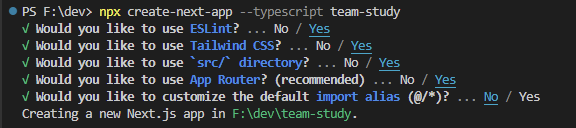
해당 명령어를 입력하면 위와 같이 물어본다.
프로젝트에 따라 yes/no 를 선택해주면 된다.
2. 서버 사이드 렌더링을 지원하도록 설정하기
Next.js의 커스텀 Document를 이용하여 _document.tsx 파일을 생성한다.
pages/ 디렉토리에 _document.tsx 파일을 만들고 아래의 코드를 추가한다.
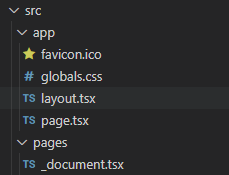
//_document.tsx 파일

import Document, { DocumentContext } from 'next/document'
import { ServerStyleSheet } from 'styled-components'

class MyDocument extends Document {
  static async getInitialProps(ctx: DocumentContext) {
    const sheet = new ServerStyleSheet()
    const originalRenderPage = ctx.renderPage

    try {
      ctx.renderPage = () =>
        originalRenderPage({
          enhanceApp: (App) => (props) =>
            sheet.collectStyles(<App {...props} />),
        })

      const initialProps = await Document.getInitialProps(ctx)
      return {
        ...initialProps,
        styles: (
          <>
            {initialProps.styles}
            {sheet.getStyleElement()}
          </>
        ),
      }
    } finally {
      sheet.seal()
    }
  }
}

export default MyDocument
만약, 'Cannot find module ...' ('next/document' 모듈을 찾을 수 없습니다.)
라는 에러가 발생한다면?
{
  "compilerOptions": {
    "lib": ["dom", "dom.iterable", "esnext"],
    "allowJs": true,
    "skipLibCheck": true,
    "strict": true,
    "noEmit": true,
    "esModuleInterop": true,
    "module": "esnext",
    "moduleResolution": "node",
    "resolveJsonModule": true,
    "isolatedModules": true,
    "jsx": "preserve",
    "incremental": true,
    "plugins": [
      {
        "name": "next"
      }
    ],
    "paths": {
      "@/*": ["./src/*"]
    }
  },
  "include": ["next-env.d.ts", "**/*.ts", "**/*.tsx", ".next/types/**/*.ts"],
  "exclude": ["node_modules"]
}
moduleResolution을 node로 변경하면 에러가 사라진다.
그리고 npm run dev를 하면 실행됨!!