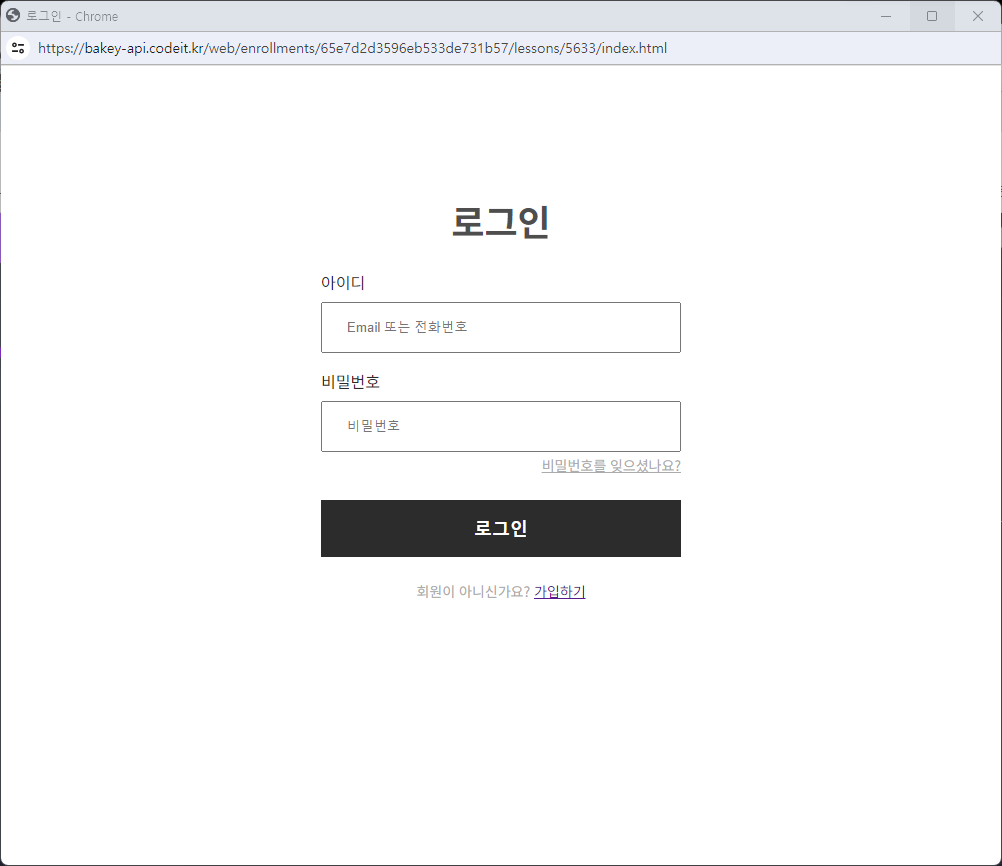
index.html
<!DOCTYPE html>
<html>
  <head>
    <meta charset="utf-8" />
    <title>로그인</title>
    <link rel="preconnect" href="https://fonts.googleapis.com">
    <link rel="preconnect" href="https://fonts.gstatic.com" crossorigin>
    <link href="https://fonts.googleapis.com/css2?family=Noto+Sans+KR:wght@400;700&display=swap" rel="stylesheet">
    <link rel="stylesheet" href="style.css" />
  </head>
  <body>
    <form>
      <h1>로그인</h1>
      <label>아이디</label>
      <input
        name="username"
        type="text"
        placeholder="Email 또는 전화번호"
      />
      <label>비밀번호</label>
      <input
        name="password"
        type="password"
        placeholder="비밀번호"
      />
      <div class="pwbox">
        <a href="#" class="forgetpw" >비밀번호를 잊으셨나요?</a>
      </div>
      <button>로그인</button>
      <div class="notuser">
        회원이 아니신가요?
        <a href="#">가입하기</a>
      </div>
    </form>
  </body>
</html>
style.css
html {
  font-family: 'Noto Sans KR', sans-serif;
  font-size: 16px;
  font-weight: 400;
  text-align: center;
  display:flex;
  justify-content: center;
  align-items: center;
}
*{
  box-sizing: border-box;
}
form{
  width:360px;
}
h1{
  margin:120px auto 24px ;
  font-size: 36px;
  font-weight: 700;
  color:#4e4e4e;
}
label {
  display: block;
  margin: 16px 0 8px;
  font-size:16px;
  font-weight: 400;
  color:#2c2c2c;
  text-align: left;
}

input {
  display: block;
  padding: 16px 24px;
  color:#ababab
  border: 1px solid #d1d1d1;
  width:100%;
}

button {
  border: none;
  display: block;
  padding: 16px ;
  margin: 24px 0;
  font-size:18px;
  font-weight: 700;
  background-color:#2c2c2c;
  color:white;
  width:100%;
}
.pwbox{
  text-align: right;
}
.forgetpw{
  font-size:14px;
  font-weight: 400;
  color:#ababab;
}
.notuser{
  color:#ababab;
  font-size:14px;
  font-weight: 400;
}
모범답안
<!DOCTYPE html>
<html>
  <head>
    <meta charset="utf-8" />
    <title>로그인</title>
    <link rel="preconnect" href="https://fonts.googleapis.com">
    <link rel="preconnect" href="https://fonts.gstatic.com" crossorigin>
    <link href="https://fonts.googleapis.com/css2?family=Noto+Sans+KR:wght@400;700&display=swap" rel="stylesheet">
    <link rel="stylesheet" href="style.css" />
  </head>
  <body>
    <form class="login">
      <h1 class="login-title">로그인</h1>
      <label>아이디</label>
      <input
        name="username"
        type="text"
        placeholder="Email 또는 전화번호"
      />
      <label>비밀번호</label>
      <input
        name="password"
        type="password"
        placeholder="비밀번호"
      />
      <div class="login-forgot">
        <a class="login-forgot-link" href="#">비밀번호를 잊으셨나요?</a>
      </div>
      <button>로그인</button>
      <div class="login-signup">
        회원이 아니신가요?
        <a class="login-signup-link" href="#">가입하기</a>
      </div>
    </form>
  </body>
</html>
html {
  font-family: 'Noto Sans KR', sans-serif;
  font-size: 16px;
  font-weight: 400;
}

label {
  color: #2c2c2c;
  display: block;
  margin: 16px 0 8px;
}

input {
  border: 1px solid #d1d1d1;
  color: #ababab;
  display: block;
  font-size: 16px;
  line-height: 24px;
  margin: 8px 0;
  padding: 16px 24px;
  width: 100%;
}

button {
  background-color: #2c2c2c;
  border: none;
  color: #ffffff;
  display: block;
  font-size: 18px;
  font-weight: 700;
  margin: 24px 0;
  padding: 16px;
  width: 100%;
}

* {
  box-sizing: border-box;
}

.login {
  margin: 120px auto;
  width: 360px;
}

.login-title {
  color: #4e4e4e;
  font-size: 36px;
  font-weight: 700;
  margin: 24px 0;
  text-align: center;
}

.login-forgot {
  text-align: right;
}

.login-forgot-link {
  font-size: 14px;
  color: #ababab;
}

.login-signup {
  font-size: 14px;
  text-align: center;
  color: #ababab;
}

.login-signup-link {
  color: #2c2c2c;
}