함수형 component는 변화하는 값을 관리할 수 없지만 이를 hook으로 관리 가능
useState
- 구조분해 문법
const first=arr[0];
const second=arr[1];
const third=arr[2];
const[first, second, third]=arr;
const count=result[0];
const setCount=result[1];
const [count,setCount]=usetState(0);
useState(0);
number, boolean, string 등을 다룰 수 있음
App.js
import { StatusBar } from "expo-status-bar";
import { StyleSheet, Text, View } from "react-native";
import StateWithClassComponent from "./StateWithClassComponent";
import StateWithFunctionalComponent from "./StateWithFuctionalComponent";

export default function App() {
  return (
    <View style={styles.container}>
      <StateWithClassComponent />
      <StateWithFunctionalComponent />
    </View>
  );
}

const styles = StyleSheet.create({
  container: {
    flex: 1,
    backgroundColor: "#fff",
    alignItems: "center",
    justifyContent: "center",
  },
});
StateWithClassComponent
import React from "react";
import { View, Text, Button } from "react-native";

class Component extends React.Component {
  constructor(props) {
    super(props);
    this.state = {
      count: 0,
    };
  }

  render() {
    return (
      <View>
        <Text>You clicked {this.state.count} times</Text>
        <Button
          title="Click me"
          onPress={() => this.setState({ count: this.state.count + 1 })}
        />
      </View>
    );
  }
}

export default Component;
StateWithFunctionalComponent -> 함수형 component가 훨씬 간결
import React, { useState } from "react";
import { View, Text, Button, Switch, TextInput } from "react-native";

const Component = () => {
  const [count, setCount] = useState(0); // number


  return (
    <View>
      <Text>You clicked {count} times</Text>
      <Button title="Click me" onPress={() => setCount(count + 1)} />

    </View>
  );
};

export default Component;
useState
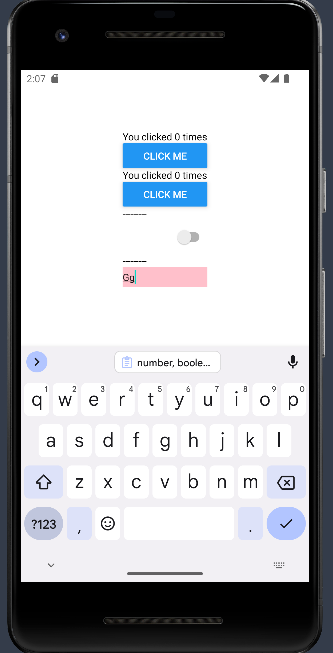
number, boolean, string 예제
import React, { useState } from "react";
import { View, Text, Button, Switch, TextInput } from "react-native";

const Component = () => {
  const [count, setCount] = useState(0); // number
  const [isOn, setIsOn] = useState(false);
  const [name, setName] = useState("");

  return (
    <View>
      <Text>You clicked {count} times</Text>
      <Button title="Click me" onPress={() => setCount(count + 1)} />

      <Text>---------</Text>
      <Switch
        value={isOn}
        onValueChange={(v) => {
          console.log("v", v);
          setIsOn(v);
        }}
      />

      <Text>---------</Text>
      <TextInput
        value={name}
        onChangeText={(v) => {
          console.log("v", v);
          setName(v);
        }}
        style={{ backgroundColor: "pink" }}
      />
    </View>
  );
};

export default Component;
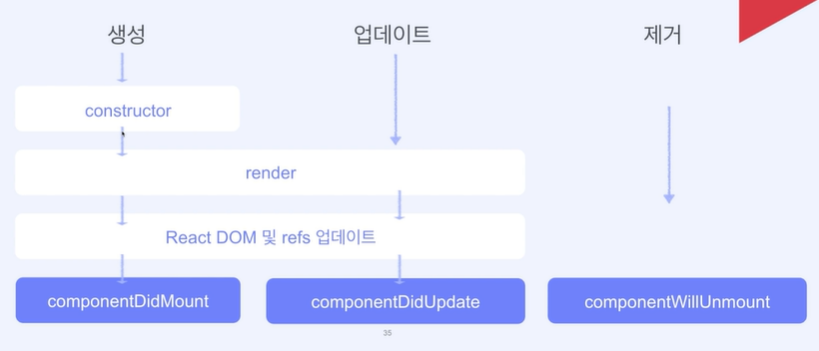
클래스 컴포넌트의 생명주기
-
constructor는 component를 생성할 때 실행
-
render는 컴포넌트를 rendering 하는 메소드
-
componentDidMount는 첫 렌더링이 되고난 후 실행됨
-
componentDidUpdate는 props나 state가 바뀌어서 렌더링을 마쳤을 때 실행
-
componentWillUnmount는 component가 소멸되기 직전에 호출되는 함수
-
componentDidMount로 생성한 component는 componentWillUnmount로 꼭 제거 작업을 해줘야 함
-
state가 업데이트 되면 DidMount 실행 후 render함수 실행됨
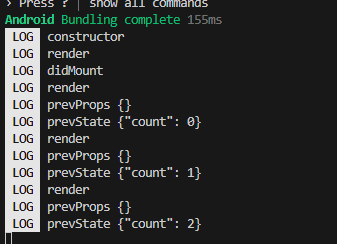
1) constructor
2) render
3) didmount
업데이트 시
1) render
2) didupdate (state 변화 및 업데이트)
UseEffect - class component
useEffectWithClassComponent
import React from "react";
import { View, Text, Button } from "react-native";

class Component extends React.Component {
  constructor(props) {
    console.log("constructor");
    super(props);
    this.state = {
      count: 0,
    };
  }

  componentDidMount() {
    console.log("didMount");
  }

  componentDidUpdate(prevProps, prevState) {
    console.log("prevProps", prevProps);
    console.log("prevState", prevState);
  }

  componentWillUnmount() {
    console.log("componentWillUnmount");
  }
  render() {
    console.log("render");
    return (
      <View>
        <Text>You Clicked {this.state.count} times</Text>
        <Button
          title="Click me"
          onPress={() => this.setState({ count: this.state.count + 1 })}
        />
      </View>
    );
  }
}

export default Component;
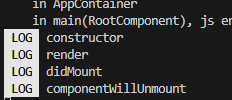
willunmount
import { StatusBar } from "expo-status-bar";
import { useState } from "react";
import { StyleSheet, Text, View, Button } from "react-native";
import StateWithClassComponent from "./StateWithClassComponent";
import StateWithFunctionalComponent from "./StateWithFuctionalComponent";
import UseEffectWithClassComponent from "./UseEffectWithClassComponent";

export default function App() {
  const [isTrue, setIsTrue] = useState(true);
  return (
    <View style={styles.container}>
      {/* <StateWithClassComponent />
      <StateWithFunctionalComponent /> */}
      {isTrue ? <UseEffectWithClassComponent /> : null}

      <Button title="toggle" onPress={() => setIsTrue(!isTrue)} />
    </View>
  );
}

const styles = StyleSheet.create({
  container: {
    flex: 1,
    backgroundColor: "#fff",
    alignItems: "center",
    justifyContent: "center",
  },
});
- isTrue (state)값이 True 일때 렌더링하고, 아닐 땐 아무것도 렌더링 하지 않음
const [isTrue, setIsTrue] = useState(true);
{isTrue ? : null}
<Button title="toggle" onPress={() => setIsTrue(!isTrue)} />
Use Effect - Functional
UseEffectWithFunctionalComponent.js
import React, { useEffect, useState } from "react";
import {
View,
Text,
Button,
TextInput,
Switch,
ActivityIndicator,
} from "react-native";

const Component = () => {
const [count, setCount] = useState(0);
const [isOn, setIsOn] = useState(true);
const [input, setInput] = useState("");
const [isRefresh, setIsRefresh] = useState(false);

useEffect(() => {
  console.log("didMount");
}, []);

useEffect(() => {
  console.log("didUpdate - count", count);
}, [count]);

useEffect(() => {
  console.log("didUpdate - isOn", isOn);
}, [isOn]);

useEffect(() => {
  console.log("didUpdate - input", input);
}, [input]);

useEffect(() => {
  if (isRefresh) {
    setTimeout(() => {
      setIsRefresh(false);
    }, 2000);
  }
}, [isRefresh]);

return (
  <View style={{ alignItems: "center" }}>
    <Text>You clicked {count} times</Text>
    <Button title="Click me" onPress={() => setCount(count + 1)} />

    <Text style={{ marginVertical: 15 }}>
      -------------------------------------------------
    </Text>
    <Switch value={isOn} onValueChange={setIsOn} />

    <Text style={{ marginVertical: 15 }}>
      -------------------------------------------------
    </Text>

    <Text>input: {input}</Text>
    <TextInput
      value={input}
      onChangeText={setInput}
      style={{ borderBottomWidth: 1, borderColor: "grey" }}
    />

    <Text style={{ marginVertical: 15 }}>
      -------------------------------------------------
    </Text>
    <Button
      title="새로고침!"
      onPress={() => {
        setIsRefresh(true);
      }}
    />
    {isRefresh && <ActivityIndicator />}
  </View>
);
};

export default Component;
함수형은 constructor 없음
render도 무시
전부 useEffect로 구현, 두번째 인자는 의존성 배열
의존성 배열에 있는 값들이 바뀌었을 때 첫번째 함수를 호출하는 것
useEffect : state가 바뀌는 것을 감지
useEffect(() => {
console.log("didMount"); //렌더링 될 때 무조건 실행되기 때문에 didMount의 역할, 첫 렌더링
}, []);
useEffect(() => {
console.log("didUpdate - count", count); //count가 변경될때마다 이 함수가 호출됨, count 초기값을 설정하는 것도 변화했다고 감지되기 때문에 처음에 로그가 찍힘, 바뀐 이후의 값이 찍힘
}, [count]);
useEffect(() => {
console.log("didUpdate - isOn", isOn);
}, [isOn]);
useEffect(() => {
console.log("didUpdate - input", input);
}, [input]);
//두번째, 세번째, 네번째 useEffect는 각 의존성 배열 input에 의해서만 실행됨 useEffect(() => {
if (isRefresh) {
setTimeout(() => {
setIsRefresh(false); //setIsRefresh가 true일때만 새로고침 표시가 2초간 나타나도록
}, 2000);
}
}, [isRefresh]);
로딩중 표시
custom hook
한 화면에서 여러 state를 관리하는 경우 각 state를 선언하고 업데이트 하는 로직도 component에 존재
각 기능마다 custom hook을 만들어서 component logic을 간소화 시켜 리팩토링
회원가입할 때마다 받아야 할 여러 값들이 있음
onChangeText: text가 change 됐을 때 call back 되는 함수, 바뀐 값을 그대로 setNam에 넣어주면 됨
 <TextInput value={name}
        onChangeText={(v)=>{
            setName(v);

        }}/>
onChangeText와 setName의 함수 생김새가 똑같기 때문에 다음과 같이 바꿔줄 수 있음
<TextInput value={name}
        onChangeText={setName}/>
setName: 변화하려는 값이 오면 이를 토대로 state를 바꿔주는 함수
const setName =(v)=>void;import React from "react";
import { useState } from "react";
import { TextInput, View, Button } from "react-native";
const CustomHook = () => {
const [name, setName] = useState("");
const [age, setAge] = useState("");
const [city, setCity] = useState("");
return (
<View>
<View style={{ flexDirection: "row" }}>
<TextInput
value={name}
onChangeText={setName}
style={{ borderBottomWidth: 1, width: 200 }}
placeholder="이름을 입력해주세요"
/>
<Button title="초기화" onPress={() => setName("")} />
</View>
<View style={{ flexDirection: "row" }}>
<TextInput
value={age}
onChangeText={setAge}
style={{ borderBottomWidth: 1, width: 200 }}
placeholder="나이를 입력해주세요"
/>
<Button title="초기화" onPress={() => setAge("")} />
</View>
<View style={{ flexDirection: "row" }}>
<TextInput
value={city}
onChangeText={setCity}
style={{ borderBottomWidth: 1, width: 200 }}
placeholder="사는 곳을 입력해주세요"
/>
<Button title="초기화" onPress={() => setCity("")} />
</View>
</View>
);
};
export default CustomHook;
반복되는 부분을 재사용 가능한 component로 변경
import React from "react";
import { useState } from "react";
import { TextInput, View, Button } from "react-native";

const InputBox = (props) => {
  //재사용 컴포넌트
  return (
    <View style={{ flexDirection: "row" }}>
      <TextInput
        value={props.value}
        onChangeText={props.onChangeText}
        style={{ borderBottomWidth: 1, width: 200 }}
        placeholder={props.placeholder}
      />
      <Button title="초기화" onPress={props.onReset} />
    </View>
  );
};
const CustomHook = () => {
  const [name, setName] = useState("");
  const [age, setAge] = useState("");
  const [city, setCity] = useState("");

  return (
    <View>
      <InputBox
        value={name}
        onChangeText={setName}
        placeholder="이름을 입력해주세요"
        onReset={() => setName("")}
      />
      <InputBox
        value={age}
        onChangeText={setAge}
        placeholder="나이를 입력해주세요"
        onReset={() => setAge("")}
      />
      <InputBox
        value={city}
        onChangeText={setCity}
        placeholder="사는 곳을 입력해주세요"
        onReset={() => setCity("")}
      />
    </View>
  );
};

export default CustomHook;
customHook은 use로 시작